



Narobic on YouTube
Insiders
-
Joined
-
Last visited
Everything posted by Narobic on YouTube
-
.thumb.jpg.61de846de400ca98f85d205992527de1.jpg) Is anyone else having issues with the turn signals and back lights? They don't turn on anymore for me anymore. I didn't use the OIV but rather grabbed the files from the package and put them into the game.
Is anyone else having issues with the turn signals and back lights? They don't turn on anymore for me anymore. I didn't use the OIV but rather grabbed the files from the package and put them into the game.- 265 comments
- 83 reviews
-
.thumb.png.63a9dd2c9aeb24c87bf6ae187716cdfa.png) Edit 2: I spoke too soon about speaking too soon. With the default indicators setting, my turn signals don't work and are always set to off. With the amber, they are on by default. Do we need to update the visualsettings.dat to the new one? Or are we able to use the one from the last version? Resolved
Edit 2: I spoke too soon about speaking too soon. With the default indicators setting, my turn signals don't work and are always set to off. With the amber, they are on by default. Do we need to update the visualsettings.dat to the new one? Or are we able to use the one from the last version? Resolved- 27 comments
- 10 reviews
-
 I wasn't clear enough, sorry. I was just trying to suggest that there should be something to counteract this. Like when it scans for new mods via opening the .exe or pressing "scan for new mods" it should cross check .dll files with disabled.dll files. I figured out what the issue was, I thought it was something I'd let you know about.
- 136 comments
- 30 reviews
-
 It's a shame that you didn't change the build version to match the version on LSPDFR.com. I was really hoping that we could use this with Update Checker
- 635 comments
- 72 reviews
-
 I took a look at the xml file and couldn't find anything wrong with it. I ran it through a xml validator just to be sure. My best guess is that it doesn't allow addon vehicles. It says at the top of the file that it only allows police vehicles (and then states which ones). Wish I could help more.
- 1,915 comments
- 242 reviews
-
As much as I LOVE the new arrest feature, I wish there was a .ini setting to set instant arrests or default arrest animation. I kind of liked the animation that your guy plays where he puts the cuffs on the subject. Which regions?
- 1,915 comments
- 242 reviews
-
-
 As much as I LOVE the new arrest feature, I wish there was a .ini setting to set instant arrests or default arrest animation. I kind of liked the animation that your guy plays where he puts the cuffs on the subject. *WRONG MOD COMMENTS SECTION* IGNORE THIS
- 1,081 comments
- 166 reviews
-
Do we need to replace the visualsettings.dat for this update? Edit: The whole point of me asking this was to ask if I had to replace my default indicators setting that you created for me. I see now that It's been added by default. Thanks again!
- 27 comments
- 10 reviews
-
Hi there! I've just updated to the newest everything and I noticed that, for a lot but not all mods, certain keybindings aren't working. Just for example: LSPDFR+ & Arrest manager keybindings that I have set in the .ini don't work at all. I mainly posted this to ask if this is a common issue or am I doing something wrong?
-
This isn't RPH or R*'s fault. There's are a million reasons why it would be crashing on Loading and Population game world. You should try posting a new support thread.
-
GTA Comes Alive came out with a new update, but the checker didn't notify me
- 136 comments
- 30 reviews
-
-
.thumb.png.04b25c8a7ac82200b6090b878a013276.png) You're instructions are a bit off. If you open the .yft file you just view the model. The textures are located in the .ytd file. All vehicle textures always are.
You're instructions are a bit off. If you open the .yft file you just view the model. The textures are located in the .ytd file. All vehicle textures always are.- 2 comments
- 3 reviews
-
On the contrary; I have more units set up in the city using CB than I do in the counties. No worries, though. I'll just deal with the way it is until (maybe) it's changed. Still a great mod and I appreciate it nonetheless.
-
That's the weird thing, in the city it follows the arrest manager settings Also it's quite an inconvenience to have to press 8 as I sit away from my keyboard and use a controller. I'll have to set another xpadder combo :/ Others may not agree, but I personally think that it should simply activate the already installed arrest manager instead of doing its own thing. Sort of how it calls EMS using better ems but doesn't change them.
-
Pressing suspect transport should just send a keystroke to activate arrest manager.
-
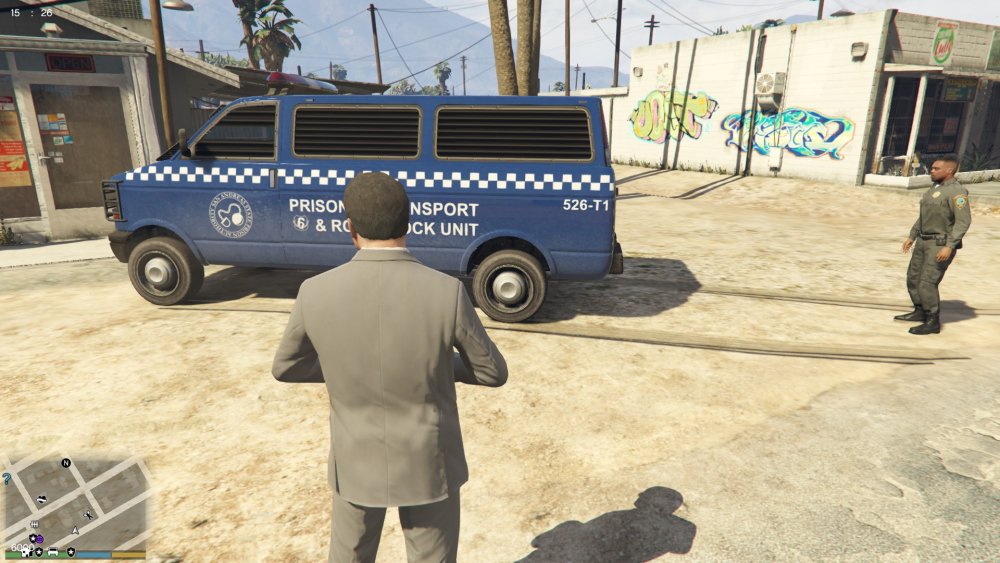
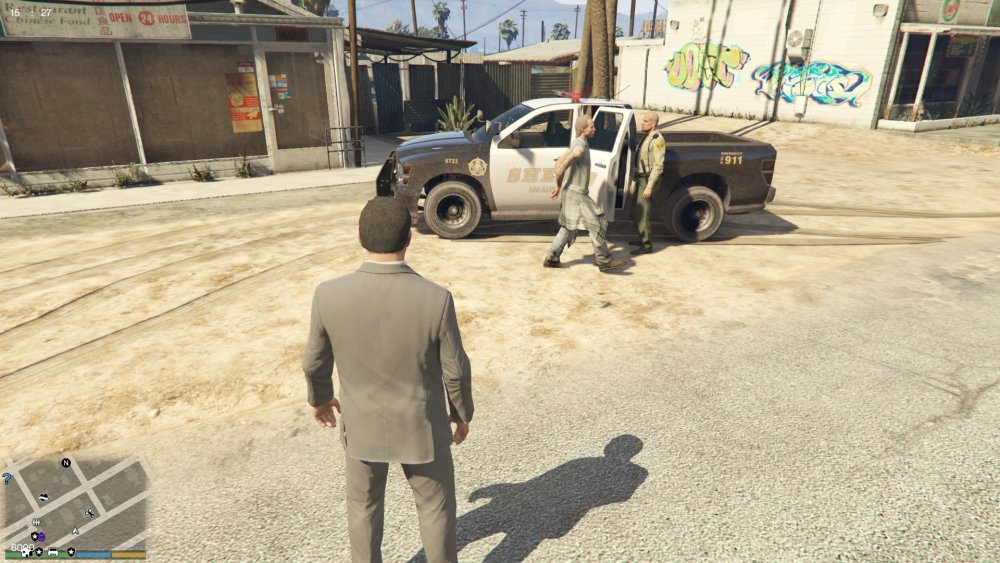
So this mod does not work the best with Arrest Manager. It "works" as in it picks up suspects, but it doesn't follow my settings for AR Here is an image of what arrest manager sends to pick up suspects when I'm in sandy shores using the default '8' button: But here is what happens when I use the suspect transport feature on custom backup to pick up suspects in sandy shores Of course, here is my rph log from this session (timestamps on the top left of the images match up to the timestamps in the log) RagePluginHook_07102016_223033.log And here are the .xml files for Arrest Manager Transport Regions.xml Transport World Districts.xml
-
Ok, so I found out that it's not your script that's messing it up. It's @PNWParksFan's custom backup that isn't working properly with my settings. I'll go and post my support question on Custom Backup instead of here. Sorry to bother you!
- 1,915 comments
- 242 reviews
-
-

- 1
-
-
Not only is this mod super useful and a great idea, but @Justin991q is super nice when it comes to requesting to add mods. All you gotta do is ask and he'll look into it. 5 stars for sure!
- 136 comments
- 30 reviews
-
-
- 1
-
-
Even though I have policet set to pickup prisoners everywhere, in LSC & BC it still uses the sheriff... Help? Transport Regions.xml Transport World Districts.xml
- 1,915 comments
- 242 reviews
-
I was thinking the other day, what if someone attached the hook for the towtruck to the back of the flatbed cab. When the cars spawn they spawn on the flatbed. Then we can finally use the flatbed with Arrest Manager!
-
 This happened by accident, but I think this camera angle would be much cooler (maybe a bit to the right, though) You should also add the ability to set weapon tints
- 127 comments
- 33 reviews
-
 There should be an option to ask to leave & arrest suspect. Right now you have to ask them to leave the vehicle and hope that the stop function works
- 1,178 comments
- 137 reviews
-

.thumb.jpg.61de846de400ca98f85d205992527de1.jpg)
.thumb.png.63a9dd2c9aeb24c87bf6ae187716cdfa.png)
.thumb.png.04b25c8a7ac82200b6090b878a013276.png)


