Narobic on YouTube
Insiders
-
Joined
-
Last visited
Everything posted by Narobic on YouTube
-
Understood. However, the ambulances in my game use police_warning instead of ambulance_warning. Strange
-
But then what's this one? My game uses this one and the phasers as a secondary tone when I hold the horn. "0x144C8602 - Ambulance Secondary"
-
So while messing with some sound files I found Ambluance_Warning. I can't figure out when this is used in the game or how to use it myself. Any help?
-
 Wait. You're deaf and your most popular mod is a siren pack. Pretty impressive.
- 83 comments
- 19 reviews
-
-

- 1
-
-
.thumb.jpg.6c80ecc7060134b39a0d153a8d09ac1f.jpg) May I ask what the difference is between this and your other charger model? Edit: I decided to download them both and see the difference for myself For anyone who wants to know: The difference is mainly in # of extras to disable/enable & the lighting setup + bugs removed the ANPR scanners on the back & the wrap around bumper (There were probably some interior differences, but I didn't check)
May I ask what the difference is between this and your other charger model? Edit: I decided to download them both and see the difference for myself For anyone who wants to know: The difference is mainly in # of extras to disable/enable & the lighting setup + bugs removed the ANPR scanners on the back & the wrap around bumper (There were probably some interior differences, but I didn't check)- 107 comments
- 24 reviews
-
-
- 1
-
-
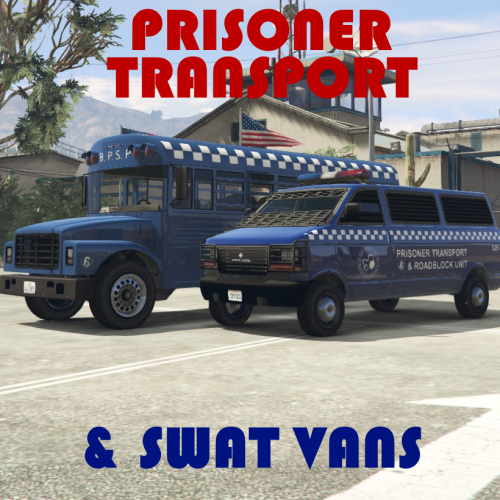 Vehicle designs based off of vanilla vehicles. Instructions in README This is NOT a full model. Just a texture for a model by @GlitchGamer You can find the model here: Important Information: Please rate the mod for what it is, and not what it should be. Thank you. They are technically 4k, but some of the logos and such may be a lower quality
- 1 comment
- 2 reviews
-
-
- 3
-
-
-
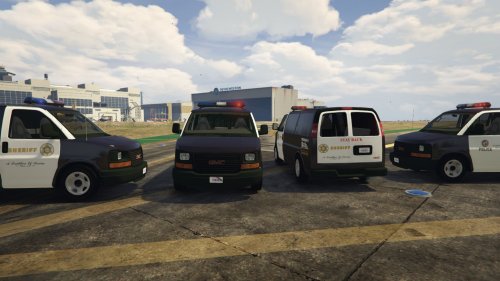 Here's a few suggestions to make this more realistic: The windows should be barred or made of metal There should be a metal barrier (wall) between the two side seats and in front of the back facing seats (Edit: Didn't see the cage in front of the back facing seats) There should be a cage between the drivers and prisoners It should look more like this:
- 26 comments
- 8 reviews
-
-
- 1
-
-
 Well what you can do is load the weapons and create a game save. You'll spawn in with those weapons each time you start the game. However, if you are using EUP, it removes all of the attachments when you activate your character.
- 127 comments
- 33 reviews
-
Wow. It never gave me a notification that you replied to this, lol. I found out that custom entries for any vehicle located in the update.rpf/vehicles.meta cannot be posted anywhere else. The update.rpf always takes primary.
-
 It's not letting me get my K9 unit. The prompt isn't coming up. It works for the partern Edit: Only the controller binding isn't working
- 542 comments
- 98 reviews
-
Hey! If anyone wanted the security uniform, old green border patrol shirt, or the old LSSD bike patrol texture, here ya go: Install these into the EUP mod folder in OpenIV Security Uniform: (mp_m_freemode_01_mp_m_luxe_02) jbib_001_u.ydd jbib_001_u_1.ydd jbib_001_u_2.ydd jbib_diff_001_d_uni.ytd (I didn't know which .ydd file it was) Boarder Patrol: (mp_m_freemode_01_male_apt01) jbib_012_u.ydd jbib_diff_012_a_uni.ytd LSSD Bike Patrol Texture: (mp_m_freemode_01_male_apt01) jbib_diff_003_c_uni.dds (Replace any of the bike shirt textures with this one) Some custom things I made (Very quickly and crudely made) SWAT Vest: task_diff_001_e_uni.dds (Replace any vest texture) EMS Jacket: jbib_diff_003_a_uni.dds (Replace any track jacket texture) (based off of michaels paramedic uniform)
-
 Is anyone else having issues with the new male NOOSE security uniform? Or should I try to reinstall Edit: Sorry. I forgot to post this on the support thread :/
- 2,346 comments
- 236 reviews
-
Extremely interested in that idea!
-
 It depends on the control scheme you set. Not all controls are in standard.meta.
- 161 comments
- 23 reviews
-
I'll work on one in a bit. Personally, I use xpadder to change the vehicle lights key to down because I use left and right for turn signal Completed File: Button_Change#2.rar
- 161 comments
- 23 reviews
-
Narobic on YouTube replied to Narobic on YouTube's topic in Website Problems, Feedback & SuggestionsWell thank you guys for clearing that up :)
-
-
Narobic on YouTube replied to Narobic on YouTube's topic in Website Problems, Feedback & SuggestionsEvery once in a while when I force duty it gives me an message saying "Version 0.3.1 is now available" but no matter how many times I redownload, it still says it. Then I looked on Update Checker and it says it's version 0.3.38.5436

-
I've been having trouble with only my State Patrol. I have it customized to work with my added on vehicles but it only cooperates in North Yankton In the city and counties it spawns roughly 50/50 between the bike and police4. It won't spawn any other vehicle nor follow my chance settings for my vehicles. Everything else works perfect, it's just my state patrol settings. StatePatrol Settings: Full XML file CustomBackup.xml Hopefully someone can help find the problem :/ Edit: I discovered the issue. Two carvariations.meta files were interfering with each other and prevented one of my addon vehicles from spawning. Also, I had to manually change the spawn chance on each vehicle (even though the document says that if it can't find a specific set chance=" " then it will just manually calculate a chance)
-
I'm aware. Many people have been doing this. I just felt that I wanted to offer my version to the community.
- 161 comments
- 23 reviews
-
-
- 5
-
-
Don't make fun of me for the thumbnail xD I couldn't find a good enough picture of an Xbox controller so I went with the Play Station one.
- 161 comments
- 23 reviews
-
-
- 1
-
-
The successor to Free My Controller This mod is no longer supported on a regular basis. I may, from time to time, complete custom sets requested from the request board. I can't promise it will be done right away, if at all. How to Install: In OpenIV, travel to 'update > update.rpf > common > data > control' Then copy/paste the files from the provided .rar Specialty Addons: These addons are files that can be added on to any set. Make sure to install these files after installing the desired set. Simply install into the same location as the set. The options include Remove Cover [LB,RB,X,RT] Remove Handbrake [A] Remove Handbrake [RB] Remove Handbrake & Duck [A+RB] Remove Jump [X,A] Remove Stealth Mode [LS&A] Remove Vehicle Duck [A&RB] Similar Mods: Here are some sets provided to you by other users with similar mods: Spoiler If you want any of the following sets, click here. These sets are provided to you by @Delco24 LSPDFR Version: Phone Horn Change Weapon in Vehicle Vehicle Aim Radio Wheel Headlights Character Wheel Cinema Cam Duck Change Camera Phone/Horn Only: Phone Horn Phone Only: Phone Phone/Radio Only: Phone Radio Wheel If you want the following set, click here. This set is provided to you by @ProMotivated No Assault from B: Phone Up (in vehicle/on foot) Light Melee (on foot) 2 Current Sets: Spoiler 8 Spoiler [Set#1] What it removes: Phone Up (in vehicle/on foot) Select Weapon (in vehicle) Cinematic Mode (in vehicle) [LB] Aim (in vehicle) Headlights (in vehicle) Interaction Menu (in vehicle/on foot) [Set#2] What it removes: Phone Up (in vehicle/on foot) Select Weapon (in vehicle) Cinematic Mode (in vehicle) [LB] Aim (in vehicle) Interaction Menu (in vehicle/on foot) [Set#3] What it removes: Phone Up (in vehicle/on foot) Select Weapon (in vehicle) Cinematic Mode (in vehicle) [LB] Aim (in vehicle) Interaction Menu (in vehicle/on foot) Expanding Minimap (in vehicle/on foot) [Set#4] What it removes: Phone Up (in vehicle/on foot) Select Weapon (in vehicle) Cinematic Mode (in vehicle) Interaction Menu (in vehicle/on foot) Expanding Minimap (in vehicle/on foot) [Set#5] What it removes: Phone Up (in vehicle/on foot) Cinematic Mode (in vehicle) Expanding Minimap (in vehicle/on foot) Character Wheel (in vehicle/on foot) [Set#6] What it removes: Phone Up (in vehicle/on foot) Select Weapon (in vehicle/on foot) Cinematic Mode (in vehicle) [LB] Aim (in vehicle) Interaction Menu (in vehicle/on foot) Expanding Minimap (in vehicle/on foot) Radio Wheel (in vehicle) [Set#7] What it removes: Phone Up (in vehicle/on foot) Select Weapon (in vehicle) Cinematic Mode (in vehicle) [LB] Aim (in vehicle) Interaction Menu (in vehicle/on foot) Expanding Minimap (in vehicle/on foot) Character Wheel (in vehicle/on foot) Radio Wheel (in vehicle) [Set#8] What it removes: Phone Up (in vehicle/on foot) Interaction Menu (in vehicle/on foot) Radio Wheel (in vehicle) [Set#9] What it removes: Phone Up (in vehicle/on foot) Select Weapon (in vehicle) Cinematic Mode (in vehicle) [LB] Aim (in vehicle) Interaction Menu (in vehicle/on foot) Expanding Minimap (in vehicle/on foot) Character Wheel (in vehicle/on foot) [Set#10] What it removes: Phone Up (in vehicle/on foot) Select Weapon (in vehicle) [LB] Aim (in vehicle) Interaction Menu (in vehicle/on foot) Expanding Minimap (in vehicle/on foot) Character Wheel (in vehicle/on foot) Radio Wheel (in vehicle) Talk/Call Taxi (on foot) Horn (in vehicle) [Set#11] What it removes: Phone Up (in vehicle/on foot) Select Weapon (in vehicle) Cinematic Mode (in vehicle) [LB] Aim (in vehicle) Headlights (in vehicle) Interaction Menu (in vehicle/on foot) [LS] Horn (in vehicle) [Set#12] What it removes: Phone Up (in vehicle/on foot) Select Weapon (in vehicle) [LB] Aim (in vehicle) Interaction Menu (in vehicle/on foot) Expanding Minimap (in vehicle/on foot) Character Wheel (in vehicle/on foot) Radio Wheel (in vehicle) Talk/Call Taxi (on foot) [LS] Horn (in vehicle) [RS] Accurate Aim (on foot) [LS] Look Behind (in vehicle/on foot) [Set#13] What it removes: Phone Up (in vehicle/on foot) Select Weapon (in vehicle) [LB] Aim (in vehicle) Interaction Menu (in vehicle/on foot) Expanding Minimap (in vehicle/on foot) Character Wheel (in vehicle/on foot) Radio Wheel (in vehicle) Talk/Call Taxi (on foot) [RS] Accurate Aim (on foot) [Set#14] What it removes: Phone Up (in vehicle/on foot) [Set#15] What it removes: Phone Up (in vehicle/on foot) Select Weapon (in vehicle) Interaction Menu (in vehicle/on foot) Expanding Minimap (in vehicle/on foot) Character Wheel (in vehicle/on foot) Radio Wheel (in vehicle) Talk/Call Taxi (on foot) [LS] Look Behind (in vehicle/on foot) Cinematic Mode (in vehicle) [Set#16] What it removes: Phone Up (in vehicle/on foot) [LB] Aim (in vehicle) [Set#17] What it removes: Phone Up (in vehicle/on foot) Select Weapon (in vehicle) [LB] Aim (in vehicle) Interaction Menu (in vehicle/on foot) Character Wheel (in vehicle/on foot) Radio Wheel (in vehicle) Talk/Call Taxi (on foot) Cinematic Mode (in vehicle) [Set#18] What it removes: Phone Up (in vehicle/on foot) Select Weapon (in vehicle) Cinematic Mode (in vehicle) [LB] Aim (in vehicle) Headlights (in vehicle) Interaction Menu (in vehicle/on foot) Expanding Minimap (in vehicle/on foot) Character Wheel (in vehicle/on foot) Radio Wheel (in vehicle) [Set#19] What it removes: Phone Up (in vehicle/on foot) Select Weapon (in vehicle) Cinematic Mode (in vehicle) [LB] Aim (in vehicle) Headlights (in vehicle) Interaction Menu (in vehicle/on foot) Expanding Minimap (in vehicle/on foot) Character Wheel (in vehicle/on foot) Radio Wheel (in vehicle) Change Camera View (in vehicle/on foot) [Set#20] What it removes: Phone Up (in vehicle/on foot) Select Weapon (in vehicle) Cinematic Mode (in vehicle) [LB] Aim (in vehicle) Headlights (in vehicle) Interaction Menu (in vehicle/on foot) Light Melee Attack (on foot) Look Behind (in vehicle/on foot) [Set#21] What it removes: Phone up (in vehicle/on foot) Select Weapon (in vehicle) [LB] Aim (in vehicle) Interaction Menu (in vehicle/on foot) Expanding Minimap (in vehicle/on foot) Character Wheel (in vehicle/on foot) Radio Wheel (in vehicle) [Set#22] What it removes: Phone Up (in vehicle/on foot) Select Weapon (in vehicle) Cinematic Mode (in vehicle) [LB] Aim (in vehicle) Headlights (in vehicle) Interaction Menu (in vehicle/on foot) [LS] Horn (in vehicle) Pause Menu (in vehicle/on foot) Light Melee (on foot) [Set#23] What it removes: Phone Up (in vehicle/on foot) Cinematic Mode (in vehicle) Light Melee (on foot) [Set#24] What it removes: Phone Up (in vehicle/on foot) Select Weapon (in vehicle) [LB] Aim (in vehicle) Headlights (in vehicle) Interaction Menu (in vehicle/on foot) [Set#25] What it removes: Pause Menu (in vehicle/on foot) Interaction Menu (in vehicle/on foot) [Set#26] What it removes: [LB] Aim (in vehicle) Pause Menu (in vehicle/on foot) [Set#27] Phone Up (in vehicle/on foot) Phone Up (in vehicle/on foot) Select Weapon (in vehicle) Cinematic Mode (in vehicle) [LB] Aim (in vehicle) Headlights (in vehicle) Interaction Menu (in vehicle/on foot) Expanding Minimap (in vehicle/on foot) Character Wheel (in vehicle/on foot) Radio Wheel (in vehicle) Change Camera View (in vehicle/on foot) [LB] Aim (in vehicle) Expanding Minimap (in vehicle/on foot) Radio Wheel (in vehicle) [Set#28] Phone Up (in vehicle/on foot) [LB] Aim (in vehicle) Radio Wheel (in vehicle) [Set#29] Phone Up (in vehicle/on foot) Cinematic Mode (in vehicle) Expanding Minimap (in vehicle/on foot) Character Wheel (in vehicle/on foot) [Set#30] Phone Up (in vehicle/on foot) Select Weapon (in vehicle) Cinematic Mode (in vehicle) [LB] Aim (in vehicle) Interaction Menu (in vehicle/on foot) Character Wheel (in vehicle/on foot) [Set#31] Phone Up (in vehicle/on foot) Select Weapon (in vehicle) [LB] Aim (in vehicle) Interaction Menu (in vehicle/on foot) [Set#32] Phone Up (in vehicle/on foot) Select Weapon (in vehicle) Cinematic Mode (in vehicle) [LB] Aim (in vehicle) Headlights (in vehicle) Interaction Menu (in vehicle/on foot) [LS] Horn (in vehicle) Pause Menu (in vehicle/on foot) Light Melee (on foot) Enter Vehicle (on foot) Exit Vehicle (in vehicle) [Set#33] Interaction Menu (in vehicle/on foot) Pause Menu (in vehicle/on foot) Change Camera View (in vehicle/on foot) [Set#34] Phone Up (on foot) Select Weapon (in vehicle) [LB] Aim (in vehicle) Change Camera View (in vehicle/on foot) Interaction Menu (in vehicle/on foot) Pause Menu (in vehicle/on foot) [Set#35] Phone Up (on foot) Interaction Menu (in vehicle/on foot) Radio Wheel (in vehicle) Pause Menu (in vehicle/on foot) [Set#36] Phone Up (in vehicle/on foot) Select Weapon (in vehicle) Cinematic Mode (in vehicle) Interaction Menu (in vehicle/on foot) Expanding Minimap (in vehicle/on foot) Pause Menu (in vehicle/on foot) [Set#37] Select Weapon (in vehicle) [LB] Aim (in vehicle) [Set#38] Phone Up (in vehicle/on foot) Select Weapon (in vehicle/on foot) [LB] Aim (in vehicle) Interaction Menu (in vehicle/on foot) Expanding Minimap (in vehicle/on foot) Radio Wheel (in vehicle) [Set#39] Phone Up (in vehicle/on foot) Cinematic Mode (in vehicle) [LB] Aim (in vehicle) Expanding Minimap (in vehicle/on foot) Character Wheel (in vehicle/on foot) Radio Wheel (in vehicle) Change Camera View [Set#40] Added set #40 which removes: Phone Up (in vehicle/on foot) Cinematic Mode (in vehicle) Radio Wheel (in vehicle) Change Camera View (in vehicle/on foot) [LS] Horn (in vehicle) [Set#41] Added set #41 which remove: Phone Up (in vehicle/on foot) Select Weapon (in vehicle) Cinematic Mode (in vehicle) Headlights (in vehicle) Interaction Menu (in vehicle/on foot) Expanding Minimap (in vehicle/on foot) Character Wheel (in vehicle/on foot) Radio Wheel (in vehicle) Talk/Call Taxi (on foot) [LS] Look Behind (in vehicle/on foot) Pause Menu (in vehicle/on foot) [Set#42] Phone Up (in vehicle/on foot) [LB] Aim (in vehicle) Radio Wheel (in vehicle) [Set#43] Phone Up (in vehicle/on foot) Cinematic Mode (in vehicle) Aim and shoot (in vehicle) Headlights (in vehicle) Interaction Menu (in vehicle/on foot) Expanding Minimap (in vehicle/on foot) Radio Wheel (in vehicle) [Set#44] Phone Up (in vehicle/on foot) Light Melee (on foot) Radio Wheel (in vehicle) Character Wheel (in vehicle/on foot) [LB] Aim (in vehicle) Select Weapon (in vehicle) [RS] Look Behind (in vehicle/on foot) Headlights (in vehicle) Expanding Minimap (in vehicle/on foot) Cinematic Mode (in vehicle) Interaction Menu (in vehicle/on foot) [Set#45] Phone Up (in vehicle/on foot) Select Weapon (in vehicle) Aim and shoot (in vehicle) [RS] Look Behind (In Vehicle) Interaction Menu (in vehicle/on foot) [Set#46] Phone Up (in vehicle/on foot) Radio Wheel (in vehicle) Character Wheel (in vehicle/on foot) [LB] Aim (in vehicle) Select Weapon (in vehicle) Expanding Minimap (in vehicle/on foot) Cinematic Mode (in vehicle) [Set#47] Phone Up (in vehicle/on foot) Character Wheel (in vehicle/on foot) Radio Wheel (in vehicle) Expanding Minimap (in vehicle/on foot) Cinematic Mode (in vehicle) Horn (in vehicle) [Set#48] Phone Up (in vehicle/on foot) [LB] Aim (in vehicle) Select Weapon (in vehicle) [Set#49] Phone Up (in vehicle/on foot) Light Melee (on foot) Radio Wheel (in vehicle) Character Wheel (in vehicle/on foot) Select Weapon (in vehicle) [RS] Look Behind (in vehicle/on foot) Expanding Minimap (in vehicle/on foot) Cinematic Mode (in vehicle) Interaction Menu (in vehicle/on foot) Pause Button (in vehicle/on foot) [Set#50] Phone Up (in vehicle/on foot) [LB] Aim (in vehicle) Select Weapon (in vehicle) Light Melee (on foot) [Set#51] Phone Up (in vehicle/on foot) Light Melee (on foot) [LB] Aim (in vehicle) Select Weapon (in vehicle) Change Camera View (in vehicle/on foot) Expanding Minimap (in vehicle/on foot) [Set#52] Phone Up (in vehicle/on foot) [LB] Aim (in vehicle) Select Weapon (in vehicle) Change Camera View (in vehicle/on foot) Interaction Menu (in vehicle/on foot) Pause Button (in vehicle/on foot) Cinematic Mode (in vehicle) [RS] Look Behind (in vehicle) Character Wheel (in vehicle/on foot) Radio Wheel (in vehicle) Horn (in vehicle) Headlights (in vehicle) Exit Vehicle (in vehicle) [Set#53] What it removes: Phone Up (in vehicle/on foot) Change Camera View (in vehicle/on foot) [Set#54] What it removes: Phone Up (in vehicle/on foot) Select Weapon (in vehicle) Cinematic Mode (in vehicle) [LB] Aim (in vehicle) Headlights (in vehicle) Expanding Minimap (in vehicle/on foot) Character Wheel (in vehicle/on foot) Radio Wheel (in vehicle) [Set#55] What it removes: Phone Up (in vehicle/on foot) [LB] Aim (in vehicle) Radio Wheel (in vehicle) Character Wheel (in vehicle/on foot) Select Weapon (in vehicle) Expanding Minimap (in vehicle/on foot) Cinematic Mode (in vehicle) Headlights (in vehicle) Light Melee (on foot) Pause Button (in vehicle/on foot) 10 6 74 1 75 114 3 Do you want a custom version? Post your requests on the request board:  Important Information: Please rate the mod for what it is, and not what it should be. Thank you. Requests posted in the comments section below will be ignored and removed! This modification may be incompatible with other modifications that use controller bindings. (ELS being one of them) Unfortunately, some (if not all) sets may remove the ability to scroll up in a menu using DpadUp. Changing weapons in your vehicle using TAB or the scroll wheel will crash your game if you're using a set that removes weapon select. This can be fixed by removing or changing the key bindings in the game settings I recommend using Xpadder or Controller Companion to fix any issues regarding controller bindings Please post concerns and support questions in the comments section below rather than asking in the review section. Thank you. If you want to re-upload these for any reason, ask permission and give credit where credit is due. Thank you.
- 161 comments
- 23 reviews
-
-
-

- 24
-
-
 Just so you're aware. The version the mod says it is and the version LSPDFR says it is don't match up.
- 91 comments
- 21 reviews
-
Just so you're aware. The version the mod says it is and the version LSPDFR says it is don't match up.
- 2,346 comments
- 236 reviews

.thumb.jpg.6c80ecc7060134b39a0d153a8d09ac1f.jpg)