




PNWParksFan
Insiders
-
Joined
-
Last visited
Everything posted by PNWParksFan
-
Is there a good way for me to detect if arrest manager is installed, and if so use said API? Would be nice to book arrest manager into the custom backup menu. Likewise my next release will have an API to let other plugins call for custom backup, so you could do something like call for local code 2 unit as the backup transporter and then pass the vehicle + peds to your internal logic.
-
 There is a setting in the INI file to turn off the LSPDFR backup override. Try setting it to false and see if it fixes those issues. Also how did you "change the default LSPDFR backup key"? As far as I know that isn't possible.
- 378 comments
- 23 reviews
-
 Well, it's tough when the cop just runs out in front of you directly in the line of fire.... "hey watch out buddy, you trying to get shot?!" GTA AI logic, right?
- 1,081 comments
- 166 reviews
-
-

- 1
-
-
I'll have to check, I didn't realize that you couldn't call for backup while aiming or in cover. Does it just not register the keypresses?
- 378 comments
- 23 reviews
-
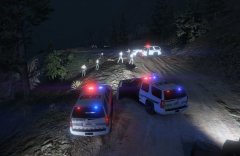
From the album: PNWParksFan WIP and screenshots
Pursuit ends in Raton Canyon, with takedown by US Park Rangers, Blaine County Sheriff's deputies, and San Andreas Highway Patrol. Featuring the new Tahoe by @GlitchGamer, US Park Ranger skins by me, BCSO skins by @Krame86, and SAHP CVPI by @Virzza. -
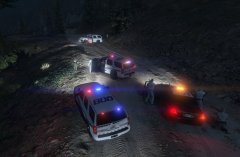
From the album: PNWParksFan WIP and screenshots
Pursuit ends in Raton Canyon, with takedown by US Park Rangers, Blaine County Sheriff's deputies, and San Andreas Highway Patrol. Featuring the new Tahoe by @GlitchGamer, US Park Ranger skins by me, BCSO skins by @Krame86, and SAHP CVPI by @Virzza. -
It appears that I can generally arrest the officer who I'm backing up when I respond to a traffic backup callout. I'm not sure if that's a bug in your callout or in the LSPDFR API... are you calling Functions.SetPedAsCop() on the cop the officer backs up? I'd think that should prevent the player from arresting them. When I spawn cop peds in my plugins I can't arrest those peds.
- 1,081 comments
- 166 reviews
-
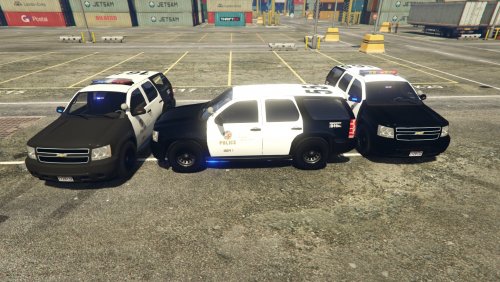 Haha. Glad you got it to work. It's very dependent on your computer's specs how many you can fit without it crashing, which is why I put the 2k textures in by default for the fire SUV. Which one did you leave out?
- 118 comments
- 18 reviews
-
You can edit the YTD file, but the YFT file makes it crash. Not sure why, I believe the author of the model is working on it. If you're having issues saving many skins, try downsizing them to 2k. I've noticed I have more issues with lots of skins causing crashes when I have more than about four 4k textures, but I can get 8-10 2k textures no problem.
- 118 comments
- 18 reviews
-
 In the most recent update, the lightbar seems to have its textures mapped wrong - the texture seems to be about 50% higher than the underlying model, or something like that:
- 95 comments
- 29 reviews
-
On a slightly related note... could you add an API method for us to basically hand off an arbitrary ped to the internal backup manager? We can dispatch a unit Functions.RequestBackup, but that generates the ped and vehicle for us. Something like Functions.SendPedAsBackup(Vector3, EBackupResponseType, EBackupUnitType, Ped), where the Vector3 is where they should respond to, the response type is how they should respond, the unit type is how they should be considered internally (as it appears the AI treats regular cops and SWAT units differently), and Ped being the ped to add. This way callouts or plugins could spawn a specific cop and vehicle desired for that situation, but take advantage of the built-in API logic. It would be very helpful for my custom backups mod, but surely for some callouts as well.
-
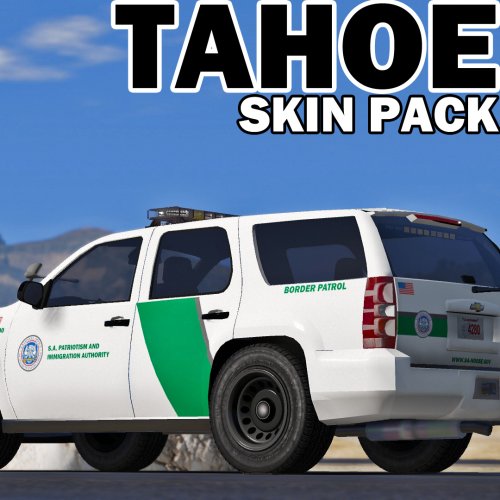 It's OK lol. At least you didn't upload a texture with a huge typo in it like I did today :P
- 9 comments
- 4 reviews
-
-
- 1
-
-
The correct name for the skins is tahoe_sign_n, you have tahoe_skin_n, which means when you import them they won't actually show up on the model. To make it easier for people to import correctly, you should rename the PNG files to tahoe_sign_n.
- 9 comments
- 4 reviews
-
Thanks for making the Blaine County skins. I was hesitant to make one like that because I wasn't sure who the original creator of that livery style was to get their permission. Glad to see a download for them, now I can have LSSD and BCSO!
- 9 comments
- 4 reviews
-
-
- 1
-
-
Support instructions are included in the documentation PDF. Please upload your CustomBackup.xml, CustomBackupLocations.ini, and RagePluginhook.log to the forum thread for this plugin. Just the RPH log alone is not enough to diagnose what the problem might be. I will say that you should make sure all of your plugins included LSPFR and RPH are up to date.
-
Not all modelers are as reasonable as you two, sadly. But I suppose you already know that. Thanks for being generous with releasing so many unlocked models so we can all enjoy more variety in our games!
- 118 comments
- 18 reviews
-
-
- 1
-
-
Yes. There are instructions included for editing your vehicles.meta, make sure that slot has the flags FLAG_HAS_LIVERY FLAG_HAS_EXTRA. To add liveries just add tahoe_sign_n.
- 118 comments
- 18 reviews
-
-
- 1
-
-
Agreed that this would be nice. I'd also like to see a way to make them not produce so much smoke... road flares don't generally smoke like that.
-
The underlying light corona is still blue. You can use the original emerglights or the emerglights_clear texture to make it red/blue as usual. Depending on your graphics settings, the red texture may look normal, some computers make the blue show up more than others.
- 118 comments
- 18 reviews
-
Here you go. Hopefully the main download will be fixed though so people who haven't downloaded it yet don't have to download twice. fixed_pranger_skin.zip
- 118 comments
- 18 reviews
-
-
- 1
-
-
-
Crap... that's embarrassing, not sure how I missed that. I will fix it and send the updated file to @GlitchGamer as soon as I get home.
- 118 comments
- 18 reviews
-
-
- 1
-
-
When I first installed this I had issues with the lights showing up wrong. Turns out I had old carvariations entries I had forgotten about in various locations. If you have issues, make sure you remove any carvariations entries you put in for that slot in any of the possible locations (mpheist, mpluxe2, mpchristmas2, etc.). The lights settings aren't the same as for the Ford Explorer models I had in a lot of these slots previously, which is why I had issues. Also the download should include some variations of emerglights texture, letting you put all red, all blue, or red/blue w/ clear lightbar options for the edge model.
- 118 comments
- 18 reviews
-
-
- 1
-
-
If you're reading this review you're wasting your time, you should be downloading and playing with this model instead! In short, it's everything you've been waiting for in a Tahoe model. Having all of the different variations is great - there's something for everybody. @GlitchGamer has done a great job fixing the bugs and it should be a solid model now. Why are you still reading this, go download it already!
- 118 comments
- 18 reviews
-
-
- 6
-
-
That's been suggested above. I agree that it would be a useful thing to have, and intend to eventually develop that. I'm not sure how soon I'll have time though, as that'll take a fair amount of work.

