PNWParksFan
Insiders
-
Joined
-
Last visited
Everything posted by PNWParksFan
-
 Good on you for releasing it open when you decided you could no longer pursue the project. Thanks for giving it a good start; I hope somebody brings it fully to life!
 -
 Look for the entries in the sample XML files for park areas. You can also look in the excel file for a list of all the region names.
- 378 comments
- 23 reviews
-
Could you please go to the discussion thread, upload a copy of your CustomBackup.xml file, CustomBackupLocations.ini, RagePluginHook.log, and a detailed description of the issue you're having, what you expect should happen, and what's actually happening? I'll take a look at it later today. Thanks. The documentation shouldn't need to be extracted... it's just a PDF. Unzip the whole download, then the PDF should open up as normal. I just tried it myself, so it shouldn't be an issue with the download. If you're having extraction issues try re-downloading the mod.
- 378 comments
- 23 reviews
-
I spy an XML close comment just hanging out at the end there: "-->" Did you try using an XML validator as recommended in the documentation? You don't need to put the xlsx file anywhere. It's just provided as a reference for developing your own custom backup entries.
- 378 comments
- 23 reviews
-
-
The Traffic Control mod lets you shut down traffic with a lot more control. I'd suggest installing that.
-
Use traffic police mod by albo, then you can use the mimick feature to make them pull over right where you want them.
-
Thanks, it's working now! Is it turned off by default, or did I go and disable that at some point for some silly reason and then forget about it?
-
NOTICE: Custom Backup will not be updated for LSPDFR 0.4. The main features, including region customization and weapon selection, have been added to the built-in LSPDFR backup customization files. Custom backup gives you a new level of control in LSPDFR. The key feature of this mod is regionally customized backup, allowing you to set a different response for any area on the map. For any named area of the game (like "Rockford Hills", "Los Santos International Airport", "Sandy Shores", etc.) you can completely customize every level of response just like the built-in backup.xml. The syntax of the CustomBackup.xml file is very similar to the built-in backup.xml, but has numerous additions to increase your control over the game: Set a chance for anything! Peds, vehicles, and vehiclesets now all take a chance attribute which controls how likely they are to be chosen. (The built-in backup.xml only lets you set a chance on peds.) Configure vehicle extras, liveries, and colors! You can now set any color you want for any response vehicle, opening up a whole new level of customization for unmarked units. Vehicle extra configuration also works reliably, whereas it seems to have some issues in the built-in backup.xml. Cop weapon selection! Set a list of weapons to give your backup units, set the probability for each weapon, and decide whether you want them to pick one at random or always get the most powerful one. Set spawn distance range for each vehicle entry! Every vehicle entry can have a minimum and maximum spawn distance set. This allows for additional realism by making certain units spawn closer or further away. NOOSE SWAT probably isn't just hanging out around the corner, so make them drive in from a mile away. On top of Mt. Chiliad your backup will probably be coming from a long distance, but in Downtown there's probably local patrol units very near by. Your imagination is the limit for leveraging these settings. Code 2 response with lights! Let's be honest, how often do cops really respond "code 2" with no lights? You can now configure your Code 2 units to respond with lights (but no siren), or to respond with their lights off but turn them on once they arrive and park on scene. YouTube video demo. Integration with Better EMS: Download and install Better EMS, and you can call for an advanced EMS response through the Custom Backup menu. Integration with Police Smart Radio: Call for backup from your radio! Call Code 2 or Code 3 local backup, or Pursuit and Air Support units. Installation instructions are included in the download. Basic installation is pretty easy; just make sure to choose a CustomBackup.xml file to use and put it in place. Advanced usage of the CustomBackup.xml file is explained in great detail in the documentation PDF. INSTRUCTIONS TO OVERRIDE DEFAULT LSPDFR BACKUP MENU: To completely disable the built-in LSPDFR backup menu and use the custom menu instead, follow these instructions. Edit CustomBackupLocations.ini. Set these settings: CustomBackupMenuKey=B CustomBackupModifier=None OverrideLSPDFRBackup=false Go to the GTA V settings menu Under Keybindings, go to GTA Online section Change "Look At" from B to something you don't use, like the numpad period Thank you to @vladimir850 for figuring this out! PLEASE DO NOT ASK FOR SUPPORT IF YOU HAVE NOT READ THE DOCUMENTATION PDF! THERE ARE EXPLICIT INSTRUCTIONS IN THE PDF ON WHAT TO DO IF YOU ARE HAVING TROUBLE! Requirements: RPH 0.45+ (compiled for 0.51) LSPDFR 0.3.1 RageNativeUI 1.4.1 Please post suggestions, support requests, etc in the forum thread: To share your CustomBackup.xml or get ideas on what customizations to make, visit the sharing thread: Special thanks to everybody who made this mod possible: The LSPDFR team, especially Sam and LMS All contributors to the LSPDFR-API examples on Github: Alexguirre, Albo1125, LMS, Stealth22, Stray, LtFlash, and LukeD Everybody who helped answer questions about the API and development on the forums, especially @Albo1125 and @alexguirre The original beta testing team for this mod: @Play3r2 – special thanks for all your help figuring out the controller button settings @The Loot @CriticalBrit @Ray3501 @Kilyin SPECIAL THANK YOU to members of the Parks Benefactor Program who have supported my mod development! Their generous donations have helped to make continued updates to my modifications possible. Particular thanks to the Old Faithful donors who have supported me with noteworthy donations: Kilyin, anters, Sergeant Anderson, winglesschip, Dsonke1, and PolGuin255. You can join the Parks Benefactor Program by donating to support my mods, and to get early beta access to new modifications and updates to my existing modifications.
- 378 comments
- 23 reviews
-
-

- 30
-
-
Post excerpts or full files from your CustomBackup.xml file for the Custom Backup mod here. To share, please put your XML file contents in a code block in a spoiler, or upload the file. For suggestions or support, go to the main CustomBackup mod thread. This thread is only for sharing XML files and ideas for how to use the mod.
-
Tried in Firefox and IE too, still doesn't show up. I'm guessing it's some issue with my account.
-
I appear to be missing that menu. I wonder if this is a bug? Are there any conditions which would cause an account to not be able to post status updates? I'm running Google Chrome, latest release build (48.0.2564.116 m). I tried opening the page in incognito mode too (to ensure plugins were disabled) and have the same issue. @Cyan I think you're the web developer, right? Any ideas what might be causing this?

-
I see other people's status updates linked on the home page, but I can't for the life of me find where to post one myself. Looked under the create menu, under my user menu, on my profile page... what am I missing? I'm sure there's a link out there somewhere, but perhaps it should be made a bit more obvious?
-
I'd be interested in making some park ranger textures for the tahoe and F150, and possibly some other textures as well if there's interest. Would be happy to test out the models for you too. Is there a non-slicktop version of the tahoe? You did a great job creating the siderunners, but I'm just not too big a fan of them in real life to begin with.
-
You might be interested in my custom backup mod when it comes out then. It should be released tomorrow or Monday!
-
Sure, that could be an option.
-
Better EMS is now released: Follow this post for progress updates on the next version! Feel free to post suggestions, requests, and bug reports on this thread.
-
-
@LMS any word on if this might be implemented?
-
It would be nice to have that option. You could also check if comp_tasks is set to 2, in which case don't mess with it. If it's set to 0 or 1, then manage it appropriately. That way if the vest is set explicitly it won't be turned off, but if it isn't then the holster can be managed.
-
It appears that the LSPDFR cop manager takes over cop peds' comp_tasks, preventing you from ever spawning your own cop or sheriff ped with a bullet-proof vest. You can set comp_tasks to give them a vest, but as soon as LSPDFR does anything with the cop it'll remove it. Any time you go on/off duty, start or end a pursuit, or start/end engagement with hostile peds. Here is the test I did to confirm this: Spawned a cop ped (with LSPDFR not loaded at all) Set the ped's comp_tasks to 2 (bullet proof vest) Loaded LSPDFR (did not go on duty) Cop immediately removed vest Turned the vest back on Went on duty Cop's vest immediately went away again Turned vest on again Accepted a callout for pursuit in progress Cop's vest disappeared yet again Turned it back on again Force-ended the pursuit Cop's vest disappeared again I would really like the ability to set a ped's comp_tasks for myself! Is there any way to disable or override this behavior? I could make my plugin constantly scan for when a ped it's trying to control has its components messed with, and then set it back, but I'd prefer not to have my plugin wasting the user's resources to constantly battle LSPDFR's behavior. @LMS any suggestions?
-
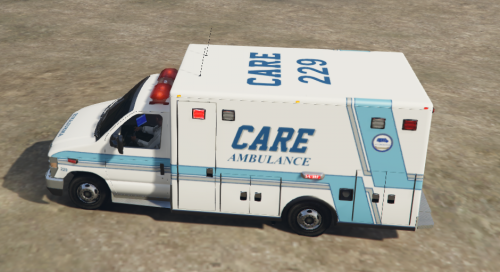 These ambulance companies are private companies, not government agencies, so they use the California plates. LAFD and other city agencies like that use the CA EXEMPT plates.
- 8 comments
- 1 review
-
-
- 1
-
-
"I'm not trying to pollute more, I'm just trying to get higher production yields from my factory. To get higher yields you have to pollute more, it just goes hand in hand." And when enough people believe that way and disregard the consequences of their selfish and unnecessary actions, you end up with this:
-
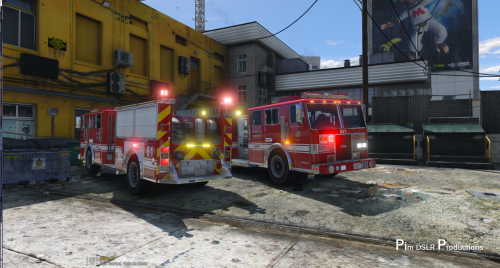 Well done! I did have the LOD problem show up. Screenshot attached... that's a second fire truck behind me, seems it's picking up the rear lights really large for some reason and nothing else.
- 58 comments
- 20 reviews
-
Considering that the OBD computer controls how the engine works, and therefore directly affects the emissions of the vehicle, then yes it is pertinent to the EPA. It does jeopardize everybody's well-being... air pollution accounts for over 6% of deaths worldwide. If I ran a factory and there was a computer control system running the pollution control systems, I couldn't just say "welp I'll just reprogram it to make my factory run cheaper and emit more pollution... my computer, my factory, right?"