


cp702
Friends of LSPDFR
-
Joined
Everything posted by cp702
-
My computer isn't letting me unset the Read Only flags on the necessary folders, and advice online is unhelpful (it says that it doesn't even matter; evidently, the LCPDFR installer cares). Is there a way to completely install the taser from scratch?
-
Today's date is April 1st. If you're still confused, try googling "April Fools Day".
-
From the looks of it, that's not a police car.
-
No, they're not your templates. The templates belong to the person who mapped the model to a template in the first place (which is not an easy thing to do). Also, even with permission, you should credit. If they're your templates, that implies that you had some role in this process; from what I can tell from your forum thread, you basically edited out the triangles while working from the preexisting templates. On another note: You should try using layers. They make everything much easier (e.g. you can change the base paint without editing anything else about the skin; you can work on decals without worrying about the base; it's easy to make minor changes; you can reuse stuff...)
- 8 comments
- 4 reviews
-
You know, graphics software has this thing called "layers"... Also, you should really credit the people whose templates these are.
- 8 comments
- 4 reviews
-
Why do the triangles matter, anyway? The right way to do it is to work on a separate layer; the triangles shouldn't matter at all.
-
 He's a cop; he doesn't get ticketed.
 -
Yes. EDIT: And about TrafficLoad, I have absolutely no idea why that would lead to an issue. The next version will have the ability to force a spawn for debug purposes, and will have a log that can help with debugging. I actually don't remember if I had the log on or off on v0.5; can someone check and see if there is a file named SpawnCars.log in the main IV directory that has been modified recently?
-
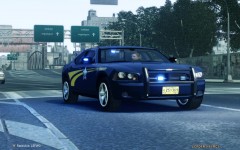 Where did you get OSP-style ASP skins?
 -
-
That happened in my county!
-
Hit the ` key, type "Heal", and hit enter (only works if you have ScriptHook .NET; you automatically do if you have LCPDFR).
-
-
Not m_y_cop_p, m_y_cop. m_y_cop_p is the hat. To install the textures, open m_y_cop.wtd in Edit Mode in SparkIV or OpenIV. Replace the corresponding textures.
-
If you're talking about the in-car texture (not the LCPDFR computer texture), the square is almost certainly not black. Instead, it's probably extremely darkened, but still an LCPD skin in there. You will almost certainly need to darken your stuff a ton to make it look nice. My recommendation would be to lighten it to normal, edit, and darken again.
-
Try OpenIV if SparkIV doesn't work.
-
Like, literally 170,000 polys *more* than your old version? How many does it have now?
-
He's not talking about RAGE; that's the game engine behind GTA IV. He's talking about a mod that puts GTA SA content in IV, but does not make sure you own SA first. EDIT: What about conversion of individual models from games like Driver:SF? Is that also illegal?
-
That looks a lot like the first 2011 Charger you released. What's new?
-
I don't love the blue-on-white, but DAMN, the white-on-blue looks great.
-
-
Or a taxi... Why doesn't the NYPD have more of the taxi police cars, anyway? It seems like the perfect disguise.
-
You need to type "cd C:GTAMSI". cd = change directory.
-
Some police cars *now* don't have cages. It's not just an era thing.
-
Well, what are the details? Also, have you contacted Rockstar?

