


A Stranger
Members
-
Joined
-
Last visited
Everything posted by A Stranger
-
Yep, that has not changed and won't.
-
Of course. Edit the backup.xml or the DefaultRegions or whatever .xml's for UltimateBackup and simply add the cars.
-
There are many places here to search; including the search bar up top. If there are none, try and look for something alike. Like a Tahoe, maybe.
-
"Realistic LSPD Police Car Skins" clearly states that it's a skin pack; which is why it only includes the .ytd or sometimes .png. Therefor, you need to find the pack it was created with. They're usually linked in the description.
-
Did you load LSPD:FR? You can load LSPD:FR with two seperate methods: 1.: Load it in the RagePluginHook settings. Hold SHIFT after double clicking the RagePluginHook.exe. The settings window should pop up. Click on "Plugins" and checkmark "Load These Plugins on Startup" and checkmark LSPD First Response. Save & Launch. 2.: Load LSPD:FR ingame via the RagePluginHook console. Once you are successfully loaded into SinglePlayer with RagePluginHook press F4. Type: LoadPlugin LSPD First Response.dll and press Enter.
-
Multiple things: 1. You can not install multiple packs with replace vehicles. They are limited vanilla slots you are replacing. If you want more vehicles than what the vanilla game offers, you need to install / create Add-ons. 2. You never, ever replace the vehicles.meta. You edit it.
-
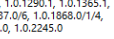
He is not. He is using an outdated version of ScripthookV. It's clearly displayed in the error message. As you can see; the latest supported version is marked as 2245.0. So he has to remove ScripthookV and download it from the link you provided.
-
Please send your RagePluginHook.log. (Found in your GTA V main folder.)
-
Please only create one forum post. Thank you.
-
Please send your RagePluginHook.log. Looks like you got logging enabled. Also, if you run GTA V / RPH in Compatibility mode, that will happen.
-
Make sure to remove the 2015 package from your PC first! Restart your PC. Then install this: https://www.microsoft.com/en-us/download/details.aspx?id=52685
-
Do you have a Trainer installed? If so; reset the settings and make sure: Police Ignore Player Everyone Ignore Player Are disabled.
-
Remove AmbientAICallouts in /plugins/LSPDFR.
-
Don't load LSPD:FR on startup. Load it ingame. If you have an ongoing main missions (Story mission), you need to complete it first.
-
If it's an .oiv you can open it with 7zip or WinRAR and open the assembly.xml. It will tell you where stuff is being installed to.
-
Du musst einen gewissen Punkt in der Story erreicht haben. (Lamar in free-roam) Und dann kannst du erst LSPD:FR laden und spielen. Kannst natürlich auch einfach ein 100% savegame runterladen.
-
Please show me the vehicles.rpf including the path in OpenIV of where you put your vehicles. Thank you.
-
Do you press the "SHIFT" key a bunch of times, maybe? Or maybe some background task opens up?
-
-
Please send your full RagePluginHook.log.
-
Yep. And then copy them over manually.
-
Looks like it has a tint on it. Go into the vehicles.meta of said slot (mods/update/update.rpf/common/data/levels/gta5; if it's a replacement) and make sure the diffusetint looks like this: <diffuseTint value="0x00FFFFFF" />
-
Could be a corrupt archive. Remove the "missing" DLCpacks in /mods/update/x64/dlcpacks and copy them over from your vanilla files. Maybe verify before you copy them over to be sure.
-
You can try resetting your keys.ini. Found in GTAV/LSPDFR/
-
Remove everything in it. Save & close.


