


A Stranger
Members
-
Joined
-
Last visited
Everything posted by A Stranger
-
It's whatever you installed into your mods folder.
-
LSPD:FR does? You just respawn after you died.
-
Wrong log. Next time, please send your RagePluginHook.log. But; remove in /plugins/LSPDFR: ALPRPlus; BankCallouts; CalloutManager; CalloutsV; Code 3 Callouts; ComputerPlus; FBI Callouts; FederalCallouts; HighPriority; PeterUCallouts; redCallouts; RegularCallouts; StraysCallout; WildernessCallouts
-
Are they ELS cars? If so, please make sure to: 1. Install ELS. 2. Install ScripthookV 3. Install the .xml files with the cars into GTAV/ELS/pack_default.
-
Probably because it's the response I always give with SlimDX. It's currently the only known way to fix it.
-
1. Make sure GTA V is closed during the installation. 2. Make sure you have copied your update folder to /mods and that the update.rpf isn't corrupted. (You can open it in OpenIV and check)
-
Seems like it's caused by your mods folder. Rename mods to _mods and retry. If you have LML; disable it.
-
You know you can turn every add-on car pack into a replacement-pack? Might take some work, but it's usually worth it in the end if you really like those cars. Also; do you want only police cars or regular ones, too? Because there are plenty out there.
-
You can replace any file at any given time with the vanilla package. I usually recommend (especially with sound mods) to test them after the install before installing another one. That saves you (like now) a lot of time & troubleshooting.
-
Welcome to the famous SlimDX error. It's famous because it's been around for years and has a limitless list of possible solutions. Let me run you through what you can do: 1. Add your GTA V folder to Antivirus exceptions. 2. Delete SlimDX from your GTAV folder and restart your PC. 3. Download RagePluginHook and put the .zip in your GTA V folder. 4. Click "Extract Here." If that doesn't help you; try the following: Make sure you have all of the requirements installed. If it says you already have them installed; reinstall them to be sure. https://www.microsoft.com/en-us/download/details.aspx?id=48130 https://www.microsoft.com/en-us/download/details.aspx?id=26999 https://www.microsoft.com/en-us/download/details.aspx?id=52685 And if that still doesn't work; Try a clean reinstall of your GPU driver.
-
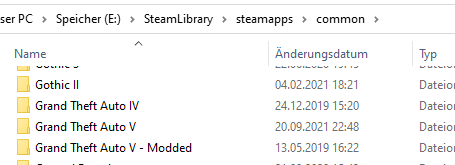
You can't rename the folder you are running RagePluginHook from. It has to be" Grand Theft Auto V" and located on the original drive. (D:\ for you.) Just switch folder names so it doesn't mix / overwrite your clean folder:
-
Please send your RagePluginHook.log. (The one found in your GTA V main folder.)
-
That's mostly how the AI works. You can set their reaction to "chaos" and stuff in the vehicletasks.ymt file.
-
Please send your RagePluginHook.log. (The one found in your GTA V main folder)
-
Remove in /plugins/LSPDFR: PeterUCallouts; CalloutsT; CalloutsV; Copper Callouts; CrazyCallouts; LSPDFR-Callout-Template; FayaCallouts; ForceACallout; FortZancudoCallouts; LencoBearCatControls; megaPhoneUI; OfficerprociPlugin; PriorityCallouts; RegularCallouts; redCallouts; RichAmbience; RichsPoliceEnhancements; Station 19 Callouts; terrcall; WildernessCallouts; And then reinstall the keys.ini from LSPD:FR 0.49 manual.
-
Means your mods folder is the cause. Whatever you last installed; remove or revert it.
-
Yes, you will have to change that in the carvariations.meta. Since the ones for police cars (vanilla) are encrypted, just add a template to mpchristmas2's carvariations.meta and change it there.
-
Remove in /plugins/LSPDFR: - County Calls;
-
You are missing files for it. Make sure you installed ALL files for RagePluginHook; EUP menu and RageNativeUI.
-
Your mods folder. Or LML; if you use it. What did you last install into it?
-
Please read the official RagePluginHook FAQ: https://docs.google.com/document/d/1Hp2Qco0qsgKfohkhjYWUxTr2OF7NSCkp8uSZwWz6rRQ/
-
Could be a hardware problem; something isn't able to display visuals correctly. Or it tries to save resources. Specs of the PC + running software would be good. (Sometimes AV's can block the background)
-
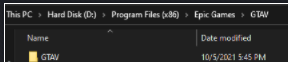
You need to open the "GTAV" folder in /GTAV. RagePlguinHook needs to be in your installed Grand Theft Auto V f older.
-
Please refer to the RagePluginHook FAQ: https://docs.google.com/document/d/1Hp2Qco0qsgKfohkhjYWUxTr2OF7NSCkp8uSZwWz6rRQ/ Your problem is listed in it. Follow the steps and show us in case it doesn't work.

-
Por favor envie o seu RagePluginHook.log.

