


A Stranger
Members
-
Joined
-
Last visited
Everything posted by A Stranger
-
What is your Antivirus? Chrome itself usually doesn't flag files from LCPDFR.com Though you can go to chrome://downloads and let it download regardless.
-
You downgraded your game. Please update it officially and then rename your mods folder to _mods.
-
You're in the wrong support section; this should be in LSPD:FR 0.4 support. Please attach your RAGEPluginHook.log; found in your GTA V folder.
-
Make sure you load LSPD:FR via the RAGEPluginHook settings or ingame via the F4-console.
-
Please attach your RagePluginHook.log from your main GTA V folder. Thank you.
-
It is, please download it from the LSPD:FR 0.49 manual download.
-
Send a screenshot, please.
-
Multiple things here: 1. When running LSPD:FR; do you have Preload disabled in your LSPDFR.ini in GTAV/LSPDFR? 2. With custom cars; are the .ytd files above 12MB?
-
Just wait. One of the RPH developer is currently awol and Alexander Blade has a life, too. Give it a few days, weeks and it will be announced. Check the websites, etc.
-
Rename your mods folder to _mods and verify your game files; just in case.
-
You need to install RageNativeUI into your GTA V main folder: https://github.com/alexguirre/RAGENativeUI/releases
-
Please make sure to add your GTA V folder to your Antivirus exceptions. Additionally, make sure your GTA V folder, GTA5.exe and RagePluginHook.exe (including the /LSPDFR folder) have all permissions for all users.
-
You can't just use a different folder if it's not linked. And your GTA V folder. Make sure it's just vanilla.
-
Please send your RagePluginHook.log.
-
Simply remove anything not vanilla related. Clean Steam folder: https://i.imgur.com/L5b9x1j.png Clean Retail folder: https://i.imgur.com/yaQbqOi.png Clean Epic Games folder: https://i.imgur.com/tNLuM7Y.png
-
Clean your folder. Could be that something in your folder is corrupt if you can't even launch it via Steam.
-
Were you the guy who joined RPH? If so, then this is solved. If not, send a screenshot of your GTA V folder.
-
Send your RagePluginHook.log and show me where you installed them to.
-
Simply open dutyselection.xml in LSPDFR/Data and add them.
-
Did you add them to dlclist.xml?
-
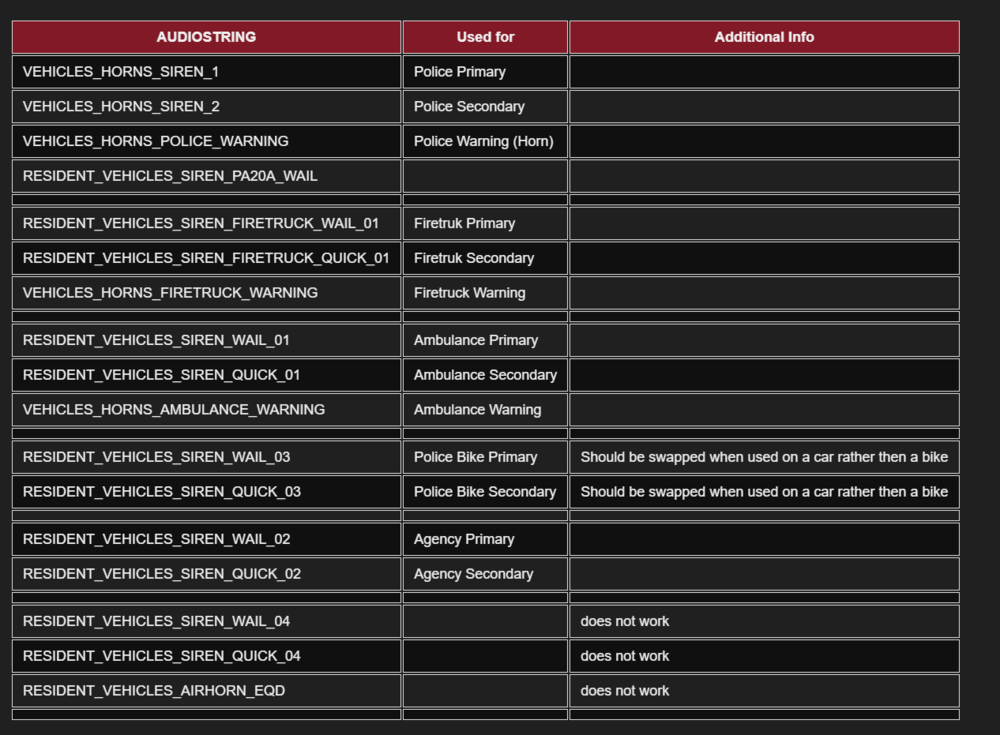
Do you mean this? (Credit goes to Aebian)
-
Add-on cars don't go to dlc-Patch. They go to: mods/update/x64/dlcpcks.
-
That's the same? Link it please.
-
You edited them into the Patrol Unit; not the Motor Unit.
-
You sent the wrong log. Next time, please send the RagePluginHook.log from your GTA V folder; not /mods. Remove in /Plugins/LSPDFR: - Ambient FX; (Or install SHVDotnet for it) - AmbientAICallouts; - Chill Callouts; - Door Control; - fayaCallouts; - LSPDFR+; - NothingHappened; - OCSpray; - RichAmbience; - RichsPoliceEnhancements; - UK Callouts; - YetAnotherEnhancer; And then set your PluginTimeoutThreshold to 60k instead of 10k.


