
Nemesisx101
Members
-
Joined
Everything posted by Nemesisx101
-
 Could you look into adding shoving animation (the one NPCs can do to Player when agitated)? Would be cool to create distance with peds coming up in your face or as an act of intimidation…. perhaps have a prob for whether the ped will cease hostility (if they are aggro with Player) or end up fighting. Don’t know if you can momentarily relinquish control of the Player character to allow the animation to be performed correctly (lined up and what have you) and have an abort key to cancel animation if need be.
- 84 comments
- 9 reviews
-
 Interesting. Perhaps I might be able to do something, carry over stuff maybe, if setup ain’t too dissimilar (xml formatting and what have you). You got any previews/could provide more information?
- 217 comments
- 22 reviews
-
Yeah, getting crashes during pursuits and peds not staying down,warping back on their feet. Having lspdfr/stp recognise arrests would be ideal.
- 84 comments
- 9 reviews
-
 With all due respect, I’m not seeing the relay function/api spamming being the problem (disabling relay/Broadcastify has no effect anyway) as the performance profile is a flat curve of misery from loading to unloading xscanner. Regardless, the issue of spamming was always a thing and never caused fps drops— wouldn’t think it would be a static performance deficit like this —with previous builds so unless something changed fundamentally with lspdfr/game as a result of the update, I would hazard a guess that you’re overlooking something. Just not adding up in my mind. I understand your frustration and know you want this resolved just as much as everybody else.
- 637 comments
- 51 reviews
-
-

- 1
-
-
Tried new build and performance is still really bad (might be worse actually). Hopefully you work it out, m8
- 637 comments
- 51 reviews
-
-
- 1
-
-
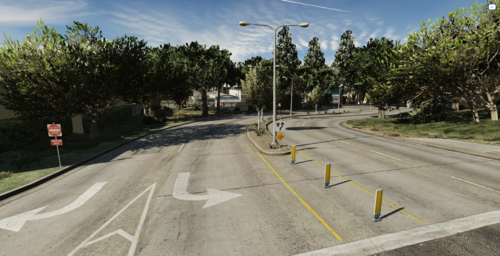 Honestly, most roads need to be shrunk down (width) and those nonsensical, insanely large junctions too. Mostly just empty space. GTA 4 felt more lively in comparison due to how compact everything was— obviously different cities but still.
 -
Hey, I’m getting a significant performance drop with latest build (isolated plugin to make sure)…feels like I’m losing around 10-15 fps with it running similar to that previous build a while back that had a fps issue. Could you look into this please, many thanks. Really wanted to try out your new releases but the performance is pretty pants like this, unfortunately.
- 637 comments
- 51 reviews
-
-
- 2
-
-
 What a wonderful Christmas present; I shouted out when I saw the update lol. Good show! Have a great new year, m8.
- 35 comments
- 3 reviews
-
-

-
- 2
-
-
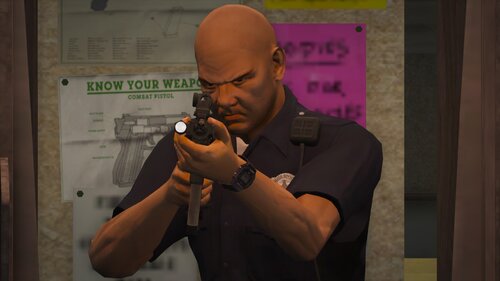 I mean general weapon holding in 3rd person. You’ve modified other weapons but left out pistol (and taser) . Ahh I figured it out, you’re using the microsmg motionclipset to get those animations— I’ve got them working again for pistol.
- 56 comments
- 2 reviews
-
The animations aren’t working and looking at the meta, I’m not seeing the stealth animationset being used for the ‘tactical grip’ as if you reset the entries back to default or something. Looks like vanilla file as far as pistol goes?
- 56 comments
- 2 reviews
-
-
Yo, I’m not getting any extra animations (idling, running, etc.) with latest build? I was hoping to downgrade but lost previous files and don’t know how you do the running/idling stuff. Would you be so kind as to send me the lines for these animations please. Many thanks.
- 56 comments
- 2 reviews
-
-
@Joe C Wilson Could you do animations (idling/running) for taser please. Thanks. I’ve already done the taser for myself. Sure, the line is ‘cover@move@ai@base@1h’ (pistol) for CoverMovementClipSetHash
- 56 comments
- 2 reviews
-
Yes, every character model the Player uses. I believe there is a way to specify by model/group as RDE does this with the ‘stealth’ animationset for cops (works for Player too) so perhaps you can add cover animations override—use coveralternate line for ‘CoverMovementClipSetHash’—without needing to edit actual base weapon lines. That said, I’m not entirely sure if the meta needs to hook with others files looking at how meticulous RDE’s setup is
- 56 comments
- 2 reviews
-
Nice work. Did an edit to have npc cover animations too and reverted weapon aiming back to vanilla (could do version with 'stealth' animationset) that might interest you—to be included as an alternate config perhaps. Let me know and I’ll send you it.
- 56 comments
- 2 reviews
-
I’m talking about police car scanner chatter outside of LSPDFR— it’s a game script.
- 637 comments
- 51 reviews
-
@khorio Awesome stuff! I’d like to bring up an idea/request I had back in the day that made the rounds (no one really figured it out): could you look into tricking the game/ forcing the dispatch chatter herd in police cars to play in the background while on-foot? It would really add to the experience as its dynamic. I mean, you could always try replicating it by creating your own system by grouping voice lines and stringing them together in the same format while checking Player location to create the illusion of background simulation of crime/other unit activity. Many thanks.
- 637 comments
- 51 reviews
-
-
-
 Fixed the issue: you need to set item animate to false for pistol section in CopHolster XML
- 1,509 comments
- 85 reviews
-
Fantastic work with the updated vanilla cops! Shame about the CopHolster issue (gun model not consistently showing up).
- 1,509 comments
- 85 reviews
-
-
 Well done with the new screen-space system—I see a lot of potential. Pushing the envelope.
- 194 comments
- 21 reviews
-
-
-
- 2
-
-
 @Michael21107 Thank you for informing me. UPDATE ’General Update 4’ will rectify numerous typos
- 42 comments
- 7 reviews
-
-
- 1
-