
Nemesisx101
Members
-
Joined
Everything posted by Nemesisx101
-
 My apologises, this is leftover debugging. I shall rectify this. What you're seeing here is a monitor running checks-- should I receive feedback, I can look into managing things differently; I imagine ol’ Khorio may lay an egg when he comes sniffing around.
- 179 comments
- 4 reviews
-
-

- 1
-
-
Are you using Steam/Rockstar platform and where is your game folder located on your system?
- 179 comments
- 4 reviews
-
@Sergeant Nighthawk Hello there, yeah sorry for not clarifying this and for the crash (I should add an exception handle to prevent crashing) —folders themselves can’t be changed/deleted as they are hardcoded at this time, only the content of the various subfolders (i.e ‘Engaged’, etc.) can be customised. ‘Lost’ is non-functional/placeholder and ‘load’ is a startup audio cue. Thank you for raising this.
- 179 comments
- 4 reviews
-
-

- 1
-
-
Sure— you mean in general? Please specify on a volume scale of 1-5 (5 being normal car radio music at max volume in game settings/LSPDFR dispatch callout audio without XScanner) , how loud you’d like it…
- 179 comments
- 4 reviews
-
Hey, look over there! *Runs away and hides behind something as you turn your head— you shrug looking confused and just forget about the whole thing. All’s well with the world.*
- 179 comments
- 4 reviews
-
-
-
 What about if you forgot where you parked though? (Joke)
 -
Instructions are in site description and in ‘README’ included within download package. I’ve already tried reaching out to you via DM about issue (of which I believe to have resolved) raised in your previous comment. It’s my understanding @BlueLine Vibes has his own dispatcher for ‘Dispatch 2.0’— he can create his own staging (using existing framework) for her and distribute accordingly for himself.
- 179 comments
- 4 reviews
-
Appreciate the feedback— I actually used that back in the day myself and requested it (if you’re talking about the lamppost guy) ; this has always been something I wanted to do! Sure, I’ll certainly look into that.
- 179 comments
- 4 reviews
-
-
- 2
-
-
 Ain't no time left in the day no more. Christmas again already... time is 100% going faster; it's a very real phenomenon that's happening.
- 27 comments
- 4 reviews
-
 Sweet. I’d like to see an event with ped damaging/attacking (perhaps with an offensive weapon) parked vehicle. Also make sure you’re accounting for vehicles/entities going invalid to prevent crashes if you haven’t already. It’s a big problem with the game.
- 28 comments
- 1 review
-
Thank you for the feedback. Yes, it's a known issue-- switch to NAudio version when General Update 1 drops.
- 179 comments
- 4 reviews
-
No, both are unaffected by AmbientScanner and will continue to function (police station chatter is just an environmental emitter with looping audio files and not a dynamic game script like scanner herd in emergency vehicles) as intended. I’d recommend disabling vehicle scanner with a trainer or what have you for consistency. I believe you’ve got the wrong idea here, friend… I suggested Broadcastify to Khorio (dev of XScanner) as a feature for their plugin. AmbientScanner is just the game’s dispatch out-of-the-box. Apologises for any confusion.
- 179 comments
- 4 reviews
-
No, fantastic as it is, XScanner only relays LSPDFR/game’s dispatch and does not expand it in any way outside of actual pursuits (with XPU) and locational info for callouts. You’re thinking of Broadcastify (I actually came up with that implementation idea) which will naturally compliment AmbientScanner as you’ll have both the game’s dispatch chatting away in the background now and real-world radio feeds being piped in for greater immersion. Thank you for asking and potentially helping to clear some things up for folk.
- 179 comments
- 4 reviews
-
-
- 1
-
-
@0xShelby Simply put, Mr Shelby: AmbientScanner simulates police activity outside of Player and callouts making dispatch more active; communicating with/coordinating other units. Puts hairs on your chest.
- 179 comments
- 4 reviews
-
-

-
- 2
-
-
-
An oversight: AmbientScanner has been coded to fetch content based on my own setup (CDrive/ProgramFile). I would need to address this by changing how lookups are handled and only seek game dictionary. My apologises for the inconvenience— I’ll work on this. Thank you for bringing this to my attention, and for your interest. *Issue resolved*
- 179 comments
- 4 reviews
-
Dedicated to my beloved Teddy Bear TalkativePlayer (Standalone Plugin) A plugin that expands Player dynamic speech beyond game native code (i.e. taunting, pursuing, warcries, etc.) in response to game events achieving NPC-like situational awareness and only triggering if appropriate when certain conditions are met. Also includes various Player/Cop/Ped interactions to make the game world more lively and dynamic contextual animations with full-control of Player character. Please note, even if conditions are met, behaviour triggers are not guaranteed. This is a design decision. ‘Radio Realism FR’ by Officerporci recommended to be used alongside Features Combat; Announce (Player/Cops) Combat; General (Player) Combat; General (Suspect) Combat; General (Cops) Combat; Barks/Warcries (Player/Cops) Combat; Coordination (Player w/ cop responses— Cops w/ Player responses) Combat; Officer Down (Player) Combat; Perp Down (Player) Combat; Under Fire (Player/Cops) Combat; Stress (Player/Cops) Combat; Pinned in Cover (Player) Combat; Weapon Spotted (Player) | Preview builds | Misc; Ped Shocked Combat, Animation; Strafing (Player) Combat, System; Incapacitated State (Player) CONTROLS When downed (health critical) Exit/Attempt recovery: Hold 'Sprint' while inputting movement (left analog stick/WSAD) OR wait for recovery Return fire: 'Attack/Fire' Combat, Animation; Gunfire Flinching (Player) *Inspired by RDR2* Combat, Animation; Hand-signalling (Player) *If coordinating nearby cops* Pursuit; Foot-Chase (Player) Pursuit; Reports (Player) *Suspect heading, etc.* Pursuit; Foot-Chase (Suspect) Pursuit; Foot-Chase Losing Suspect (Player) Pursuit; Foot-Chase (Cops) Pursuit; Foot-Chase Group (Player/Cop) Pursuit; General (Player) Misc; Firing Weapon (Player) Misc, Animation; Weapon Drawn (Player) Misc; Targeting Ped (Player) Pursuit, Animation; Apprehend (Player) *Animation used by ai cops when targeting Player character if wanted* Pursuit; Caught (Suspect) Pursuit; Megaphone Announce (Player/Cops) Misc; Megaphone Public Warning (Player) *If perp armed* Pursuit; Megaphone Chase (Player) Pursuit; Megaphone Chase (Cop) Pursuit; Megaphone Chase Group (Player/Cop) Misc; Idle Gossip in Vehicle (Player/Partner) Misc; Stuck in Traffic (Player) *Hold down horn* | Preview builds | Misc, Player Attention *Observe surroundings and peds/vehicles in game world — inspired by RDR2* Agitation; Ped Staring (Player) Agitation, Ped Following (Player) | Preview builds | Agitation, Bumped Into (Player) Agitation; Shove (Player) Misc; Dynamic Text/On-screen Greetings (Peds) Misc; Dynamic Observations (Player) Misc; Ambient Cop Walkstyle/ On-Foot Patrol (Player) *Cops do this when out on the beat* Trigger Conditions: Walking for a period of about 20 secs (no active callout/in combat or on traffics-stop, ideally busy status). Must enter a vehicle once if loading-in with LSPDFR Misc; Various World Interactions/Events (Peds/Player, Peds/Cop, Peds/Peds, Gang/Cop, Player/Cop, Cop/Player) *Greetings, idle chatter, spats, physical altercations ,etc.* Misc; Intimidation (Player/Cop) *Like in GTA IV* Voice Change/Lock Keybinding Commands: White Male Voice Group: Alt+NumPad4 Black Male Voice Group: Alt+NumPad7 Sheriff Voice Group: Alt+NumPad1 White Female Voice Group: Alt+NumPad5 Black Female Voice Group: Alt+NumPad8 Cancel/disable voice lock: Alt+NumPad0 Note, voice locking will only engage upon initial command - - - - - Installation Drop provided files at following locations TalkativePlayer (dll/pdb): plugins/LSPDFR - - - - - Some may find Player/Cops overly aggressive/mouthy (this was a design decision to be in keeping with lore— Extensive/Default presets). __________________________________________ AmbientDispatch (Standalone Plugin) A plugin replicating scanner herd in police vehicles while expanding upon original scope of chatter. Essentially Player’s radio in the background with dispatch managing/communicating with officers in the field beyond just Player callouts/plugins. ‘AmbientAICallouts’ by ziipzaaapM16A4 recommended to be used alongside *Make sure to disable police vehicle scanner audio; most trainers and XScanner can do this* Features . Vanilla Dispatcher (out-of-the-box) . Procedurally generated calls/reports/bolos/comms . Playback on-foot (and within vehicles) . Increased complexity of chatter (from native scanner) . Simulates radio activity outside of Player/callouts .Utilises game’s suite of crimes and other misc . Personally edited new vanilla dispatcher lines included . Non-intrusive and blends into background . Fully customisable/expandable (Add, remove or replace any WAV file regardless of file name in staging folders/subfolders for AmbientDispatch to use— creating your own personalised dispatch) Default version uses LSPDFR api for standard audio (like callouts) or indirect XScanner playback, if installed. Recommended NAudio version that runs in the background which can still be used alongside XScanner/LSPDFR (with volume scaling which works with older versions of LSPDFR) also included— 'Recommended’ in download package. - - - - - Installation Drop provided files at following locations AmbientDispatch (dll/pdb): plugins/LSPDFR NAudio dependencies (dll): GTAV root AmbientDispatchStaging folder: lspdfr/audio/scanner *Please ensure exact pathing here matches (case-sensitive)* WARNING: Incorrect installation or renaming/deletion of folders might unfortunately result in errors or crash! - - - - - Please note Tied to game-time like with native scanner (design-decision). Custom timescales/frozen time supported (unlike native scanner). If using ‘XScanner version’, remove ‘INTRO/OUTRO’ WAV files located in ‘RESIDENT’ within AmbientDispatchStaging to prevent duplicated audio. Switch to NAudio version if experiencing hitches/performance issues with XScanner. __________________________________________ PursuitMusic/CalloutMusic/TrafficStopMusic/CombatMusic/InteractionMusic (Standalone Plugins) Plugins that play wanted themes (last gen/next gen; city) during pursuits/callouts/traffic-stops/interactions/combat while dynamically adjusting based on conditions (e.g. suspect visual). Fully customisable/expandable (Add, remove or replace any WAV/MP3 file regardless of file name in PursuitScore/CalloutScore/TrafficStopScore/CombatScore/InteractionScore subfolders) Features personally mixed strands sourced from xXSilentAgent47Xx’s series of YouTube in-game captures. - - - - - Installation Drop provided files at following locations PursuitMusic/CalloutMusic/TrafficStopMusic/CombatMusic/InteractionMusic (dll/pdb): plugins/LSPDFR NAudio dependencies (dll): GTAV root PursuitScore/CalloutScore/TrafficStopScore/CombatScore/InteractionScore folder: lspdfr/audio/scanner*Please ensure exact pathing here matches (case-sensitive)* - - - - - WARNING (PursuitMusic): Incorrect installation or renaming/deletion of folders might unfortunately result in errors or crash! __________________________________________ Patrol Assignments (Standalone Plugin) A plugin that randomly generates shift duties periodically throughout Los Santos/Blaine County. - - - - - Installation Drop provided files at following location Patrol Assignments (dll/pdb): plugins/LSPDFR - - - - Please note Assignments vary in duration. Grace-period of 7-8 mins; accounting for travel time Reminders of assignments can be viewed in pause menu— ‘brief’ section Potential Issues Assignments currently unaffected by paused-state/callouts/pursuits (will continue to run in background). Somewhat intentional design choice. *Work in progress* BONUS Personal Vanilla-Cop Spawning Configs (LSPDFR&UB), both Mixed & Male Only with randomized props/patches/hair Also includes: Revised 's_m_y_cop_01' (vanilla toolbelt w/nightstick, colourized badge and no hat) Revised 'Beta Cop' by Yard1 (vanilla toolbelt w/nightstick, colourized badge and no hat) Revised 'Improved Female LSPD' by Olanov (with male animationset *enter vehicles faster like male peds, but please note—peds will have male pain/exertion vocalisations* and no hat) CopHolster Supported And Alternate Walkstyle 'Agitation Fix' for LSPDFR Personally curated meta enabling NPC agitation triggers for Player beyond Story Characters *values have been altered for a more realistic experience--- only gang members will be aggroed by Player's proximity when stationary* Great for emergent gameplay/interactions when out on patrol. My other work: The Peelian Way Interactions Sim with Role-Play Elements Be Advised: Steep Learning Curve (Intended as a gameified training/quasi-academic resource for aspiring officers and first-contact social workers) *Very in-depth, unconventional, greatly involved and methodical-- will slow down all interactions significantly and add tangible weight to every micro-decision* Dedicated to my beloved Miss Bell “The police are the public and the public are the police; the police being only members of the public who are paid to give full-time attention to duties which are incumbent on every citizen in the interests of community welfare and existence.” - Sir Robert Peel; founder of the Metropolitan Police Service LSPD-focused 'CustomQuestions' and 'TrafficStopQuestions' XMLs with an emphasis on public engagement— informed by real world neighbourhood/problem-orientated policing knowledge and experience with an evidence-based approach. Key Features . Complex interconnected meta systems with conduct feedback loops . Reputational standing/community relations . Emergent gameplay opportunities (STP/PR scenarios) . Many bespoke categories (Domestics, searches, and so on) *On-foot and traffic context specific* . Ped demands, requests, questions, engagement blockers, intel and conditionals . Ped personas (with complete backgrounds, housing situation, occupation, love life/marital status, activity *i.e going to work, etc.* , hobbies/ventures, societal participation, outlooks on things, perception of/history with police, quirks... so forth, and dynamic states of emotion, varying levels of awareness and potential vulnerabilities) . Suspect misbehaviour (Detained, arrested, while secured in vehicle) . Mental state/intoxication/perception response/behaviour modifiers . Player consequence (with lots of checks) . De-escalation tactics, mutual cooperation, and non-contact conflict management *up to two persons* . Informal chatter and Player comments/insults . Ped anti-social behaviour . Public engagement . Vulnerable person safeguarding measures, rapport building avenues and referrals . Robust open-ended investigation/inquiry . Basic medical/intoxication assessments . A suite of verbal commands *On-foot and traffic context specific* . Approach procedurals with impact on interactions (micromanagement of Player character factoring addressing/tone of voice/vocal level/positioning/intimidation) . Ped agitation/concern/wariness (e.g. Player standing too close, etc.) . Partner/buddy dialogue and support options . Advanced observation system (contextual/general/eye contact/body language/proximity/behaviour/movements) . Extensive Player actions and hands-on tactics/suspect management *on-foot and traffic context specific* Thousands upon thousands of lines, descriptors, observations, etc. (just squint while scrolling XMLs if you're curious-- don't spoil things for yourself!)-- largest, and most ambitious STP/PR project undertaking. Conceptualised and authored strictly by myself (excluding legacy stuff). A must-have; very proud of this (2 years of hard work). Handsome one/top dog on site, straight up. The Peelian standard. Please note that certain responses are meta given limitation, and interchangeable (i.e. '*___ language*')-- should circumstance dictate. CONTENT WARNING: Some users may find certain dialogue options/responses upsetting and/or distasteful as this XML aims for realism, and explores sensitive topics. FULL CHANGELOG and User Guidance (my comments) on Dedicated page: Commendation: Insanely talented musician @Colin Stetson https://m.youtube.com/@ColinStetsonMusic GTAV/RDR/RDR2 OST Mixes @SteppedUpStation https://youtube.com/c/steppedupstation?cbrd=1 Policing Insight/Commentary (Opinionated) @Thoughts of a Patrol Officer https://m.youtube.com/c/thoughtsofapatrolofficer?cbrd=1 Get into Policing Police Recruitment/Professional Development Advice/Guidance (UK-based *Teachings universally applicable* ) @Bluelight Consultancy Ltd https://m.youtube.com/channel/UCTlIM5qpMHlcb4iR9zW7cVw
- 179 comments
- 4 reviews
-
-
-
-
-

- 23
-
-
 Hello there, not entirely sure if it’s a feature or a third party cause but your events keep triggering pursuits when on-foot. It’s really annoying.
- 297 comments
- 17 reviews
-
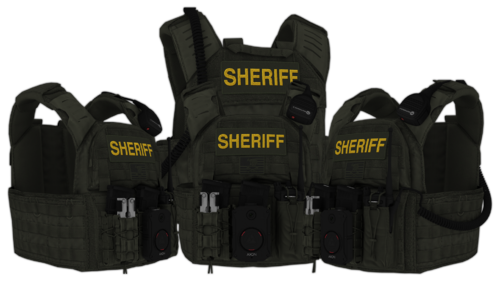 Would it be possible to have these vests to work with vanilla cops by replacing their body armour or know of any models that do? I tried copying over the meshes (exporting to openformat and replacing high/low mesh files in the subfolders and not editing anything else) but they just end up floating far from character— thinking meta files handle positioning of model(s) in-game. Sure clipping and all that is understandable but they just end up completely out of whack. Perhaps you could elucidate on the reason for this behaviour.
- 10 comments
- 2 reviews
-
 Possible to get the vests to work for vanilla cops by replacing their body armour?
- 550 comments
- 44 reviews
-
-
 oui
oui -
 Apologises, it occurred me that you’re effectively handling in blocks and it’s a specific offending file that was cancelling out entire lines—the issue has been resolved on my end. Thank you for your time. Hopefully you look into report function.
- 637 comments
- 51 reviews