




Kilyin
Members
-
Joined
-
Last visited
Everything posted by Kilyin
-
go to update.rpf -> common -> data Extract and edit gameconfig.xml Change the following <PoolName>Vehicles</PoolName> <PoolSize value="300"/> to <PoolName>Vehicles</PoolName> <PoolSize value="400"/> and change <MaxVehicleModelInfos value="310"/> <MaxExtraVehicleModelInfos value="100"/> to <MaxVehicleModelInfos value="400"/> <MaxExtraVehicleModelInfos value="150"/> Replace the edited gameconfig.xml back into update.rpf -> common -> data
-
 Reverted back to previous version, can drag bodies again. Callouts work, human partner works, didn't test dog but I assume it will not. Older version is much more stable, sadly.
- 542 comments
- 98 reviews
-
-
.thumb.png.e88f1892e13ddb98db35e668d465c34b.png) The .YTD files still open for me, which is where you replace textures. Just can't open the .YFT files.
The .YTD files still open for me, which is where you replace textures. Just can't open the .YFT files.- 182 comments
- 44 reviews
-
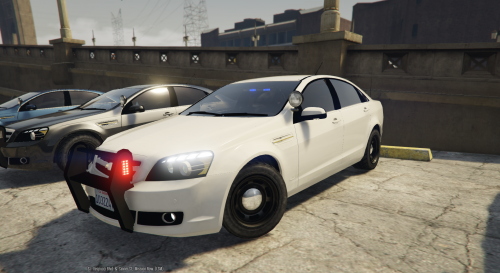 There is one, but it isn't very good. The paint looks like shit and I don't even think it's a GTAIV quality model... but since you asked. The 87 CV looks much better though... not sure why the Caprice looks so bad.
- 34 comments
- 10 reviews
-
-

- 1
-
-
Check RagePluginHook.ini, if present remove TimeScale=1
-
-
-
Tried to drag a (dead) body, completely crashed to desktop. Nothing in the RagePluginHook.log.
- 542 comments
- 98 reviews
-
-
-
Give me a beta of this callout or I'll never play Trashmasters again! ;)
-
What DemNinjas said, and are you able to launch vanilla GTA5 from Steam ?
-
Steam or Retail? Here is a link to the Launcher from Rockstar, you could try that, see if it kicks off the update for the game: http://patches.rockstargames.com/prod/gtav/Launcher_EFIGS/GTA_V_Launcher_1_0_505_2.exe
-
-
You're correct, if all you're modifying is RESIDENT.rpf, that's all you need to copy (along with the correct path structure). I know this to be true because that's the only file I have in that path in my mods folder.
-
-
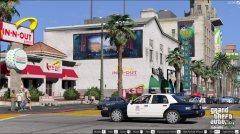 Does your ragehook console work with sweetFX turned on?
 -
 Drugalyzer... "Sir, please step out of the vehicle and pee in this cup..."
- 3,646 comments
- 306 reviews
-
-
- 1
-
-
Edit: Scratch that, I didn't notice the dropdowns to drill the results down... so I guess it is pretty similar. ;)
-
Since the site update, I can't find the "New Content" feature. Possible I'm blind, or was this removed? "Unread Content" does not provide the same functionality.
-
 You should just be able to click edit, I don't think you can delete comments.
- 20 comments
- 5 reviews
-
-
- 1
-
-
This is built into Simple Trainer now, under Teleports -> Other Teleports -> Enable MP Map
-
http://www.lcpdfr.com/files/file/4607-lcpd-first-response/
-
I like it, thanks. Maybe to make install easier you could create the correct file structure for each file in the archive instead of pictures.
- 20 comments
- 5 reviews
-
-
- 1
-


.thumb.png.e88f1892e13ddb98db35e668d465c34b.png)

