


LtFlash
Members
-
Joined
-
Last visited
Everything posted by LtFlash
-
Keep them coming, Ringo4493! MP gameplays are always way more interesting than most of videos from singleplayer. I'm very excited about your unmarked ELS Town Car. Is it released somewhere to download?
-
'> I'd love to see sth like that too
-
1) It works! Thanks! It's seemed to me a little bit senseless to call Alt a "Menu" key, since it can be mismatched with the context-menu key but I reminded myself that [Alt] is/was used to focus on menu bar in older applications.
-
1) My tests show that [Alt] causes the problem: a) if (Functions.IsKeyStillDown(Keys.Alt) && Functions.IsKeyDown(Keys.E)) { Functions.AddTextToTextwall("Alt+E"); } gives an instant ERROR after *.dll is loaded. b) if (Functions.IsKeyStillDown(Keys.LShiftKey) && Functions.IsKeyDown(Keys.E)) { Functions.AddTextToTextwall("LShift+E"); } works completely fine. This issue is not a big deal, I can stay with [End] to force-end a callout. 2) This would let me use some custom radio traffic (CalloutMsg) I'm able to prepare, thx. ========================================================================= 3) One more thing I forgot about: using ped.DrawTextAboveHead() with DelayedCaller causes an exception: [ERROR - 4:19:33 PM] [Main] CRITICAL ERROR DURING MAINLOOP! REPORT THIS ISSUE AT LCPDFR.COM BY INCLUDING THIS LOGFILE. [ERROR - 4:19:33 PM] [] System.InvalidOperationException: Collection was modified; enumeration operation may not execute. at System.ThrowHelper.ThrowInvalidOperationException(ExceptionResource resource) at System.Collections.Generic.Dictionary`2.Enumerator.MoveNext() at LCPD_First_Response.Engine.Timers.DelayedCaller.a() at LCPD_First_Response.Engine.Main.c() [ERROR - 4:19:33 PM] [ExceptionHandler] System.ThrowHelper.ThrowInvalidOperationException(ExceptionResource resource) L_0010 System.Collections.Generic.Dictionary`2+Enumerator.MoveNext() L_0000 LCPD_First_Response.Engine.Timers.DelayedCaller.a() L_0298 LCPD_First_Response.Engine.Main.c() L_009e Error hash: 79D9B968E4AE2D7C9300F32B3574414311789ACA here's an example I used to reproduce the error: LCPD_First_Response.Engine.Timers.DelayedCaller.Call(delegate { ped.DrawTextAboveHead("Hello!", 2000); }, this, 2000); I can still use the function with Timer so you can treat it as a report, not a help request
-
BSODs are often caused by damaged RAM or another component on the motherboard. First thing I would advise you is to install some program to monitor temperatures (HWMonitor). Second: scan your ram with MemTest, it is build into BIOS in many cases, otherwise you can use a bootable pendrive with a Linux distribution. It'll let you decide whether replace RAM or go to the service.
-
Ohi, that's me again with two more issues: 1) Is there any way to use IsKey(Still)Down() to detect a combination like [Alt]+[E]? When I use it with && operator it gives me an exception System.IndexOutOfRangeException. 2) Can PlaySound() be used to play a couple of files like PlaySoundUsingPosition()? When I use eg. PlaySound("ALL_UNITS AT_SEA", true, true) what I got is a warning that "ALL_UNITS AT_SEA" doesn't exist. With that second function there's no such problem.
-
I believe they could use the original film reel and convert it to digital format which could be enhanced with modern techniques. I've seen a movie after such operation and it's astonishing to see something you know good in new perfect quality.
-
 This color fits perfectly, thanks for the tip, Reibu!
 -
Holy Moly! Is this beauty released somewhere?
-
-
1. Get some general knowledge how programming in C# works, plenty of websides offers it for free. 2. Review the API examples, as lcpdsergeant advised, and compare it to how a certain callout work in-game. 3. Your first script should be something very easy, make it fully reliable - test in different conditions (learn to manage resources inside the code).
-
-
It can be done with API, no doubts about it. The most important thing is to simplify everything, eg. missing person call: check hospitals (older person who had some problems with his memory), places where a victim could go to (he was a junkie -> check in Lower Easton/Bohan, prostitute? -> go to Chase Point etc.), go to an airport to watch CTV tapes (he might want to take a flight to Wisconsin just to GTFO from the city). Make a reverse investigation: what do you want a victim to do, take some places, plan what you could do to investigate. Before that you might want to read LCPD:FR API so you know what you can do and what you cannot.
-
My contribution: hope you like it
-
Of course I haven't tested the most obvious way, dumb me... Doing it as you advised, LMS, helped me to get rid of my problem. Thanks again! For all of you who encounter the same issue: if (arrow != null) { arrow.Delete(); arrow = null; }
-
LCPDFR.log [ERROR - 6:19:39 PM] [Script.CalloutManager] Error while processing callout: >>callout_name<<: Object reference not set to an instance of an object. at LCPD_First_Response.LCPDFR.API.ArrowCheckpoint.Delete() at API_Example.Callouts.>>callout_name<<.End() at API_Example.Callouts.>>callout_name<<.Process() at h0.Process() [ERROR - 6:19:39 PM] [Script.>>callout_name<<] System.NullReferenceException: Object reference not set to an instance of an object. at LCPD_First_Response.LCPDFR.API.ArrowCheckpoint.Delete() at API_Example.Callouts.>>callout_name<<.End() at API_Example.Callouts.>>callout_name<<.Process() at h0.Process() [ERROR - 6:19:39 PM] [ExceptionHandler] LCPD_First_Response.LCPDFR.API.ArrowCheckpoint.Delete() L_002e API_Example.Callouts.>>callout_name<<.End() L_012f API_Example.Callouts.>>callout_name<<.Process() L_01cf h0.Process() L_022e Error hash: 2C4F9853ACFA1A901D82E1411D1C489462935478 [WARNING - 6:19:39 PM] [Script.CalloutManager] Failed to free callout properly: >>callout_name<<Object reference not set to an instance of an object. at LCPD_First_Response.LCPDFR.API.ArrowCheckpoint.Delete() at API_Example.Callouts.>>callout_name<<.End() at h0.c() My script uses it in a very simple way: just after LPlayer.LocalPlayer enters the ArrowCheckpoint it calls a proper method with callout logic + arrow.Delete(); If it goes as intended there's no problem - it's not needed to check and remove it second time BUT the problem begins when I want to protect my script from GTA/player failures -> eg. when something goes wrong I can catch it and free all resources in End() so there are no arrows left on the map etc. As I checked before try ... catch will prevent bigger fu**ups but will force-end the callout with a big msg about exception which I'd like to avoid. My interpretation with help of your post is: an internal reference is removed once in callout logic and then the second time (failed attempt) in End() because there's no Exist() method for ArrowCheckpoint to ensure whether Delete() is needed; I'm not in a hurry, it would be nice if I could get some resolution at all. I managed to create quite interesting scenarios in my callout(s) that require ArrowCheckpoint and I'd be glad if I could release it in some time fully working and as failure-proof as possible.
-
I'll keep posting in this thread to not to spam the section. I use ArrowCheckpoint. I can Delete() my arrow in any time but when I want to ensure that it's removed in End() LCPD:FR throws an exception regardless of the check: if (arrApt != null) { arrApt.Delete(); } ArrowCheckpoint can't be checked for Exist() so I'm asking for some tip how to perform a working existence check before removing.
-
-
Alright, I considered that resolution and I'll stick to it if there's no other way. Thank you once more LMS
-
Ohi, as a complete amateur in programming I need some help from you guys, more advanced in C#. I want to have a possibility to set ECalloutProbability of my callout dynamically on basis of GameTime and an area where LocalPlayer.Ped is located. For example: Process() in the Plugin class (just like in the API example) checks if GameTime is between 8 AM and 4 PM (or LocalPlayer is in "Lower Easton"). If yes - it will set ECalloutProbability.Always, if not - ECalloutProbability.Never (="turned off"). The problem is I have no idea how I can change it outside the target class. I'll appreciate any help. Adam
-
Hastings, they are beautiful, it would be a great loss to not to have them in this topic I think. I'll see more with big pleasure.
-
Thank to your tip I managed to resolve the issue. My *.dll had an older version of LCPD First Response.dll as a reference, after recompilation with the newer one it works alright. Thanks LMS!
-
I can't run execute the method neither from console nor directly from my code, here's the important part of logs LCPDFR.log: [ERROR - 12:35:13] [Plugin.TestPlugin] System.MissingMethodException: Method not found: 'Void LCPD_First_Response.LCPDFR.API.Functions.StartCallout(System.String)'. at API_Example.TestPlugin.Process() at ay.b() [ERROR - 12:35:13] [ExceptionHandler] API_Example.TestPlugin.Process() L_ffffffff ay.b() L_00a0 Error hash: 4B730627DA46BEDC75E6101A0431339BD749D283 My VS links the StartCallout() properly but every in-game usage ends in the same way - an exception.
-
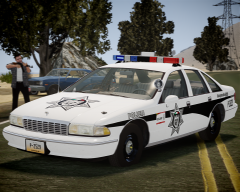 Caprices are the prettiest, keep'em comin' :D That Aspen matches perfectly to this scene.
 -
 Reminds me the good old "French Connection", it was worth to wait so long :D


