



RyWilson
Members
-
Joined
-
Last visited
Everything posted by RyWilson
-
hello. i have never heard of this problem but i did take a minute to look it up. i will include a few links that may help you. http://forums.steampowered.com/forums/showthread.php?t=2736637 https://support.rockstargames.com/hc/communities/public/questions/200752293-Black-screen-at-startup-GTA-IV http://www.neowin.net/forum/topic/946392-gta-iv-blank-screen/ i can't guarantee if these will work and i take no responsibility but please back up your game before you do any of these. hope something helps.
-
most of the AI cops uniforms are directly related to the ones you have installed. so if you have installed uniforms that have armour then those guys will too. the only way to ensure that every cop has one on would be to find a ped with just one file inside it. that way the AI cops have no choice but to choose from one type of uniform. for example, this link here contains a vest but it also contains many more uniforms so the AI cops have many to choose from http://www.lcpdfr.com/files/file/529-new-cops-state-troopers/ now this ped here has just one shirt. thats it. so any AI that is normally wearing this slots clothes have one yellow shirt. http://www.lcpdfr.com/files/file/5733-las-vegas-metropolitan-police-department-yellow-uniform/ i hope this makes sense. it is possible to do what you are talking about but you also limit your player from being able to choose different uniforms also
-
hmm. i have been searching around but no luck yet. i do have a question though. when you first turn on LCPDFR you have to push left Alt P to start the mod. does that work? or are you not able to even do that? knowing that it at least works there might be of some help on ma searches :P
-
okay i been checking around for stuff and here is all i can find. i found a youtube video of a guy with a new chevy caprice. i have included the police car files for it. i have also included the link from this forum for the state police textures which i am sure you have seen. the video in the car looks just like the screenshots from the textures. so hopefully this will fit and you can use this. the video: https://www.youtube.com/watch?v=wzdAuI7X6R8 the car files: https://drive.google.com/file/d/0B0G0Qy0tx-uXNXNnRHlOZnhWV3c/edit and https://drive.google.com/file/d/0B0G0Qy0tx-uXMXZtN0VPM2tWMXc/edit the skins: http://www.lcpdfr.com/files/file/4519-rhode-island-state-police-package/ hope this helps or is what you are looking for :P
-
here is a quick video for that. hope it helps :) https://www.youtube.com/watch?v=dGa6fnQu78M
-
hello. un install LCPDFR and then download the Manual installation. before you do disable your virus protection so that it doesnt stop any of those files from being downloaded. you are missing key components that dont seem to be getting installed. lemme know what happens.
-
okay do this real quick. check your GTA IV folder and make sure that there is an Advanced hook.dll in there. it should be dated January 2,2015. then check to make sure you have Scripthook.dll in there also. it should be dated June 6, 2011. Those are usually two of the culprits of that error. they simply dont get installed somehow. if you dont have those in there download the MANUAL installation of LCPDFR and grab those files and drop those in your main GTA IV folder. then try and see what happens. lemme know if that helps or no
-
hello and welcome to the forum :) if you download from Steam you should have the correct version which is GTA IV 1.0.7.0. First make sure when you download GTA IV that you are able to run the game with no problems whatsoever. if you are able to run the game then make a backup copy and store it. that way anything we do from here on out wont matter too much. then install LCPDFR automatically. make sure before you do that you disable your virus protection until after you have installed the police mod. some virus protections will block certain parts of the mod. make sure when you run the police mod that you are right clicking LaunchGTA.exe and running as administrator. start your GTA IV game and when it loads up and you are in the safehouse press the left Alt and P. That will start the mod for you and you will get a prompt at the top of the screen "Welcome to LCPDFR. Please report to the police station to start duty" if you see that then technically you should be good to go. remember that you will have crashes of the game here and there..hopefully there is a decent amount of playtime in between crashes. but we're gettin ahead of ourselves :D let me know if you get your game going.
-
lol i posted about it in my status but i didnt think about a video link. duh! i think im goin start trying to learn car textures first bub. i can't jump into all this without knowing some basic stuff. i still dont know what that texture thing is that comes with vehicles when ya download em. it says side and front. looks like the car but its like somebody drew it and its purple and pink lol. so i just ignore it :D
-
well that sucks :( can we all vote on it lol
-
howdy :D now i haven't actually started a thread in the request section for a long time so i am not sure if there is a best answer button like the other forum had. i am only guessing their isn't because it seems like noone marks that their problem is fixed so i never know if the help i am giving is good or not :( i know it is probably just me being weird. but i bookmark certain things here and there around the net in order to be ready for the new guys when they sign up. but here lately im really feeling sketchy about whether or not my info is effective or just plain wrong cuz noone is saying so lol. plus it looks like things are just piling up in the request section. its like we're hoarding :D HAHA! sorry if there is a button and nobody is using it haha
-
YES! i agree!! i like previewing cuz i get a chance to see how sexy my post will be before i post it...which really means i get a second chance to proofread
-
yeah i think you hit that right on the head. wish we woulda had that screenshot earlier. let's hope that works. one of the articles i read was on a dungeon and dragons game and the guy talked about pink and blue. once you see this picture its obvious. good job.
-
 i want that :( its so shiny and just sittin there lookin at me.
 -
 <3 omg. UGH! thats one sexy bitch right there. mhm!
 -
lol :P okay now thats because the scripthook in the Trainer is outdated. so what you wanna do is go into your ELS V8.5 folder ( the one you originally downloaded in the zip file..not the one in your GTA IV folder) and grab that Scripthook and drag it into your GTA IV folder and replce the old one. then you should be good to go. because if im right your current Scripthook is probably dated 2010. and you want the one dated 2011 :)
-
hello again :) i can't tell anything really from what is here. can you run the LCPDFR diagnostic tool? its in the LCPDFR folder. it will run a test to see if you have the basic things needed. see if you can do that and get back to me.
-
hello. i was searching around the web because i've heard of a red sky problem but never pink tint. so i checked very few articles with snips of info. the pink tint was "alleged" to be caused by interference with other mods you may have installed. is that true? who knows :P my advice would be to remove that ENB and try another. make sure you back up your game in case you make mistakes. i have included links to some ENBs you can try out. http://www.gtainside.com/en/gta4/mods-386/ http://www.gta4-mods.com/misc/cryenb-v3-1070eflc-f30597 http://www.gta4-mods.com/misc/simple-enb-for-natural-and-realistic-lighting-f20765 good luck and i hope you find one that suits you :)
-
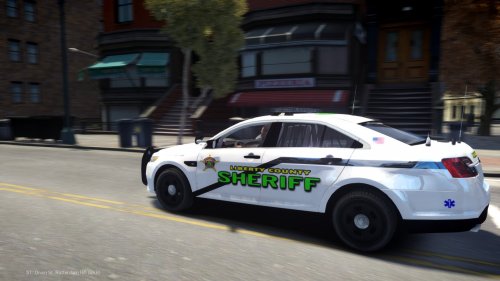 thanks for the skin and for including the link to the mod. all you guys been making some really nice and colorful cruisers lately. i feel i wanna download all of em :P
- 1 comment
- 1 review
-
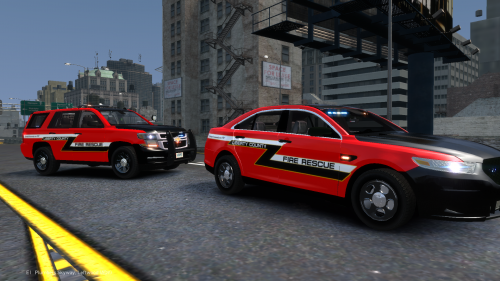 these are bad ass. ive always wanted a red cruiser..now just wondering if i'd feel stupid pulling people over in a fire rescue car haha :P thank you very much!!
- 5 comments
- 1 review
-
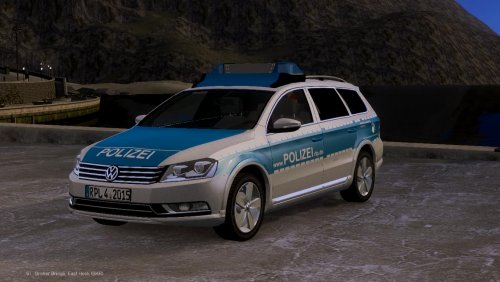 hey that looks really nice with the filled in trunk. that light bar is pretty sexy even though i don't understand it haha. thank you very much
 -
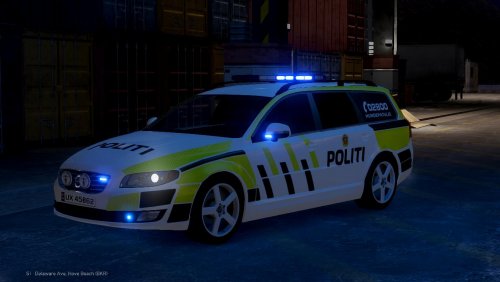 thanks for releasing this car. i been filling up ma slots today with those bright colored cruisers and this would fit good in ma empty fbi slot. nice colors and nice light bar on that.
 -
 hey that skin looks great!! i love those bright colors. thanks alot for making this for us!!!!
- 5 comments
- 3 reviews
-
-

- 1
-
-
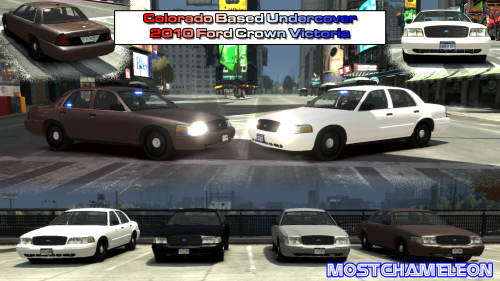 i am one of those people that likes having a plated undercover car when i change states in my game. so for me this is useful. thanks :) so regardless of how easy this was i appreciate it :D
- 4 comments
- 3 reviews
-
holy crap i was just thinking about saying the same thing yesterday..but i went to work. so definitely high five to everybody who made the best police mod ever :D

