




CouthInk4
Members
-
Joined
-
Last visited
Everything posted by CouthInk4
-
the police models? Can you remember a link to them? I have a feeling that your PC can't handle high poly mods, so it's crashing to save itself from having to much of an impact on your PC. Can you tell us your PC specs aswell?
-
GTA 4 wasn't a good port to begin with, so modding it will make it unstable. every mod you add makes it more unstable. car mods is also the main cause, so judging by the mod (traffic spawner) you're using car mods, try limiting the car mods. like me, i have 4 car mods (police1,police2,noose and FBI)
-
I doubt it. crashing happens at random and due to the users system specs. reinstall GTA 4, patch it to 1.0.7.0 and use the manual installer - '?do=embed' frameborder='0' data-embedContent>>
-
The only other thing i can think of is that your game is ruined. try cleaning your disc then retry loading it. if that doesn't work, your only other option is to buy a new disc.
-
Honestly if you're getting a computer for gaming, then just get a desktop. Laptops aren't meant to be used for gaming (except those overly priced machines), Laptops for originally designed for study or work related things. Desktops are more powerful and can be upgraded to your needs. and they work better for gaming than a laptop.
-
Try doing a fresh install, patch it to 1.0.7.0, once your at the start screen (where you choose GTA 4 or EFLC), once you're at the start screen, click on 'options' instead of 'start' then lower your settings. from the sounds of it, your computer can't load GTA 4 because it can't handle it.
-
Try restarting your computer, once it's restarted disable your anti-virus (sometimes background programs and Anti-Viruses conflict and don;t let certain applications or games work)
-
It's not exact.. but this does look a bit similar http://www.gta4-mods.com/vehicles/2012-slicktop-dodge-charger-f22154
-
Because ELS and LCPDFR are completely different mods, created by different developers. plus if you're talking about implementing it into LCPD:FR... then it'll be a pain, it maybe simple for downloaders.. but it'll be a lot of work for developers. EDIT: Also like what c13 said, not everybody wants to use ELS. so people will actually turn away from downloading LCPD:FR because of the ELS feature.
-
It's a bug with the traffic spawner, i get that too. if you drive around for a while you'll see civilians driving the police bike, buffalo and stinger.. then eventually it replaces all the cars with them (civilians still driving). This is the reason i reverted back to using GTA 4
-
Can your PC support GTA 4? Is it a legal copy (not downloaded from torrent sites)? Are you patched to 1.0.7.0?
-
MDT is a Mobile Data Terminal. it's essentially a program for Emergency services to keep track of calls, storing peoples records lik citations, arrests and warrants etc.
-
the car models take damage just like a regular car, however ELS resets the car so damage is impossible. ELS V8 fixed this issue, so now you can use ELS and have damage.
-
I recommend dsound because it's what i have always used. plus xlive disables online, so if you use xlive you won't be able to get online.
-
it sounds a bit like this version here - '?do=embed' frameborder='0' data-embedContent>> There are different versions and siren sounds of the premier hazard so just put in "GTA 4 Premier Hazard siren" into google if you want a different one.
-
Maybe doing a fresh reinstall of GTA 4, patching it to 1.0.7.0 then follow the manual guide i linked to. if you're getting a dsound error then it's something you have done wrong. it'll be best to start on a fresh install.
-
To me it sounds like a Whelen 295. '?do=embed' frameborder='0' data-embedContent>>
-
From what i could hear, it sounds very familiar to a Premier Hazard, which different versions can be found both here in the download section or on gtapolicemods
-
Eh.. i live in a dodgy neighbourhood, so the drugs or alcahol will kill them before the zombie apocalypse happens. it's really not something i think about, because the chances of that happening is reeeealllllllly slim.
-
Honestly, i have never heard of someone punching a police officer because they asked for ID.
-
completely remove 0.95 RC2 since it's no longer supported. upgrade to 1.0c I suggest using the manual installer and using this guide - '?do=embed' frameborder='0' data-embedContent>> However, if you can't follow the guide or you find it too difficult, using the auto installer is a good option.
-
a Chicago police Ford Explorer has been made. here is a texture pack (including the link to the Ford Explorer) - '?do=embed' frameborder='0' data-embedContent>> EDIT: The vehicle link is invalid, download the texture pack from the link above then download the vehicle model from here - '?do=embed' frameborder='0' data-embedContent>>
-
Many posts have been asked about this and the developers have already confirmed that IF GTA 5 is able to be modded, a mod like LCPD:FR will be made.
-
You don't save the game, because it will corrupt your GTA 4 save game. You should never save your game while a mod is activated. callouts just come randomly, you can edit in the INI file on how often a callout comes. if you get bored with them, look through the downloads section because there is a couple callout add ons you can download and use in LCPD:FR
-
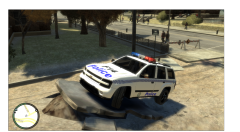 Make your POLICE on the hood smaller, and turn the F14 around.


