




CouthInk4
Members
-
Joined
-
Last visited
Everything posted by CouthInk4
-
Tried using SparkIV instead? I have used SparkIV since i started modding a few years ago and haven't had any problems with it.
-
When you download cars with a working lightbar it says in the description whether or not it's ELS or Non-ELS.
-
Every vehicle allows damage, the only thing that stopped it was ELS since it refreshed the car, That was removed in ELS v8 so now all ELS cars can take damage.
-
Why? It'll be a waste of money. You'll be paying for something that might not even work in GTA.
-
I highly doubt it'll work in GTA 4. Also i don't see anyone paying $80 dollars for a model
-
I don't think you can, unless you try a keyboard/controller emulator. I tried doing this a while ago because of the same reason (i hate switching from controller to keyboard every 2 seconds) with no luck at all :/
-
Make sure your keybinds for your Trainer are switched OFF and not ON. since keybinds use a keyboard letter, it might be trying to spawn something while your activating ELS. which could make it crash
-
Completely remove all your ELS files from your directory, then try to install it. You might have left a file that was for v7 which is conflicting with v8
-
Dell or Chromebook is like saying would you like bacon or bacon xD. It's not the brand you have to look at, it's the Laptop's system specs. For me personally i'd actually forget about a laptop and get a desktop because it'll be hard to find a laptop that'll run GTA 4 with a decent frame-rate (except if you're willing to pay 1000-2000 dollars on a gaming laptop). 95% of Laptops aren't made for gaming, Laptops themselves were never designed for gaming, they were designed for school/office work, browsing the internet etc.
-
Honestly, i think it's more of a sharing post. Like he is posting his ex/used police car and what's others to show off theirs (if they have one)
-
You can download an original copy online like Reibu said. You should've copied your whole game directory as soon as it was installed though, just remember that in future
-
I think you should do a re-install of Windows, I try to re-format every 5-6 months to give my PC with a bit of ease and clear it with all the junk that would have built up over time. I would recommend using Windows 7 because for me personally, it's better for gaming. My sister has a laptop with Windows 8 and every time i have to fix it, i takes me weeks because it's too stubborn or it just doesn't work, with Windows 7 i haven't had a problem. You would have to pay for it, but in my opinion it'll be worth it since Windows 8 isn't really friendly towards gamers.
-
Try running LCDPFR with no other modifications (including no car mods, no othr scripts all standard GTA files). and see if that works. LCPD:FR isn't supported nor is GTA stable with third party modifications
-
That little twerp couldn't hurt a fly. He said he was going to punish our Prime Ministers mistress Julie Bishop... Guess that didn't happen huh? He thinks he has power and everyone is scared of him, when in reality he is a little spoil sport who only got into the position of "leader" (and i use that term very loosely) because his father died and made him "leader" When in reality.. every other leader and person in this world is laughing at him.
-
You're right, However after some research on google Run32.dll is also the name of a virus.
-
You could use the VDH towing script. Or.. I hear a good old RPG can do the same effect
-
It's Simple Native Trainer it's a mod/Trainer which can let you spawn cars, guns, change your appearance/model, time, weather etc.
-
To me, it sounds like the virus was already in your computer which was downloaded from another program. Try doing a search for the virus/file and delete it, once it's deleted (and removed from your recycle bin). then preform a Virus check. Just be careful though because some Anti-Virus scanners detect certain things as a virus when in fact they're not, it won't hurt to google this particular file to make sure if it is actually a virus.
-
Is your game a legal copy? Also did you download LCPD:FR from here and not from a different site? Because as far as i know the installer doesn't have a file called rundll32
-
If there was to be an LSPD:FR/SAPD:FR mod for GTA 5 and founded by G17 Media, then i think they'll just change the name of the site from LCPD:FR to something like "First Responce Modifications" or something.
-
That's Detective to you.. It's LAPD, say my name wrong again and i'll go all Rodney King on your ass boy xD
-
What is privacy? Everywhere we go, we are being watched by CCTV, we're being monitored, recorded and watched.. so does it really matter if the police has this stuff, it's not like our phone conversations were private anyways. If you have nothing to hide, then what's the big deal. If they're going to do it, then they're going to do it.. there is nothing we can do to stop them
-
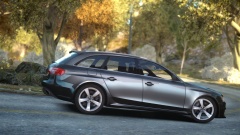 I can't really tell if this is a screenshot of RL or GTA.. I swear Carry, i'm gonna steal your PC JUST for these graphics xD
 -
You do have that option in 1.0. aim at someone hold down E and you'll have the option to tell them to go back to their vehicle.
-
I think you can do that by opening up the LCPDFR INI file and adding the car name to the "Other police car" slot


