




Iconography
Members
-
Joined
-
Last visited
Everything posted by Iconography
-
Can you link a copy of your lcpdfr.log file? It's in your main GTA IV folder. Scripthook.log isn't giving us any errors (besides the 3D device being lost and regained over and over... but pausing the game / Alt + Tabbing out will do that, no error there in most cases).
-
I don't normally say this often, but I must thank you for making this post.... I'm going to love this mod now that I've seen it.
-
This is the good ol' USA at its best. People give you dirty looks for saying "hello" in a public place, civilians accuse LEOs of being brutal because civilians failed to follow the law, and people complain that undercover police cars are "entrapment" and is also an abuse of power. [sarcasm] Oh, I just love this country! [/sarcasm]
-
http://www.lcpdfr.com/cops/forum/forum-20/announcement-5-need-support-read-this-first/
-
The same thing we told the OP, you need a better system. I heard Traffic Load (or Traffic something... not traffic flow) can also cause this but it is almost always a weak system.
-
The screen blur is built in to GTA IV. Change the "definition" key binding in GTA's settings, or do what Wayne said every time.
-
Go to GTA IV --> common --> data --> weaponinfo.xml and open it with a text editor. Change these lines: timebetweenshots="333"> ... <reload time="2000" fasttime="2000" crouchtime="2000"/> Edit the numbers to whatever you want. Lower = less time (in ms) per action = faster. Oh, and you will need to find what weapon you replaced, an then find that weapon in the WeaponInfo file.
-
-
LCPDFR is designed to use only the computer that comes with LCPDFR. You can not use the original computer while on duty, that's just how the mod was designed. Vigilante missions, etc are not accessible with LCPDFR whilst on duty.
-
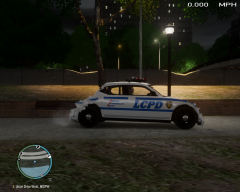 Is that a Dodge Charger that got crushed beyond recognition, or an actual Beetle that got owned?
 -
I've had the same problem, but the original police computer isn't supposed to be accessed at all from a police car while on duty. It is supposed to be completely replaced, but sometimes it still tries to make an appearance. You really can't use it unless you are not on duty.
-
This sometimes occurs randomly, but it can also sometimes mean you are out of RAMor your RAM is bad. A lot of things can cause the error.
-
Go to your ini fie, and set PreloadAllModels = True
-
Why do they always have to be so cryptic :dry:
-
Reloadscripts reloads just script mods. It does not affect GTA core files in any way.
-
Controls can't be changed yet. The original police computer shouldn't be accessible at all with LCPDFR running. If you want to use it, don't be on duty with LCPDFR. The missing callouts have already been reported numerous times, developers are looking into it.
-
Yeah, I honestly can not give you an answer to it at the moment. Maybe someone like Sniper might know more about it.
-
Hope it works for you Like I said, some things might tend to die off after a while though. You can try experimenting with different values, and also I have heard pressing F11 to force a callout sometimes can kick things in again.
-
Try my ini settings: My settings seem to help a little, but things still die down after a while. The developers are looking into this.
-
You can still save the game after you go off duty. What causes the problem is your player model. if it isn't set to Niko (so you're playing as a cop), and you save, your savegame will be corrupt. As long as you're Niko you should generally be ok.
-
Wait, it says "duty forced?" This shouldn't be implemented in the RC1...... You have version 0.95 RC 1, correct?
-
They should be down to the lowest possible, until you can upgrade.
-
Link lcpdfr.log rather than the error reporting log, please.
-
Currently, keys can not be remapped. Check your GTA IV keyboard settings and make sure that the video editor isn't set to F7 (is there even an entry for it, though?). You could try re-installing LCPDFR, perhaps that might fix it, who knows. If that doesn't work, I can only recommend re-installing GTA but that's a pain... Anyone else have some ideas to toss around?
-
The developers are looking into this. No fix, currently. Just for reference, this is part of my ini file: Maybe using that one will help, it tends to produce more callouts but it still seems to die off after a while.


