




Iconography
Members
-
Joined
-
Last visited
Everything posted by Iconography
-
So a child thought it would be fun to let his imagination run wild, and the response was to laugh and make jokes about him on the community for the game that he adores? I didn't realise having an imagination was such a sin. Making fun of a kid's imagination just isn't right.
-
Hello, and thanks for trying LCPDFR. If you're here looking for support, you've come to the right place. However, we'd like to clarify what to expect in this forum. Our site is full of volunteers who dedicate their own free time to help others, something you'll be reminded about when creating a new thread in this section. We don't have a dedicated support team, and anyone who tries to help you is doing so out of their own kindness. Please do not expect a professional, fully-fledged support system with people willing to spend dozens of hours working to resolve your issues. The people trying to help you will be ordinary members just like you. No one is entitled to receive support here, and acting like you are entitled to it will result in people refusing to help you and your thread may even be closed. If you follow the pinned threads at the top of this forum, follow the troubleshooter that shows up when creating a new thread, and respect those trying to help you, you'll likely have plenty of people trying to help you. Don't forget to take a look around and search for others who may be having the same issue as you. If they managed to fix it, try their fixes and see if that works before creating your own thread. Thanks again for trying LCPDFR, and we hope your issues are resolved.
-
Pretty much what they said. Also take a look at signatures and profiles. This is being closed to keep it from being turned into a recruitment drive. Nothing to see here! This topic has been closed by LCPDFR.com staff. If you feel that this topic has been closed in error, please report this post.
-
Currently writing this from my Windows 10 VM. Have to say, it's almost exactly like windows 8/8.1. Except better. Far, far better. The annoying Charms bar lurking in the corner? Locked away forever (unless you, for some demonically possessed reason, decide to summon it using windows+C). The "Metro" UI is also locked away in a frozen tomb. For anyone using a standard mouse+keyboard setup, sans touchscreen, the metro UI won't show up at all. I believe you have to actually change some settings to use it. And that's great. The new start menu is quite nice and works just like the old 7-styled one, but it has a bit more functionality. I find the position of the restart/shutdown button to be decent. I didn't have to look for more than a couple seconds to find it. Start menu (ignore the colour, I chose a preset and didn't change it): Besides those things, though, everything is about the same. The only other big difference I can find is that apps from the Store fully reside on your desktop and not the foolish Metro display. There's no multiple personality disorder there now. Although I haven't been using Win10 for a long time, I haven't once had to look at Metro. Not even changing PC settings requires viewing Metro (it's all handled on the desktop now). For anyone who avoided windows 8/8.1 due to a terrible fear of Metro, it should be safe to try 10. Keep in mind, however, that we're many months away from the real release and the whole point of this preview is to recommend changes and see how windows 10 transforms. The things I mention now may not be the same in a few months or even a few days.
-
Faster read/write times are essentially all you'll get out of an SSD. Loading screens should be faster, game saving should be faster, etc. Beyond that there won't really be much of a difference. Framerate shouldn't be altered - that's dependent on your CPU and GPU. I suppose if a game continuously loads information some things might get quicker, but that would be on a game-by-game basis and I haven't heard of that happening before. Outside of games, the computer in general should also be more responsive if you don't have to read/write everything from a HDD (for example, if your OS is installed onto the SSD). Programs should start faster and Windows will boot/shutdown quicker.
-
Then there's really no point in this showroom thread then. If you're not going to make this available to everyone, whether on this site or elsewhere, you shouldn't try showing it off here. Nothing to see here! This topic has been closed by LCPDFR.com staff. If you feel that this topic has been closed in error, please report this post.
-
I'm sure many of our active members will know that profile lists are quite a common occurrence here, and very rarely have we ever stepped in when it comes to determining what we can and can't allow. That has had to change over the past few days due to some recent events, and it's best to let everyone know about it now before we come knocking. First, I'd like to state that we have no intention on getting rid of profile lists completely. They're a great way for members to express themselves and thank other members who've helped them or who have been good friends over time. However, we have to address a specific type of list - the "abusive list" for lack of a better term. Some may remember a few months ago, there was an isolated incident where a member drafted a list containing the names of a dozen or so members and wrote abusive remarks about them. As this was an isolated incident, it was removed, and that was that. Unfortunately, a similar event has occurred again, and the trend doesn't show any sign of abating so we've had to address the issue formally. We want members to be able to express themselves on their profiles. We can't however allow lists that abuse, slander, or otherwise degrade other members. That goes against the direction we want this site to go in, and it's something we simply can't tolerate. Having abusive profile lists only spreads discontent between the members involved and allows any personal problems to escalate farther than they otherwise could. Not only that, but anyone visiting a profile containing an abusive list may develop the wrong impression toward certain members because of the list. As such, any profile lists of that nature that we come across will be removed and as with any incident of abuse, proper action will be taken. I must stress that this doesn't mean we're prohibiting any list that isn't "positive." We see no issues with having a list of people someone doesn't like; there just can't be any abuse, slander, or other remarks of that nature. Having a list entitled "people I don't like" is fine, but having a list saying "these people are all idiots" is not. We feel this is an acceptable balance between prohibiting degrading remarks and allowing members to express themselves. This may be a significant restriction for profiles (and probably disliked by some), but there's really no other option. No civilised forum should allow members to spread crude remarks about others. If we allowed abusive lists, we'd be saying it's okay to label and degrade other members on profiles. That simply isn't acceptable. Our Community Guidelines will be updated accordingly to reflect this change as well.
-
Nah, changed my mind. Back to 0 you go!
-
0. Perhaps we should let them win, just once?
-
Probably false. Mad? The person below me has gotten snow already.
-
To be honest you really don't need a book to teach you about the metric system. You can learn all you need for free on the Internet, or from one of your science courses.
-
Well simply put, yes. The two are not related in any way and I find it strange that someone can be under the impression that they're mutually exclusive. Intelligence refers simply to how much someone knows or is capable of learning, while work ethic is a reference to how hard someone is willing to work. Someone can be entirely dense but work hard all day long, smart and hardly work, or smart and hard working. It depends entirely on the individual in question. The best thing is to try and learn as much as you can and work as hard as you can.
-
Fortunately, Tom was able to kill the taxi driver and then he tried driving the taxi himself.
-
The easiest method to overwrite the windows boot manager is to use Boot-Repair on a live USB (use UNetBootIn or similar utlilty to create a live usb): https://help.ubuntu.com/community/Boot-Repair From there you can choose to completely overwrite the windows boot manager and choose any other miscellaneous settings you may want (you can even install GRUB to every single disk at once). if you don't want to do that, run a sudo grub-install to the drive itself (sda for example) rather than the partition (sda1) (if you didn't do that already). Depending on whether your system is running an MBR or EFI basis, some things may need to be tweaked. I'm assuming you're running an MBR setup.
-
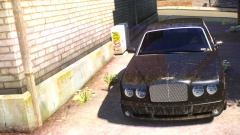 That Bentley is probably devising methods of killing you, since you allowed it to get so dirty.
 -
My only real reaction to this is: RIP. I doubt Microsoft will let things carry on like normal. They're going to get their hands dirty and try changing things more than likely. We'll have to see how much changes but I'm not exactly optimistic.
-
If you can't follow the rules we unfortunately have no choice but to take action. This is the most extreme reaction to a gallery spam warning we've ever seen. Since this is a private matter this thread serves no purpose being open. Nothing to see here! This topic has been closed by LCPDFR.com staff. If you feel that this topic has been closed in error, please report this post.
-
You're referring to the channel, not the ports. Opening ports (called port forwarding) won't speed up your Internet. It allows your computer to send and receive traffic over a specific port. Normally almost every port is blocked by your router's firewall and Windows firewall for security reasons. Changing your router's broadcast channel may speed up your wifi connection, however it's hard to say right now by how much or what channel you should use. You should look online for a wifi channel analyser to see what channels around you aren't being used by other routers (like your neighbours). The busier the channel, the more interference you may encounter. As mentioned by the post above, use ipconfig to view the IP for your router and as before use that to access the configuration settings.
-
No but I will.
-
True (20 1/6 counts as above 20 to me). The person below me owns at least two computers.
-
LukeD is living proof to the contrary. My hill (or maybe his).
-
No one's mentioned the new forum. My hill.
-
While I agree with everything you've said, I just want to mention that this part is true with almost every phone company nowadays. Seems like every year or two they come out with a new flagship model that makes the old model entirely obsolete. One thing I forgot to mention in my first post is that I'm glad to see with the newest iOS version, Apple is opening the customisation doors a little bit with third-party keyboards. That's partly what enables me to even consider a switch.
-
It's about time they made it larger. I was just saying a few weeks ago that if they made a 5"+ phone I would consider buying it. And indeed they finally have. Can't say much else is different though, looks like they added a "25% faster CPU", a barometer, and NFC payment. Nothing new there really, those have been around in other phones for quite some time. It looks better than the old ones though. If my contract runs out I'd have to consider a switch from my LG G2 to the iPhone 6 Plus, when before I never, ever would have considered buying an iPhone. Even though it's not a revolutionary phone in any way, I've always been a little depressed by the sometimes lackluster performance of even high-end android phones. With all of my things stored in Google's services though, a switch would be a nightmare and I'll probably just wait for the next big android flagship phone.
-
I believe this should be all of them: Found that on the 1.0 download page.


