Sniper296
Friends of LSPDFR
-
Joined
-
Last visited
Everything posted by Sniper296
-
Looks like it is aimed more at low end computers or ones that have had little to no maintenance. Probably good for my sluggish old laptop but my £1k new computer would see no noticeable improvement. It does seem that this could be replaced with the following tools & practices: CCleaner, Minimem, closing unnecessary programs, not installing random crapware & treating your very expensive computer like a car(keep it clean, well maintained & don't wreck it). The site also said it will no longer be freeware soon.
-
It is falling back to Alt+R because `.` is not a valid Keys.[KEY], `.` is either Decimal or Oemcomma depending on your keyboard. I can't see why it is not working otherwise, upload your .ini
-
Or you could just edit the file that controls the camera offsets. commondatavehOff.csv VEHICLE police FIELD BOOT_OPEN POS 0.039971 -1.771195 0.165018 ANGLES 0.414808 -0.000267 3.079485 FOV 55.000000 VEHICLE police FIELD BONNET_FWD POS -0.035156 0.684204 0.600242 ANGLES -0.000000 0.000000 0.000000 FOV 72.000000 VEHICLE police FIELD BONNET_BWD POS 0.005859 -1.610962 0.630361 ANGLES -0.000260 0.000000 -3.141540 FOV 55.000000 VEHICLE police FIELD CINEY_WHEEL POS -1.191075 -0.479600 -0.016837 ANGLES 0.058496 -0.002477 -0.017671 FOV 55.000000 VEHICLE police FIELD CINEY_UNDER POS 0.004654 -0.031342 -0.479362 ANGLES -0.000493 0.000234 -0.000025 FOV 55.000000 VEHICLE police FIELD CINEY_MISC_1 POS 0.015203 -1.030029 1.190063 ANGLES -0.103065 0.000000 0.000000 FOV 55.000000 VEHICLE police FIELD CINEY_MISC_2 POS -0.875415 -0.348022 0.595703 ANGLES -0.199865 0.124059 -0.420349 FOV 55.000000 VEHICLE police FIELD JACKED POS 0.052135 0.445679 0.161743 ANGLES 0.244166 0.000000 2.080312 FOV 55.000000 VEHICLE police FIELD BUSTED POS -0.422185 0.584717 0.489746 ANGLES -0.044702 0.000000 2.524978 FOV 55.000000 VEHICLE police FIELD CARPHONE POS -0.453938 0.767456 0.575073 ANGLES -0.000000 0.000000 -0.000000 FOV 55.000000 VEHICLE police FIELD BONNET_L POS -0.574841 0.127676 0.626068 ANGLES 0.000573 0.001829 1.569881 FOV 55.000000 VEHICLE police FIELD BONNET_R POS 0.578056 0.127750 0.625905 ANGLES 0.000112 -0.000286 -1.570677 FOV 55.000000 VEHICLE police FIELD CINEY_WHEEL_2 POS 1.217074 -1.919374 -0.144266 ANGLES 0.055345 0.271098 0.080927 FOV 55.000000 VEHICLE police FIELD CINEY_BACK POS -0.958162 0.550669 0.567770 ANGLES -0.250973 0.161077 -2.910170 FOV 55.000000 VEHICLE police FIELD BUMPER POS 0.000000 2.364502 -0.332153 ANGLES -0.000000 0.000000 -0.000000 FOV 55.000000 VEHICLE police FIELD AIM_FR POS 0.000399 -0.510864 1.136963 ANGLES -1.562062 0.000000 0.000000 FOV 55.000000 VEHICLE police FIELD CINEY_FAR_1 POS -2.313754 -4.262500 0.320801 ANGLES -0.124060 -0.170269 -0.364130 FOV 55.000000 VEHICLE police FIELD CINEY_FAR_2 POS 1.809137 -4.542358 1.240601 ANGLES -0.301003 0.214050 0.238884 FOV 55.000000 VEHICLE police FIELD CINEY_FAR_3 POS 1.579926 2.879173 -0.200073 ANGLES 0.088938 -0.174351 2.413151 FOV 74.300003 VEHICLE police FIELD CINEY_FAR_4 POS -1.445244 3.783025 0.962524 ANGLES -0.303930 0.149751 -2.855858 FOV 55.000000
-
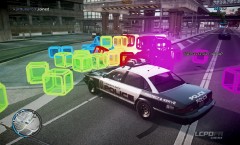 QUB3D blocks spilled on the road.
 -
-
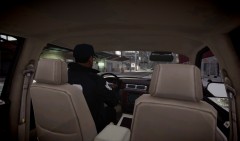 With C06alt's first person mod installed, I spawned a driver with SNT and then used `Cycle Through Passenger Seats´ to get to the back seat. I was going to be in the passenger seat but the light was in the way.
 -
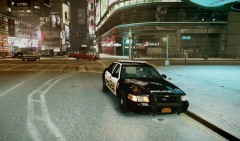
From the album: Screens
Waiting for partner to return from Cluckin' Bell© Copyright © 2012 Sniper296, All rights reserved.
-
-
Classic ELS crash, either 'downgrade' to v5 or disable AI in the .ini
-
Make sure the .ttf file is in a folder named IVDashCam so the path to the file should be scriptsIVDashCamCPMono_v07_Plain.ttf
-
Still looking for the problem, are you able to reproduce the issue or is it a rare or one time issue?
-
Make sure that the following files exist in your scripts directory: IVDashCamCPMono_v07_Plain.ttf IVDashCamCPMono_v07_Plain_License.txt IVDashCamIVDashCam Manual.pdf IVdashcamV2.ini IVDashCamV2.net.dll The italicised ones being the important ones.
-
Is there a log file in the main directory that has the same name or any relevant entry in SHDN's log?
-
The stuff in Speed() only gets run once meaning Interval = Settings.GetValueInteger("Interval", "SETTINGS", 20000); will not get updated unless you reloadscripts, you need to have it somewhere it can get run again such as speedTick().
-
Typing "ppm" into the database is an easter egg, it is a "mode" which mimics the PPM mod by arming everyone with RPG-7s. You could also think of it like a crude riot mode.
-
I can't be sure because I can't see the entire script, but are you setting the interval value from the ini anywhere? Interval = Settings.GetValueInteger("Interval", "SETTINGS", 20000);
-
No support for cracked copies, just buy the damn game!
-
They do seem to run or open fire more often when you have a firearm out. I am not sure if it is the code or just because it is pseudo-random.
-
CHEAT! Home connections only. If they do anything wrong, complain to them like mad, they will give you a discount if you do. As far as I can see in the UK the choice for fast home broadband is Virgin or BE, or BT if you believe their BS ads and don't mind the worst service. We have been with them since it was NTL. If you get more than 10Mb/s from an ISP then you are lucky.
-
Better be, they charge enough!
-
Can't be bothered to run a new one so I will post this one from two months ago:
-
Back files up as you edit/replace them, then you don't end up with another 16GB eaten up. Say I am going to edit visualsettings.dat, I would copy and paste it into the same folder so I now have visualsettings - Copy.dat, then simply rename that visualsettings.dat.BAK and edit the other file. As for the distributing original files, it is not allowed but they can be found, I can't link to them but just Google it and you should find them.
-
Screenshots from my desktop Specs: Intel Core i7-2600k @ 3.40GHz Corsair 8GB Dual Channel DDR3 @ 1866MHz Intel HD 3000 @ 1350MHz 512MB Game settings: Mostly medium settings
-
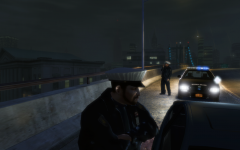
From the album: 2012/02/14 - 2012/05/25
Balista stopped for defective tail light, partner radios vehicle's tags.© Copyright © 2012 Sniper296, All rights reserved.
-
I have had two laptops & a desktop from HP, D230MT & G70-213EM are the models I remember. I will gladly bad-mouth them, not for "their" hardware, but for the un-belivable quantity of crapware they bundle. The first one I got (D230MT 7 years ago) came with a thick manual and a XP disc, all the others came with a "recovery" partition(yes they can't even shell out for 1 dvd!) full of crapware. I had to download a Vista HP OEM disc just to restore the thing to a CLEAN state. And their customer support! I contacted them to ask for the price of a recovery disc and they replied "Out of warranty", HP - I was willing to pay your extortionate price for a disc - now I will never buy or recommend anything from you!