


IronicRainbow
Members
-
Joined
-
Last visited
Everything posted by IronicRainbow
-
 (Yes, 4 month old comment. I know)
 -
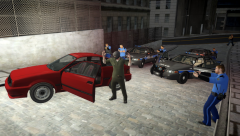 I believe there is a tutorial for pictures like this somewhere on the gallery.
 -
 PEACE NO PEACE
 -
-
If only we could give half stars... Quite honestly I would rate this a 2.5/5. It seems like little to no thought and/or creativity went into this. You already have a "Monroeville Police" texture out, which is exactly like this one, except the wording and badge. Lines are straight and simple, and text is bland.
- 9 comments
- 1 review
-
 Would have liked to see some interior pics, but nice work!
 -
 XD Well it's not like they would turn around. Well... If they did, i'm sure the Sheriff's would see them. That's why the Charger is there, to chase em' down!
 -
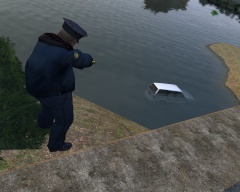 Gross.
 -
From the album: IronicRainbow's Pictures
The Liberty County Sheriff's Office has recently started deploying frequent DUI and seatbelt checkpoints across the county. They are cracking down hard on both of these offences, and LCSO Commissioner Caples was quoted saying, "Our officers will see you coming before you see our checkpoint, so don't drink and drive in the first place." The LCSO hopes that the increased number of roadblocks will deter DUI drivers and non-seatbelt users and make them think of their actions. -

From the album: IronicRainbow's Pictures
The Liberty County Sheriff's Office has recently started deploying frequent DUI and seatbelt checkpoints across the county. They are cracking down hard on both of these offences, and LCSO Commissioner Caples was quoted saying, "Our officers will see you coming before you see our checkpoint, so don't drink and drive in the first place." The LCSO hopes that the increased number of roadblocks will deter DUI drivers and non-seatbelt users and make them think of their actions. -

From the album: IronicRainbow's Pictures
The Liberty County Sheriff's Office has recently started deploying frequent DUI and seatbelt checkpoints across the county. They are cracking down hard on both of these offences, and LCSO Commissioner Caples was quoted saying, "Our officers will see you coming before you see our checkpoint, so don't drink and drive in the first place." The LCSO hopes that the increased number of roadblocks will deter DUI drivers and non-seatbelt users and make them think of their actions. -
 Unfortunately not :(
 -
I also was being sarcastic :P If I can get permissions from Evan to release this, expect it out. I wouldn't hold your breath, though.
-
I see how it is.
-
From the album: WIP Models
I've been working with this Explorer a lot lately. Finally decided to put together a slicktop model. Not for release :( -
*shakes head in agony* OP said he didn't want a thread like the previous ELS 8 involved threads XD although knowing this community its pretty much inevitable Sorry if I hurt MSA's feelings <3
-
Can we just not.
-
-

From the album: IronicRainbow's Pictures
James Cooke, a 28-year-old resident of Liberty County, had been using his apartment located on Mohawk Ave. to grow and distribute large amounts of marijuana for recreational use and profit. The Liberty County Sheriff's Office narcotics task force officers were tipped of the grow house by an anonymous source. The LCSO then proceeded to gather a search and seizure warrant from the Liberty State Federal Courthouse. At about 3:22 PM on the afternoon of April 9th, 2014 the LCSO narcotics TFO's, along with DEA agents, stormed Cooke's apartment, taking him by surprise. They seized approximately 42 adult marijana plants and 2 1/2 kilograms of packaged and processed marijuana ready for shipment. Cooke is now in jail and awaiting trial. -

From the album: IronicRainbow's Pictures
James Cooke, a 28-year-old resident of Liberty County, had been using his apartment located on Mohawk Ave. to grow and distribute large amounts of marijuana for recreational use and profit. The Liberty County Sheriff's Office narcotics task force officers were tipped of the grow house by an anonymous source. The LCSO then proceeded to gather a search and seizure warrant from the Liberty State Federal Courthouse. At about 3:22 PM on the afternoon of April 9th, 2014 the LCSO narcotics TFO's, along with DEA agents, stormed Cooke's apartment, taking him by surprise. They seized approximately 42 adult marijana plants and 2 1/2 kilograms of packaged and processed marijuana ready for shipment. Cooke is now in jail and awaiting trial. -

From the album: IronicRainbow's Pictures
James Cooke, a 28-year-old resident of Liberty County, had been using his apartment located on Mohawk Ave. to grow and distribute large amounts of marijuana for recreational use and profit. The Liberty County Sheriff's Office narcotics task force officers were tipped of the grow house by an anonymous source. The LCSO then proceeded to gather a search and seizure warrant from the Liberty State Federal Courthouse. At about 3:22 PM on the afternoon of April 9th, 2014 the LCSO narcotics TFO's, along with DEA agents, stormed Cooke's apartment, taking him by surprise. They seized approximately 42 adult marijana plants and 2 1/2 kilograms of packaged and processed marijuana ready for shipment. Cooke is now in jail and awaiting trial. -

From the album: IronicRainbow's Pictures
James Cooke, a 28-year-old resident of Liberty County, had been using his apartment located on Mohawk Ave. to grow and distribute large amounts of marijuana for recreational use and profit. The Liberty County Sheriff's Office narcotics task force officers were tipped of the grow house by an anonymous source. The LCSO then proceeded to gather a search and seizure warrant from the Liberty State Federal Courthouse. At about 3:22 PM on the afternoon of April 9th, 2014 the LCSO narcotics TFO's, along with DEA agents, stormed Cooke's apartment, taking him by surprise. They seized approximately 42 adult marijana plants and 2 1/2 kilograms of packaged and processed marijuana ready for shipment. Cooke is now in jail and awaiting trial. -
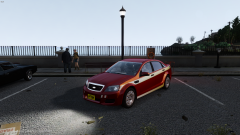 No, stop it right now! It's hideous! Jk pls finish ;-;
 -
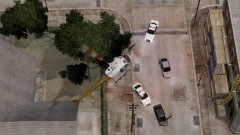
From the album: IronicRainbow's Pictures
A vehicle pursuit involving the Liberty County Sheriff's Office this morning ended in a tragedy. 36-year-old Jacob Lazel was driving drunk on Beaverhead Avenue in Alderny around 7:32 AM this morning when Lieutenant 'Ironic' Maddin attempted to stop Lazel in his dark grey Lokus. Lazel then proceeded to flee from the Officer. He led Lieutenant Ironic, along with Deputy Sheriff Keys and Sergeant Clint on a 17-minute high speed chase, which ended when Jacob rolled his car 3 times on Bridger St., killing the 36-year-old on impact. LCAS and LCFR were called to the scene, and pronounced Lazel DOA. -
From the album: IronicRainbow's Pictures
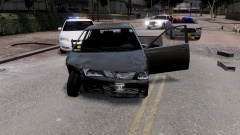
A vehicle pursuit involving the Liberty County Sheriff's Office this morning ended in a tragedy. 36-year-old Jacob Lazel was driving drunk on Beaverhead Avenue in Alderny around 7:32 AM this morning when Lieutenant 'Ironic' Maddin attempted to stop Lazel in his dark grey Lokus. Lazel then proceeded to flee from the Officer. He led Lieutenant Ironic, along with Deputy Sheriff Keys and Sergeant Clint on a 17-minute high speed chase, which ended when Jacob rolled his car 3 times on Bridger St., killing the 36-year-old on impact. LCAS and LCFR were called to the scene, and pronounced Lazel DOA.


