


IronicRainbow
Members
-
Joined
-
Last visited
Everything posted by IronicRainbow
-

From the album: IronicRainbow's Pictures
FDLC cleaning the entire fleet. -

From the album: IronicRainbow's Pictures
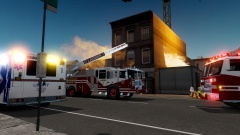
At approximately 3:46 PM on April 13, a 3-story structure fire was started at an apartment complex on Seymour Ave. All residents were evacuated from the structure without harm. FDLC Ladder 1 was called to the scene to use the ladder to enter the structure. The FDLC had to attack the fire internally to fully extinguish it. Demolition of the structure is planned within the next month, and is planning to be rebuilt on the same plot. -
From the album: IronicRainbow's Pictures
At approximately 3:46 PM on April 13, a 3-story structure fire was started at an apartment complex on Seymour Ave. All residents were evacuated from the structure without harm. FDLC Ladder 1 was called to the scene to use the ladder to enter the structure. The FDLC had to attack the fire internally to fully extinguish it. Demolition of the structure is planned within the next month, and is planning to be rebuilt on the same plot. -
 Um... Khakis.
 -
-
 Thanks!
 -
Awesome looking skin! What city is this based off of, if you don't mind me asking?
-
 Unfortunately no, it's for a clan I am in. Feel free to pm me for more info if you're interested.
 -
If you use Braveheart's Script, press Alt + F while aiming your weapon at the driver.
-
Literally the best Intel build you can get now Mobo: MSI B85-G43 GAMING CPU: Intel Xeon E3-1275v3 RAM: Kingston Hyperx BEAST 32GB (4x8GB) GPU(s): 3x (three) Nvidia TITAN Black Edition 6GB GPU's PSU: Rosewill HERCULES 1600w Storage: Go HAM on some 1TB SSD's (Or get The WD Black2 Hybrid Drive, or a couple, or a few) Cooling: Custom Watercooling loop for that sheet. Slap on some waterblocks onto your GPU's and CPU, resivour, pump, radiator(s), fans for the radiators, tubing, fluid Literally the best AMD build you can get now Mobo: ASUS Crosshair V Formula-Z CPU: AMD FX-9590 (or 8350) RAM: Same as Intel GPU(s): 3x (three) Radeon R9 295X2 card (when released), or 3x Radeon 7990, or 3x Radeon R9 290X PSU: Same as Intel Storage: Same as Intel Cooling: Same as Intel Case: Whatever you want Edit: AMD build comes to around ~$4200, i'd expect the Intel to be a little bit above that. Feels good man
-
Thank you!
-
![[REL] 2013 Ferrara 100' Aerial Ladder - FDNY - Version 2 [with working ladder] 2.0](//s3-gallery.int-cdn.lcpdfrusercontent.com/gallery/album_547/sml_gallery_2101_547_1259015.png) Ooh it's released o.o
Ooh it's released o.o -

From the album: IronicRainbow's Pictures
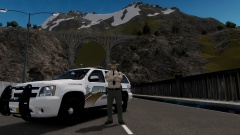
**On a traffic stop** The Liberty County Sheriff's Office receives long-awaited, and needed, uniforms. They have converted from the black/white/yellow theme to a more traditional Sheriff color scheme, green/tan/yellow. Cadets will still be using grey uniforms and a vest. -

From the album: IronicRainbow's Pictures
The Liberty County Sheriff's Office receives long-awaited, and needed, uniforms. They have converted from the black/white/yellow theme to a more traditional Sheriff color scheme, green/tan/yellow. Cadets will still be using grey uniforms and a vest. -
From the album: IronicRainbow's Pictures
The Liberty County Sheriff's Office receives long-awaited, and needed, uniforms. They have converted from the black/white/yellow theme to a more traditional Sheriff color scheme, green/tan/yellow. Cadets will still be using grey uniforms and a vest. -
 And eating sed hot dog with a bandana on. Totally legit.
 -
First off, ATi is now owned by AMD (has been since ~2008-2009), so ATi is now called AMD as well. Also, Intel works fine with AMD, AMD works fine with Nvidia, and vice-versa, it just depends on what you're using it for. Also, if you are going to go AMD, OP, wait until the R9 295x2 is released. It is basically two 290X cards on one PCB with two integrated water blocks on the card and one radiator. It also has air cooling, so it falls into a 'hybrid' category. As for RAM, if your budget is as high as you say, go for 16-32GB. Make sure that the speed the RAM is rated at is 1600MHz or higher. Anything below 1600 will not give optimal performance when gaming (in most scenarios). Also, if you are going on the Intel side of processors, get one with hyperthreading. Your best bet right now on the Haswell architecture is the i7-4770k. Best bet on the AMD side is the FX-9590. In my experience, AMD is overclockable as hell if cooled correctly. I am running an FX-6300 in my system, and got it to 4.3GHz with a Corsair H50 water cooling loop with no problems/hiccups what-so-ever.
-
 Dang, this looks pretty nice!
 -
 Definitely not this one. Look at the spotlight position and rambar size.
 -
 Pretty much sums up my feelings right now.
 -
Welcome! Hope you have as much fun as we all have :)
-
-
 Thank you! I used Vdh Policehelper to spawn the "flares". You spawn them by pressing Shift + Z. They are cones in the daytime and "flares" at night.
 -
It served us well! Remember back in the day when you didn't have internet, so you just pulled up pinball or Microsoft Paint? REMEMBER THOSE DAYS?!
-
Win 8.1 on my gaming rig for the fast bootup times mainly. Pair it up with an SSD and you're golden. BTW, R.I.P. Windows XP, Microsoft officially cut support for the old girl :(



![[REL] 2013 Ferrara 100' Aerial Ladder - FDNY - Version 2 [with working ladder] 2.0](http://s3-gallery.int-cdn.lcpdfrusercontent.com/gallery/album_547/sml_gallery_2101_547_1259015.png)
