Leaderboard
-

-

-

-
CR7 Modding
MembersPoints49Posts




Popular Content
Showing content with the highest reputation since 05/20/2026 in Posts
-
How Paywalls Hurt the LSPDFR Modding Community
GTA 5 Jedi Master and 3 others reacted to lucianboi for a post in a topic
4 pointsSome people in the LSPDFR community have started putting mods, tutorials, and “how-to” content behind paywalls, and I don’t agree with it. LSPDFR was built as a free modding community where people shared ideas, files, and knowledge to help others enjoy the game. Charging money for basic support, access to mods, or tutorials takes away from the open-community spirit that made LSPDFR popular in the first place. I was very active years ago and decided to give LSPDFR another shot, and I see a lot hasn't changed, and if anything, the greed is becoming more rampant. I understand creators spend time making content and deserve recognition, but hiding essential mods or information behind subscriptions can divide the community. New players may feel excluded if they cannot afford paid access. I think modding communities work best when creators share knowledge freely and collaborate instead of locking content away. Donations and optional support are fine, but turning a free community into a paywalled environment changes what LSPDFR originally stood for. Just my opinion, and I am talking about the modders who now have Patreon and other forms of payment systems. I have even seen how-to videos on YouTube on certain mods, where, to access the video, you have to pay. What are your thoughts? Am I blowing it out of proportion, or do you agree?4 points -
LSPDFR crashes after 1 hour to 1.5 hours of game play.
UnknownBastion and 3 others reacted to Lennyy for a post in a topic
4 pointsHalf of what you said we’ve already established further up in this thread. Whilst I appreciate the effort, it may be worth checking what was discussed prior to posting the log to a log reading tool and just share its output… Put double the values and see if that helps at all. 1500 and 14688 If you still have issues I’d update my game rph and LSPDFR and the beforementioned plugins before doing any other troubleshooting.4 points -
Los Angeles Police Department (Patrol)
Cali21 and 3 others reacted to CR7 Modding for a post in a topic
4 points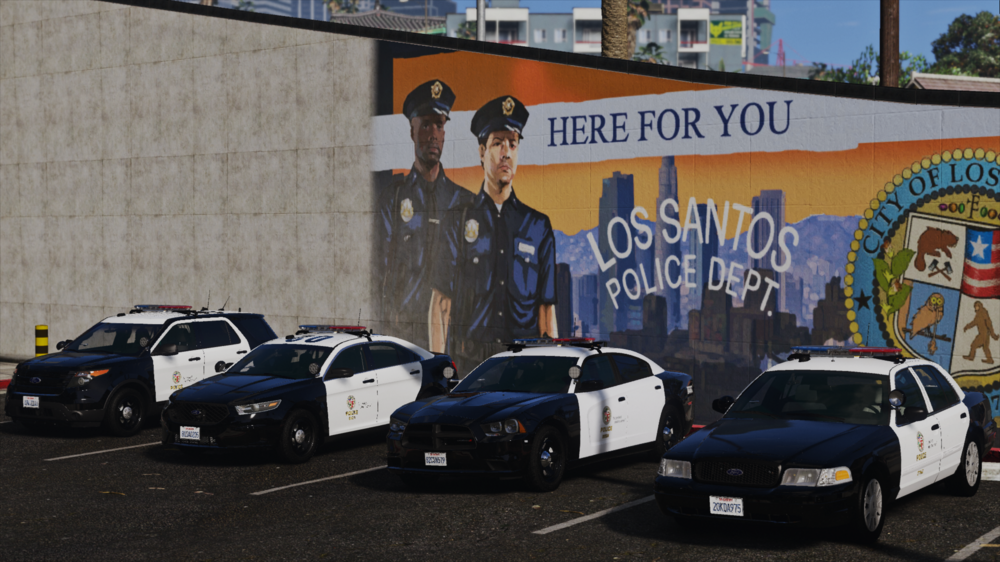 4 points
 -
AI Disclosure Improvements/Suggestions
Quasar and 2 others reacted to ApparentlyRohan for a post in a topic
3 pointsPreface: I have seen there has been a lot of discourse in different LSPDFR discords about vibe coding and the AI disclosure. I recently updated an older mod and had to fill out the AI disclosure. To be honest, I was a little confused. The wording was vague. There is no clear distinction between the 3 different tiers(minor, moderate, substantial). The suggestions below aim to improve that. Also some additional thoughts. There are 4 main ways a developer can use AI to aid in their development of a mod: Ideation/Design work, Implementation(the actual methods/code), Debugging, Marketing(Description and Images). Currently, the first 3 ways are represented with 1 option and the last option (Marketing) is represented with 2 options. This feels lobsided and where I think the disconnect is happening. As an example: If the AI did a substantial amount of debugging which in turn changes a lot of code, I would think one would have to choose "substantial" for mod and mod content. Therefore, my mod would be slapped with the "Made with AI" tag. This gives users the impression in this scenario that I vibe coded this out with Claude Code and posted it on the forums with no thought behind it. How I would improve the system? My theoretical new disclosure system would look like this: This gives each aspect of script development its own disclosure giving the user a clear picture of how the developer uses AI and whether the AI is an aid or the developer. If this new system feels too invasive, I would understand that. However, I think the hesitation in telling the truth comes from what the consequence is if you did use a lot of AI; the dreaded black tag, "Made with AI". Many devs nowadays use AI as an aid within development. This system hurts those devs just as much as the devs who are using Claude Code to build plugins ("AI Slop"). If this system does not get implemented, I would maybe suggest changed how the tag is phrased.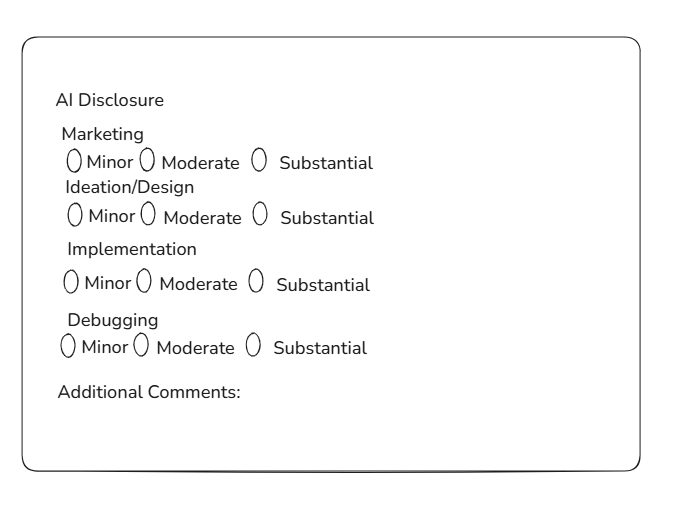 3 points
 -
Will LSPDFR continue to be developed when GTA VI is released?
unitedOrange66 and one other reacted to Gan Ceann for a post in a topic
2 pointsI'm not sure where you got your information but there has been no official announcement or information regarding the development of LSPDFR or RPH for GTAV, post GTA VI release2 points -
ELS UI / Smart controller
CoDeL and one other reacted to unitedOrange66 for a post in a topic
2 pointsYes, the UI is from SirenMastery, and the texture is from a paid FiveM siren controller UI.2 points -
How Paywalls Hurt the LSPDFR Modding Community
lucianboi and one other reacted to SuperPyroManiac for a post in a topic
2 pointsIt's not just GTA either, it started with unfinished texture packs for minecraft, and clothing addons for the sims. Now its every game seems to go crazy with this paid model. I mean the fact cars for LSPDFR will cost as much if not more than GTA itself, for high poly optimized vehicles with hardly realistic meta files is insane. Only way to make a change is to not buy them and stick to the thousands of free mods.2 points -
(Request) VCPD Maverick livery
Gan Ceann and one other reacted to Jason6 for a post in a topic
2 pointsHey! I managed to recreate the VCPD livery on the Maverick. It's not perfect yet, but I'm happy with it. Thank you very much for your help!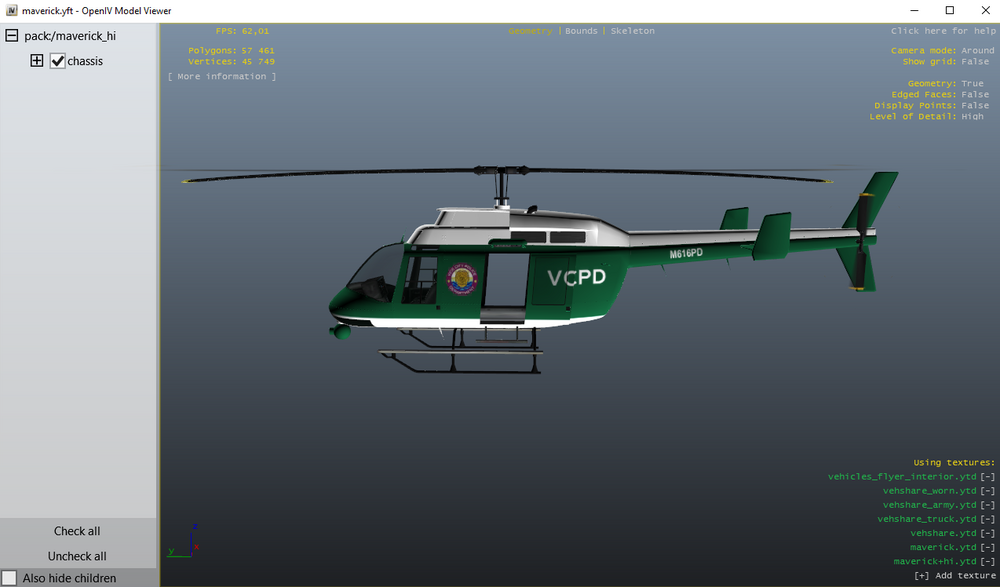 2 points
 -
Spring 2026 Site Update - New Features, Improvements & More
Cyan and one other reacted to BlueLine Vibes for a post in a topic
2 pointsThanks Cyan for the updates 👍2 points -
Restrict/Remove the ability to post files in mod description
SuperPyroManiac reacted to Michael21107 for a post in a topic
1 pointI strongly suggest that at least the posting of .exe and .zip files be disabled in mod file descriptions, as I'm pretty sure virus checks aren't done on them, and from what I see, it's most often the author uploading mod files that way for whatever reason.1 point -
1 pointdeleting calloutinterface fixes the crashes but im going to try to reinstall it rn It's a really weird problem because callout interface was working fine, i added some plugins then it crashes the whole game, but anyways reinstalling it fixed the game thank you very much1 point
-
i meant that it doesnt fix the problem, and i think there is no solution i also tried installing the original flashlight files and tried whit the STP realistic weapon loadout, nothing works i think they are just incompatible, but thank you i appreciate your help1 point
-
My EUP Menu and my LSPDFR plugin keeps crashing and I cant figure out why
error404vibes reacted to Riley Shepherd for a post in a topic
1 pointThank you sir1 point -
hello ty for helping me, im gonna try to reinstall nve on another folder and ill send you the crash log1 point
-
1 pointI know I just posted the message above, but I found a solution. Open the folder: Documents / Rockstar Games / GTA V / Profiles / (your profile number) and delete the last saves. They should look like: SGTA5...., look after the latest modification date. When you go back in, just press "Skip all" if Steam (I don't know if it is the same with Rockstar) asks you if they should use your deleted save. Then just try launching RagePluginHook and see if it works. Remember, never save the game when you are on duty! I hope this post was clear enough to follow.1 point
-
Cool idea for a chatbox mod in singleplayer
GoofierCard60 reacted to flooent for a post in a topic
1 pointI've been having this idea for a while, and with the release of NPCAI, I decided to post this. I think it would be great to have a working, text-based chat system (just like in FiveM, but powered by AI) for LSPDFR/singleplayer. It could be used both as a radio system and as a way to communicate with NPCs/subjects. To my awareness, something like this doesn't exist yet (but I might be wrong). This would be GREAT for people like me that want to have real interactions with dispatch/NPCs, but don't want to actually talk/ don't own a mic/ don't have the possibility to talk in their game for some reason. These are some of the features I thought about: Maybe there could be two separate chats for radio and for talking with NPCs, much like a lot of systems used in Roblox RP games, because having both radio and chat in the same menu could get confusing. The two chats could have separate UIs/could be switched with a hotkey/ could automatically switch when, for example, a message from dispatch comes in. A commands system could also be integrated, similar to the ones in FiveM, to be able to write commands like /me (where NPCs will actually respond in the chatbox if needed) or maybe even commands incorporated with other mods (e.g. turning on the bodycam with something like /bodycam or /bwc). Another command I was thinking about is an emote system (/e), as that would be ideal for roleplaying, also because there's not a lot of good emote menus for singleplayer (except SimpleEmotes, or Roleplay+ maybe). Instead of a whole separate chatbot, the radio system could also just use Grammar Police to do different actions (basically, an AI interprets the text you write and chooses the thing you're trying to do and sends it to grammar police, but I don't know if that's possible code-wise). So the radio would just be activated by a command, like maybe /r for radio (for example, you could write in the chatbox: /r dispatch, show me 10-8; and your grammar police status would actually change). These are just my ideas of features the plugin could have, but basically I'm just thinking about a FiveM chatbox but ported in singleplayer where everything actually functions with the help of AI. I would LOVE to develop a script like this, but I have no idea how to code and I don't really have the time to learn something like that. Maybe a plugin like this could also be done with the help of AI, but I'm also not too skilled at that. Feel free to steal this idea since this would definitely be the best plugin of all time for me.1 point -
Backup units and services issue.
ColdwaR reacted to reaper4438 for a post in a topic
1 pointI figured it out. I had RealTrafficAI installed and removing it from my scripts fixed it. If you have it, remove it.1 point -
ELS issues since game update
Gan Ceann reacted to Alcatraz19 for a post in a topic
1 pointIt work perfectly !! Thank you ! I was despairing of not finding a solution, every new game update brings new unpleasant surprises1 point -
ELS issues since game update
Alcatraz19 reacted to Gan Ceann for a post in a topic
1 pointHopefully that fixes it for you! If not let me know we can try troubleshoot it1 point -
1 point98% of the users don't speak turkish, so cant vote1 point
-
lspdfr crashes after going on duty
error404vibes reacted to DEJFNEBR for a post in a topic
1 pointThanks for your help! Issue was something in my mods folder and plugins folder i think. Thanks alot for helping me!1 point -
Hello, Welcome to LCPDFR.com What exactly is the issue that you are facing?1 point
-
Can't exit any emergency vehicle without turning off my els lights.
Avoxhellhounds reacted to dumb as rocks for a post in a topic
1 pointI've never had this issue before and I can't find anything online about it. anyway when I have any of the 3 stages on I can't exit the vehicle unless I turn it off, alongside that when I exit the vehicle and press J my character freezes for a fraction of a second and it only happens when I press J. I can't figure out what's causing this.1 point -
1 point
-
trentmootube channel
Officer Here reacted to TrentMU for a post in a topic
1 point1 pointUNHANDLED EXCEPTION DURING GAME FIBER TICK
error404vibes reacted to Zefir for a post in a topic
1 pointI'll tell you "Спасибо" and Thank you:) Seriously, the support of LSPDFR is just wonderful.1 pointim making a mod list rn
dobzy reacted to Troopah911 for a post in a topic
1 pointim making one and it should be out in like a week maybe1 point1 pointOriginally, I believed that a mega pack was at fault for the crashing, however I did not change my PackfileLimit or HeapAdjusterLimit to what they should have been, so the crashing stemmed from that.1 pointLSPDFR crashing when in garage (changed topic)
Gan Ceann reacted to Carson.123321 for a post in a topic
1 pointI have played around some and as far as I am aware everything works great. Thank you so much again1 pointtrentmootube channel
Officer Here reacted to TrentMU for a post in a topic
1 point1 pointLSPDFR crashing when in garage (changed topic)
Gan Ceann reacted to Carson.123321 for a post in a topic
1 pointThank you so much, I will try these fixes now1 pointLspdfr Crashing
Fusion67 reacted to error404vibes for a post in a topic
1 pointUpdate required: UltimateBackup. Unstable plugin: DeepCallouts. (may cause crashes) These plugins threw an error: LSPDFRExpanded These do NOT belong in GTA V/plugins/LSPDFR! Please reinstall them correctly into your main GTA folder > Newtonsoft.Json. These files are installed incorrectly: Please use the information below to install them correctly > LemonUI.RAGEPluginHook [From GTAV/Plugins/LSPDFR to GTAV]. If it doesn't work, try this as well after doing what I mentioned above: Rename the mods folder to _mods and tell me if it works. If it does, it means one of the mods isn’t working, and you’ll need to uninstall them one by one to figure out exactly which one(s) are causing the issue. It’s also good to have Gameconfig, Heap Adjuster, Packfile Adjuster and Resource Adjuster installed.1 pointYour current version of LSPDFR makes Script Hook V stop working
Occifer Jimmy McNulty reacted to Araxyllis for a post in a topic
1 pointhttps://www.lcpdfr.com/forums/topic/155094-ragepluginhook-direct-storage-error/ https://www.lcpdfr.com/forums/topic/154827-rage-plugin-not-working-due-to-directstorage-initialization-error/#findComment-820675 Pretty much these two topics already describe the problem. Your installation of LSPDFR overwrites files from script hook, non working files. So one needs to install script hook V and let it overwrite everything AFTER one has installed your mod, or else the app crashes shorty after start. The error message from the rage plugin is then also wrong, it says its lacking permissions and its probably a problem with anti virus, and asks the user to restart, which does not help. I would advice to either inform Users in your installation manual that the mod breaks the install of script hook V, or fix whatever files you wrongly overwrite. Kudos for having a Forum. God, I missed these, discord is the worst for support, i found help for my actual issue within minutes.1 pointELS not not working correctly?
Gan Ceann reacted to user2382762761 for a post in a topic
1 pointThank you so much for you're help! :)1 point1 pointSirenMastery from Albo? Not sure if that is still working though.1 pointLooking For Mod Demo Videos?
Officer Here reacted to Tee6789 for a post in a topic
1 pointHi! I'm Tee. I make content, and have been intermittently for the better half of 15 years now, as well as an LSPDFR user for closer to 8 years. I'm looking for a chance to make some demonstration videos, for those developers who work tirelessly on their mods and don't want to add to their workload. Many wonderful addons, plugins, and vehicle packs do not provide insight to what their mod offers, leaving subscribers wondering or not understanding what it entails. My experience stems from multiple YouTube channels regarding various content such as LEGO, gaming, vlogs, and even commercial work. Not to mention a good understanding of tools within GTA V. I don't plan on charging anyone for the demo's I create for them, I do accept donations however! Don't let your followers guess when it comes to your mod. Let's work together and make something happen!1 pointIts pretty random, like i'll just be driving and it would crash but i also sometimes crash when im in a callout, i'll also upload the logs for you1 pointHello, That is not a feature of base LSPDFR, it will be one of the mods you have installed. First I would check to see what mod it is from1 pointHow Paywalls Hurt the LSPDFR Modding Community
Hex Modifications reacted to lucianboi for a post in a topic
1 pointThat’s the part I think that frustrates a lot of people in the LSPDFR community. Most players understand supporting developers financially, especially for large-scale projects that take real skill and time. The issue is when basic fixes, compatibility updates, or small edits get locked behind subscriptions after the original free content breaks. It also changes the spirit of the community. LSPDFR grew because people shared resources, helped each other, and built on free community-made content. Now it sometimes feels less like a hobbyist modding scene and more like a marketplace where even minor add-ons are monetized separately.1 point1 pointhey.........nah, man - that looks great! Nice work!1 pointYour best LSPDFR 0.4 screenshots?
Officer Here reacted to Cali21 for a post in a topic
1 pointLAPD Southeast Patrol Officers....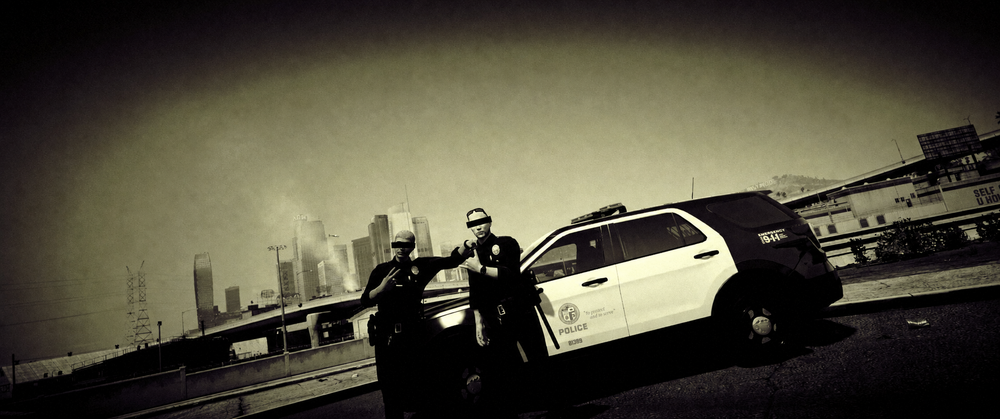 1 point
im making a mod list rn
dobzy reacted to Troopah911 for a post in a topic
1 pointit might be another 2 weeks i have to do it when i got time. it will include my mods that i use1 pointLet me know your values once you get a chance to.1 pointscreen flickering everytime i turn on els
Gan Ceann reacted to dirkasdiaper for a post in a topic
1 pointfound the culprit its this plugin https://www.lcpdfr.com/downloads/gta5mods/scripts/54207-intense-effect/1 point@Gan Ceann Finally! its everything's worked.. I deleted resist plus and some other mods too. They're all does not exist or banned. Thank you for resolved bro :)1 point1 point1 pointHey, I had this same issue I talked to some people inside a support server and a guy gave me this asi that fixed the issue. Give it a shot and let me know if it works!1 point1 pointTo anyone who comes in this thread with the same question. If you change the pixel format to DX1 it will fix this.1 pointWhat siren does Miami City PD use and which one does Miami-Dade PD use?
YBzTricky reacted to Dwight Schrute for a post in a topic
1 pointwhelen ws21001 pointadding police3 help
JakeKindaSus reacted to aparna for a post in a topic
1 pointGuys you can add extra vehicles to GTA4 very easily...!!!! Check this mod out which provides all the TBOGT vehicles to GTAIV..!!! I am using this currently..!! http://www.www.gtain...at=370&id=31873 And more over if you want the police3 and police4 to spawn ingame you can try editing the cargrp.dat file under commondata This is default line police, police2, polpatriot, noose, predator, pstockade, nstockade, fbi # POPCYCLE_GROUP_COPS This is what I changed to police, police2, polpatriot, noose, predator, pstockade, nstockade, fbi, police3 # POPCYCLE_GROUP_COPS Now I get the police3 along random police vehicles...!!! @edit: When I added policeb to the line, the game crashes and I dont know if this happens only to me.1 pointThis leaderboard is set to London/GMT+01:00