



Gan Ceann
Community Team
-
Joined
-
Last visited
Everything posted by Gan Ceann
-
Hello, If I remember right, this error tends to happen when the game is trying to spawn you into the LSPDFR apartment. It may be tied to your character. I would suggest backing up your chars folder and generating a new one and see if that works!
-
Hello, Please upload your latest RagePluginHook.log from your main game folder
-
That is strange. I would suggest verifying your game files and make sure your graphics drivers are up to date
-
Hello, The difference is that liberty city is based on New York City with GTA IV having New Jersey city, Manhattan, and Queens/Brooklyn as the islands (I assume liberty city due to the statue of liberty). I recommend trying GTA IV at least. It is a much different feel and atmosphere from the other GTA games but that's part of the charm. Vice city then is based off of Miami. GTA Vice City had a relatively small map, so it was only really based on Miami. However, GTA VI is based on Leonida state/county which I believe is supposed to be Florida as a whole, as you have Miami, Tampa, the everglades, etc. GTA SA is definitely still my favorite map, had so much variety compared to the other maps
-
Hello, Are you able to launch the game normally at all? Can you also try loading into the game normally first and then starting RPH
-
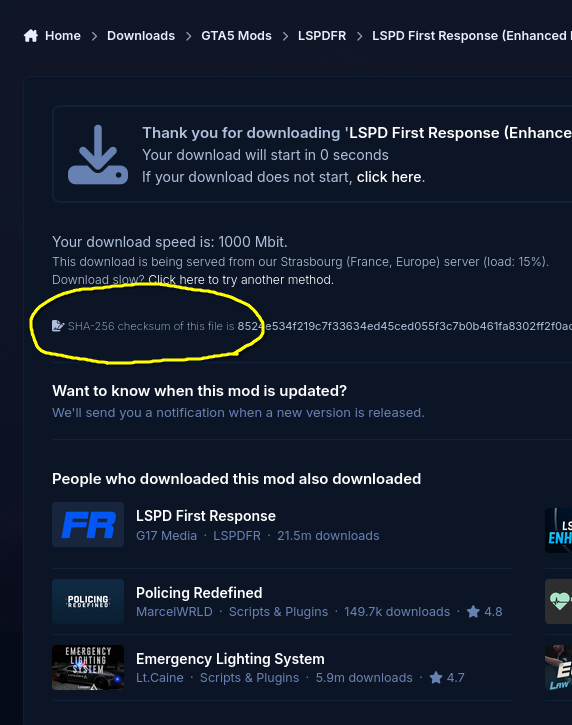
Try downloading it again, and when you are taken to this page, take note of the SHA-256 checksum. When the zip is downloaded, use 7zip to check the SHA-256 checksum of the zip and make sure it matches the one on the download page. If it doesn't, then something is interfering with the download
-
Hello, Welcome to LCPDFR.com The enhanced download works as normal Checksum errors are usually due to interrupted downloads, anti-virus software, or other ways the download could have been interfered with. Are you downloading on your PC and Android phone from the same network?
-
Hello, Your game, RPH, and LSPDFR are all out of date. We can only provide support for the latest versions!
-
Hello, Welcome to LCPDFR.com! LSPDFR on Mac via crossover isn't officially supported. The only way I currently know of to play it on Mac is to use a windows VM, but if you get it working then great! You seem to be missing RAGENativeUI, but I doubt it is related to your issue
-
Hello, That certainly sounds strange, can you upload your latest RagePluginHook.log from your main game folder
-
Rename your mods folder to _mods and see if the crashing stops, we can rule out another issue that way
-
Shamrock is right, you don't have RAGENativeUI installed but you do have a mod installed that requires it. You can get it from here: https://github.com/alexguirre/ragenativeui/releases You want version 1.9.3
-
Hello, Welcome to LCPDFR.com Please upload your latest RagePluginHook.log from your main game folder. Have you tried loading into the game normally first and then starting RPH? Adding -nodx to your commandline is a sure way to make the mod not work, I wouldn't recommend it.
-
This topic has been moved to the appropriate forum. Please post in the correct location in the future.
-
Hello, Welcome to LCPDFR.com When you are adding the vehicle packs, are you making sure to add them to the DLCList.xml? Also have you made sure to install a packfile limit adjuster?
-
As per your log, RPH and LSPDFR are out of date, make sure you update to the latest versions
-
Yes it is a false positive. It happens with every new update, it takes a while for Microsoft to mark it as safe
-
Happens to the best of us! Thanks for sharing though
-
Many mods and plugins use SHVDN, RPH and LSPDFR work fine with it. It's likely a combination of SHVDN and something else you have installed
-
In the ELS.ini there is this setting: ElsTrafCtrlOn = true Try change it to false and see if it still happens. I've had to do this before myself
-
Are you using any frame generation on the new card? Please also upload the latest RagePluginHook.log from your main game folder
-
asi mods would be classed as script mods also! Weird, did you install the NVE LSPDFR patch? I believe it comes with one
-
Please upload your latest RagePluginHook.log from your main game folder
-
Hello, Did you make sure to install ScriptHookV after installing ELS?
-
I would suggest verifying your game files, and if the normal game without RPH still isn't launching, it is likely one of the script mods you have installed


