Skip to content
View in the app

A better way to browse. Learn more.

LCPDFR.com

A full-screen app on your home screen with push notifications, badges and more.

To install this app on iOS and iPadOS
  1. Tap the Share icon in Safari
  2. Scroll the menu and tap Add to Home Screen.
  3. Tap Add in the top-right corner.
To install this app on Android
  1. Tap the 3-dot menu (⋮) in the top-right corner of the browser.
  2. Tap Add to Home screen or Install app.
  3. Confirm by tapping Install.

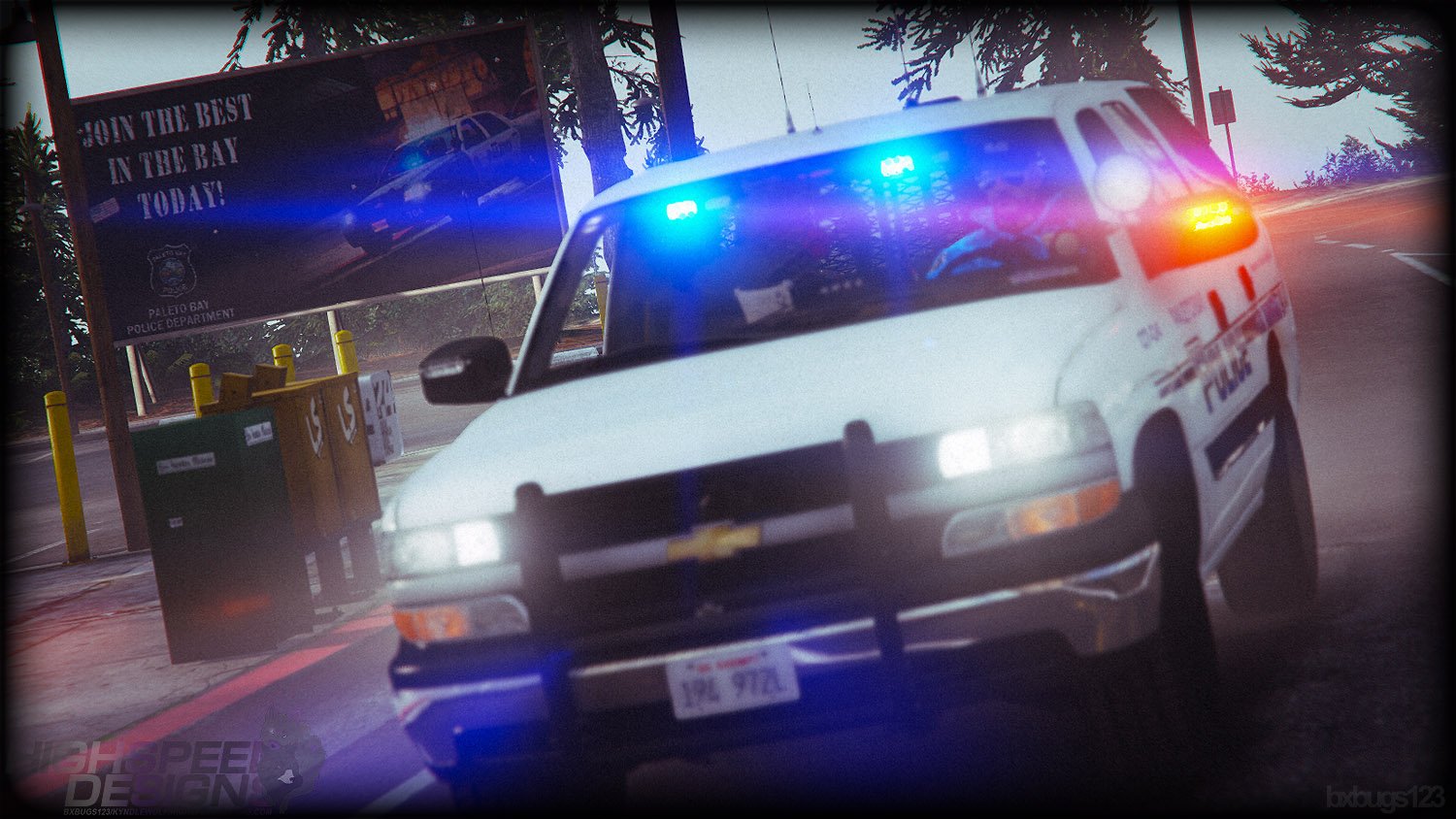
2006 CHEVROLET TAHOE Z56 PPV 1.6

(36 reviews)

17 Screenshots

eh8Lr3D.png

88x31.png

This work is licensed under a

Creative Commons Attribution-NonCommercial-NoDerivatives 4.0 International License.


By downloading this file you agree to the TERMS OF USE AND DISTRIBUTION, If you can not abide by those terms then do not download this file.

What's New in Version 1.6

Released

* Added gameconfig.xml file to the installer.

* Removed gameconfig.xml file from the installer, use a 3rd party game config for your GTA V version.

User Feedback

Recommended Comments

Ashley92

Members

(edited)

2 hours ago, West Coast Wookie said:

@Bxbugs123 Hey bugs, first welcome back to the modding scene and great model! I have unfortunately been a victim of this crashing my game. After toying around with different potential fixes I have come to the conclusion that the reason people are experiencing crashes is because the model is using a lot of memory. I've realized this because it is a guaranteed crash if you have the model spawned and ForceDuty on LSPDFR which causes and increased use in memory. One thing I have found that significantly helps reduce the crash rate is by deleting all but one of the liveries. By doing this it is reducing the amount of memory required to use the file. So in closing I believe the problem lies in the file size. Maybe try crunching the polys even smaller if possible and lowering the resolution of the textures to fix it? 


anyway great model and I am glad to see you're back on the modding scene. 

Good idea to why but what's also weird is the Titanic model does not have the same crashing issues but causes some texture loss though. But maybe the skins themselves or the meta files?  I don't know GTA V Modding so I could be way off. Edit after some very short testing with LSPDFR running this time I got no crashing with just the one skin will need to do more later when I can.

Edited by Ashley92

58 minutes ago, Ashley92 said:

Good idea to why but what's also weird is the Titanic model does not have the same crashing issues but causes some texture loss though. But maybe the skins themselves or the meta files?  I don't know GTA V Modding so I could be way off. Edit after some very short testing with LSPDFR running this time I got no crashing with just the one skin will need to do more later when I can.

Yeah unlikely to be the meta files, judging on the fact that deleting the skins reduces crashing most likely makes this an issue with the vehicle files themselves, my best bet would be the size of the .YTD file (texture file). I say this because I have experienced other vehicles that have had similar issues that had a heavily memory reliant .YTD file. The simplest way to fix the issue would be to scale down the resolution of the textures to reduce the file size and make it less memory intensive.

MoonTips

Members

On 10/6/2018 at 9:53 AM, AlboGaming said:

Hot mod!

Really nice cars on the pictures but how do you install this on fivem beacuse i installed it and i am trying to put my lights on but the lightd wont turn on. So can maby someone help me with installing this on my fivem server?

On 10/6/2018 at 9:53 AM, AlboGaming said:

Hot mod!

Really nice cars on the pictures but how do you install this on fivem beacuse i installed it and i am trying to put my lights on but the lightd wont turn on. So can maby someone help me with installing this on my fivem server?

On 10/6/2018 at 9:53 AM, AlboGaming said:

Hot mod!

Really nice cars on the pictures but how do you install this on fivem beacuse i installed it and i am trying to put my lights on but the lightd wont turn on. So can maby someone help me with installing this on my fivem server?

Really nice cars on the pictures but how do you install this on fivem beacuse i installed it and i am trying to put my lights on but the lightd wont turn on. So can maby someone help me with installing this on my fivem server?

XTREMEHEAT

Members

Is there a way to do manual install?

Kilyin

Members

1 hour ago, XTREMEHEAT said:

Is there a way to do manual install?


OIV is just a zip file... so you can just extract it and do it manually if you want to go that route.

XTREMEHEAT

Members

28 minutes ago, Kilyin said:


OIV is just a zip file... so you can just extract it and do it manually if you want to go that route.

cool, thanks!

Marquess

Members

(edited)

Hands down, you make the best models without question. But is there any chance that we get your mods for manual installation? I hate the fact that I can't choose the slot. This mod for instance: I wanted to use it as an old school park ranger vehicle, that would be just perfect.  I also use policeold1 and 2 for testing... all the things I can't do with the openIV installer. 😞

I believe that you just want to make sure that everything works as intended, I understand that... but it messes up all meta and config stats that I changed for other mods. Look, people who don't know what they are doing, they will always choose the auto installer anyway. You could easily upload a second folder with just the files for the rest of us.
Now, I can extract the files after the installation and change the meta's back to normal so I can change the slot... but that's hell of a work to keep track of everything...


I'm not complaining however, I love your mods. Just sayin'.

Cheers

Edited by Marquess

  • Management Team

Just FYI since I noticed the in-game car name doesn't work (the name at the bottom of the screen when you get in) -- you need to add language files if you want to use custom names. I've uploaded an example - the lang folder goes in x64/data and gets loaded automatically: https://puu.sh/BW2Xr/3e5b24dccb.zip

XTREMEHEAT

Members

(edited)

On 10/30/2018 at 8:09 PM, Blue Lives Matter said:

Would download except it isn't ELS-compatible 

there is a mod which converts non-els to els, i attached the specific file here which I myself use. Put it in your ELS XML folder and fire it up.

06tahoe.xml

Edited by XTREMEHEAT

Forrestthompson

Members

Definitely wish Bugs would make something like this. An SAP with hubcaps. Got the best models out there. Would be pretty awesome with minimal lighting. He hasn’t made a detectives ride.

FF84D4DE-144F-4154-99DF-CE3EAF3681B0.jpeg

796348DC-5870-4BFE-94B9-2764B86905C6.jpeg

B9031110-9EAB-4CB6-925E-C56B28AB0BBE.jpeg

0E7016EC-F7B2-4032-8B13-BD49DD69F9A8.jpeg

tankguy67

Members

Should've wrote this a month ago but


*thinks bugs is dead*
*posts this shit*

Nick A.

Members

Does this car work with FiveM?

sammy401k

Members

This Tahoe is amazing.  all the addons are perfect.  I noticed the steering responds a little slow, anyone else having this problem? any fixes?

SkyLegend

Members

1/10 Only gave me the YTD

Can someone please provide instructions on how to completely uninstall the vehicle? I downloaded it, and when I ran the game, it crashed. I deleted the DLC folder and deleted the line of text from my dlclist.xml file, and when I ran my game is still crashed. I deleted all my other addon mods from the dlclsit.xml file and it still crashed. After that, I grabbed the vanilla (unedited) dlclist.xml file, put it in my LSPDFR game folder, and the game still crashed. (I'm on game V: 1.1604.0) Thanks. Also would appreciate it if you made an ELS, manual install version, in addition to the current version.

On 12/1/2018 at 6:07 PM, SkyLegend said:

1/10 Only gave me the YTD

You have to install the normal OIV file and then install the Blue Lights OIV file if that's what you're talking about. I got confused on that too.

On 10/8/2018 at 9:16 AM, mgoganjr84 said:

prob a  stupid question but what is the name of the vehicle in the game so i can spawn it?

You have to use a trainer and spawn vehicle by name: "06tahoe" if that doesn't work, try "06taho" it's one of the two.

Demi S.

Members

what happen to the wheels pack you sent with it


Officer4416

Members

Slight issue here... installed it and everything, I had to manually install a new gameconfig.xml due to the one in the OIV being out of date. That makes it work and the game no longer crashes on startup, I am able to load in the vehicle and change mods on it, but the second I try to change the livery, it crashes the game.... this is odd because if I select "max tune vehicle" in simple trainer, it changes the livery.... but I am not able to use the menu to do so manually, so I am essentially stuck with random liveries, not the biggest problem as it still works and I can just spawn it a bunch to get the livery I want, but still would be nice to have fixed.... any ideas?

Schroeder

Members

@Officer4416 Having the same issue. There's something embedded inside of the gameconfig.xml for the modifications. Game breaks due to the gameconfig.xml being outdated and the Tahoe crashes the game because replacing the gameconfig.xml removes the dependancy.


@Bxbugs123 Could you please update the gameconfig or remove it? Many people are having this issue.

chnnls823

Members

On 10/30/2018 at 8:09 PM, Blue Lives Matter said:

Would download except it isn't ELS-compatible 

Would love to see more ELS models from bugs someday

RyWilson

Members

this is a beautiful truck Bugs. very impressed and can't wait to stream this. appreciate all your work over the last few years :)

Nils Carlson

Members

Why do it so complicated with OIV packages that will overwrite your meta files and as addon, WHY? why can't we have it like before were you YOURSELF choose if you wanted it addon or replace. it's a nice truck and everything. just sayin.

OfficerFourteen

Members

We are waiting for updates for the EMS plugin!!!

Create an account or sign in to comment

Latest Mods

Account

Navigation

Search

Search

Configure browser push notifications

Chrome (Android)
  1. Tap the lock icon next to the address bar.
  2. Tap Permissions → Notifications.
  3. Adjust your preference.
Chrome (Desktop)
  1. Click the padlock icon in the address bar.
  2. Select Site settings.
  3. Find Notifications and adjust your preference.











