

Skip to content
View in the app

A better way to browse. Learn more.

LCPDFR.com

A full-screen app on your home screen with push notifications, badges and more.

To install this app on iOS and iPadOS
  1. Tap the Share icon in Safari
  2. Scroll the menu and tap Add to Home Screen.
  3. Tap Add in the top-right corner.
To install this app on Android
  1. Tap the 3-dot menu (⋮) in the top-right corner of the browser.
  2. Tap Add to Home screen or Install app.
  3. Confirm by tapping Install.

This file has been reported as outdated or no longer maintained. For further information, see the file comments.

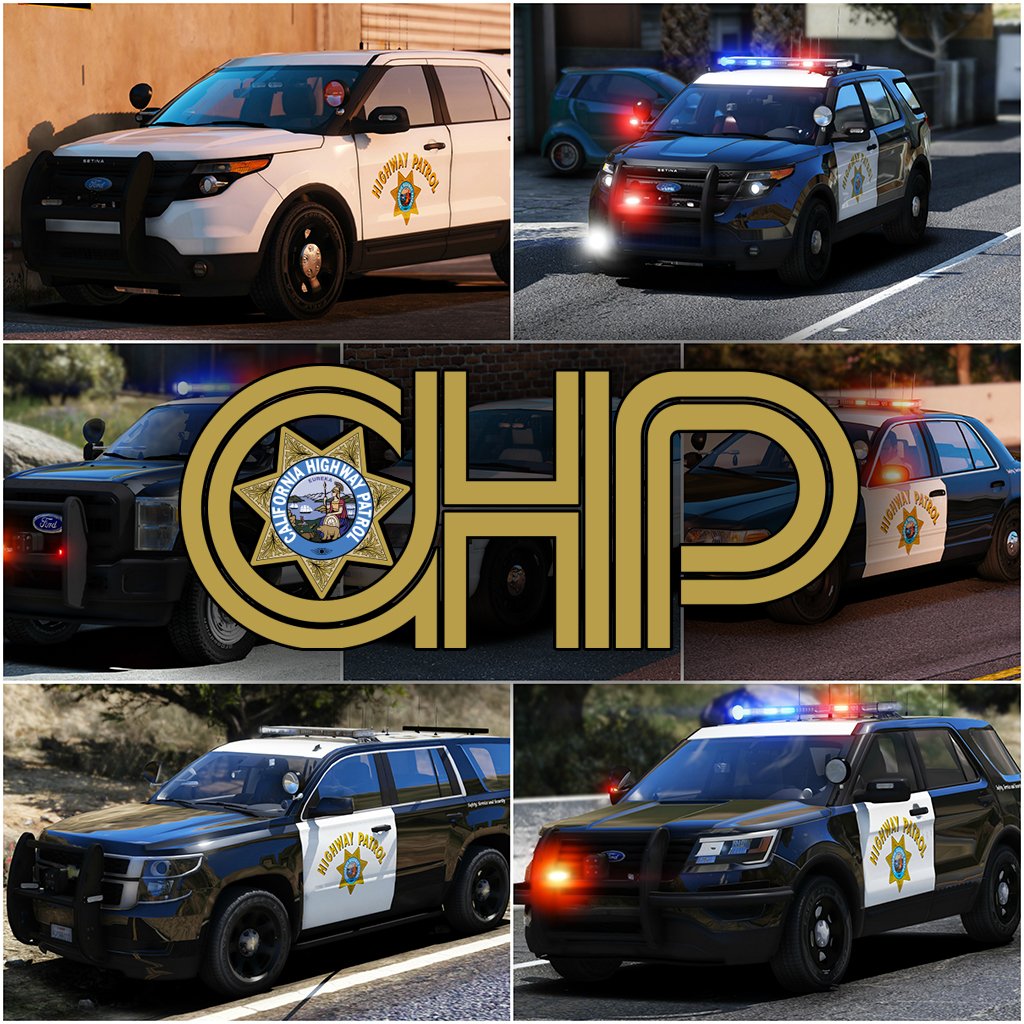
2017 California Highway Patrol Mega Pack - ELS 1.1.0

(158 reviews)

14 Screenshots

    10021674_300x300.png.9b7a0360d24b9207fd8aa44c1b616d80.png


    Welcome to something that has been in the making since I've gotten my hands on ELS, something that has taken more hours then you guys could understand. I've pulled out all the stops for this pack. I've taken all your guys' feedback on my screenshots, and I've done my best to destroy it in the realistic/quality/immersion department. I've done my best to simplify the installation of this file. For those of you who are looking for an add-on version of this pack, you're going to have to wait a little longer, as I've got barely any time to even upload this. So without further adieu, I present to you my pride and joy, the 2017 California Highway Patrol ELS mega pack, or whatever you want to call it. 


I've updated the pack to include updates to the majority of cars, an add-on version of the pack(.oiv format), and the templates that everyone has requested!
 

PACK OVERVIEW
=================================
- NAME: 2017 CHP mega pack ELS
- VERSION: V1.0
- EXTRA PARTS: CHP
- OPTIMIZED FOR: Anything


ELS USE IN GAME

=================================
When in game, the lights will work as i've designed for them to. When you exit the vehicle, the entire front of the vehicle will steady burn as it will mimic the 
CHP Traffic Stop pattern. I can't stop this from happening. 


When you are using any of the vehicles in this pack, and you preform a traffic stop, I HIGHLY recommend hitting alt-j to go to light stage two and hitting L to turn on the 
front of the vehicle. This; A, enhances realism and B, makes the car look really pretty. 


There are multiple other features that I will leave for you guys to find out with the CHP settings.


IMPORTANT NOTES
=================================

I am always accepting donations! Any amount is appreciated more then you guys will ever know!


Unfortunately I've had to split this pack into two separate parts (will be 3 when .oiv is included), PLEASE BE SURE TO DOWNLOAD ALL PARTS!


PLEASE PLEASE PLEASE READ THE READ ME BEFORE YOU ACTUALLY INSTALL THIS PACK!!!!!!!!!!!!!!!!!!!!


There are some things I have been unable to do with this pack and there are some things i've been able to do.


There is no way for me to turn off the park mode steadyburn for when you get out of the vehicle.


If you want to "reset" the pattern for the vehicle if some reason it becomes out of sync, simply press alt-J and then j again.


A incredible thank you to @Problematic , @TaylorSwift and a few more for their help and  assistance throughout this entire production of this pack. 


INSTALLATION INSTRUCTIONS

=================================


-To install any of these vehicles, Navigate to the latest patch day that you install vehicles to, I've found success with patchday10, and drag all vehicle files into the patch day
Location: Grand Theft Auto V\mods\update\x64\dlcpacks\patchday10ng\dlc.rpf\x64\levels\gta5\vehicles.rpf


-To install any VCFs with the pack
Location: Grand Theft Auto V\ELS\pack_default


-To install any included vehicle metas files
Location: Grand Theft Auto V\mods\update\update.rpf\common\data\levels\gta5


COMMON QUESTIONS
=================================

Q: Why aren't my lights bright?
A: You do not have light-enhancing mods installed. Download RadianceV and/or, other mods that increase emergency lighting brightness.


Q: Where is _____(insert any vehicle here)?

A: I've made the main vehicles of the CHP fleet as I've seen. At this point I am Content with the 16 Vehicles.


Q: Will you please help me ins--
A: Did you read the readme? No? The installation is simple.


Q: I don't have Patchday10/anything else?
A: Then put the car in your latest patch day, or copy patchday10/anything else over from your base game into your mods folder.
 
Q: Why does my game crash after I install the car/meta/carcol?
A: Make sure you have no spaces when you copied the line, make sure you're installing it in the right location and back all your shit up. 


Q: Will you send me ______?
A: No.


Q: Can I make skins for this Pack?
A: By all means, go ahead, just dont re-upload the vehicle model itself.


Q: Can I have the templates for this pack?

A: In the next update, hopefully I remember to add them.


PACK NOTES
=================================
Before i get started, please, please PLEASE don't ask me where this vehicle is, or why i didn't make this vehicle. There are 14 in this pack, please be happy with what i've 
made so far.


- All vehicles do have working takedowns with working spotlights


- All vehicles feature the same CHP setup as in real life


- All vehicles have accurate interior equipment


- All vehicles feature accurate antenna setups 


- K9 vehicles have a spawnable dog in the rear of the vehicle, for those of you who do or don't use a k9 mod


- If I haven't included a version for add-on vehicles that is in an .oiv format, then i will include one at a later date.


- There is approx 14 vehicles in this current phase of the pack, phase 2 will have a few more vehicles, that are the more abstract vehicles in the CHP fleet.


- A huge thanks to officer27 for the CHP and SAHP skins.


- With the large amount of vehicles in this pack, there are bound to be some issues with vehicles. Please let me know of any bugs you find and i'll do my best to fix them


  I'm going to be doing my best to update this pack with as many cars as I can make, and fixing any bugs i come across in the midst of it. Please consider following the file to make sure you receive all updates for the file!


Flawless video by @mroxplay, also you need to start making music mixes, the transition between songs was fantastic!


Disclaimer
=================================
-You are not to attempt to modify or rip this pack in any way shape or form.
-I (Thehurk) am not responsible for any damages done to your game. Please make a backup of any edited files!
-Do not attempt to make a profit off this pack in any way shape or form.
-Do not re-upload this pack, please make a link!!!!!
-Do not upload this file to any other site, claiming it as your own. 
-If you want to use this file in a clan, PLEASE ask me before doing so!!! I greatly appreciate this and almost always say yes!


Thank you everyone if you've gotten to this point in reading, you are truly a saint and I appreciate you not just skipping it saying what is this bullshit.


What's New in Version 1.1.0

Released

-Fixed all vehicles that have a liberty (missing one module on the passenger side)

-Fixed the 2006 CVPI Vision somehow having being affected by tint.

-Fixed the expedition's rear blues on the liberty not working

-Fixed 2013 Explorer's mirror lights not being synced
-Fixed some of the spotlights, not all, didn't have time to do others as i've been working crazy overtime.

-Fixed some VCF issues (once again they are all customizable);

  • 2006 CVPI traffic advisor should be customizable to your liking, i've left it on the default TRAF pattern
  • All motorcycles (Policeb) should now automatically go to stage 3, as there is nothing with the other two stages

-Added 2013 Harley Davidson Electraglide motorcycle

-Added the Add-On Version .oiv

-Uploaded all templates
 

User Feedback

Recommended Comments

FPI2011

Members

Hi

Thanks for your sweet mod.


I want to suggest about first camera offset of BMW R1200 (policeb)

I often use first person view when drive vehicle and I feel that Sanchez setting camera offset is a bit low.

Of course I use "vehicles.meta" setting included this mod.

So, I tested to change Pov camera offset z axis setting.

<PovCameraOffset x="0.000000" y="0.000000" z="0.100000" />

And this is screen shot.

How about this setting.

bmw pov small(2).png

Antair

Members

Great job Man!


One small issue I've found is the rear blue light in the lightbar on the expedition doesn't flash. Not sure if it's been mentioned or not, just thought I'd let you know.


Cheers

Thehurk

Members Author

6 hours ago, FPI2011 said:

Hi

Thanks for your sweet mod.


I want to suggest about first camera offset of BMW R1200 (policeb)

I often use first person view when drive vehicle and I feel that Sanchez setting camera offset is a bit low.

Of course I use "vehicles.meta" setting included this mod.

So, I tested to change Pov camera offset z axis setting.


<PovCameraOffset x="0.000000" y="0.000000" z="0.100000" />

And this is screen shot.

How about this setting.

bmw pov small(2).png


I will add this in the next update. Thanks! 

43 minutes ago, Antair said:

Great job Man!


One small issue I've found is the rear blue light in the lightbar on the expedition doesn't flash. Not sure if it's been mentioned or not, just thought I'd let you know.


Cheers


Ill correct this in the next update this weekend. 

10 DAVID 01

Members

sahp skins, even when you download the link...the folders are empty???

dunkboi

Members

14 hours ago, Marquess said:


Not really, since most other vehicle mods use very similar settings. It has been always that way since GTA SA. Lt.Caine for sure didn't want to have only ONE pattern, unable being changed...


I don't know what you mean by "California car", but there are verry little emergency vehicles in California that use the steady burn. Anyway, that wasn't my point. The point is that there's no way to turn that off. You HAVE this option in RL and you HAVE this option in ELS - so why did you took it away?

I also doubt that in RL they can't turn off the traffic advisor. I'm pretty sure, they can...

But the main issue is the fact that you can't toggle the pattern of the main lights.


All that isn't realistic at all - if that is what you intended.


Don't get me wrong. I've been waiting for this. These are first class models. But when I can't change the ELS patterns/settings the way I want them (like in every other ELS car mod)... :-(


You could have set it as the main setup, but taking away the option to change it in general, is a no go


You must be on dope my friend. First off, Every Emergency Vehicle (excluding federal vehicles) in the state of California has steady burns. this ranges from lifeguard vehicles to Police vehicles. Second, there is no option to turn this off irl nor can you do it in ELS.  Third, you cannot toggle the patterns because they are fucking California Highway Patrol Vehicles set to California Highway Patrol Patterns option in ELS it's as realistic as it gets. I hate when people get butt hurt because they do not do their research. 


Steady Burns on every vehicle in this spoiler: 

Spoiler


even the fucking park rangers: 


FPI2011

Members

I think that  Marquess should read ELS user-guide included DOCUMENTATION folder.


Quote

(page 15)

Steady Burn Lights
Steady burn lights (SBRN) can be enabled on a vehicle via the UseSteadyBurnLights parameter in its VCF. In game, SBRN will activate at LSTG 1 and higher. SBRN do not flash but instead maintain a steady pattern when on. They are controlled by the LSTG system, and cannot be toggled alone like other ELS features.
Important note: A vehicle model must be specifically configured to use SBRN. The feature will not work on incompatible vehicle models.


Why there are setting like this ?

This mod is the answer.

If he dislikes steady burn red light, he has chance to use other mod.

In this site, there are many sweet mod without steady burn red light.


I love this mod because this is the California Highway Patrol.


MDBuvarp

Members

Hi! love the pack, and good job on the lighting. Only problem I have are the ford Expedition. The primary seems to be a bit off on the left side-back. If that made any sense. Just wondering if this is only for me or if this is a a problem for others.

Again, great pack a solid 5/7. Cheers


DraceusPD

Members

RadianceV doesnt work for this pack for some reason. the lights have no brightness

mikaelgranli

Members

2 hours ago, DraceusPD said:

RadianceV doesnt work for this pack for some reason. the lights have no brightness

Workes perfectly fine for me

mikaelgranli

Members

I've noticed that on the 2013 Explorer, you're using two independent components for the lights on the door mirrors, which allows them to move when the door opens. That's neat, but it means that you have had to add one of the rear lights to the same component as half of the front lights because you're limited on the amount of components you can use, and this means that we can't have the front lights steady burn while the vehicle is in park (slash while we are outside), as it conflicts with the rear pattern, correct?

On every other model that has lights on the mirrors, even the slicktop version of the 2013 Explorer, these mirror lights are a part of the same two components as the rest of the front lights. By having them on the same components as the rest of the front, you're able to have the front steady burn while the vehicle is in park, because you have enough components to give all the rear ones it's own. It means that they don't move when the door opens, and therefore is left in mid air, but we're not leaving our door open unless there's the need for protection, and in that case I don't think we're gonna notice either, as it's a very small detail. I only realized when I tried to figure out how to make my front lights steady burn.


I would suggest to have the lights mounted on the door mirrors be a part of the same components as the rest of the front lights. I think it gives us the max amount of realism we can have with the amount of components we can use.


Or, if you could have all the extra gear as a vehicle mod, so that we have to use the vehicle mod menu to add it, you could use component 12 and the one component you're not using (for example number 2 on the 2011 CVPI) for the mirror lights.


Again though, this pack is truly awesome, thank you very much for all the time and effort you've put into this. As a huge CHP fanboy, I'm in love with this! :tongue:

Sleepwalker

Members

22 hours ago, Marquess said:


Not really, since most other vehicle mods use very similar settings. It has been always that way since GTA SA. Lt.Caine for sure didn't want to have only ONE pattern, unable being changed...


I don't know what you mean by "California car", but there are verry little emergency vehicles in California that use the steady burn. Anyway, that wasn't my point. The point is that there's no way to turn that off. You HAVE this option in RL and you HAVE this option in ELS - so why did you took it away?

I also doubt that in RL they can't turn off the traffic advisor. I'm pretty sure, they can...

But the main issue is the fact that you can't toggle the pattern of the main lights.


All that isn't realistic at all - if that is what you intended.


Don't get me wrong. I've been waiting for this. These are first class models. But when I can't change the ELS patterns/settings the way I want them (like in every other ELS car mod)... :-(


You could have set it as the main setup, but taking away the option to change it in general, is a no go


i cannot comprehend why you are complaining about light patterns on a fucking CHP based car pack.. and if you've ever even read the ELS documentation you would know that Lt. Caine did in fact implement this far before this pack was made.


Screenshot (15).jpg

Thehurk

Members Author

2 hours ago, mikaelgranli said:

I've noticed that on the 2013 Explorer, you're using two independent components for the lights on the door mirrors, which allows them to move when the door opens. That's neat, but it means that you have had to add one of the rear lights to the same component as half of the front lights because you're limited on the amount of components you can use, and this means that we can't have the front lights steady burn while the vehicle is in park (slash while we are outside), as it conflicts with the rear pattern, correct?

On every other model that has lights on the mirrors, even the slicktop version of the 2013 Explorer, these mirror lights are a part of the same two components as the rest of the front lights. By having them on the same components as the rest of the front, you're able to have the front steady burn while the vehicle is in park, because you have enough components to give all the rear ones it's own. It means that they don't move when the door opens, and therefore is left in mid air, but we're not leaving our door open unless there's the need for protection, and in that case I don't think we're gonna notice either, as it's a very small detail. I only realized when I tried to figure out how to make my front lights steady burn.


I would suggest to have the lights mounted on the door mirrors be a part of the same components as the rest of the front lights. I think it gives us the max amount of realism we can have with the amount of components we can use.


Or, if you could have all the extra gear as a vehicle mod, so that we have to use the vehicle mod menu to add it, you could use component 12 and the one component you're not using (for example number 2 on the 2011 CVPI) for the mirror lights.


Again though, this pack is truly awesome, thank you very much for all the time and effort you've put into this. As a huge CHP fanboy, I'm in love with this! :tongue:


I must have included an older version when i released the pack, I'm going to be putting out an update to the pack this weekend that hopefully fixes all the bugs that were included when I initially released the pack.

With the lights on the mirror, I already knew they were the same extra, and what that did for all the vehicles. It was an intentional design aspect of the pack so that A: the patterns with respects to the front will always be in sync, and B: so that i can still have as many patterns from CHP as possible.

TheFyreGamer

Members

Loving this pack!!! But it there a way for me to change the pattern of the vehicle. To maybe put turn of the steady burn or something like that.. 

EliteOperations

Members

What about a California POLICE DEPARTMENT instead of highway patrol?? I'll hate to only be able to patrol the highway :sad:

Thehurk

Members Author

2 hours ago, Mikeyfeltz said:

What about a California POLICE DEPARTMENT instead of highway patrol?? I'll hate to only be able to patrol the highway :sad:


I don't think you understand the undertaking this pack was to complete.
 

17 hours ago, firebuff101 said:

Can you please add your Harley-Davidson?


I'll be trying to add that in the next update.

(edited)

4 hours ago, Mikeyfeltz said:

What about a California POLICE DEPARTMENT instead of highway patrol?? I'll hate to only be able to patrol the highway :sad:

I don't think you understand that CHP IS a Police Dept. They are the State Police of California. CHP Officers are armed police officers with arrest powers. They have jurisdiction over the entire state and respond to calls as well as patrol the highway. Stop being a bratty bitch and do some damn research before complaining about everything. 


Also, did you not see any of the videos the other guy just posted? There were at least 4 different PDs, a bunch of fire depts, and lifeguards all using the steady red. Please do the world a favor and fuck off.

Edited by firebuff101

dunkboi

Members

18 minutes ago, firebuff101 said:

I don't think you understand that CHP IS a Police Dept. They are the State Police of California. CHP Officers are armed police officers with arrest powers. They have jurisdiction over the entire state and respond to calls as well as patrol the highway. Stop being a bratty bitch and do some damn research before complaining about everything. 


Also, did you not see any of the videos the other guy just posted? There were at least 4 different PDs, a bunch of fire depts, and lifeguards all using the steady red. Please do the world a favor and fuck off.


Dont forget the park rangers!

steinberg4145

Members

2 hours ago, dunkboi said:

Do you (or anyone else) know how polecat got the yelp pattern to function? 


From this point: 

https://youtu.be/CIx4hNK3JmU?t=23m9s

First off that FPIU doesn't belong to this pack, but all he did was edit the ELS config.  The issue with using an edited config is that you lose all the other features of the CHP pattern option like park mode and having actual working lstg1/2. I've edited a ELS config for hurks pack that mimics the yelp pattern, but that's about all it has going for it is just lstg 3 settings.  Just be warned it's a pain in the ass if you want a semi-functional park mode. 

hwaycar15.xml

Caramel Please

Members

On 2/26/2017 at 3:57 AM, Thehurk said:


I'm going to be putting out an update to the pack this weekend that hopefully fixes all the bugs that were included when I initially released the pack.


Is this update coming out as in this weekend or the weekend coming up? It is Monday where I live, America and Canada is just hitting Sunday night. I am excited to download this pack but I won't download it right now if an update is coming soon. Thanks for your work!

steinberg4145

Members

@kevo15, there's no need for the user to have any more control over changing patterns than there already is.  The pack is called "California Highway Patrol Mega Pack" for a reason.  That reason being partially because it has accurate CHP patterns.  If for some reason (I really don't know why you would) you feel the need to change the patterns and make the patterns look inaccurate all you have to do is edit the ELS config and change the settings from "CHP" to "LED", or you could try reading the ELS user documentation.   It's also not really justifiable to down rate a file just because you don't know how to edit an ELS config.  Reviews should be based off the quality of the work done rather than what you(the reviewer) want, but don't know how to do, or some other reason not related to the quality of the work.

ISPfan12

Members

idk if this has been addressed or not but the blue lights on the rear of the light bar on the expedition do not work. Idk if that is correct or how its supposed to be but it seems like it should work.

Thehurk

Members Author

55 minutes ago, ISPfan12 said:

idk if this has been addressed or not but the blue lights on the rear of the light bar on the expedition do not work. Idk if that is correct or how its supposed to be but it seems like it should work.


I'll hopefully be putting out an update within the hour fixing this.

dunkboi

Members

@Thehurk is it possible you can add this to the mega pack some time: 


This is an actual duty car and take home car used by Captains+ 


*taken by myself at the CHP Academy*

Create an account or sign in to comment

Latest Mods

Account

Navigation

Search

Search

Configure browser push notifications

Chrome (Android)
  1. Tap the lock icon next to the address bar.
  2. Tap Permissions → Notifications.
  3. Adjust your preference.
Chrome (Desktop)
  1. Click the padlock icon in the address bar.
  2. Select Site settings.
  3. Find Notifications and adjust your preference.











