Skip to content
View in the app

A better way to browse. Learn more.

LCPDFR.com

A full-screen app on your home screen with push notifications, badges and more.

To install this app on iOS and iPadOS
  1. Tap the Share icon in Safari
  2. Scroll the menu and tap Add to Home Screen.
  3. Tap Add in the top-right corner.
To install this app on Android
  1. Tap the 3-dot menu (⋮) in the top-right corner of the browser.
  2. Tap Add to Home screen or Install app.
  3. Confirm by tapping Install.
We're performing changes on the site and things may be unstable. We'll remove this notice when we're done. Thanks for your patience.

DanielMonte

Members
  1. I have all the planned packages, where I also plan to make LASD cars (LSSD), you can see the full list of future packages in my discord
  2. DanielMonte changed their profile photo
    • 4,014 downloads
    • Version 1.0.0
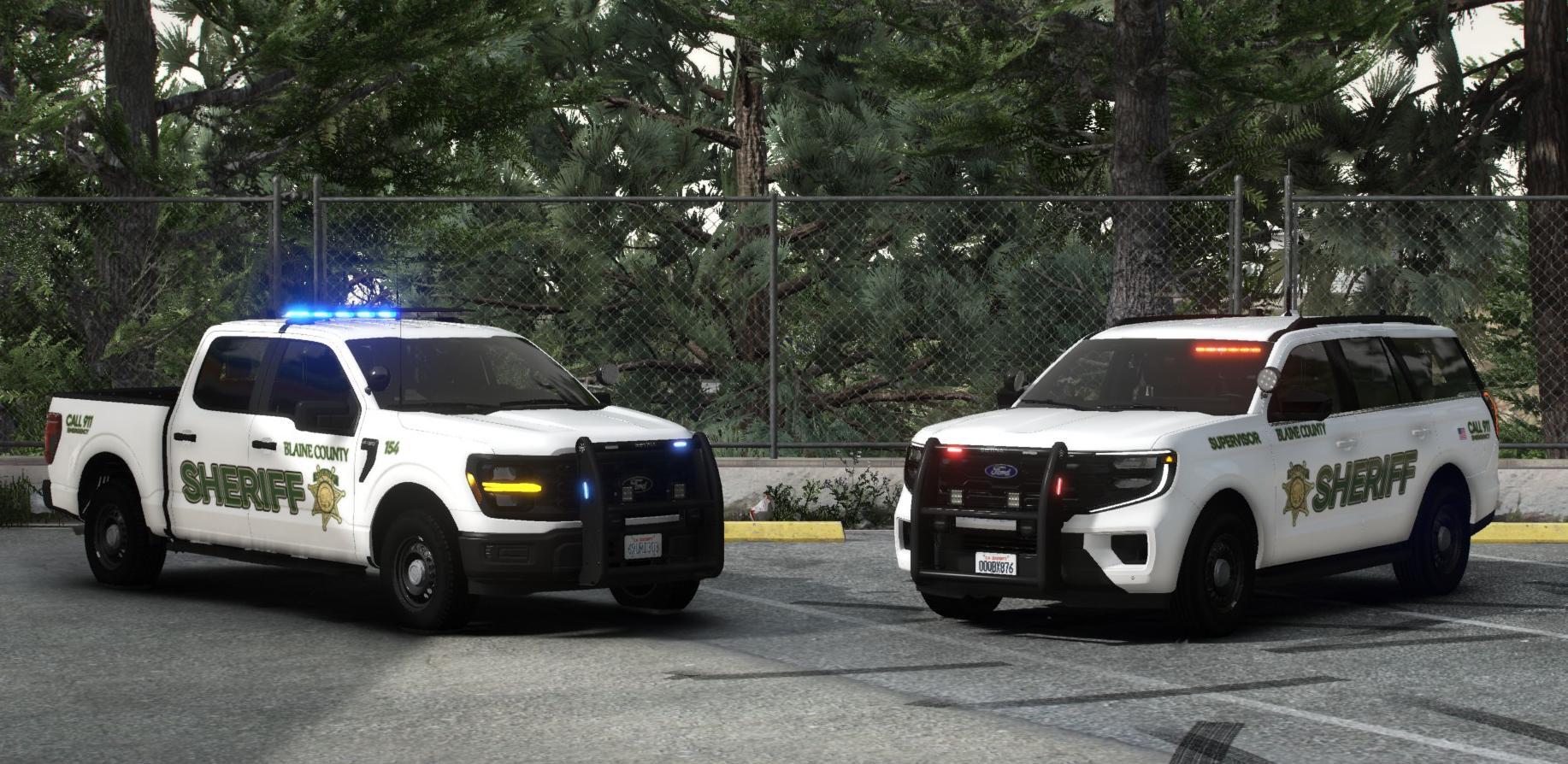
    Blaine County Mega Consolidated is a comprehensive and highly detailed vehicle pack designed to completely overhaul and breathe new life into the street atmosphere of Blaine County. Forget standard, boring textures—this project unites the region's key local law enforcement agencies into a single, stylistically cohesive ecosystem. A standout feature of this release is that the primary Blaine County Sheriff's Office (BCSO) fleet is built around the authentic style and configurations of the Santa Clara County Sheriff's Office (California), giving it an incredibly realistic and recognizable American aesthetic. In addition to the sheriff's department, the pack features specially adapted and detailed vehicles for local municipal departments—the Paleto Bay Police Department and the Grapeseed Police Department. While I have made every effort to capture the authentic look and feel of the real-world counterpart—utilizing specialized lighting setups and high-resolution textures—please be advised that these may not achieve 100% perfect realism in every single detail. Features: ELS setup Realistic livery Boot equipment Detailed interior Cars that are in the pack: Installation Guide: 1. Installing the Models (Replace or Add-on) For Replacement: Using OpenIV, navigate to mods > update > x64 > dlcpacks > patchday9ecng > dlc.rpf > x64 > levels > gta5 > vehicles.rpf. Simply drag and drop the files from the Replacement vehicles folder into this location. For Add-on: Copy your DLC pack folder into the following directory: GTA V > mods > update > x64 > dlcpacks. 2. ELS Configuration To ensure the lighting systems function correctly, move the configuration files from the archive to your GTA V > ELS > pack_default folder. 3. Activating Add-on Vehicles To make the game recognize your new vehicles, you must register them in the DLC list. Navigate to mods > update > update.rpf > common > data, open the dlclist.xml file in edit mode, and add the following line to the end of the list: <Item>dlcpacks:/BCSOConsolidated/</Item> Save the file and launch the game. Your new Blaine County units are now ready for patrol! TERMS OF USE: DO NOT rip or republish my work DO NOT Unlock ANY of my models You are ALLOWED to EDIT the Vehicle texture (YTD) and if able give me credit if this car is used in yt vid or stream(Helps spread the word)
  3. Gonza9 started following DanielMonte
  4.    DanielMonte reacted to a comment on a file: Liberty City Callouts
  5. We've been waiting for Callouts for this map for a long time, finally)
  6.    DanielMonte reacted to a file: Liberty City Callouts
  7. Thank you for your words! I will be home on Saturday evening, and I am ready to throw all the templates into the mod folder, immediately with the errors fixed.
  8. Thanks for letting me know about Charger, but unfortunately I'll be away for a couple of days and won't be able to fix the problem, could you please wait a bit?
    • 9,345 downloads
    • Version 1.3.0
    Voting for a next vehicle pack in Discord! 🚨🔗 Link: https://discord.gg/DsCQ8TfAqq HI everyone! This modification introduces a detailed fleet of patrol vehicles for the Blaine County Sheriff Department, inspired by the distinctive aesthetics and design philosophy of the Riverside County Sheriff's Department in California. These vehicles represent one of my first public releases where I have fully implemented and adhered to the complete development process for American-style law enforcement vehicles in GTA V. While I have made every effort to capture the authentic look and feel of the real-world counterpart—utilizing specialized lighting setups and high-resolution textures—please be advised that these may not achieve 100% perfect realism in every single detail. Nevertheless, this project represents a significant commitment to faithfully reproducing the Riverside style within the game world, offering an immersive and professional patrol experience for your roleplay scenarios in Blaine County! Features: ELS setup Realistic livery Boot equipment Detailed interior Cars that are in the pack: 2023 Chevy Tahoe PPV (Allegiant lightbar) 2023 Chevy Tahoe PPV (Valor lightbar) 2023 Chevy Tahoe PPV (K-9 UNIT) 2025 Chevy Tahoe PPV (Allegiant lightbar) 2025 Chevy Tahoe PPV (Valor lightbar) 2020 Chevy Tahoe PPV 2025 Chevy Silverado PPV 2018 Dodge Charger Pursuit 2020 FPIU Installation Guide: 1. Installing the Models (Replace or Add-on) For Replacement: Using OpenIV, navigate to mods > update > x64 > dlcpacks > patchday9ecng > dlc.rpf > x64 > levels > gta5 > vehicles.rpf. Simply drag and drop the files from the Replacement vehicles folder into this location. For Add-on: Copy your DLC pack folder into the following directory: GTA V > mods > update > x64 > dlcpacks. 2. ELS Configuration To ensure the lighting systems function correctly, move the configuration files from the archive to your GTA V > ELS > pack_default folder. 3. Activating Add-on Vehicles To make the game recognize your new vehicles, you must register them in the DLC list. Navigate to mods > update > update.rpf > common > data, open the dlclist.xml file in edit mode, and add the following line to the end of the list: <Item>dlcpacks:/BCSORSO/</Item> Save the file and launch the game. Your new Blaine County Sheriff units are now ready for patrol! TERMS OF USE: DO NOT rip or republish my work DO NOT Unlock ANY of my models You are ALLOWED to EDIT the Vehicle texture (YTD) and if able give me credit if this car is used in yt vid or stream(Helps spread the word)

Account

Navigation

Search

Search

Configure browser push notifications

Chrome (Android)
  1. Tap the lock icon next to the address bar.
  2. Tap Permissions → Notifications.
  3. Adjust your preference.
Chrome (Desktop)
  1. Click the padlock icon in the address bar.
  2. Select Site settings.
  3. Find Notifications and adjust your preference.