Skip to content
View in the app

A better way to browse. Learn more.

LCPDFR.com

A full-screen app on your home screen with push notifications, badges and more.

To install this app on iOS and iPadOS
  1. Tap the Share icon in Safari
  2. Scroll the menu and tap Add to Home Screen.
  3. Tap Add in the top-right corner.
To install this app on Android
  1. Tap the 3-dot menu (⋮) in the top-right corner of the browser.
  2. Tap Add to Home screen or Install app.
  3. Confirm by tapping Install.

HoldMyGun 1.4.1.0

(22 reviews)

1 Screenshot

For all vehicle creators/modelers: I've included a documentation file, in case you want to make a compatible vehicle, where people can toggle the weapons in a gunrack. It's not complicated at all, and if you upload a vehicle with this feature, please send me a message so I can put a link up on this download page 🙂


This plugin allows you to store your Carbine Rifle, Shotgun, SMG, as well as Body Armor and Fire Extinguisher in your police car, and also to retrieve it. 

It does NOT require compatible vehicles, however, they will add additional features, like seeing your weapons appear/disappear from the gunrack.


Features:

  • Store your Carbine Rifle, Shotgun, SMG, fire extinguisher and armor in your patrol vehicle.
  • Retrieve the same from either inside the vehicle, or from the outside. Stand near the driver door and press the key to retrieve your weapons, stand near the trunk and press the key to retrieve your armor + medkit and/or your fire extinguisher
  • Includes some fancy animations
  • Customizable attachments for the weapons
  • Customizable keybinds


Installation:


Put the .dll and the .ini into your "Grand Theft Auto V\Plugins\" folder.


Make sure to take a look at the .ini file to set your name and preferred keybind.


You have to sit in a Police car  to store and retrieve your rifle/shotgun.

It does not matter whether it's a default police car, a replacement, or an addon, as long as you added the Police car correctly.
It works with the Carbine Rifle(MK2) and PumpShotgun, which come with an equipped flashlight upon retrieving. 


Disclaimer:


Do NOT upload or redistribute without my written permission.

This includes private sharing or uploading to any other website. 


And here's a link to my Discord server, where you'll find information about the current state of development for my plugins, and you'll get early access to beta builds:

https://discord.gg/RbSGF2d


The first compatible vehicle. Made by @panoszaf. Thank you 🙂
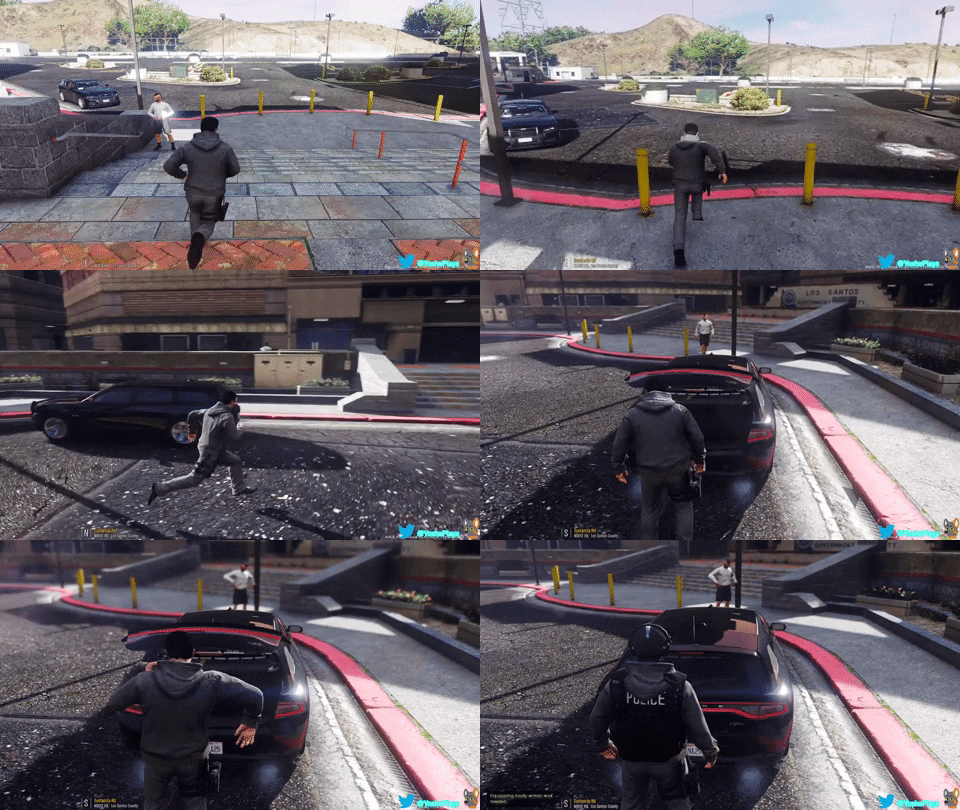


giphy.gif


Thanks to FirstThirtyMinutes for showing the plugin in action!


What's New in Version 1.4.1.0

Released

Patchnotes for 1.4.1.0:


  • Fixed scope not attaching on standard Carbine Rifle.


Patchnotes for 1.4.0.0:


  • Added SMG
  • Added SMG Mk2
  • Added Attachments for SMG/Mk2
  • Added Shotgun Mk2
  • Added Attachments for Shotgun/Mk2
  • Added all 3 Scope variations for the Carbine Rifle Mk2, SMG Mk2, and Shotgun Mk2


Patchnotes for 1.3.3.0:


  • Updated for RPH .63
  • Changed a function for making compatible vehicles. (misc_z and extra_ten for the Carbine Rifle, misc_y and extra_12 for the Shotgun)

trunk.JPG

User Feedback

Recommended Comments

Sebo

Members Author

On 3/2/2019 at 6:45 AM, MaxVu said:

This mod doesn’t work. I downloaded the newest version and in game it says it’s outdated. The keybindings don’t work with ANY vehicle and I also got the charger that comes with it (the one you got in the description) and it doesn’t work with that neither and it don’t appear in the guns slot inside of the charger.


You can turn off the update checker in the .ini file.

Make sure you put the .dll and .ini file into your Grand Theft Auto V\Plugins folder, and not plugins\lspdfr. 

You also need to load it via the RPH settings or ingame via command.

londonrials

Members

2 hours ago, Sebo said:


You can turn off the update checker in the .ini file.

Make sure you put the .dll and .ini file into your Grand Theft Auto V\Plugins folder, and not plugins\lspdfr. 

You also need to load it via the RPH settings or ingame via command.

It's in the right places, that's not the issue. When I go on duty, it says that HoldUp loaded correctly. I'm saying it's not working b/c no matter what I put the keybinding do not work and I know how to properly set keybindings as I do it with many other mods and ini files.


Not in your defense, I didn't see the turn off update hidden at the bottom so I will turn that off. I'll update my review based on the results. 

YoshePlays

Members

(edited)

On 3/2/2019 at 1:45 PM, MaxVu said:

This mod doesn’t work. I downloaded the newest version and in game it says it’s outdated. The keybindings don’t work with ANY vehicle and I also got the charger that comes with it (the one you got in the description) and it doesn’t work with that neither and it don’t appear in the guns slot inside of the charger.


Haven't been on the 0.4 lspdfr much lately but here are some point I want to point out.

1. This mod was last updated on December 5, 2018, therefore if it's incompatible with 0.4 then it's sad.

2. This mod is not a LSPDFR Addon, but a RPH plugin, therefore it shouldn't conflict in the first place.

3. As a beta tester for this mod, this mods seems fine when I tested the latest version.

4. This works on any type of vehicle, just that the supported vehicle will have the rifles/shotguns(as an extra) remove/added on in the central divider of the vehicle.

5. Make sure the modifier key is pressed as well, unless if you don't want it then set it to none.

6. Define "Not working"

7. I've never seen a sniper rifle in a patrol vehicle, stop asking for it, it will not be added.

8. Visual armour is not part of the functionality of this mod, it may be considered, but it's not the main point of this mod.

9. It should load when you type it in the console/the start of the game, not when you're on duty. If it does load during the moment you go on duty, then you're probably referring to other mods, as it would not load under the lspdfr folder. Perhaps you were referring to a mod called "HoldUp"?


Edited by YoshePlays

Sebo

Members Author

(edited)

22 hours ago, MaxVu said:

It's in the right places, that's not the issue. When I go on duty, it says that HoldUp loaded correctly. I'm saying it's not working b/c no matter what I put the keybinding do not work and I know how to properly set keybindings as I do it with many other mods and ini files.


Not in your defense, I didn't see the turn off update hidden at the bottom so I will turn that off. I'll update my review based on the results. 


I see. I was just going through the usual troublemakers, but I'll get my GTA set up again and do some testing myself.

About your review: 


It's not outdated (which you acknowledged).

It's not a plugin for LSPDFR, so I didn't expect it to need an update, but that will be fixed.

Same with the keybinds. I don't get it either why it stopped working, but I'll fix that asap. 🤷‍♂️


About your suggestions:


I can't update it for LSPDFR 0.4, because it's not a plugin for LSPDFR.

The keybinds will be fixed.

I won't add a sniper rifle, and I cannot add visual armor. Just not possible.

I also won't put any more vehicles in the description, as I don't want to turn this mod page into a showroom for other people's mods.

You can however check out panos_zaf's LSPDFR profile, and you'll find more compatible vehicles.


Overall, you did a good job on the review, it's definitely something I can work with.

I hope you'll edit your review as soon as I fix those problems 🙂


Edit: Well, I can't seem to reproduce those issues. It's working perfectly fine for me on a fresh installation with LSPDFR 0.4

image.thumb.png.ffa22b026c023330b04f6f186b692d89.png

Edited by Sebo

Deqq

Members

Dude I just can't get how do I use this plugin...

I don't even understand the controls/keybinds.

Denny

Members

Si it ONLY works with the MK2 Carbine?

YoshePlays

Members

On 7/3/2019 at 3:03 PM, Denny said:

Si it ONLY works with the MK2 Carbine?

No, it works for the regular Carbine as well.

adam enforcers

Members

(edited)

is there a chance you can add new weapons?

Edited by adam enforcers

adam enforcers

Members

also the plugin crashes when loaded.

Sebo

Members Author

On 9/6/2019 at 9:38 PM, adam enforcers said:

also the plugin crashes when loaded.


I'm going to rewrite the plugin anyway, but the only thing I'll be adding is the luxury variations of the weapons.

Also, send a log if it crashes, because it didn't crash for me.

lspdfrgta5xb1

Members

How do I like grab the fire arm?

Armando_Monteza

Members

Dosent work for me at all


Sebo

Members Author

On 12/23/2019 at 9:56 AM, Armando_Monteza said:

Dosent work for me at all


DM me with your RagePluginHook.log and a description of what isn't working for you.

JohnnyWow

Members

does this still work 0.4?


Sebo

Members Author

On 1/3/2020 at 8:44 AM, JohnnyWow said:

does this still work 0.4?


Yes it does.

It does not require LSPDFR, so it'll always be compatible until an RPH update breaks it, which is highly unlikely.

Pumpk1in

Members

@Sebo Strange problem for me : Graphics menu crash.


If I load your plugin at launch (in startup.rphs), the game crash as soon as I go to the Graphics menu.

If I load it after game launch, no problem.


What the hell ? 😛


(I tried with all my rph mods, then with only lspdfr and yours. No matter if it loads before or after lspdfr, same crash if auto-loaded at launch)


Thanks 😉

Sebo

Members Author

6 hours ago, Pumpk1in said:

@Sebo Strange problem for me : Graphics menu crash.


If I load your plugin at launch (in startup.rphs), the game crash as soon as I go to the Graphics menu.

If I load it after game launch, no problem.


What the hell ? 😛


(I tried with all my rph mods, then with only lspdfr and yours. No matter if it loads before or after lspdfr, same crash if auto-loaded at launch)


Thanks 😉


First time hearing about that lol. But I don't recommend loading plugins on startup anyway, since plugins (especially LSPDFR) often cause an infinite loading screen. 

Thanks for letting me know though 🙂

  • Community Team

There was an issue with getting body armor from inside of the patrol cars.


My character got killed because I was trying to get a new body armor from the vehicle, after I pressed the key, it removed my existing body armor, I tried to press the key again to get a new one but my character's health started to go down then he died. 

Sebo

Members Author

5 hours ago, unitedOrange66 said:

There was an issue with getting body armor from inside of the patrol cars.


My character got killed because I was trying to get a new body armor from the vehicle, after I pressed the key, it removed my existing body armor, I tried to press the key again to get a new one but my character's health started to go down then he died. 


Well, yea. You'd have to remove your old armor first before you can put on a new one 🙂

  • Community Team
10 hours ago, Sebo said:


Well, yea. You'd have to remove your old armor first before you can put on a new one 🙂

But if I have an armor then I can't get the new one unless I unequipped that first, when I press the key it automatically unequipped it. 

drifter213

Members

On 2/19/2019 at 4:55 PM, Sebo said:


I’ll look into the NumPad issue, but I’ll probably wait until .4 before I release an update. 

And no, Sniper Rifle is not planned.

I have the same Issue, I figured out that if you you set the modifier key to none it works, but if you are using a modifier key like ShiftKey it does not work. I don't know if it's fixable or if this has something to do with the microsoft library.

Sebo

Members Author

7 hours ago, drifter213 said:

I have the same Issue, I figured out that if you you set the modifier key to none it works, but if you are using a modifier key like ShiftKey it does not work. I don't know if it's fixable or if this has something to do with the microsoft library.


I honestly don't even know what's causing it haha. The issue just appeared randomly without me even changing anything. 

Bluekayender

Members

I need help. it crashes on start up. the game douse not just the .dll. what should I do. @Sebo

Sebo

Members Author

1 hour ago, Bluekayender said:

I need help. it crashes on start up. the game douse not just the .dll. what should I do. @Sebo


DM me your RagePluginHook.log

Any reason the weapon dissapears after taking it out?. I got it working but the second I remove the shotgun or rifle it vanishes.

Create an account or sign in to comment

Latest Mods

Account

Navigation

Search

Search

Configure browser push notifications

Chrome (Android)
  1. Tap the lock icon next to the address bar.
  2. Tap Permissions → Notifications.
  3. Adjust your preference.
Chrome (Desktop)
  1. Click the padlock icon in the address bar.
  2. Select Site settings.
  3. Find Notifications and adjust your preference.




