




ineseri
Friends of LSPDFR
-
Joined
Everything posted by ineseri
-
Grab 'em while they're rad! (http://www.gog.com/promo/fallout_series_giveaway_winter_promo_2013) Sadly, you have to get Fallout Tactics, but hey, atleast you get 2 of the good Fallout games. Plus, you will get a bunch of extra stuff, as always with gog.com
-
I don't think he actually peed on it....
-
I'm not currently in school, so I guess I could say LCPDFR is my life/break.
-
I swear I saw a thread somewhere about this.... Anyway, why don't you just use EFLC ?
-
I'll make my own thread! With blackjack! And hookers! Anyway. On the topic of countdowns: What are you guys planning for the mongolian independence day?
-
It's quite lovable. It's the christmas spirit embedded into a thread.
-
You can download OpenIV here (http://openiv.com/WebIV/guest.php?get=1). Always read the readme of both the software and downloaded mods and make backups. Happy modding.
-
Can you post the entire text log? What are your specs? You will need these: http://www.microsoft.com/en-us/download/details.aspx?id=17718, http://www.microsoft.com/en-us/download/details.aspx?id=5555.
-
I just saw a gif of that. It's pretty cool actually. I hope they didn't kill any of the poor buggers.
-
That^ and: Are you running the game as administrator? Using the latest patch? What mods are you using? List them please. Could you run the diag tool ('?do=embed' frameborder='0' data-embedContent>>) and post the generated log here? Running the game as administrator: Go to the GTA IV folder, right click on GTAIV.exe, Properties, Compatibility and select 'Run this program as administrator', do the same exact thing to the LaunchGTAIV.exe. Also, download and extract Scripthook.dll and ScripthookDotNet.asi files to your GTA IV directory. (http://www.hazardx.com/details.php?file=83) Also, I would recommend you use this: (http://www.microsoft.com/en-us/download/details.aspx?id=5549).
-
I say the officer did a splendid job, and handling the situation really proffesionally. Glad to see it.
-
I understand if you didn't like it, that's fair. It was a little... weird. But calling us all children is a little, ya know.... We all like different things :)
-
Did you buy the game?
-
Good thing it is on sale atleast :p
-
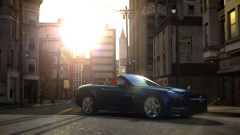 My PC would melt.... Really nice work!
 -
 "There are heads stuck under the bridge. Dispatch, please advice."
 -
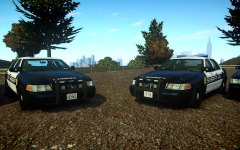 Looking really good!
 -
Then it probably is the mp3 sound quality. I never had this issue before... A little strange, I must admit.
-
I love you and your sense of humor.
-
What the flying noodle cookie dough did I just.... I... Slimory? Whyyyyy?
-
No, because that will count as piracy.
-
It would not be possible to upload the files needed, because that will count as illegal file sharing of Rockstar's intellectual property.
-
It's pretty simple if you follow the instructions :)
-
Here's a tutorial from GPM. http://gtapolicemods.com/showthread.php?3018-Add-New-Car-GTA-IV-Not-Replacing
-
I, for one, enjoy spending time with you Sniper. I just told people to stay away so I can have you all by myself *manical laughter*


