




ineseri
Friends of LSPDFR
-
Joined
Everything posted by ineseri
-
Hello. First off, use the manual installer if you are having problems applying the hot fix. Second: are you using the trainer? This may cause issues with ELS. Third: vDH PoliceHelper is kind of incompatible with LCPDFR 1.0, unless you disable the world events in the ini file of vDHPoliceHelper. Also, about the ScriptHook: You will need the latest version, which LCPDFR comes pre-installed with.
-
Haha, well installing mods is a tedious process but this is the only sure-fire way to fix it :)
-
It may very well be the problem. Can you try to restore the vanilla cars with the backups you made previous to installing the carmods? Try the game. Does it work? If yes, it's one of the car mods. Install them one by one to find out which mod it is. With that I mean: Install one car. Test. Install another car. Test. and so on til you find the broken car mod.
-
Ah great that you got it working! Have fun now, and happy gaming :D
-
Are you using any car mods? Does it work without a asi loader? (scripts won't work if you remove it, but it's good for troubleshooting).
-
Does it work with no mods but LCPDFR 1.0? :)
-
Yes, put these files into your main GTA IV directory, overwriting any files:
-
Then you can just redo it, it's not that hard :) You can find the hotfix here ('?do=embed' frameborder='0' data-embedContent>>) If you are using the manual installation, there is no need to use the hotfix.
-
No idea at the moment, I know that has several projects going :)
-
The API key system is down for maintenance at the moment I believe.
-
As Icon said, this most likely isn't a Steam issue. Make sure that the game is installed as instructed above, and make sure you are running the game as administrator. Running the game as administrator: Go to the GTA IV folder, right click on GTAIV.exe, Properties, Compatibility and select 'Run this program as administrator', do the same exact thing to the LaunchGTAIV.exe.
-
Ah great stuff! Thanks for letting me know :) Happy gaming now!
-
I recommend you to use the manual installation package as it is very simple to install and should work better most of the time.
-
It's a modded player or pedestrian model. No, you do not need to uninstall anything. Just follow the manual installation guide.
-
Could you try using the manual installer instead?
-
Hello, there is a texture for a Crown Vic here ('?do=embed' frameborder='0' data-embedContent>>) You will need a Crown Vic model for this (not sure which one that'll do, play around and see which suits best). As for the Tahoe, I couldn't find one sadly.
-
LCPD Default one. Not sure what it is called in more technical terms. Oh, or the one from the end of the Blues Brothers and the final chase. I can't remember what it is caleld though...
-
I see. When installing LCPDFR 1.0, did you use the automatic or manual installer?
-
Install LCPDFR 1.0a manually with the manual installation package. I also see that you have the freval error. The freval error was fixed for some users by doing this: Open up your LCPDFR.ini, look under "Main", it should look something like this by default: Now, add to the bottom of that part PreloadAllModels=TrueThe "Main" part should now look like this: Also, make sure that you have the latest patch (1.0.7.0) and a legal copy of the game.
-
The thing is, it's not a waste of money if you bought it for yourself. You need to install LCPDFR Manually or Automatically + The hotfix to make it work properly. Read the available guides for you, and then it should work fine. Please ask a question, and I shall gladly answer it in this thread.
-
Do you have any modded peds? Could you try using the manual installation package instead?
-
Hope you enjoy that mod then. 1.0 is considered to be much more stable, but I am sorry you didn't get it to run.
-
Then I am not sure what could be wrong, sorry :/ What are your computer specs? Also, try to remove/move your savefiles. The save files are located in 2 different places. X:Users%username%AppDataLocalRockstar GamesGTA IVsavegames X:Users%username%DocumentsRockstar GamesGTA IVsavegames Note: The AppData-folder is usually hidden, make sure that you can see hidden files. Note 2: “X” is the drive where you have installed GTA IV, and %username% is replaced by your username
-
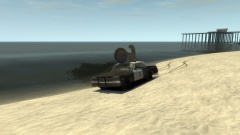 Here's the download link for those who want it :) (http://www.gta4-mods.com/vehicles/1974-dodge-monaco-bluesmobile-f5142)
 -
Try to delete/move your save files. The save files are located in 2 different places. X:Users%username%AppDataLocalRockstar GamesGTA IVsavegames X:Users%username%DocumentsRockstar GamesGTA IVsavegames Note: The AppData-folder is usually hidden, make sure that you can see hidden files. Note 2: “X” is the drive where you have installed GTA IV, and %username% is replaced by your username


