


Ridgerunner
Members
-
Joined
-
Last visited
Everything posted by Ridgerunner
-
It'll be out after I fix a few things, along with another related surprise.......
-
Like this one???
-
First off make sure you have the most current version of OpenIV. You can try to run as administrator (right click on the icon and select "run as administrator"). Also make sure the files you're changing are named correctly, otherwise you'll just add a new model instead of replacing. Go into "models>cdimages>componentpeds.img then select "File>edit mode>yes". Then select the green "+" symbol (add new file) and locate the new files click "open". When you add the new ped models correctly you'll be able to click on them (m_y_cop.wdd , m_y_strooper.wdd, etc.) and they'll display in the viewer (as OpenIV automatically saves in edit mode). That should work for you!
-
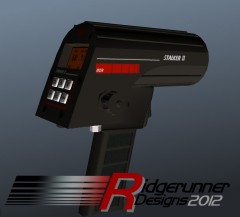 There was a SNAFU with Sniper296's mod so while he fixes the installer issues he's also adding some really nice features. So you will need to be patient until he releases his mod again.
 -
Please post in the correct section next time **Moving topic**
-
The quick and easy way is to use OpenIV, but there are no guarantees that everything will align correctly (some models will be off). Here is the link to cp702's tutorial: http://www.lcpdfr.com/page/tutorials/index.action/_/player-ped-modification-tutorials/combining-ped-meshes-how-to-mix-and-match-clothes-for-a-ped-r4 Moving topic as this is not LCPDFR related
-
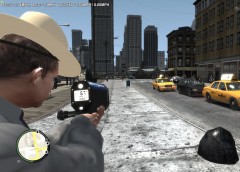
From the album: Ridgerunner Designs
New York State Trooper using a Laser Tech Ultralyte LR B laser unit to detect speeding motorists in Liberty City. Credits NYSP Uniform: Textures by Ridgerunner Designs NYSP Hat: Model and Textures by Ridgerunner Designs Ultralyte LR B: Model and Textures by Ridgerunner Designs The NYSP Uniform is already in my NYSP pack, but I'll also include it in the release of the NYSP Hat which will debut with another related special release by another modeler!! The Ultralyte LIDAR unit will release when Sniper296 re-releases his excellent GTA Policing Tools mod! -
There were some tutorials on gtaforums but I think most have missing pictures now (you can search around on there if you're curious). Basically you'll want to play around with the settings to find your desired affect. Once installed it will show up under the "Filter" tab in Photoshop. So use the texture that you want to make the normal for and then select Filters>Nividia Tools>NormalMapFIlter. Adjust the settings to fit your needs and click "ok". You've just created a normal. Just keep in mind that the new normal texture name needs to match the normal texture you're replacing or you might accidently delete/overwrite the wrong texture when importing.
-
There is a Nvidia plugin for PS and there is one also for GIMP depending on what you use that allows you to create your own normal textures. Link to the the Photoshop plugin on Nvidia's website: http://developer.nvidia.com/content/nvidia-texture-tools-adobe-photoshop
-
-
This is the pinned "Non ELS Collection" thread in case you haven't seen it: Your rather limited with options for non els content as most vehicle modelers choose ELS to fit their lighting needs. There is a K-9 CVPI model that fits your criteria (other then being K-9). http://gtapolicemods.com/downloads.php?do=file&id=59
-
While we wait for Sam and the other dev's to complete Illumination 2.0, I found that using non els vehicles with Iconography's "New Non-ELS Lights and Coronas" paired with Kit's strobe mod actually looks quite nice and is ofc very stable. New Non-ELS Lights and Coronas link: Strobe mod:
-
-
They're certainly different.... I can tell why they didn't do as well as the other models, but I did see pictures that the San Francisco Police Department and the Connecticut State Police had used them back in the day.
-
Good video! I worked at a VLF station not that far south of you Slimory and their towers were 1,000 ft or less. I thought they were tall but that tower is stupid high. Our dispatcher had experience as a contractor doing that type of work on the towers at the VLF, surprisingly he said he didn't mind the work! I'm sure they're well compensated but there are easier things to do in life then climb 1,000++ ft towers!!!
-
If Americans ever gave up their constitutional rights is this the future we should look forward to?? http://www.telegraph.co.uk/news/uknews/crime/9516776/Farm-tenant-arrested-after-burglars-shot-was-plagued-by-break-ins.htmlThe strap is part of the strooper mesh. There isn't a quick and easy way to do it, you could always use OpenIV to change the upper mesh with another models but there are no guarantees that it will look correct. You can adjust it in 3ds Max using GIMS & OpenIV but it's some work....It's a tragic event that I know will turn into a "lessons learned" for new officers in police academy's across the country. It's another painful reminder that officers need to always perform thorough searches. 3 lives could have been saved with just a proper search of the suspect, very sad indeed. I feel very sad for all the families affected by this tragedy.This should be helpful to you. http://gtapolicemods.com/showthread.php?6182-MISSING-ROADS-AND-TEXTURESI think the whole "Drunk Driving. Over the limit, under arrest" is another on going campaign slogan by NHTSA. Also "One text or call could wreck it all". You might want to checkout the NHTSA website as they fund a lot of these programs.This is on a few modelers radar. Yes there is a model being scratch built on GPM, but just to caution hopeful readers this will probably take some time to have a finished model (interior/exterior) with proper textures. More then likely we'll have to wait until October for the release of the NFS Most Wanted to get a accurate/optimized version. Not that I wouldn't be happy to see one sooner! :Daznairsoftdude has made the textures already he might be kind enough to share :D http://dumfoundedcreativemods.tumblr.com/page/2


