




Pavy
Members
-
Joined
Everything posted by Pavy
-
That's called coronas. I asked you to take a screenshot... Did you install any graphics mod? Go to\mods\x64a.rpf\textures and open graphics.ytd Search for coronas. If the image is black then your lights are dimmed down. You need to go to the unmodded location and copy over the vanilla version of graphics.ytd into the modded area.
-
Non-Steam versions of GTAV: Select "Start", "Run", and type "cmd" without the quotes. Hit enter. Type "cd c:\Program Files\Rockstar Games\Grand Theft Auto V" (without the quotes) in the cmd window. Note: If you’ve installed the game to a different directory, enter that directory path instead. Hit enter. Type "GTAVLauncher.exe -verify" (without the quotes) Hit enter.
-
you simply delete that .exe and verify your steam game cache, it auto downloads.
-
What is the version of your gta V? 1493.1? Did you put script hook and dinput.dll in your main gta 5 directory?
-
Probably have Great reviews and a lot of downloads.
-
@nypd1999 How did you fix it...
-
Reinstall Directx. If that didn't fix, delete d3dcsx_46.dll and d3dcompiler_46.dll from your main GTA 5 Directory. Verify Game cache with steam so it can redownload it.
-
It's not els. It's a graphical mod you have. Anything such as enb, MVGA, redux, NVR.
-
This is due to something wrong inside your mods folder. You have to figure out what you did. Simple fix would be to start a new mods folder.
-
What game config did you use? Link that and please upload your dlclist.xml here
-
@LMS Will Version 0.4 Require a Certain or Minimum Version of Ragehook? Asking because I'm on vers 0.57 rage which is gta update 1180 a major fps improvement. The current state 1493 is a fps killer.
-
I'm pretty sure it's not possible due to limitations
-
How'd you fix it
-
From your asiloader ASI: Loading "D:\steam\steamapps\common\Grand Theft Auto V\ELS.asi" "ELS.asi" failed to load Can you please take a screenshot of your entire Main GTA 5 Directory.
-
Are your vehicles add-ons? Where did you install your vehicles into? What do you mean by everything? The only thing that would be affected is the dlclist.xml. He needs to Simply add the lines again IF his modded vehicles were add-ons.
-
You shouldn't copy and paste that since it will crash the game. OP is supposed to replace the lines. Not add new ones. Also tell him the location of caravariations.meta Idk it offhand I'm on mobile.
-
You might be adding too many unnecessary audio files. There's a special number you can't go over. I believe it's 15.7mb off hand. What is yours at? Lol he can simply get the clean files from the unmodded area of his gta5. He doesn't need to download anything from you. Plus theres a clean folder included in that pack he downloaded.
-
This is Steve's Setup. https://kit.com/SteveTheGamer55/stevethegamer55-gaming-recording-pc https://www.youtube.com/user/stevetrackboyz55/videos He's one of the most popular lspdfr streamers with almost 2mill subs and he gets 30-40fps with the average amount of mods.
-
Your question is very vague. Yes it's enough. But how much fps are you looking to play lspdfr at is the main question? Based on youtube videos this setup can run alot of games on ultra with a great fps count. I would get 32gb of ram though. Personally 16gb is too small.
-
This user here https://www.gta5-mods.com/users/gta5testya/files Has really great map edits to make the areas more Alive and definitely worth the add.. Such as gas stations, sandy shores, paleto, etc. Don't use the Map editor version because it takes forever to load the objects and lags alot. Use the Ymap method which is very simple.
-
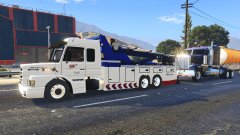 I have a feeling you would like to this youtube channel https://www.youtube.com/user/TowmaterEthan/videos
 -
Great ideas but some of these plugins have already been made in some sort of alternative form or they aren't able to be created due to GTA 5's limitations. Example: Domestic Dispute already exists in I believe 2-3 callout packs. Celebrity spotted drunk in public, there are plenty of packs with a random ped walking the streets. Large house fire, its not possible to set buildings on fire. There is no building destruction physics in gta.
-
No it wouldn't say that. Game cache should be verified and a modded game config is needed @JU3X REMIX https://www.gta5-mods.com/misc/gta-5-gameconfig-300-cars
-
When you add the dlc.rpf you also have to add a line of text into your dlclist.xml. You have to do it anytime you create a new addon folder. It's so the game can read the folder. mods\update\update.rpf\common\data
-

