


Creators: Due to background reprocessing of files, approvals and file security checks may be delayed. Thanks for your patience.

DLer
Members
-
Joined
-
Last visited
Everything posted by DLer
-
Two new ones:
-
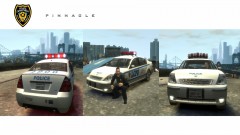 Good to hear. Do you plan on changing the wheels to something more appropriate like the one ITO put out? Looking forward to a Pinnacle with a vector lightbar
 -
In case you haven't seen them, a better look at the new cruisers, including the 'heavy' variant and the new Coquette?
-
New Coquette?! And there's definitely a Police Patriot of some sort back there...
-
-
I currently use motioninjoy and the controller works fine, though I'm not sure how to configure the keys to work with it. I'll look into it. EDIT: http://www.electracode.com/4/joy2key/JoyToKey%20English%20Version.htm Try this maybe?
-
I believe that may be hardcoded into LCPDFR? It may only register commands made by the keyboard...I could be wrong though!
-
-
-
-
http://www.rockstarg...eos/video/10261 Until then!
-
Can I get this model? I have a LCPD skin I made for it I'd like to use. Check my gallery for it.
-
Looks like there's another thread saying the same thing. Multiple police forces! Pretty cool. I will have to be patient. I don't want to mod the game until I play it through the first time around, though apparently there will be many ways to play each mission...and the storyline takes 25 hours to complete...!
-
Some new screenshots from various gaming magazines as the info comes pouring in! BEST LOOK YET AT THE NEW CRUISER (NOOSE?): TRAINS: There are some others here: www.gtav.net
-
Check out Lt. Caine's old models as well as Ekalb's, great stuff.
-
You have a point, but it is leaps and bounds better than GTA IV. Also was interested when they stated how the distance level of detail will be significantly higher. Obviously these can't be PC screenshots since they haven't mentioned a PC version even...they likely wouldn't enhance their screenshots for their cover story...right?
-
No problem. My obsession grows hourly so of course I'll be patiently waiting for the release of the trailer next Wednesday.
-
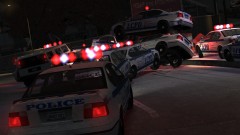 Reminds me of the Blues Brothers...
 -
-
Nevermind, I see it does! Awesome. PS you can't edit or delete comments made on downloads. on Firefox for some reason.
- 90 comments
- 40 reviews
-
-
-
The rest of the screens not seen in the scans or other link I posted: http://www.cinemablend.com/games/GTA-V-Screenshots-Showcase-Weapons-Fighter-Jets-Rappelling-49139.html
-
I will say there's other info and screenshots unavailable on just a printscreen version vs the dynamic one...so there's more out there...
-
http://fast1195.imgu...uto_5_gi_reveal Another link with all pages! No word on car customization, and no new photos thus far of police vehicles...


