


NickieB
Members
-
Joined
-
Last visited
Everything posted by NickieB
-
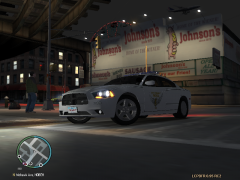 Thats not mine, thats Cj24's
 -
Post pictures of your emerglights_emis material in zmodeler. Chances are its not that, if you have it setup correctly. Its more likely that its just your computer and you have to keep trying to find a color combo that works for you. It took me forever to finally find the color combo that worked best for the settings I used. I'm very picky about my ELS and the textures that use to come with cars were to light, almost like a sky blue and same for the red, almost like a pink or blush color. I was experimenting but then Bugs released his Whelen Justice and now I use the "snow ball" style ELS textures on mostly all my cars. This video below is how it looks in my game. If your using the default settings chances are you could use the same textures I am but if you use a ENB or other modified values thats out of my knowledge. I don't use a ENB and never will Around the 0:50 mark
-
Yea its EVI's, I don't recall the reasoning for removing it. A few of us BETA tested it for him, it was released but taken down shortly after.
-
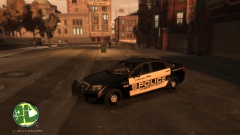 Yes there is still hope lol
 -
The one you see pictured - no because the author requested it not be released publicly. But I have another Caprice that I can export/import this setup onto and release that one
-
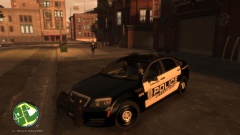 I have nothing against his work or that car, I just didn't like it because of the fact that you could really only use 1 flash pattern. The other ones didn't look good or didn't work properly. Thats why I want to try and figure out something else. Yea I like the flood lighting too, I did a few versions of the Taurus I have with the Whelen XLPs and I did flood lighting on those for the takedowns. No problem :)
 -
Okay now I got ya. I won't make any promises for the pack but I will promise you a caprice with this setup that I can release or at least let you use. Give me a couple days, I wanna think things over to see if I can make something happen with this valor to replicate the dual color modules in a way that actually looks good and allows you to actually change patterns
-
@c13 - I really don't have the attention span for car packs, I like to do something different for each car I do so to do a pack of next gen stuff wouldn't be for me. Where you talking about a pack with next gen equipment or next gen cars? Or both? Yea I'd just prefer to do the Caprice right now. @blaze - yea there aren't many Caprices or Taurus now, not many people have them or some who do have them aren't suppose to. I have a Taurus but it's the same situation as this car, I can us it but I can't release it. I've never shown it because I didn't want to be bombarded with PMs asking for it. I agree, I think it's terrible when people don't even take the time to edit the Chargers to PPVs
-
I knew someone would bring that up, You win a prize, free admission to my shit list for making me do more work. Lol :) jkjk, yea I knew they weren't done, when I gave it to him1250 he never mentioned it so I didn't bother and I was hoping to get away with it but you caught it. I'll go back in and do them so that's it's complete. *Provided I still have the Z3D* this was awhile ago that I made this for him
- 20 comments
- 4 reviews
-
Not a problem man, I was saying I have another caprice besides this one that I can release so I could just transfer this stuff over and it shouldn't take much adjusting. I'm sure it will take a little tweaking but nothing to serious. Not sure if you saw me say that or not @ Blaze - I agree it does suck that the actions of a few people have to ruin things for everyone else but unfortunately that's just the way it is. Are there a lot of Chargers now? I don't check the downloads as much as I use to.
-
Yeah sorry, the description sort of seems like it's going to be released, I realize that now. but I was just trying to make it seem like a newspaper article or something haha And Kevin is a great guy but with all the model theft lately he just prefers it this way especially since he made the whole car from scratch. I would be happy to take recommendations for a similar setup on either a Charger or Explorer. Actually I do have another caprice that I have release perms for, I could just transfer this setup over to that car. Thoughts?
-
I'm only respecting the wishes of the person who gave me the car, I'm glad you help your opinion, I really don't want a flame war on my gallery :P Thanks though @c13 - Yes, I do have a '13 Charger on the list due to have this lightbar on it. I could actually do this exact setup on the Charger if you'd like
-
Video finally uploaded 10 minutes after it said it was complete. Page updated above with video. Thanks though
- 20 comments
- 4 reviews
-
-
Unfortunately your correct, it won't be released to respect Kevins wishes and to preserve his hard work on this car. If the time comes in the future that I have perms for a full release I will do so but for now its private. Its a shame too, the car as it sits there is only about 2.5MB Thanks Ringo
-
Not a problem bud. Hopefully you dont mind I released it. I gave you a few months to enjoy it but now I think everyone else should to :)
- 20 comments
- 4 reviews
-
![[REL] Tahoe - Code 3 21TR](//s3-gallery.int-cdn.lcpdfrusercontent.com/gallery/album_496/sml_gallery_9139_496_19682.jpg)
From the album: New Release
RELEASED - -
Tahoe - Code 3 21TR Plus by NickieB (FINAL) I made this Tahoe for a custom request a few months ago. I let him have exclusive right to it for awhile but now I think its time everyone enjoys it. It didn't go through all the normal testing like my other cars do but it should work just fine. I haven't worked on it in awhile and I don't plan to again. It was just made for a friend of mine and he said he liked it in its current state so I stopped there. The truck does have wig-wags (rare for a release of mine) and the secondaries are the rear facing lights All ELS colors and lightbar colors included as usual ** Please use the included ELS config for best results but feel free to edit it to your liking. ** **CREDITS** - Model is original "Chevrolet Tahoe" by 4x4 Full Driver - Hummer H2, converted to GTAIV by Stiopa. - Model improvements & Modified By Bxbugs123 - Wheels By Bxbugs123, Textures by Lt.Caine - Code 3 x2100 made by Bxbugs123 and penguin2254, modified and converted by gfxle. Code 3 x2100 modified to Code 3 21TRPlus by NickieB - TIR3 by NickieB - Whelen ION, Code 3 Commanstik, Code 3 lightbar stand by NickieB - Tahoe Setina Rambar by NickieB - Divider, Laptop Stand, spotlights, radar, Siren speaker by BxBugs123 - Antennas by PriMan - modified by NickieB - Shotgun/M4A1 by Grimm - Laptop, Whelen Cencom, Switches by PFCBarefoot - ICOP, Bearcat Scanner, Motorola radio, LoJack, Window Bars by NickieB - Console by Hilth - Dashcam by Caleb - Soundoff Intersectors, rear storage by Tim98 - Black/Grey Skin skin by NickieB - Dodge County Sheriff CVPI skin orignally by Carper - modified to Tahoe by NickieB - Black and White Police skins by sKuare ** Please do not ask for this model unlocked or alterations to this model ** Please do not upload or distribute this model anywhere without my written permission ** By downloading this you are agreeing not to rip the model or its contents POLPAT 2650 0.37 85 0.0 0.0 -0.5 0.5 4 0.13 5.0 210 0.45 0.55 0.6 33 1.45 1.0 14 0.2 0.46 3.0 1.3 1.3 0.1 -0.1 -0.01 0.56 2.0 1.0 2.2 2.3 0.0 70000 440010 0 0 [PolPatriot] spot-x=-0.9 spot-y=+0.8 spot-z=+0.9
- 20 comments
- 4 reviews
-
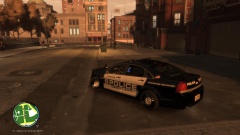
From the album: NickieB's RaNdOM Gallery
The installation shop decided to snap a few pictures of the LCPD's new Caprice that they just finished installing lighting and equipment on before they took it back to the PD. It will hit the streets shortly along with the other units still being worked on. The LCPD Purchased a few new Caprices to replace the rest of their Crown Victorias. Citizens can soon expect to see the Caprices along side the Taurus's and Explorers that are already patrolling - FedSig Valor - Setina pushbar with Whelen SA315's and TIR3's - Stalker Radar - Code 3 Wingman in the rear deck - 2 Whelen IONs in the rear side triangle windows - Soundoff Intersectors - Whelen Vertex's in the headlights -
From the album: NickieB's RaNdOM Gallery
The installation shop decided to snap a few pictures of the LCPD's new Caprice that they just finished installing lighting and equipment on before they took it back to the PD. It will hit the streets shortly along with the other units still being worked on. The LCPD Purchased a few new Caprices to replace the rest of their Crown Victorias. Citizens can soon expect to see the Caprices along side the Taurus's and Explorers that are already patrolling - FedSig Valor - Setina pushbar with Whelen SA315's and TIR3's - Stalker Radar - Code 3 Wingman in the rear deck - 2 Whelen IONs in the rear side triangle windows - Soundoff Intersectors - Whelen Vertex's in the headlights -
From the album: NickieB's RaNdOM Gallery
The installation shop decided to snap a few pictures of the LCPD's new Caprice that they just finished installing lighting and equipment on before they took it back to the PD. It will hit the streets shortly along with the other units still being worked on. The LCPD Purchased a few new Caprices to replace the rest of their Crown Victorias. Citizens can soon expect to see the Caprices along side the Taurus's and Explorers that are already patrolling - FedSig Valor - Setina pushbar with Whelen SA315's and TIR3's - Stalker Radar, Watchguard dash cam - Code 3 Wingman in the rear deck - 2 Whelen IONs in the rear side triangle windows - Soundoff Intersectors - Whelen Vertex's in the headlights -
Its possible, I get so many questions asking for unlocked Explorers, Taurus, etc that I don't always remember everyone.
-
This was another thing I was going to mention but some people get mad or dont understand so I decided not to. Your right though and I had the same "problem" when I started modeling, you have to work your way up before people will share unlocked parts and especially models. Being that the OP has zero work released no one is probably going to share a unlocked vehicle
-
I don't know of one
-
This is one of the only ones I know of. I did a 2013 Charger with that bar on it. There aren't that many cars with that lightbar in general either http://gtapolicemods.com/downloads.php?do=file&id=811

![[REL] Tahoe - Code 3 21TR](http://s3-gallery.int-cdn.lcpdfrusercontent.com/gallery/album_496/sml_gallery_9139_496_19682.jpg)
