
TheDude
Members
-
Joined
-
Last visited
Everything posted by TheDude
-
I would suggest going to the car download section, hitting sort and then either most downloaded or highest rated. tons of great options to chose from. I love these two unmarked units though, they get constant use.
-
you would need a trainer or skin control, but yes you can go on duty as any character in the game. Here is trevors and franklins lspd skin. as for micheal all i can find is his BCU uniform, you might have to head over to another site for his full uniform.
-
 So I accepted the bribe, got my money and I though all was good. but when I went to the gas station and tried to buy some P's and Q's it told me I had no money?
- 69 comments
- 16 reviews
-
-

- 1
-
-
 how would I go about adding two variables to the xml? would it just be <Vehicle extra_3,4=true> ?
- 159 comments
- 53 reviews
-
-
anyone know the backup.xml details I would need for <Vehicle extra_????=true> to force the car to spawn with the aggressive wraparound pushbar?(sorry dont know the name of it)
- 159 comments
- 53 reviews
-
 Hey albo having a crash that I think may be associated with arrest manager. what seems to happen is anytime the ai arrests somebody as soon as they drive off with the suspect out of LOD range I get a lspdfr crash. heres the log. I ran the albo tool and it came back with no errors btw. I had been playing for about five hours so I am going to cut down the log to the last 20-30 mins before the crash happened. Edit: one other thing to add although I am not sure its pertinent. rite before the crash happened I noticed all the officers from the chase walking back to their cars (the blue/red circles around them had disapeared) but rite before the script crashed every cop got a pink dot which even after restarting lspdfr via the console remained.
- 1,915 comments
- 242 reviews
-
Here ya go, works with 0.3
-
Howdy everyone, first off let me say I LOVE 0.3 its an amazing update to an already stellar mod. My question though is there anyway to lower the range that arrest takedown's are effective? It seems like even from 20m away I have a 100% arrest rate, the suspect always surrenders. It would be nice if we could allocate a percentage for a suspect to ignore a arrest takedown and continue running and to perhaps limit the range that the takedown itself is effective. The new persuits in 0.3 are so much fun but I dont think in the 80 callouts I have taken in the last two days that I have gotten into any foot chase that lasts for more then 10 seconds. Everybody that I tell to surrender does so immediately - even if they are driving by apparently pointing my gun at them is enough for them to slam on the breaks and surrender on the spot. Not to mention it sort of nullifies the need for a tazer when from the same range I can just hold down E with my service weapon at the ready.
-
i think its code3's callout in particular the police impersonator one. ever since i disabled that i haven't had that crash.
- 1,915 comments
- 242 reviews
-
-
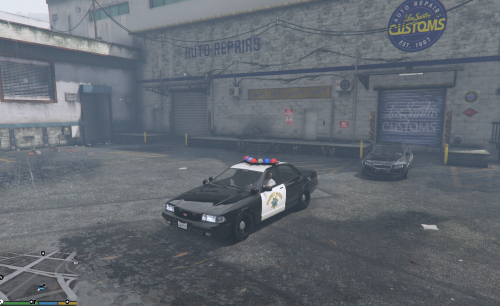 great model, although for some reason the lights on the light bar have transparent box's around them when they are lit, makes it look a bit off. idk if its something I didnt put in the carvariations or what but its a bit jarring to look at.
- 29 comments
- 5 reviews
-
0.3? Just use the automatic installer. it will do all the work for you.
-
you can sort of do this by forcing the callout to end.
-
Might be one of the yoga peds?
-
check out this thread for the mods we have found that work with 0.3
-
 lol it definitely is. Ill plop those numbers in tomorrow and let you know. going on 2am here. edit: nope with those settings its still offset to the right with 920x1030.
- 200 comments
- 22 reviews
-
@Lundy beat ya :P
-
-
Doors are rite out front. you cant miss them. garage/car storage is off to the right side of the front doors near parking lot and the dropoff for prisoner transport is behind the building near the canal with a automatic gate.
-
hmm my resolution is 1920x1080. i tried setting it to 920x1030 but its still in the middle of the screen. trying it to get it on the bottom left next to the minimap :P
- 200 comments
- 22 reviews
-
strobes and vehicle search work. and as for callouts code3, agency and arrestwarrant.
-
but they still do even when the roads are closed. perhaps its a feature thats still a WIP.
-
I am having the same issue with backup not responding. hwy nor swat is either. and police ignore is disabled. only time I have seen another unit is when I get a callout. the original units in the chase show up but then no other backup ever comes, and cant call any with the B key. edit: I noticed its throwing an error to my rph log. here it is. Edit#2: Seems it didnt like my edit to the backup xml. on line 42 apparently true was not a valid setting for <Vehicle extra_2=true>police3</Vehicle>
-
Indeed it is an amazing undertaking that they accomplished. The people complaining dont realize how much coding,debugging and testing goes into this sort of thing - and its volunteers doing it. Its amazing how they were able to incorporate so many other mods that for the last 6 months I have felt were almost mandatory for good rp. now its all bundled together and will make life so much easier not having to update 20 different mods when lspdfr now does it all on its own. I cant tell you how many times I wanted to use 'XX' mod but it required rph .32 but lspdfr required .29 and script hook wouldnt jive and so many other little pains in the ass that are now fixed.