
TheDude
Members
-
Joined
-
Last visited
Everything posted by TheDude
-
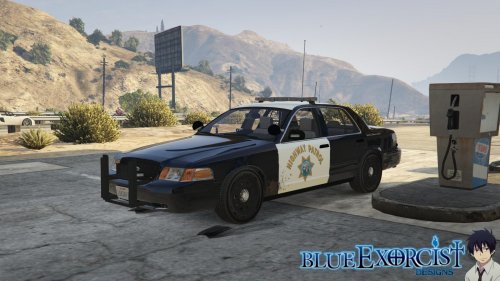 I have been using it in police4. It works like a charm minus one thing, when randomly spawning in the wild by hwyway patrol the undercoat is random colors, generally black or a dark red but it makes seeing the door decals and roof decals hard to see. what in the world do i need to do to lock it so it only spawns in white naturally?
- 77 comments
- 10 reviews
-
 I have seen some youtubers accomplish this but I am unsure how, would love to know also.
- 2,346 comments
- 236 reviews
-
 Looks great!
 -
yah but if i open it in photoshop then its only a single layer image which then shows up with no transparency/alpha layers.
-
yah thats where the issue is, the model/texture isnt unlocked. was hoping it was something I could do in a meta file but i guess ill just have to live with it
-
ah that must be it. now just to figure out how to do that lol
-
-
I just searched through all 18 of the carvariations.meta files and only found one reference to police and police3, and none to fbi. Can anyone confirm that the standard install (including patches and updates) doesn't include carvariations for these cars? I believe they reside with the sheriff cars and some of the other police vehicles in x64a/data. Unfortunately it is a ymt file and cannot be altered to the best of my knowledge.
-
I would recommend trying V.29 and see if that works for you. I have seen a lot of people having issues with the newer versions of RPH, apparently its not compatible.
-
Hmm i have been having an issue with a retexture of police4 but its that the base color randomly changes when it spawns in the wild, it should always be white but often spawns black. would the fix be to set AllowBodyColorMapping value="true" to false?
-
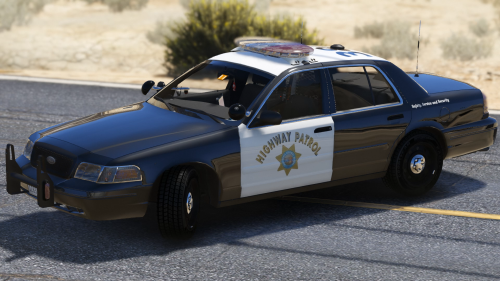 I have a small issue that when the car spawns in the wild the doors are different colors. any idea what the solution is?
- 13 comments
- 5 reviews
-
use the location that the Readme.ini states. There is some vehicle textures that require you to install to pathday8 but unless the readme tells you to then there is really no reason too. patchday8 is the most recent update so mods that effect that content such as yachts would be found inside that folder. These are the only vehicles that would need to be replaced in patchday8. The massacro is the only one that I have seen people confused about since it used to exist in patchday3 but now exists in patchday8.
-
Seems to be a bunch of people have reported the same issue on rockstars website. Seems like a reinstall is the fix for most but some others have found other things that have worked for them such as running as administrator, disabling VPN or adding a -verify line to the startup parameters. Might as well give it a read over yourself. https://support.rockstargames.com/hc/communities/public/questions/203312938-GTA-V-PC-The-Rockstar-Game-Services-are-unavailable- Edit: possible other fix. Try adding an inbound exception to your firewall for GTAV
-
a google search might be able to net you those files also ;)
-
yep generally most of them will go into update/x64/dlcpack/xxx but sometimes the readme will have you install them to the other .rpf files that are in your main GTA root directory. just make sure to make a copy of those files into your mod folder; and not make the OpenIV edits to the core files themselves, bad news come patch day if you do that. Here is what my mods folder for OpenIV in the GTA directory looks like.
-
Hmm. Have you started fresh from a new mod folder lately? It might help considering you said you have installed hundreds of cars, just rename your old mod folder to something else in case you want to go back to it easily. Its most likely a problem with a carvarations or a vehicle.meta file that was altered along the way during one of your other skin installs. I had a problem similar to this back in GTA IV and ultimately I had to restore back to default and re add everything one at a time until I figured out where I had made the mistake. Perhaps someone smarter then myself will actually know how to fix your problem though. *fingers crossed* Also If you run the game vanilla are all the light textures ok or are they all offset as well?
-
Is it just that these two hats dont exist online so they cant be used as an option? http://puu.sh/miUVx/a20b592ffd.jpg http://puu.sh/miUUe/cde0088a4b.jpg
- 2,346 comments
- 236 reviews
-
.thumb.jpg.839c9476ae8ad03d6c703fab6ea3df7e.jpg) Are these not just the textures from the @t0p4s pack with very very minor changes? why no credit to him? http://www.lcpdfr.com/files/file/8927-lscs-liveries-by-t0p4s-reworked-and-expanded-psd/. Perhaps i am wrong and all these skins are just blending into my mind lol.
Are these not just the textures from the @t0p4s pack with very very minor changes? why no credit to him? http://www.lcpdfr.com/files/file/8927-lscs-liveries-by-t0p4s-reworked-and-expanded-psd/. Perhaps i am wrong and all these skins are just blending into my mind lol.- 12 comments
- 1 review
-
-

- 3
-
-
 Is there anyway that I can make this show up on the weapon dial in a different slot? in grenades for example? would help me cut down on accidentally shooting people lol.
- 86 comments
- 33 reviews
-
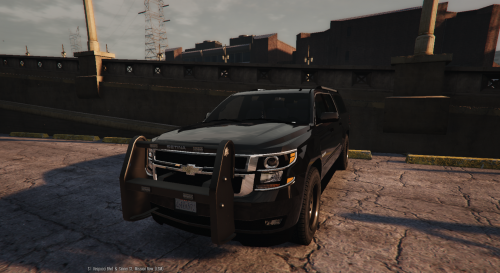 any chance for a model without the gigantic pushbar? would love to use this as an uncover instead of an unmarked.
- 38 comments
- 21 reviews
-
 does anyone else have an issue with this skin where if they get about 100ft from the car the texture disappears? I can still see officers sitting in it and if they have lights on those works, but the texture itself disappears. doublechecked the carvariation file and all is good. Edit: Just read threw the previous pages and saw that its a bug for everyone. hope a fix comes soon would love to use this car!
- 221 comments
- 34 reviews
-
-
Hey alex are the two sheriff hats included in this pack by chance? I remember you used to have a hats & helmets mod but I can no longer find it, most likely because you consolidated them all. But I cant recall if that pack ever contained those two hats?
- 2,346 comments
- 236 reviews
-
Hey fellas, was hoping you guys could help me pin down whats causing this crash. It seems to be ECALL_LSA_ARC which is causing the crash but I cant quite figure out what addon that comes from. My first quess was the police protection callout addon but I am still receiving the crash with it disabled (however it was enabled at the time of this log generation). Here is the log. Note: game crashes before I can even go on duty, I am able to relaunch lspdfr from the command prompt but a few minutes later it crashes out again. Edit : I think i fixed the first crash but now its crashing with this error.
-
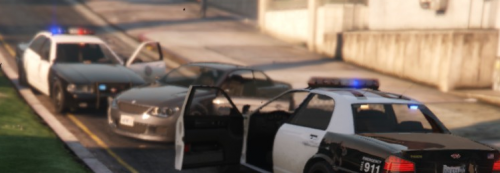 God damn it xD Thanks dude Haha np :) Although the ini now has it set to 50 max units by default, its a blue invasion! lol
- 108 comments
- 16 reviews
-
-
- 1
-
.thumb.jpg.839c9476ae8ad03d6c703fab6ea3df7e.jpg)