


Molten
Members
-
Joined
-
Last visited
Everything posted by Molten
-
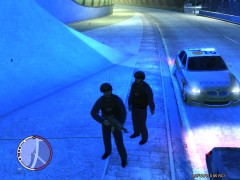 Nice hoping to use the CO19 as noose when you release them. Is that a G36C ?
 -
There may be subtle differences with the 2 paintjobs, or whoever made them may just be filling spaces with duplicates. Regarding nameing your imported image. No need to rename them as it will rename itself automatically.
-
No, on disk in "installers" folder. (I dont have disk version anymore but if deffo comes with a gfwlive installer either on the disk or in main folder. Or in steam it's / steam apps / common / grand theft auto Iv / installers... gfwlive.exe
-
If you have GTA IV on disk there is a file called installers and in that file there is a GFWlive installer .exe If you got it from steam the same file exists in the steam GTA folder. If you got it of torrent, this convo is over. Just run the GFWlive installer, Found in the "installers" file. Once installed check for updates
-
open sparkiv. In spark use the "open" folder option at the top, navigate to where your GTA folder is and open it. Then open PC / Models / cdimages / vehicles.img In vehicle.img find the car you want. Lests say for now it's police2. Find police2, there will be two entries, click one named "police2WTD" file. The line is now blue. (or you could double click) At the top of spark to the right is "Edit". Click on edit. The livery painjobs are prob' named something like sign1 - 4 or paintjobs etc.click on each to find the one you want. with that selected click "export" at top of spark. Export the paintjob to desktop (or wherever). Then go back in and select all 4 painjobs one at a time. with one of the painjobs selected click "import" at top of spark, and import the saved paintjob you put on your desktop. IMPORTANT ! after each import you must hit "save and close" and then do that for each of the 4 paintjobs. Sounds more confusing than it is. long story short. you import the painjob you like over ther 4. making sure you save after each one. You might want to save all 4 before you import over them as well.
-
Or... In the "wtd" file export the one you want to desktop. then re'import it over the overs. Removing +liverys in ide works if the livery you want is the first one I think. If it's one of the others you will be stuck with just one you don't want. But all methods work as well as each other.
-
Ahh, that explains it. OK I have no idea what "Vehicle installer" is. But the fact you have tried it and it doesn't work says it all really. This is a sound file not a vehicle. You need sparkIV and tbh the quicker you get used to sparkiv the better because it's the most used program for installing all sorts of gta files. Download sparkiv and follow what I said in previous post and it will work. Also a quote from post 14 "Im using spark iv because i dont know how works GTAIVAUD." Not surprising I thought you were using sparkiv really. Also make sure you have the right sparkiv. if your playing gtaiv then you need the sparkiv for patch 1.0.7.0. if your using EFLC you might need a different one I'm not sure tbh.. Just google sparkiv
-
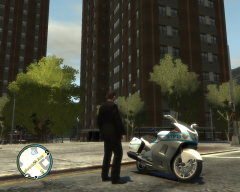
From the album: Various Patrols...
Not impressed with skin tbh making a new one. Rider position needs changing also. -
you can get a computer from Nasa but eventually with any computer it will reach a limit. Decision is what limit works for you. If I call 5 noose and 5 police backup My PC has issues, but thats fine for me as most of time I only call x2 back up at most. (normally just x1) No matter what PC you have you can always push it to its limits.
-
Your Vram (gfx card memory) can't handle the sudden surge in high poly cars that it needs to render. Long story short with modded noose / backup when you call for lots of them your PC has to work hard and if it can't keep up textures will not be rendered and you end up standing in nowhere land :)
-
ok good. That should work if installed correctly. So open sparkIV and find the Horn Ivaud file. Sounds like you had no trouble finding it as you allready mentioned it's in residents. Main folder / PC / Audio / SFX / resident.rpf / horns.ivaud In sparkiv cick on the horns.ivaud file once and select it so the line is now coloured blue. At the top of sparkiv you should see a "import" tab. Click this. Now navigate to find the new horns file you want to replace and double click on the new horns.ivaud or press open. You now have imported the file. Last thing now is to click "rebuild" and then click "save" in the top panel of sparkiv. (rebuild isn't realy needed for this file but if it is highlighted and you can click it then do so. But make sure you press "save". Thats how I do it. That should work. If not let me know.
-
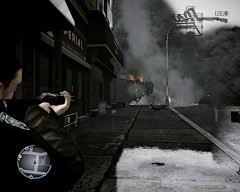 well yes and no. Meaning the pic as a whole got a bit of treatment but nothing special was done to any area in particular. The smoke particle effect In GTA IV is pretty good when caught in the right light. Only things I did was a bit of colour change, some shaddow stuff and antialiasing. Might of used an artistic filter of some kind too but can't recal. But yeah the smoke does look good :)
 -
I don't use teamviewer, but post the link for the siren you want to install and I will take a look at it and see what we can do.
-
thx. I will own up and admit I used Gimp to ajust the image :) Also this pic was taken back when I used ENB.
-
From the album: Various Patrols...
Shot dead, but sadly after he detonated his car bomb. -
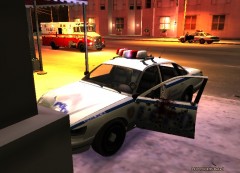 This is what I miss by having ELS. Trading decent lights for realistic damage.
 -
Your welcome. Happy things worked out. Enjoy.
-
There is a side benefit from being banned from GPM. Means I can't search for people :) @ Jam +1, and can you pick me up some Milk when your out please.
-
Thats fine, it's a good program. Whenever I use sparkiv I get in the habbit of hitting "rebuild" and "save" after each time I alter something. It's not always needed to hit rebuild but I do it anyway just so the one time I should of I don't forget.
-
All I can say is if it's running ok for an hour then your doing better than most :) Sounds like a memory leak. TBH after long play my performance suffers too. I don't think it's a hardware issue but would be interested in other peoples thoughts too.
-
Either that or timebetweenshots="133" If it is that then a smaller number will increase ROF. If it's firerate or blindfirerate (which could be aimed and non aimed) then a larger number is needed. Or as said a real weapon mod. Grims weapon pack is well rated and has rof adjustments for all weapons as well as sounds, models and real physics.
-
Yes, once you have imported the new sound save before you exit the program. Also what are you using to edit these files with, are you using sparkIV or gtaivaud ? helps us to know which one you using. (or you might be using openIV even.
-
Not sure I understand what your trying to say.
-
Might seem like the domestic call is the only one at first but give it time. That call is very common. Try Pressing Alt+F11 to force a call and decline it "N" if it's domestic call and try Alt+F11 again. You will get different calls eventually. It's just the domestic call happens a lot.
-
Let me Google that for you ;) http://lmgtfy.com/?q...+IV+Durch+siren http://lmgtfy.com/?q...iles+into+GTAIV I even spelt "Dutch" wrong in the Google search and still found stuff :) Sorry for sarcasm but it will save you and everyone time if you use google first and ask second.

