



.png.b38616cbc51290fcaa2979c44ee90512.png)
Mrsuperx13
Members
-
Joined
Everything posted by Mrsuperx13
-
Do the following 1. Load GTA 5 first. Then, once in-game, tab out and launch RPH. 2. Go into the CommandLine.txt in the Main Directory and remove everything and then add `-windowed` and save and exit the document. Then retry step 1. 3. Add GTA V to the exceptions list in your anti-virus. More info on that found in #support-faq - then restart your computer. 4. Disable any in-game overlay such as Discord, Steam, OverWolf, or GeForce Experience. 5. **If you tried everything above and it still doesn't work**: Follow the instructions on page 4 https://bit.ly/3FLBASB
-
Can you upload your latest log please
-
Then there is something wrong with your base game. Try to verify the game.
-
I know which is why I said "you are still getting way more than you called"
-
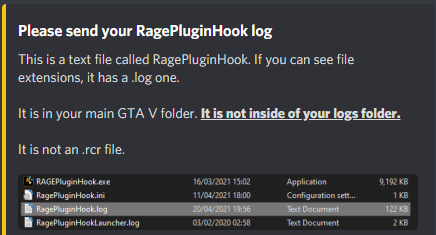
Do you use ultimate backup or the vanilla lspdfr backup option? Please go in game: Go on duty Call for backup wait for backup to show up and confirm you are still getting way more than you called exit the game upload your rage log here
-
Try launch regular GTA first then once you've loaded in game and can move your character around tab-out and launch RAGE.
-
This looks like a vehicle related crash meaning usually a vehicle that is installed wrong or a vehicles.meta edited incorrectly, but you said you already tried to rename the mods folder. Is it possible you edited any of the base game files outside of the mods folder? I would perhaps try verifying the game. Also go to gta/lspdfr/data and rename the custom folder to "_custom" Which 3rd plugins do you now have installed?
-
Please Upload your latest log
-
Reinstall Lidar Gun
-
2 things 1. Go to gta/lspdfr/data and rename the custom folder to "_custom" 2. It looks like you may have one or more outdated/unsupported mods from a retired Plugin developer named Albo. Please Remove any of the following that you have; `Auto Pursuit Backup Disabler` `Arrest Manager` `Assorted Callouts` `LSPDFR+` `Traffic Policer` `Police SmartRadio` If you are looking for a similar suite of mods I recommend checking out https://www.bejoijo.com/ and Opus49's mods on this site.
-
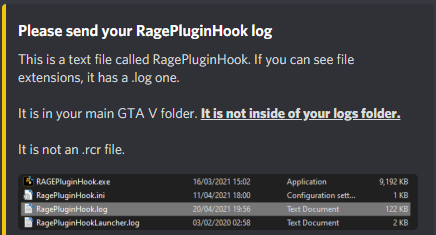
Make sure the keybinds you have set fit within this format. Also please upload your rage log.
-
If renaming your mods folder stopped your problem that means unfortunately something in your mods folders is corrupt. Either a mod you installed or a file you edited. If you can remember what you installed or edited most recently then you can try and remove it or restore the vanilla version. Otherwise I'm afraid you're gonna have to start your mods folder over again, as it is pretty much impossible for us to diagnose what's actually causing the issue. The only other thing it could be is if you recently installed a large amount of addon cars you may need to install a custom gameconfig.
-
Do the following 1. Load GTA 5 first. Then, once in-game, tab out and launch RPH. 2. Go into the CommandLine.txt in the Main Directory and remove everything and then add `-windowed` and save and exit the document. Then retry step 1. 3. Add GTA V to the exceptions list in your anti-virus. More info on that found in #support-faq - then restart your computer. 4. Disable any in-game overlay such as Discord, Steam, OverWolf, or GeForce Experience. 5. **If you tried everything above and it still doesn't work**: Follow the instructions on page 4 https://bit.ly/3FLBASB
-
Do the following 1. Load GTA 5 first. Then, once in-game, tab out and launch RPH. 2. Go into the CommandLine.txt in the Main Directory and remove everything and then add `-windowed` and save and exit the document. Then retry step 1. 3. Add GTA V to the exceptions list in your anti-virus. More info on that found in #support-faq - then restart your computer. 4. Disable any in-game overlay such as Discord, Steam, OverWolf, or GeForce Experience. 5. **If you tried everything above and it still doesn't work**: Follow the instructions on page 4 https://bit.ly/3FLBASB
-
It looks like you may have one or more outdated/unsupported mods from a retired Plugin developer named Albo. Please Remove any of the following that you have; `Auto Pursuit Backup Disabler` `Arrest Manager` `Assorted Callouts` `LSPDFR+` `Traffic Policer` `Police SmartRadio` (there has been an update to this from another developer if you would like to continue to use it https://github.com/Aschtar/PoliceSmartRadio/releases/)
-
When you download this one https://www.microsoft.com/en-us/download/details.aspx?id=48145 it gives you two options which one did you download?
-
You also have scripts installed try to rename your scripts folder to "_scripts"
-
Pleasure. If what I told you worked feel free to mark it as the solution so when others come across this thread it helps them too.
-
Different game configs allocate different amounts of resources, its possible your computer wasn't able to handle what the previous one was allocating
-
I would recommend going through the rest you have and checking if they have updates and or they are compatible with the latest version of LSPDFR.
-
Do the following 1. Load GTA 5 first. Then, once in-game, tab out and launch RPH. 2. Go into the CommandLine.txt in the Main Directory and remove everything and then add `-windowed` and save and exit the document. Then retry step 1. 3. Add GTA V to the exceptions list in your anti-virus. More info on that found in #support-faq - then restart your computer. 4. Disable any in-game overlay such as Discord, Steam, OverWolf, or GeForce Experience. 5. **If you tried everything above and it still doesn't work**: Follow the instructions on page 4 https://bit.ly/3FLBASB
-
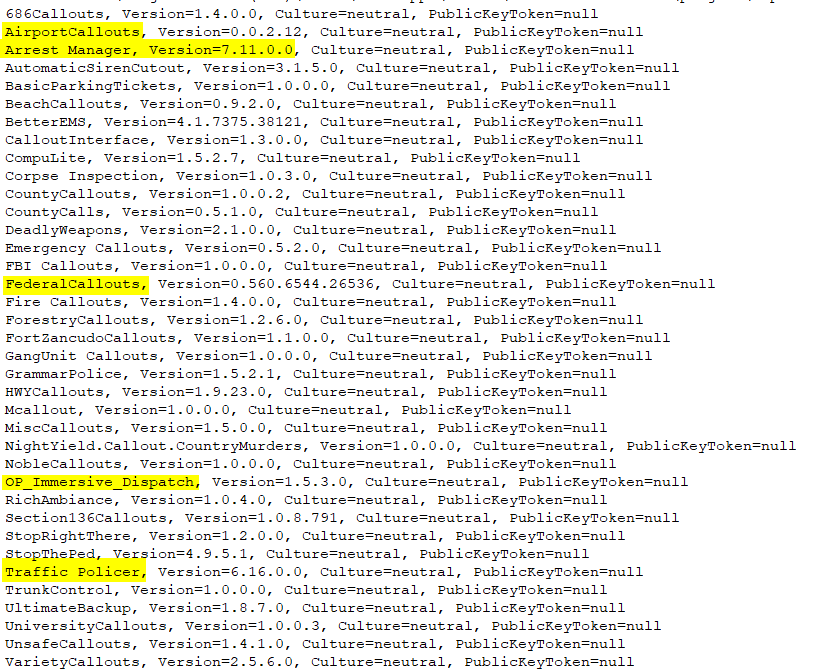
LSPDFR is never gonna be 100% stable the best way to mitigate crashes is to reduce the overall amount of plugins installed especially out of date ones. Please remove the following plugins
-
Please send screenshots of your game folder. your plugins folder and your gta/plugins/LSPDFR folder
-
Do the following 1. Load GTA 5 first. Then, once in-game, tab out and launch RPH. 2. Go into the CommandLine.txt in the Main Directory and remove everything and then add `-windowed` and save and exit the document. Then retry step 1. 3. Add GTA V to the exceptions list in your anti-virus. More info on that found in #support-faq - then restart your computer. 4. Disable any in-game overlay such as Discord, Steam, OverWolf, or GeForce Experience. 5. **If you tried everything above and it still doesn't work**: Follow the instructions on page 4 https://bit.ly/3FLBASB
-
Move the dinput8.dll out of your GTA directory. Then try launch **regular** GTA first then once you've loaded in game and can move your character around tab-out and launch RAGE.
.thumb.png.20c527cb5cfc433de390bfa6845ed282.png)


