
IceGuy221
Members
-
Joined
-
Last visited
Everything posted by IceGuy221
-
Where are you installing the replace files? Are you using any visual mods like NVE? Best place to install replace emergency vehicles is in mods/update/x64/dlcpacks/patch2024_02 If using NVE; mods/update/x64/dlcpacks/nve_vehicles (vehicles.rpf inside) Other visual mods might also have their own folder, so if installing in patch2024_02 doesn't work but you are using another visual mod, please make sure that mod doesn't have its own vehicles.rpf
-
Can you attach the actual log file so that way I can download and scan it, you can find this file in the main directory, and it will be a text-file called RagePluginHook or RagePluginHook.log
-
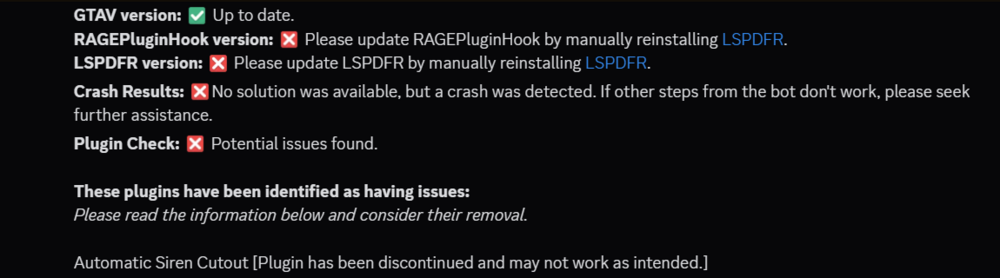
Better alternative for Automatic Siren Cutout is Richs Police Enhancements (made by same creator). Siren cutout feature in this mod must be enabled via .ini settings. Please update RPH & LSPDFR
-
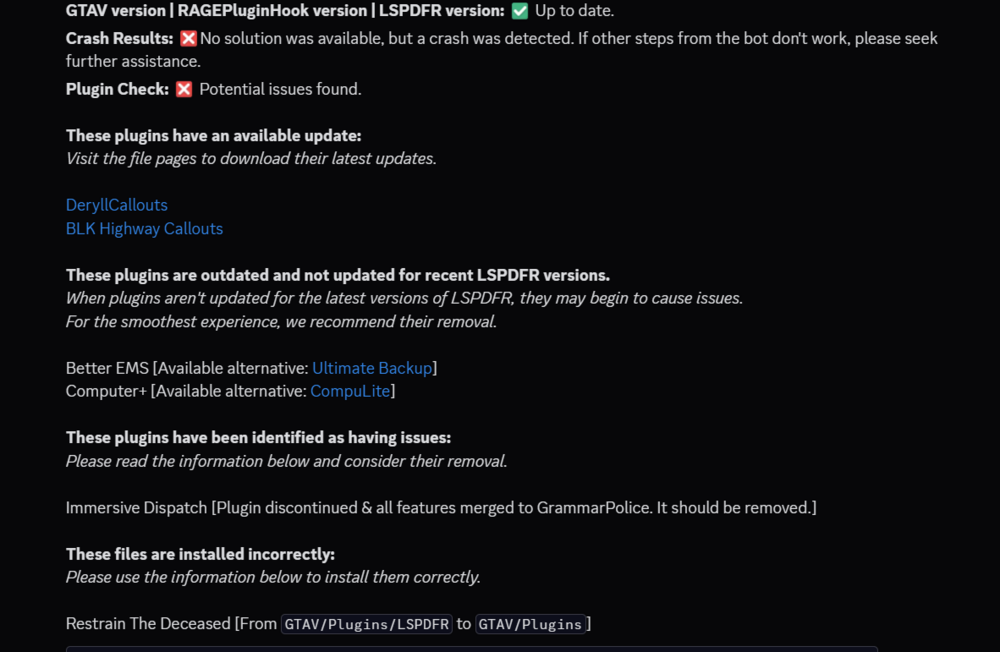
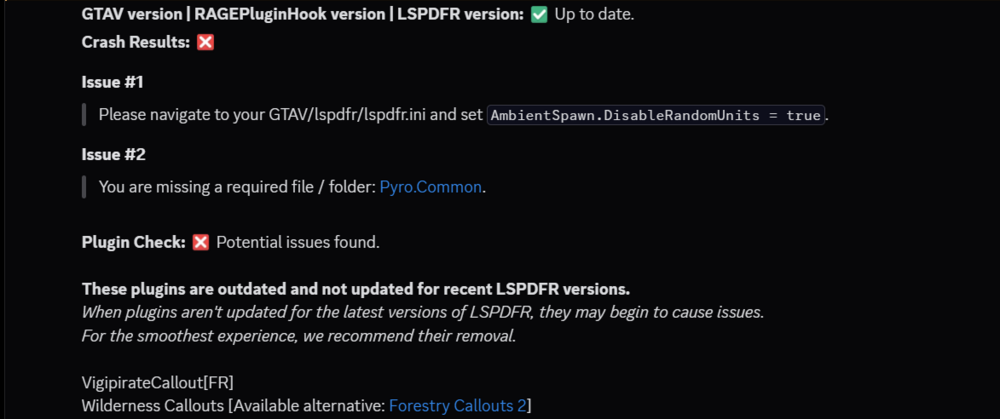
It appears you have a lot of outdated mods, and some mods installed incorrectly
-
-
Can you send a screenshot of your game directory, there's a possibility that LSPDFR may have been installed incorrectly if it's the only thing installed.
-
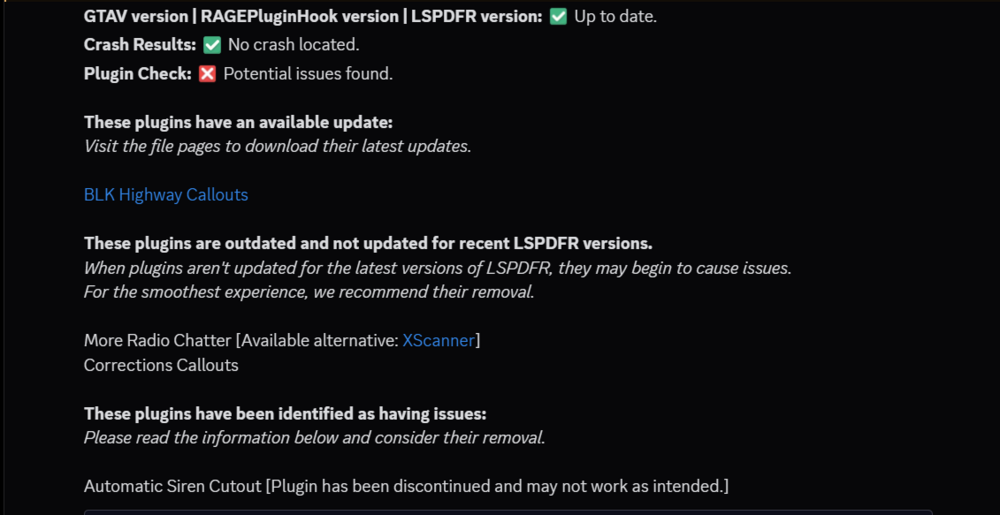
It seems that no crash was exclusively detected in your log, but you do have some mods that need updates, and some mods that are outdated and discontinued While I don't know any alternatives for corrections callouts, I know that the creator of Automatic Siren Cutout has discontinued the mod but has made an alternative mod that offers more features and includes the updated coding for Automatic Siren Cutout with it. I would try replacing that mod with Richs Police Enhancements.
-
Try adding them to mod/update/x64/dlcpacks/patch2024_02 as this is the latest patchday, and typically works for emergency vehicles when installing with replace files.
-
 probably one of the best ones on here, there's a couple of repeated charges, not sure if it's intentional or not but i'll find like the same charge in 3-4 different categories
 -
Your key lock might be enabled for ELS, I believe default key to disable/enable the key lock is the scroll lock key. If this is not the issue, then try the following: - If you edited your ELS.ini (Specifically for the Controls) and changed any of the controls to "0" (removing the key bind for the control option(s)) then this would explain why it is activated and not able to be deactivated. To fix this, simply give the control a key bind, and this should fix your issue. - If that didn't solve your issue or was irrelevant, plz send your ELS.log and I will double check that it does not indicate any issues (if you have'n't already tried this.
-
your log does not indicate any crashes, can you please explain what issue you're experiencing
-
can you send a screen shot of the directory where you install the mods? (Including where the mods actually ended up)
-
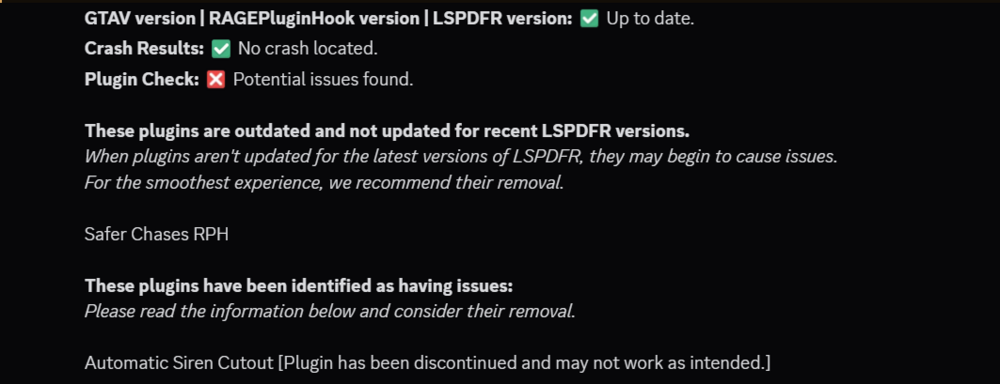
I'm not sure if the scorcher has anything to do with the crash but you have some outdated mod's, that may have been related to the crash: I better alternative, made by the same creator of Automatic Siren Cutout (ASC) is called Riches Police Enhancements. This mod does a lot more, but it includes automatic siren cutout in its coding, and is more updated and maintained
-
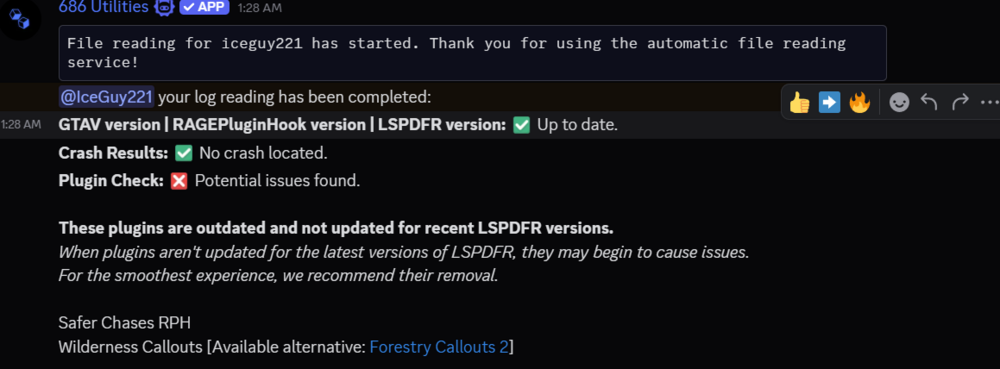
You are using a callout that is outdated. While no crash is indicated in your log, you are using wilderness callouts. This mod is outdated, and the creator of the mod has released a currently functioning and better alternative call forestry callouts this and your Safer Chases plugin
-
Instead of placing them in Patchday28, place them in "Patch2024_02" Be sure that you don't place them in in anything that says "mp" or "mp2024_02" in the name that looks similar, that one gets people sometimes If you are using NVE, you need to place any replace file you are using into NVE_vehicles as this mod comes with it's own vehicles.rpf that overrides basegame
-
-
 please add a preview
 -
 Having an issue where i can't disable the feature where the character will be holding the handheld radio when i have the radio pulled up. I thought there used to be a setting to disable the animation but now there isn't. would be nice if i could keep it to my shoulder or chest animations rather than my character pulling the handheld out or possible getting stuck in 2 animations at once
- 1,357 comments
- 85 reviews
-
 Great mod, and i've always enjoued having it in my game! There's a small bug however where sometimes, even with the .ini setting set to true, the minimap will still appear, or half of it will appear when you are in the dashcam view. Even with the ini settings set to disable it, this happens from time to time. It's easy to fix as the user by cycling through the cams a couple of times, but figured i mention it
- 287 comments
- 27 reviews
-
-
 what mod would you be referencing
 -
There are a could different ways to fix this. You can add the region to the department jurisdiction of your choice by editing regions.xml, which is located in GTA V / lspdfr / data This is the way I have fixed a lot of issues for me when it comes to the wrong departments patrolling an area. If you're looking for a specifc department from EUPFR or EUPUB, you can look in any of the departments or regions xml files locates in GTA V / lspdfr / data / custom and try to fix the issue there. These are my suggestions if you know how to edit these jurisdicational regions
-
Hello, the log you have attached isn't the log we need, as that is the detailed report, meant for RPH devs to find issues in RPH itself. The log we need to assist you would be located in your main game directory, next to RagePluginHook.exe It should be a text file names RagePluginHook / or RagePluginHook.log Do not look for it in the logs folder, as those are also not the proper log files
-
Do you have EUPFR installed? Or a Compatible Version of EUPUB for your EUP version?
-
could you please attach the log file itself? Be sure to get the log located in your main game directory, and not the logs folder. The log can be found next to RagePluginHook.exe, and should either be a text file name RagePluginHook, or RagePluginHook.log The Log you have attached originally is the wrong log as this is the detail report