


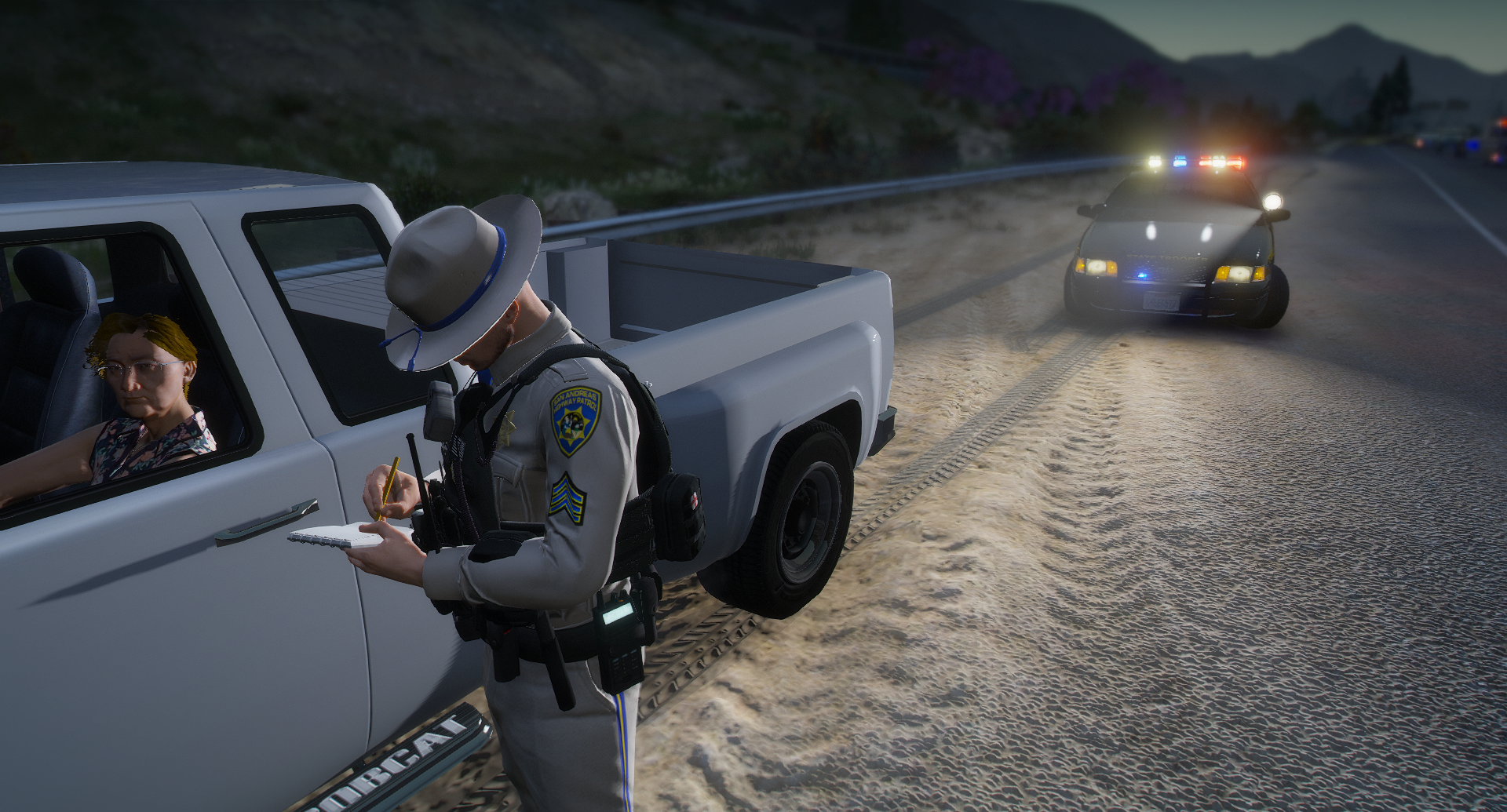

IceGuy221
Members
-
Joined
-
Last visited
Everything posted by IceGuy221
-
Yeah the log doesn’t show any crashes or anything. What mods are you running? Are all your mods and asi loaders up to date?
-
So based on this it sounds like your installing replace files. Are you sure you’re installing them in the right place? what directory are you installing them to? Do you have packfile limit adjuster, heap adjuster, resource adjuster, and any other required mods
-
Oh my goodness brother i can see that you are having some issues. I’m gonna need a couple things to be able to help you. first of all based on this image some of your callouts and plugins are somehow installed twice which can cause issues. You also have some unneeded files in there. And I’m assuming these are in the right directory only bc the directory isn’t shown in the image. but I’ll also need you log. It’s located in your main game directory where ragepluginhook.exe is located. It’s a text file names RagePluginHook or RagePluginHook.log (as shown in image below) I’m also going to need a screenshot of your main game directory just to make sure you have everything installed correctly there. I’m going to try and help you the best I can with this,

-
It looks like it says something called CarCrashMod is causing it. This is labeled under Adam69 Callouts. It’s a super long error and a series of different errors including system32 errors
-
Yes just click the add files button in here, and locate the file through the browser when it pops up
-
I need the full RagePluginHook.log file please. It’s in your main game directory, where ragepluginhook.exe is located, as shown in the image below

-
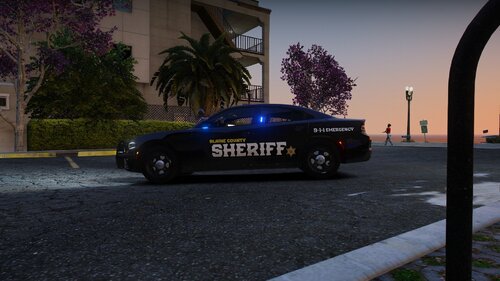 Not even gonna lie I bout broke my neck doing a double take when I saw this thumbnail bc I thought you stole one of my screenshot for a second lmao 🤣 Confused? This is what I mean, below is my screenshot: I posted this in a couple discords and on this website so I could’ve been possible but I thought it was funny enough to share. Pack looks good tho, good work
 -
The order of whether you install addons first last or in the mix won’t have any effect on their functionality. All that matters is that they are installed correctly. I’ve never heard of add-on vehicles automatically overriding replacement vehicles on their own, however I’m not fully sure what pack you used, and I supposedly it could have come with another file that allows for this. If you don’t mind linking the pack I can take a look to better understand how this happened
-
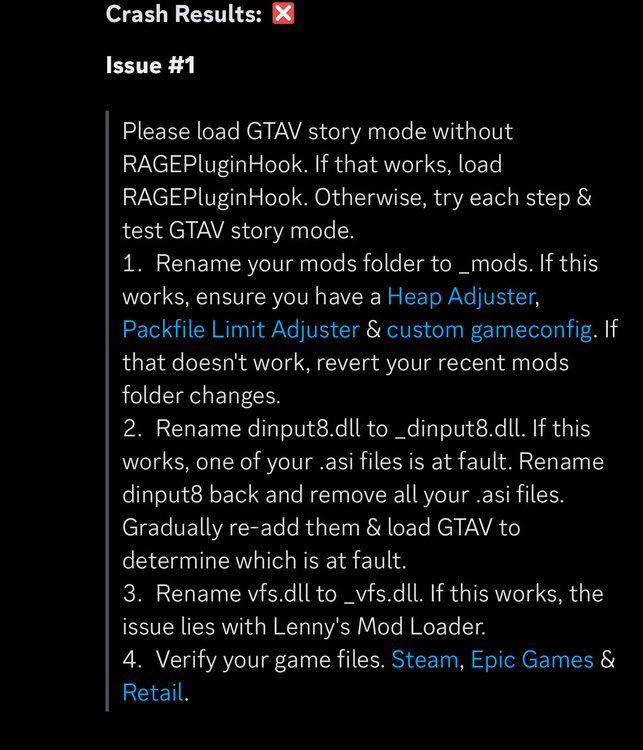
Make sure it’s the most updated version of scripthookv, and make sure you also have the latest scripthookvdotnet (nightly) and ragenativeui install head adjuster and packfile limit adjuster. And install the latest advanced hook v for ELS (required for ELS) should solve issues. I also recommend LemonUI. If you choose to install lemonui, you will need to install the following folders from the package into your scripts folder: RPH SHVDN3 SHVDNC If that doesn’t work, try following steps:
-
Can you send your RPH log? I’ll look at it and help determine what would be causing your crash
-
Hey there, this is a common issue that can usually be fixed easily! It’s important to know which EUP version you are using though! If you are using the free 8.3/9.3 version of EUP, you need to install EUPFR or EUPFR-UE and you need 9.3 configurations. As these will tell your game what the AI from ultimate backup what to wear. If you are using the patreon version of EUP (9.10) the. You need to install EUP Ultimate Backup Configurations (9.10). I’ll link the below and you can click on the link(s) that you need. For Free Version (9.3) - 9.3 Configurations - EUPFR-UE - EUPFR For Patreon Version (9.10) - UB Configurations
-
Hi there! Can you send your ragepluginhook log file? It can be found in your main game directory where ragepluginhook.exe is located (not the logs folder) The issue you’re running into is something that can happen when playing LSPDFR, but usually isn’t repeated consistently. It can also be caused by a number of things. I’ll take a look at the log and see if I can find any issues there first!

-
Do you have gameconfig? As well as heap adjuster and packfile limit adjuster
-
Hello, there don’t appear to be any crashes or errors in your log that I can find. At what point does the game crash? Is it consistent? When did this crash start occurring?
-
Can you post you RPH Log plz! Also were the vehicles you deleted addon or replace? If addon, did you remove the item line from your dlclist.xml?

-
Gameconfig is generally preference, here’s the link to the one that I use with my game, as well as another one that I found with a quick google search: what I use: https://www.gta5-mods.com/misc/how-to-install-gameconfig-in-gta-5-version-1-0-350-1-1-36-gta-5-gameconfig-for-limitless-vehicles google search: https://www.gta5-mods.com/misc/gta-5-gameconfig-300-cars
-
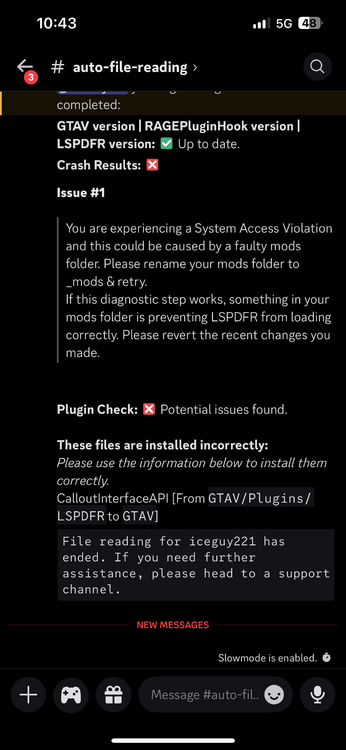
it looks like calloutinterfaceapi is installed in the wrong place. It’s currently in GTA V/plugins/lspdfr This file needs to be in your main directory (where gta5.exe is located) if this fixes the issue then we found it, if not rename your mods folder to _mods and see if it works. If it does, something in your mods folder is causing the crash, and needs to be reverted. This could also be from an install issue
-
There are plenty of videos out there. Just make sure you install it to a clean copy of GTA, and not the directory where LSPDFR or any other mods would be located. You can create a copy of you game by backing up game files. YouTube References: - - - these are just some references, there are plenty of tutorials on YouTube, and there should be one that helps you to your needs
-
It could be an installation issue if that didn’t fix it, or something simple that’s just hiding out. While I doubt I’ll find anything in the log about it, try sending your RPH log and I’ll skim through it. Also make sure everything is installed through the proper directories if possible. Do you have Heap Adjuster and/resource adjuster installed? If so you can try increasing your heap adjuster slightly to see if that fixes anything
-
Try sending the new log and hopefully I can find something in there now that all the other issues are cleaned up a bit. I know how frustrating it can be to have to do full reinstalls
-
You must install FiveM and LSPDFR to seperate game directories, they cannot both be run on the same GTA directory.
-
Please post the ragepluginhook log, located in the main directory (NOT THE LOGS FOLDER)

-
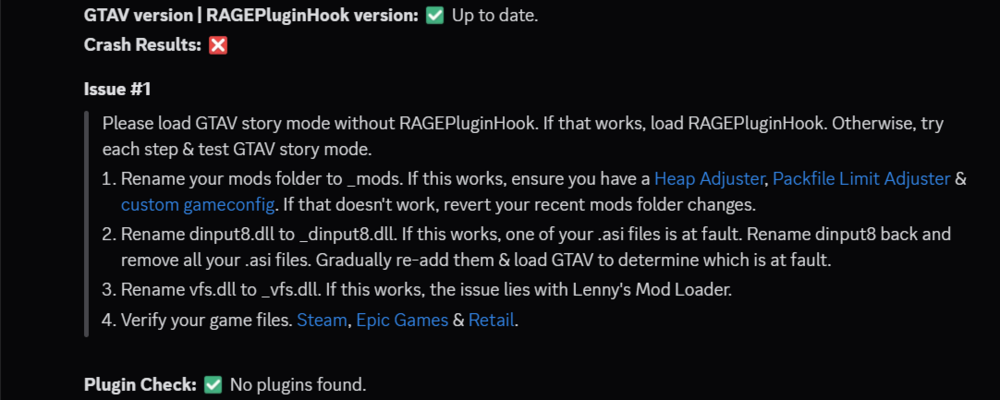
then the issue is likely outside of the mods folder. Try renaming dinput8.dll to _dinput8.dll If this works, one of your .asi files is at fault. rename dinput8 back and remove all your .asi files. Gradually re-add them & load GTAV to determine which is at fault. If that doesn't work rename vfs.dll to _vfs.dll. If this works, the issue lies with Lenny's Mod Loader. If that doesn't work, try Verifying your game files.
-
I would try the steps above if you haven't already. Also make sure that ScriptHookV, ScriptHookVDotNet, and RageNativeUI are up-to-date! (ScriptHookVDotNet Last Updated 6 days ago! This not being updated can indeed cause this type of crash) If this doesn't work let me know!
-
Hello, this isn;t the log we need to help you unfortunately. The log we need is in your main directory, not the logs folder. It will be a text file named RagePluginHook or RagePluginHook.log







