



IceGuy221
Members
-
Joined
-
Last visited
Everything posted by IceGuy221
-
have you tried updating scripthookvdotnet? sometimes the game will crash like this if it's outdated and you have mods in the mods folder. Latest update was yesterday
-
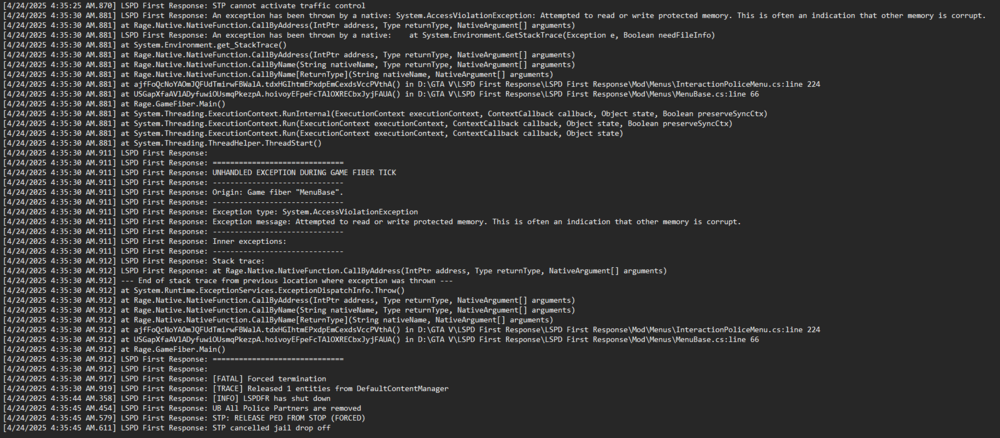
It looks like the issue is occurring when you're trying to close roads. I can't find out what it is precisely, but I'll keep looking at this log. I pulled the stack trace from the log (Image Above) and will have it attached in case a brighter mind happens to come across this forum and is able to solve it before I can.
-
you can try adding the files like RPH, mods/plugin folder as exceptions to your anti-virus, or temporarily disable anti-virus. (Disabling is not recommended, but does typically work, you can do this at your own risk if you choose) Please send you log, and I'll make sure that it's not something else

-
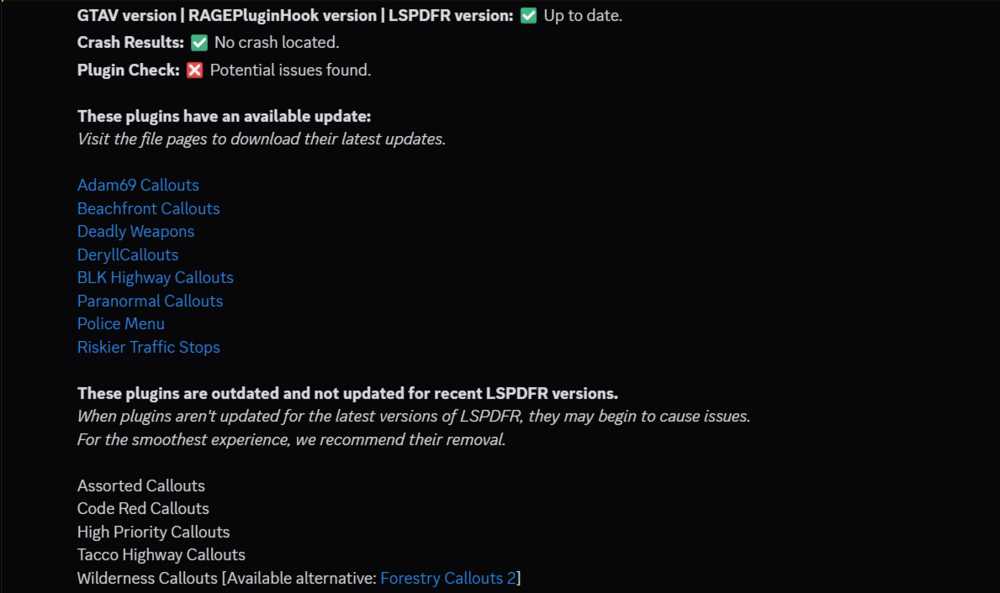
Brother it could be that you haven't been keeping your plugins updated lol. Try updating the ones that can be updated and removing the ones that are outdated as a whole. (Wilderness Callouts can be replaced by Forestry Callouts, as the creator discontinued wilderness and created the new 2.0 version named forestry callouts.) If this doesn't fix the issue, then a mod might also be installed incorrectly somewhere, or you need to increase you heap, packfile, or pool size
-
What mods do you have installed? I ran into this problem when helping them install LSPDFR recently, and the issue was one of the stability mods being outdated. Make sure you have the latest version of the following mods installed: - ScriptHookV (Updated April 12th, 2025) - ScriptHookVDotNet (Updated Yesterday, April 23rd, 2025 - RageNativeUI (Updated December 12th, 2024) Also be sure that all mods are installed correctly, and aren't outdated.
-
Can you send your log please. Also, what mods to you have installed? It could be related to a mod missing, being outdated, or just needing a quick update

-
When installing EUP, the following files are required (except EUP Badges), and should be installed in the order they are listed of for best results. - EUP Menu - Law & Order - Serve & Rescue - EUP Badges (Optional) - EUPFR or EUPFR-UE - 9.3 Configurations Installing like this should remove any issues you come across so long as they were installed through the proper directories. Make sure you also have the following mods: - Ped Prop Limit Adjuster - ScriptHookVDotNet (Latest came out yesterday, 4/24/25) (Don't know why but this being outdated always causes problems for people) - Gameconfig (Recommended) - Packfile Limit Adjuster (Highly Recommended) If you are still having issues, let me know, but the above information helps solve a lot of issues like this.
-
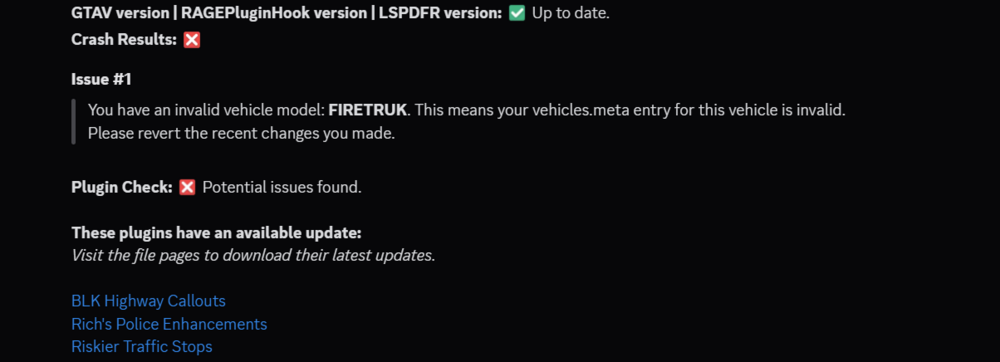
the image somehow uploaded in the quote but it's there, your vehicles.meta is messed up and you have some mods that need updated
-
 yeah i'll look for it really quick, i was seeing them from a support post somewhere RagePluginHook (2).log
- 19 comments
- 3 reviews
-
What callout mods are you using, there definitely a crash in your log but whatever it was wasn't specified, looks like it might be two mods but I can't tell. The mods I think it is based off what I'm seeing, - CalloutManager (Which is an outdated mod) - RobberyCallouts (Not sure if it's outdated or not but there are a lot of reported issues with this pack) If I'm right, cool narrowed it down. If I'm wrong, oh well, whatcha got?
-
This isn't the right log, while it seems like it the log i need is not located in the logs folder. It will be in the main game directory close to where RagePluginHook.exe as shown in the image below. I will look at the file that was sent anyways just in case, but please send the other one. update, the current log doesn't have anything in it that i can find please send the RagePluginHook.log instead

-
robbery.cs line 111 is an error i'm seeing for a lot of people, maybe the dev can look into it?
- 19 comments
- 3 reviews
-
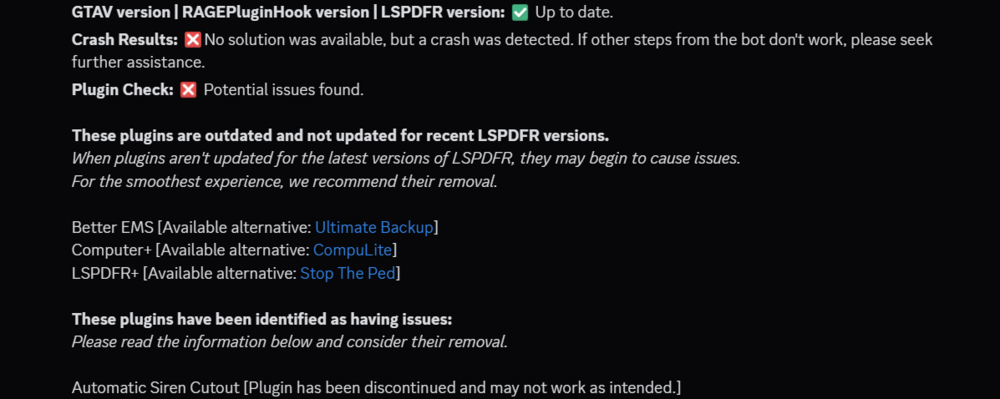
The causes of your crashes are more than likely the use of outdated/discontinued mods, and I recommend using their alternatives shown in the image below. Automatic siren cutout has been discontinued as well, and the coding for it is now integrated with richs police enhancements. (same creator different mod) You'll just need to make sure you configure the .ini for the features in the mod to work. As for EUP, which version of EUP are you using? (If the free 9.3/8.3 version, make sure you have all needed files, which are listed below, and in the proper order [as listed in order below]) - EUP Menu - Law & Order - Serve & Rescue - EUP Badges (Optional) - EUPFR or EUPFR-UE - 9.3 Configurations If the EUP issues is still showing up with the 9.3/8.3 free version, then it could be something else, but I wouldn't know what tbh
-
Can you send your RPH log file please

-
can you send your RPH log file please and thank you

-
can you send your RPH log please

-
Can you send your RPH Log Please

-
-
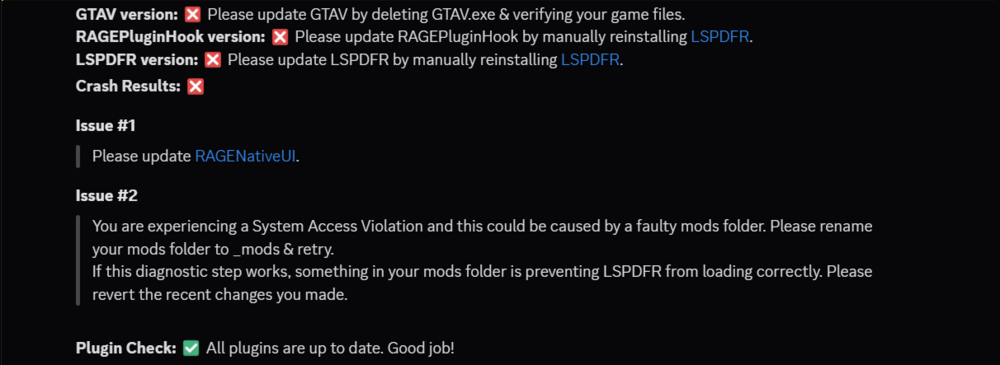
You can scan your files in Charlie686's Discord Channel (Link). There is a channel titled "auto-file-reading" and Charlie's 686Utilities bot will scan the file for you. There are also support channel that for extended help. (This is in no way an advertisement, just friendly information). Cheers!
-
Did you have any other visual mods installed when you installed Natural Vision? Also natural vision did not revert your vehicles, it's just bypassing them. The mod comes with its own vehicles.rpf with all the base game vehicles in is so that you can put your replace vehicles in there. Should be somewhere in mods/update/x64/dlcpacks/NVE_vehicles What To Do If You Installed NVE While Another Visual Mod Was Installed: Just use the NVE uninstaller. Yes it will uninstall NVE, but it will also uninstall any other visual mods that you may have installed. You may need to check for .ini's for some visual mods that have them in the main, plugins, scripts, or any other directory like that, but for the most part it's pretty simple. After uninstalling the visual mod, make sure you install NVE in the proper order: PART ONE.oiv PART TWO.oiv PART THREE.oiv Reshade Shaders (Reshade is An Optional) After doing this, you can install any option add-ons that you wish, but you MUST install the LSPDFR Compatibility Patch.oiv from the option add-on's folder. I HIGHLY recommend installing this very last, as it will remove or replace some high-quality textures from the other addons for stability. Still Crashing After This? Try increasing resource adjuster, heap adjuster, packfile limit adjuster, and if needed, edit the pool size inside of your game config (just don't break the limit specified within the .xml file) This should solve a lot of crash related issues.
-
What mods do you have installed? Can you send your RPH log as well please
-
From the album: LSPDFR Captured Moments
-
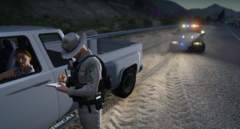
From the album: LSPDFR Captured Moments
-
How and where are you trying to install them (i.e. what pathway for the where)
-
what mods do you have installed? also go your you main game directory, and locate a txt file titles RagePluginHook or RagePluginHook.log this file should be just below RagePluginHook.exe Please send this log file.



