



IceGuy221
Members
-
Joined
-
Last visited
Everything posted by IceGuy221
-
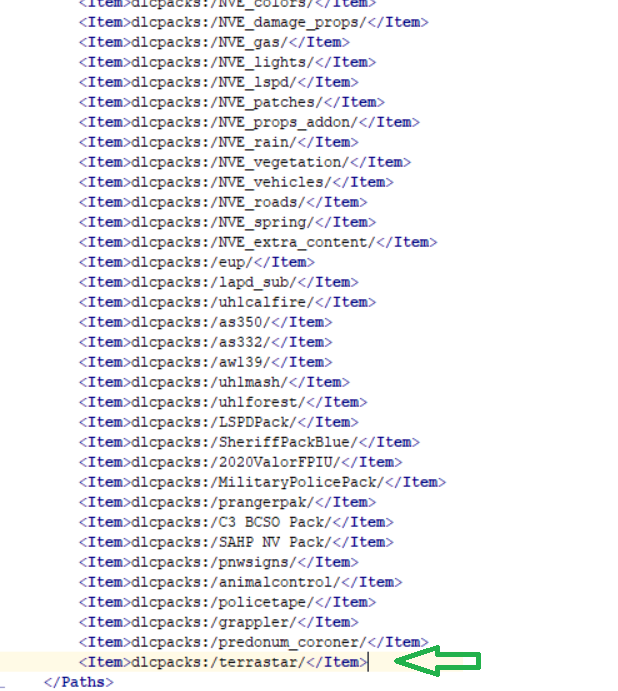
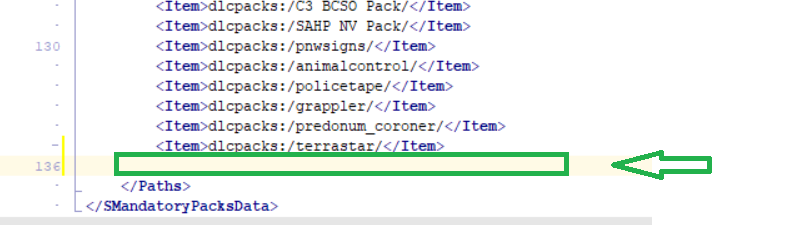
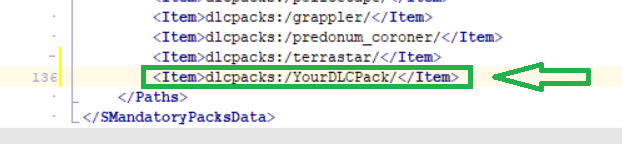
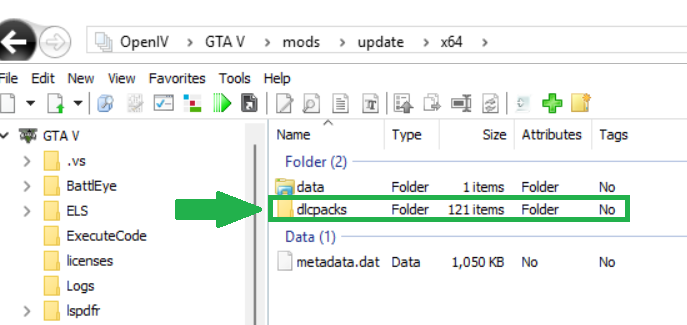
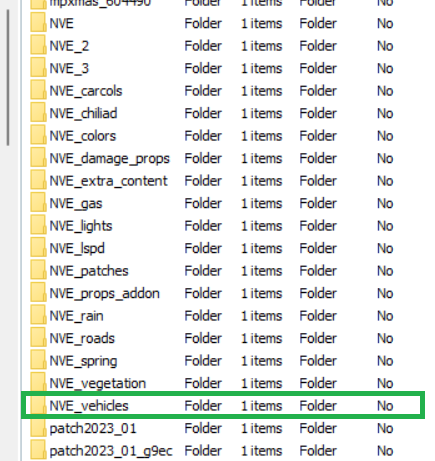
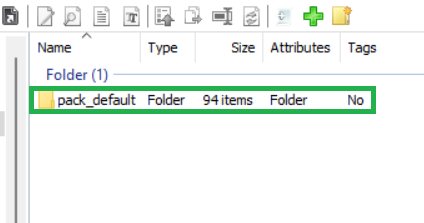
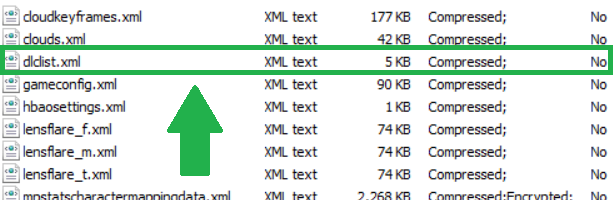
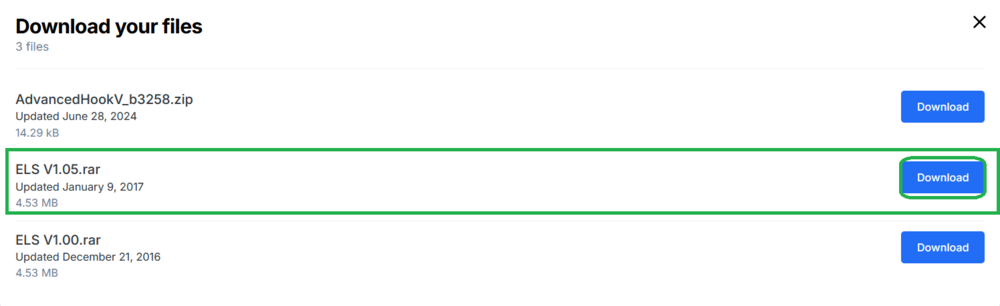
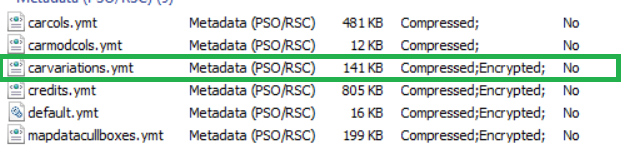
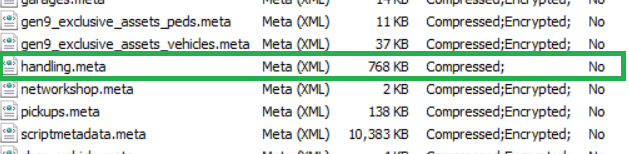
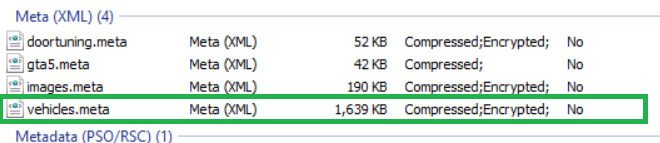
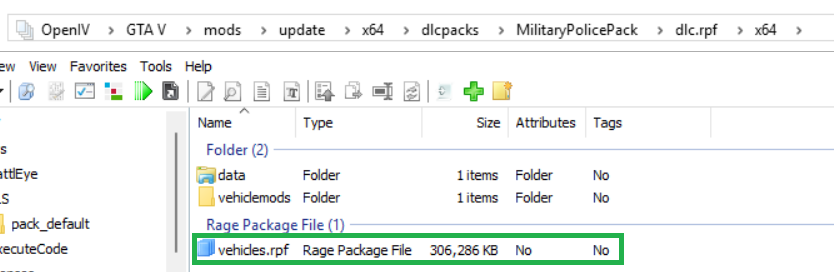
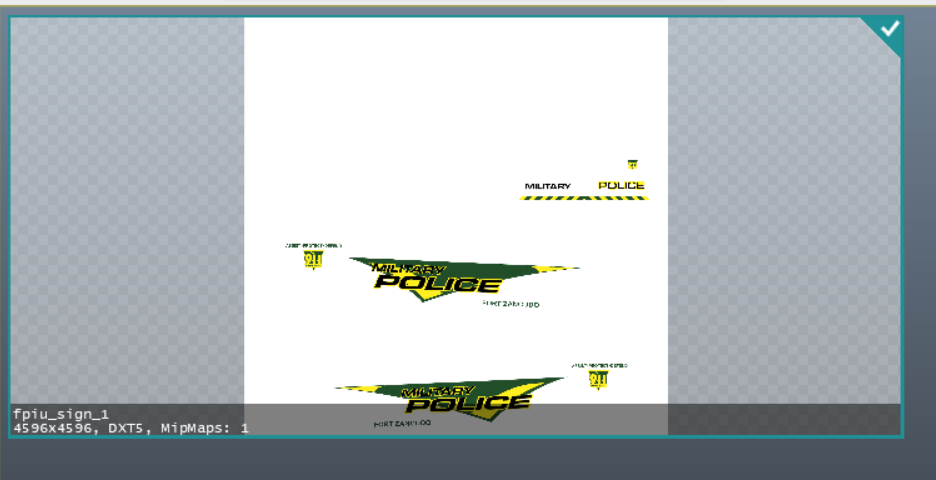
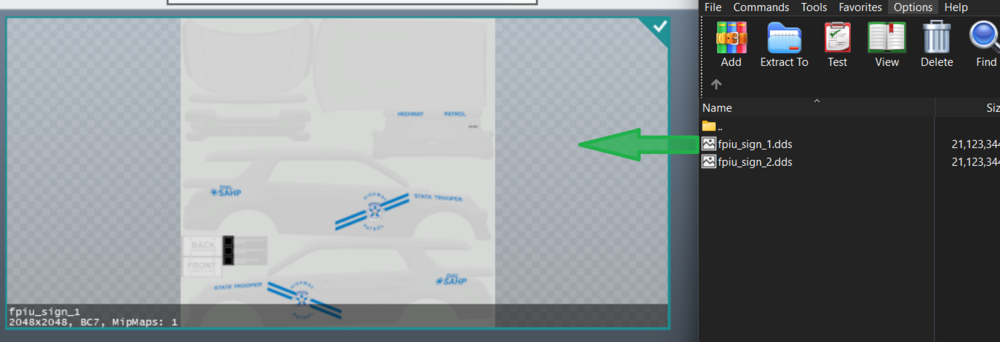
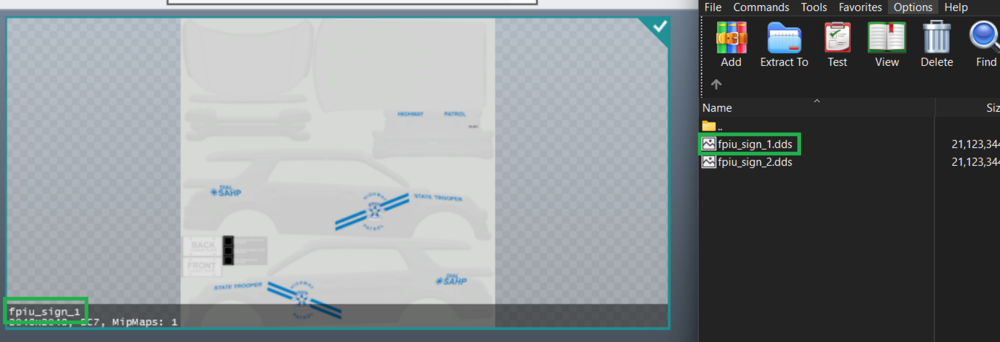
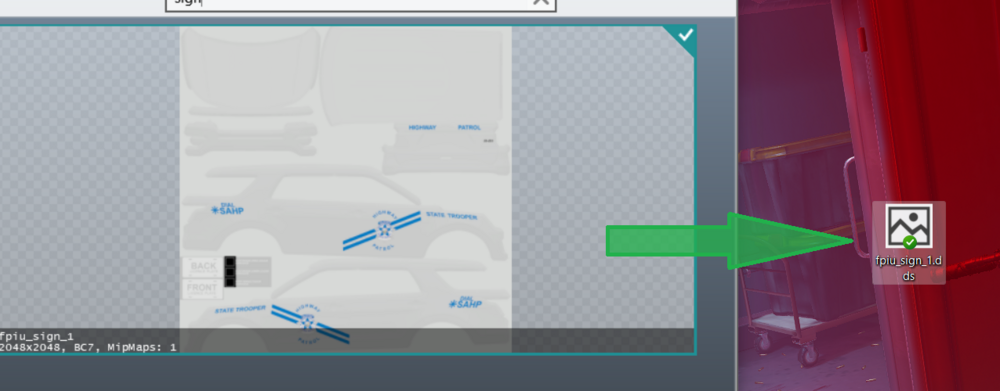
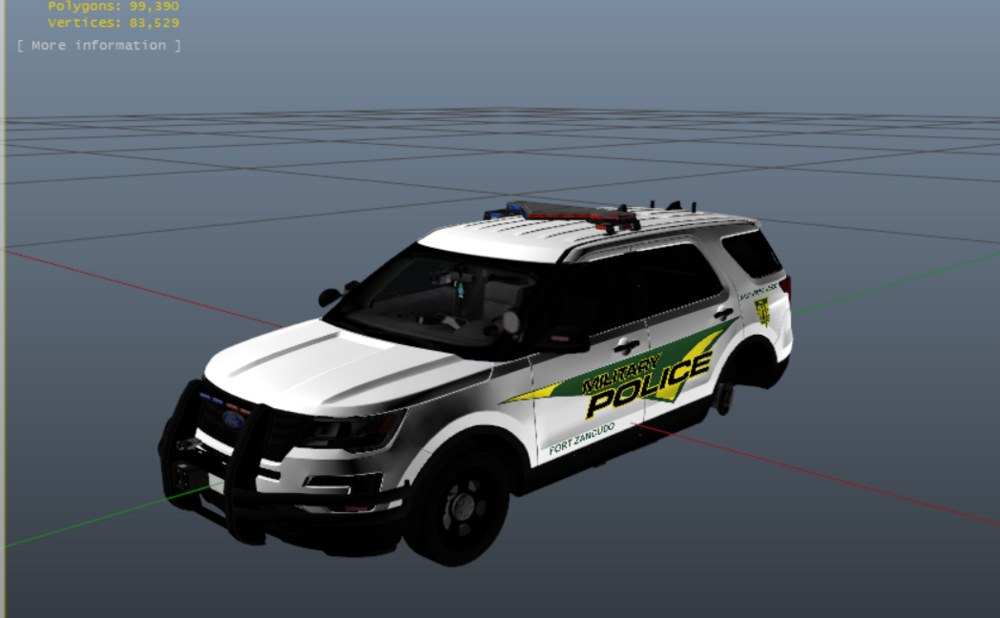
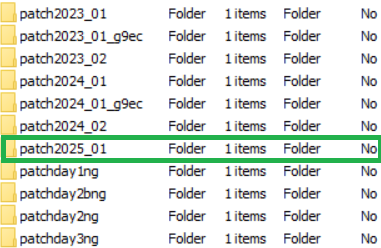
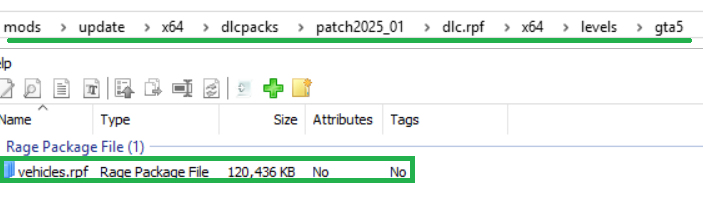
So while I know there are plenty of tutorials out there, I've been seeing a lot of support requests that regard the installation of vehicle files. My goal is for this post to serve as an "up-to-date" guide to help those in need. This guide covers how to install vehicles (ELS & Non-ELS), Liveries, Installing ELS, & More! Please note that this guide does not cover installing DLS files or editing PR Files Updated As Of: 7/27/25 Installing Add-on Vehicles: Finally found a vehicle add-on pack that you want in your game? Here's how you can install it! For add-on packs, the installation is quick and simple. First in your OpenIV, go to the following path: GTA V/mods/update/x64/dlcpacks From here, you can drag and drop the folder containing the dlc.rpf file here. This folder contains all the files for your vehicle. Now that you dlcpack is installed, we need to tell the game to use it. Go to the path: GTA V/mods/update/update.rpf/common/data In this pathway, you should be able to find your dlclist.xml. Right click this file, and click "Edit". Now scroll to the bottom of this document, and put your cursor at the very end of the last item listed. Press enter to create space for a new line. Now you need to enter the information for this new line in a very specific way. Type the following into your new line in the dlclist.xml: <Item>dlcpacks:/YourDLCPack/</Item> (BE SURE TO CLICK SAVE) BE SURE YOU REPLACE THE "YourDLCPack" WITH THE NAME OF THE FOLDER YOU INSTALLED INTO "dlcpacks"! THE NAME SHOULD BE TYPE EXACTLY THE SAME! (To include spaces and/or underscores) Now if this vehicle is Non-ELS, you're done! However, if you have ELS files for the vehicle, you need to install your VCF files. These can be located in the folder that in most cases is either names "VCF" or "ELS" in the Vehicle Package that you downloaded. Open that folder. Inside, should be a number of .xmls (the number varies by how many vehicles are in the pack). Now in OpenIV, go to: GTA V/ELS/pack_default Inside this directory, you will drag and drop all of your .xml files. Once they have generated in the directory, you're done! Your Add-on Vehicle Pack Is Installed! Installing Replace Vehicles: Installing replace vehicles can be challenging for some. But it's actually pretty simple! To Install your vehicle files (for emergency vehicles), go to: GTA V/mods/update/x64/dlcpacks/patch2025_01/dlc.rpf/x64/levels/gta5/vehicles.rpf Now that we've enter the directory, your .ytd & .yft files for your emergency vehicles can be placed into this .rpf directory. For civilian vehicle replacements (non-emergency vehicles), the installation is relatively similar. The only difference is which dlcpack folder you are placing the files into. This varies based on what car is being replaced, but in general it should be listed somewhere in the "READ ME" of the pack you downloaded. If all it says is latest patchday, you can either put it in patchday2024_02, or patchday28ng. This should work in most cases. If your vehicle is Non-ELS, and don't require and .meta changes, then you're done! If your vehicle is ELS, you need to install the .xml's in: GTA V/ELS/pack_default Installing Replace Files With NaturalVisionEvolved (NVE): If you have NVE installed to your game, it's important to note that NVE has its' own vehicle.rpf that basically overrides the other vehicle.rpfs with dlcpacks (for the most part). Because of this, if you're looking to install any replace files with NVE (Emergency or Non-Emergency), you need to install it to the following pathway: GTA/mods/update/x64/dlcpacks/NVE_vehicles/dlc.rpf/x64/vehicles.rpf If your vehicles are Non-ELS, and don't require any .meta changes, then your done! If you're vehicle is ELS, then you need to install the .xml's in: GTA V/ELS/pack_default Installing .meta's For Replacement Packs: If your replace vehicle requires any .meta changes/fixes, you should be very careful when installing these. I recommend ensuring that the .meta that comes with your pack contains all base information. Sometimes developers who create these meta's only include the information pertaining to the vehicle being replaced inside of a .meta file with the intention of you copying the information inside, and pasting it into the base .meta. Because of this it's important that you already (to some degree) know what you're doing. Some replace packs will contain what you need to copy and paste within the "READ ME" file. If your .meta's are solid full fixes, and are not design for you to copy & paste the information in any specific way, cool! then the install is easy, just install to the path pertaining to your .meta (listed below) Handling.meta: GTA V/mods/update/update.rpf/common/data Vehicles.meta: GTA V/mods/update/update.rpf/common/data/levels Carvariations.ymt: GTA V/mods/update/update.rpf/x64 Extratitleupdatedata.meta: GTA V/mods/update/update.rpf/common/data Always check your package installation's "READ ME" instructions for pathways (especially if your .meta is not listed here)! Vehicles.meta Handling.meta carvariations.ymtextratitleupdatedata.meta If your .meta requires copy & pasting information, you need to right click the .meta file in the OpenIV directory, and click "Edit". Inside, you need to go to the search tab, and search up the vehicle you are replacing (i.e. police, police3, policeb, sheriff, etc.) and highlight all the information pertaining to that vehicle, and replace that information with the information in the replace download's .meta information. You Should Never Edit The .meta Files Unless You Know What You Are Doing! Especially If You Are Manually Editing! Installing ELS: Need help installing ELS? No Problem, I'll cover that too! Installing ELS is very simple. First you need to go to the Emergency Lighting System Download Page [Link]. Now, download the V1.05 Version of ELS. You will also need to download the AdvancedHookV file that come inside of the 1.05 download. DO NOT Download the separate package named AdvancedHookV_b3258, as this version no longer works with the recent update. Now you need to install the ELS V1.05 package. Open the package in WinRAR. Now, in OpenIV, go to your main game directory (where GTAV.exe is located). In your WinRAR, you should see the advancedhookv file. Drop this into you main game directory. Now, open the "INSTALLATION FILES" folder. Now Open the "Grand Theft Auto V" folder. You Can drag & drop all of the files in here into your main game directory. You have now successfully installed ELS! Great Job! Installing Liveries To Your Vehicles: Looking to get a better look for a vehicle you installed? Found the perfect livery pack, but not sure how to install it? This portion of my guide will assist you with that! It's really very simple. It's important to note that every livery is design for a specific vehicle from a specific pack. There are multiple builds of different cars that the vehicle pack developers will use, and some are even made from scratch. So you can't just throw any livery on any car. Of course you can always experiment on your own my applying the livery to the car and seeing how it looks, and if it looks bad or doesn't fit, you can just reapply the original livery. For my tutorial, I will provide images from one of my own vehicle add-on packs. For the first step, locate your vehicles.rpf file: Now, locate the vehicle that you are trying to edit the livery on. In my case, it will be the fz16fpiu. Locate the .ytd for the vehicle (in some case there may also be an _hi.ytd or +hi.ytd version as well, you will need to install the livery there too!). Right click the .ytd file, and click "Edit" you should now see all of the files/images that make-up the cars design. go to the toolbar and click on the search icon (little magnifying glass) Now, in the search bar, type sign. This will bring up any current liveries that the vehicle has. Before installing the liveries, I HIGHLY recommend saving the current livery to desktop by dragging and dropping it to your desktop from the ytd. Now we can install the livery. Go to your WinRAR where your liveries that you are trying to install are located. First, we need to make sure that we have the livery named correctly. It should match the name of the livery that is already in the ytd. Now, drag and drop the livery to your ytd file. NOTE: (It doesn't matter if the file type is .dds or .png, as this just describes the file type) If you want to view the livery before installing, you can simply rename the file from .dds to .png | This will work in most cases Changing from .dds to .png.mp4 Your File should have successfully uploaded. And you should be able to view your finished product Now you can see how it fits the vehicle by opening the .yft file If it fits the vehicle properly on all sides, congratulations, you're done! If it doesn't fit right, then the livery doesn't work for that particular vehicle. You can install the original livery by dragging the original livery from the desktop to the .ytd file again. This Concludes This Guide! I Hope That This Helped You Out! Something missing or not covered? Let me know and I'll try and add it to this guide, or will create another one!
.png.219abe8ef63bea87393836b925de5e79.png)



-
did you edit your dlclist.xml when installing the addons? If so, did you enter all the information properly?
-
They might not spawn, but typically yes adding them into that directory shouldn't harm anything. If they spawn then it's working, if not try patchday28ng, if that doesn't work then patch2024_02 is the only directory that will get them to spawn. But ideally yes patchday23 should work fine. If the game is still crashing, it might be something else causing the crash but be sure to restore the default files that were in x64e from when you installed your replace there, that could be causing the crash
-
Where did you install the replace vehicles? And How did you install the addons. It sounds more like an installation issue.
-
Where are you installing the vehicle? Addon or replace?
-
Scripthookv does not come with els. It only comes as its own download. For ELS, you should install the 1.05 version of the mod, and then install the latest version of AdvancedHookV you will also need scripthookv and scriphookvdotnet (nightly) for your asi mods and certain plugins. They are all seperate mods from each other. The latest advancedhookv can be found on the els download page. Scripthookv cans be found on this link scripthookvdotnet can be found on this link I also recommend LemonUI, if you choose to install it, you will need to create a scripts folder. You must content within the folders listed below from the download package of lemonui into the scripts folder, should you choose to download the mod: - Content within “RPH” folder - content within “SHVDNC” folder - content within “SHVDN3” folder
-
Have you updated SHVDN? It’s latest update was this week Also if you still have betterEMS I recommend removing it, as that one does cause a lot of crashes due to being outdated
-
Do you have scripthookv and scripthookvdotnet
-
It should be in Patch2024_02
-
you shouldn't have to work with the extra's, as most vehicles are made a specific way, and don't have customization options for the parts. I could be wrong, but in my experience I haven't had to work with this. Either way, including the spawn chance is a must when coding these in your .xmls. I would try coding it without the xml's to see if they spawn fine for you, and if they do, then start working with extra's. But make sure they have customizable extras, and that you know how many there are, and what they are.
-
you need pedproplimitadjuster, it works just like packfilelimitadjuster, and you can increase it to your needs through the .ini
-
Replace files should be placed in the latest patchday through the following directory(s): (Unless a specific patchday is listed, but should never be installd through x64e, and only through dlcpacks) - GTA V/update/x64/dlcpacks/patch2024_02/dlc.rpf/x64/levels/gta5/vehicles.rpf (Especially for Emergency Vehicles) However, If you use NVE, you must install through: - GTA V/update/x64/dlcpacks/NVE_vehicles/dlc.rpf/x64/levels/gta5/vehicles.rpf (For any replace files when NVE is installed to game) no matter what patchday it states to use, it should be located in dlcpacks
-
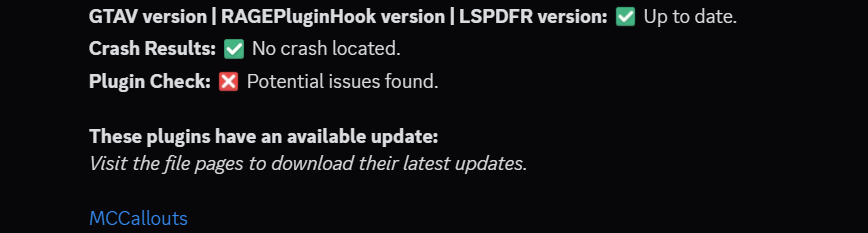
Hello, please try the steps shown below, and if this does not resolve the issue, let me know! (also please make sure scripthookvdotnet is update to date! It was last updated this week!) if you have it
-
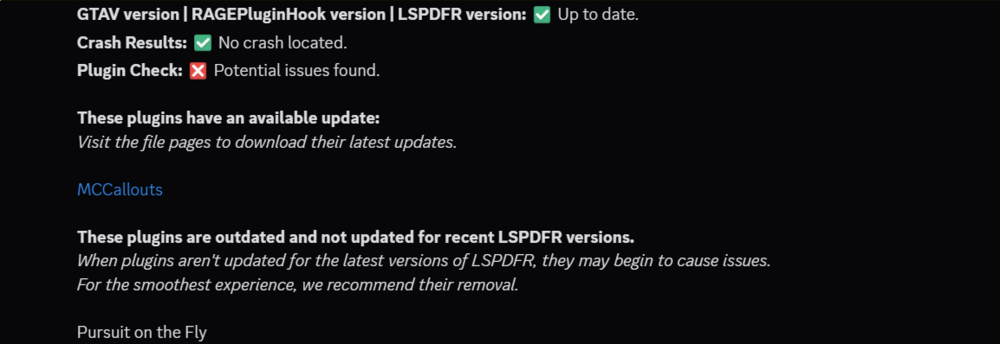
Hello, looks like some mods are outdated, please try removing/updating applicable mods, and if this does not resolve the issue, let me know!
-
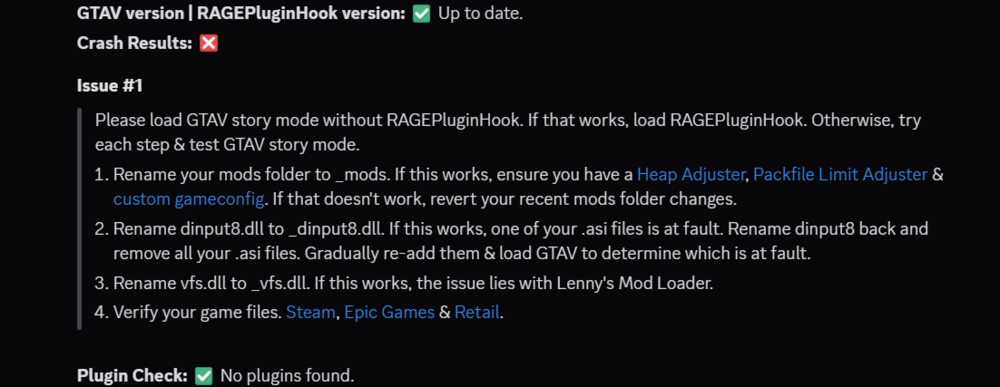
If the above does not help solve or locate the issue, can you please give more details on the crash? When is it crashing and how (by how I mean is it hard crashing, normal crash, game freezing, black screen, something else?) What did you install before the crashing started? I thought i responded to this one as well in the past, but this is the second post where my response apparently did not save or post somehow
-
I thought I responded to this already but ig my response never posted? Anyways, your logs are not showing any crashes, could you describe what is happening when the game crashes? Also, what mods to you have installed?
-
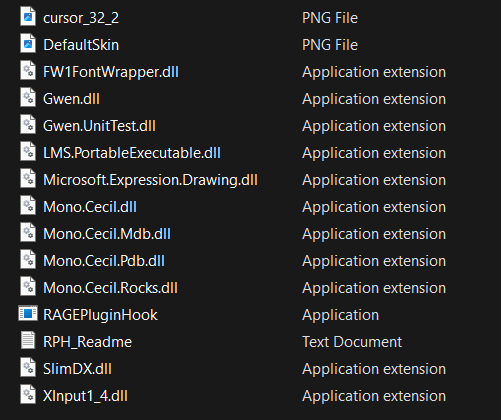
It looks like some RPH files are missing. However, lspdfr does not work with Enhanced, at least not yet. LSPDFR devs are working on a project to get lspdfr into working with it, but for now, it only works with legacy. This is the same case for RPH. Below is an image of all the files that should be installed for RPH to work:
-
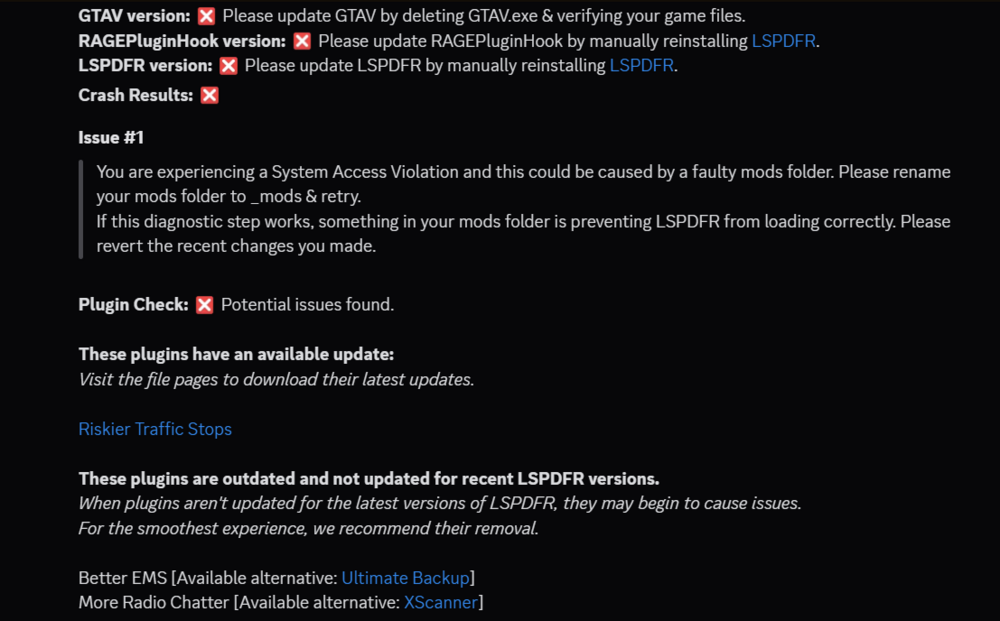
your log does not show any crashes. Obviously there was one otherwise you wouldn't be here, however, sometimes the log won't pick them up. What mods to you have installed? At what point during the startup is your game crashing? And what did you install, change/edit before the crash began occurring. Locating the source of the crash is crucial in resolving it.
-
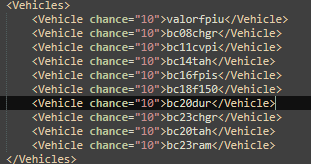
It's because you coded the .xml's wrong. You listed all the extra parts, this is not needed tho. Also it matters if you are using ultimate backup, and if you are using EUPFR/EUPFR-UE/Ultimate Backup Configurations Below Is How You Coded Your Vehicles: Below This Is How they should Be coded, and it depends on which xml you're editing when it comes to whether or not you or inputting the "pax" portion of the coding as show in the second image: (Image 1) (Image 2) When Editing .xmls These are the xmls you should edit based off what your install is: If you are using base LSPDFR w/out any EUP Configurations/EUPFR or ultimate backup: - Agency.xml (GTA V/lspdfr/data) If you are using LSPDFR with ONLY Ultimate Backup: - Agency.xml (GTA V/lspdfr/data) - CustomRegions.xml (GTA V/plugins/LSPDFR/UltimateBackup) - DefaultRegions.xml (GTA V/plugins/LSPDFR/UltimateBackup) - SpecialUnits.xml (GTA V/plugins/LSPDFR/UltimateBackup) If you are using LSPDFR With EUPFR/EUPFR-UE/Ultimate Backup Configurations With Ultimate Backup and LSPDFR: - Agency.xml (GTA V/lspdfr/data) - CustomRegions.xml (GTA V/plugins/LSPDFR/UltimateBackup) - DefaultRegions.xml (GTA V/plugins/LSPDFR/UltimateBackup) - SpecialUnits.xml (GTA V/plugins/LSPDFR/UltimateBackup) - agency_addons.xml (GTA V/lspdfr/data/custom) - agency_eupfr.xml (GTA V/lspdfr/data/custom) Please Note: When Editing, be aware of what the number for "chance" is set too. The limit to how many vehicles you can set to spawn pure <Vehicles> section is technically 100, but it is based on spawn chance percentages. All vehicle spawn chances must add up to 100%. Therefore, if you have 1 vehicle that you input to spawn, the chance should be "100", if you have 5 vehicles input, the chance for each vehicle should be "20", if you have 10 vehicles, then chance should be "10", and so on so forth. Having these messed up could result in the vehicles refusing to spawn for both NPC's and the Player, even if you are spawning through a trainer, as it messes with the vehicle spawn. If you have any further questions on how to edit these .xml's, don't be shy to ask I recommend keeping the pax at 1, or at whatever it was naturally before editing. "Pax" means how many peds will spawn in/with the vehicle, and should not be set higher than the vehicle's seating allows for. I do not reccomend changing pax_chance from 30, as this is what it is by default, and the default works as is needed. I'm not fully sure on how increasing and decreasing it will effect the spawns.


-
-
-
you need openIV, you can also manually create the mods folder by creating a new folder in your main directory, and naming it "mods" without the quotation marks. be sure to copy your "update" and "x64" folders from the main directory into your mods folder before trying to mod anything that would normally go into the mods folder.
-
Was it an Add-on or Replace pack? What Path Did You Install it too? Do you have Gameconfig, Heapadjuster, packfilelimitadjuster and Resourceadjuster? And can you explain your crash a little more, as in at what point does crash/how is it crashing (i.e blackscreen, game memory erros, normal crash on startup, etc), as your log does not show any crashes.
-
 1.05 works, but ELS will not work without the newest AdvancedHookV, which is the separate download titled "AdvancedHookV_b3258.zip" when you click download on this mod. You will still have occasional crashes related to this mod, as well as some bugs with sirens and horns from time to time due to this mod not being updated. It still runs fine, just has it's moments.
- 2,679 comments
- 235 reviews
-
do you have scripthookv and scripthookvdotnet

.png.219abe8ef63bea87393836b925de5e79.png)








