
IceGuy221
Members
-
Joined
-
Last visited
Everything posted by IceGuy221
-
What pack are you using? There's always a chance that the water nozzle is not functional by design and is instead for looks, or it could be that this an issue that the developer needs to solve.
-
thank you, I though the log name looked odd
-
I'm not see any crashes in the log. There are a couple errors coming up related to your "Section136Callouts" so that might be outdated. Make sure you have the latest version, if you do, you can try to report the errors to the dev, or uninstall the callout mod, or keep using it. (up to you) a couple errors regarding something in your pathway: GTA V/lspdfr/data/custom most of these errors are unspecific to which file, but I did see one or two that specified the duty_selection.xml Besides that, i'm not sure what would cause a crash, other that cross keybinds with a specific mod, or an outdated STP, but nothing indicates that STP is outdated
-
 Please include installation instructions
 -
Do you use EUP? If so, what version of EUP do you use
-
Hello! Please navigate to the directory: GTAV/lspdfr/lspdfr.ini and set AmbientSpawn.DisableRandomUnits = true.
-
Hello! I'm not super familiar with the .meta files, but as for some vehicles not spawning, I might be able to help out a little bit, based on the circumstances surrounding their spawn issues. - Do you use NVE? - Which Patchday were the replace files installed? - Are you using the latest gameconfig.xml?
-
You need to disable your battle eye anti cheat. this can be done in the settings of your rockstar games launcher. Open RockStar Games Launcher, go to your gta game/select the game, without starting the game, locate settings in the top right corner (right next to your social club profile image). Click the settings button, locate "BattlEye" and uncheck the box. This fix is specifically for SP GTA LSPDFR
-
 Hello, it appear it’s been a while now since you’ve made this comment, and possibly even already found your solution. But this crash was not cause by 686 Callouts, as shown in the attached images. Obviously the mods bro no shown as outdated are probably already updated in your game by now, but automatic siren cutout is outdated, and all updated for it are feature in Rich’s Police Enhancements. (Must be configured via the .ini file. images below show issues detected that the crash was a random crash: Please keep in mind (as mentioned in the featured comment) that support from 686 is now only offered via the discord linked in the featured comment. ~ I am not a support member for lcpdfr.com or Charlie686. Just a person who saw a comment and decide to help out
- 313 comments
- 60 reviews
-
I've been trying to fix this for a hot minute but support from the developers, and other experienced modders hasn't gotten me anything so far, so I'm hoping someone here will be able to help me. I reinstalled LSPDFR recently, and everything works. But this darn vehicle pack, (which I had never had issues with before) only spawns in like 3 of its vehicles. At first, after like three crashes and two restarts, it fixed itself, and everything was fine. But I think not even a week later, it was back to the same three vehicles spawning and none of the others from that pack. Granted I had updated some mods within that time frame, but I don't see how that could've broken it again. I run Natural Vision Evolved (NVE), and I tried replacing it's gameconfig.xml with the github .xml that's been recommended, but this hasn't fixed anything. And all the coding from within the pack itself looks fine and passes scans/automatic readers. I've been at this for like a month and have even tried a fresh install to solve the issue. If there's anyone who knows how to solve this issue, please reach out. - Thank you
-
 What's the best setting I can adjust my additionalgpumemory to with my system? My Rig Specs: Computer model: ASUSTeK COMPUTER INC. ASUS TUF Gaming A15 FA507NU_FA507NU Operating system: Microsoft Windows 11 Home (10.0, Build 26100) Processor: AMD Ryzen 7 7735HS with Radeon Graphics 8/16 Motherboard: ASUSTeK COMPUTER INC. FA507NU RAM: 16 GB STORAGE1: WD PC SN560 SDDPNQE-1T00-1002 (953.9 GB/Fixed hard disk media) STORAGE2: Seagate Portable SCSI Disk Device (1.8 TB/External hard disk media) Graphics card1: NVIDIA GeForce RTX 4050 Laptop GPU (6.0 GB) Graphics card2: AMD Radeon(TM) Graphics (512 MB) DISPLAY: AU Optronics B156HAN15.H (1920x1080 / 15.3 Inch)
- 105 comments
- 33 reviews
-
 could we get an addon pack for it as well?
 -
 Amazing and by far my favorite vehicle on the platform! Hope to see an entire BCSO department based off of this vic soon
 -
.thumb.jpg.8f43f89c83cdb0b58b0249e4cac1882f.jpg) .xml files were marked invalid in ELS log. Vehicles not appearing in game
.xml files were marked invalid in ELS log. Vehicles not appearing in game -
 Not sure why these cars are coming up as invalid but though i'd let you know about it. don't mind the rebel/rebel 2 xmls, those are for another pack
- 241 comments
- 15 reviews
-
-

- 1
-
-
 Will we be getting an update that's more compatible with newer EUP versions? A lot of these don't appear via eup 9.8, 9.9 or 9.10
- 552 comments
- 44 reviews
-
-
 the moderator for lua plugin too down the 10.2 version due to malicious software and hasn't reposted the clean version yet. will 10.1 from 2015 still work or no?
- 366 comments
- 32 reviews
-
If you switch to replace, you'll need to rename them as the file that you are replacing. i.e. if you replace sheriff.ytd, the xml will need to be named sheriff.xml. You will only be able to use one of the xml's for replacing one vehicle, as each xml is for a different version of the vehicle (i.e. its own separate car)
- 241 comments
- 15 reviews
-
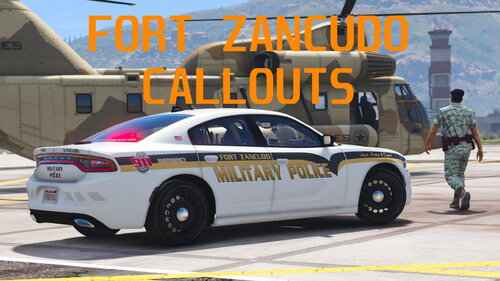 A great mod, hope to see an update that brings some extra calls soon. As an MP, one of the most common calls are domestics, medical assists, and fire assists aside from traffic stops. hopefully these can be implemented, as well as intoxicated people trying to come on base, or drunken fights. Those are really common too on some bases. EDP's (Emotionally Distress Person) calls are a big one too that not many people make callouts for, but they're all too real on post. I'll only add one more idea, which is someone who was trying to drive on base, was selected for a random search, and then decide to "run the gate" aka take off driving straight through the gate. This is what we call "Gate Runnner's" and in reality we have security barriers that we pop when someone does this, and 9/10 that person hits the barrier and flips, but sometimes they get through quick enough, and end-up getting chased down. All just some fun idea's that i feel could be included through an update. From someone who's experienced the calls to the creator of the mod
 -
 This mod has been causing some game crashes for me, it probably needs to be updated since the last update was 2 years ago RagePluginHook.log
- 402 comments
- 24 reviews
-
 this can be dependent on what mods you have installed. Some users have reported that DLS does conflict with it. It could also potentially be an install issue if you happened to place a file in the wrong place, whether its an .xml file for an ELS vehicle, or ELS.asi/other els required files themselves
- 2,681 comments
- 235 reviews
-
does it work with ClearTheWayV or do i need to remove that mod first? Just curious
- 366 comments
- 32 reviews
-
by far still my favorite vehicles for lspdfr, hope a full vehicle pack like this comes out for BCSO. Keep up the good work
-
Hey everyone! Running into ELS.asi errors? Here's a quick semi-solve to reduce the frequency with these errors! As you may have figured out, this mod is currently outdated, but still has not been marked as so. The current and only quote on quote "fix" for this issue, is to install the latest version of AdvancedHookV. Yes, you will still get these errors from time to time. The frequency does increase if you run any version of Natural Vision; but this is only due to that mod being a complete visual overhaul, requiring a higher demand on graphics resources. Regardless of any visual mods, ELS can and will run into these errors. If you run DLS, some users have found this to cause a conflict between scripts in some instances. I have not tested this myself, as I have no desire to use DLS or vehicles which require it. However, you can either uninstall DLS, or ELS depending on which one you actually are using. Another method that can help re-stabilize you game while ELS is running, is reinstalling the latest AdvancedHookV; even if you already have it installed. I have found this to work on multiple occasions, and typically I'll go about a week of on/off game-play before the error occurs again. However, if you have the capability on your computer to defrag your game files, this can do wonders for the overall stability of your game. "Defraging" is a term that not a lot of people are familiar with. Sometimes, whether it occurs naturally, when a game updates, or most especially when you mod a game, fragments can appear. "Fragments are spaces that were once taken up/reserved for another file or text that was removed or moved within the games files. So when you add a mod file, and then remove text, or remove the mod, this can create a fragment; or when your game updates, bug fixes can include the removal of coding and other files, or the movement of said files. These things cause fragments, and can cause your computer a longer period of time to read or locate files, coding, and other text. To speed up this reading process, you need to defragment your game. I personally use Razor Cortex for this, which is a perk of owning a Razor product like a mouse or keyboard, but the app can be found in the Microsoft store. There are plenty of different ways to defrag your system tho. Also be sure to clean your system of unused or junk files regularly, and ensure all your drivers are up to date. If these things don't resolve your ELS, it could be file corruption within ELS files itself, or confliction in your game files. That, or you just need to do a quick reinstall of ELS as a whole. Every solution is temporary tho, as I said before, this script is outdated. Lt.Caine if you ever read this, please update this mod. I hope this helps anyone who is confused on why these errors are occurring (It's kinda unpreventable, but reduce-able)
- 2,681 comments
- 235 reviews
-
-

- 1
-



.thumb.jpg.8f43f89c83cdb0b58b0249e4cac1882f.jpg)