




K4te
Members
-
Joined
-
Last visited
Everything posted by K4te
-
Smh from rockstar that game require Send new log, also you can check without traffic policer and RichAmbiance (if you still have it)
-
It's not required, but won't hurt to have it there
-
First install Gameconfig, Heap Adjuster, Packfile <- if this won't help then: Rename mods to _mods. If this let you launch game then it means that smh in your mods folder cause issue.
-
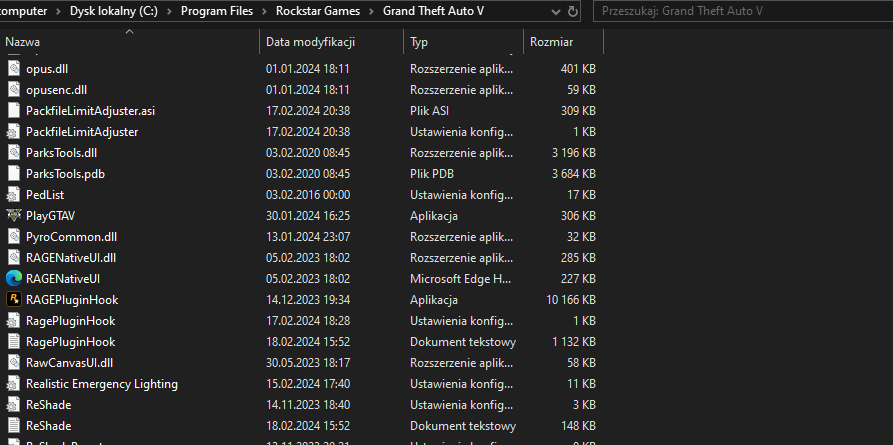
Just a gta5 folder, where you have gta5.exe playgta5.exe ragepluginhook etc
-
Check if pc restert helps Add whole gta5 folder as exception for your antivirus
-
When your mods are turned off (folder renamed to _mods) game still crashes when you go on duty? File verification only check original game files, it won't tell you if smh with lspdfr/plugins/mods/scripts folders is wrong. Attach your RagePluginHook log file (.txt or .log file in your main gta5 folder)
-
Answers are in quote window typed with red font
-
BetterEMS and STP are installed wrong - you put it in gta5\plugins where it should be in gta5\plugins\lspdfr Most of plugins in .rar/.zip are packed at path like it should be installed. Also for STP install this RNUI (this goes to MAIN GTA5 FOLDER) cuz included in STP is outdated + I suggest remove BetterEMS - its outdated plugin and it can crash your game
-
Check if solution of this thread can help you too
-
Remove ScriptHookVDotNet, you can also try this version
-
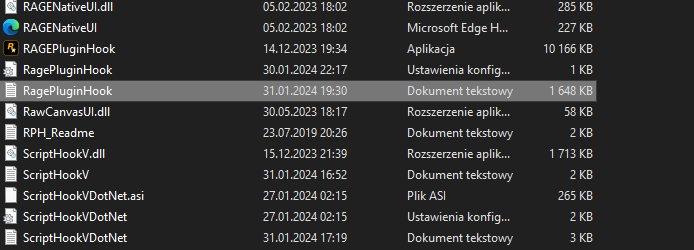
Attach screenshots of your main gta5 folder
-
Rename mods to _mods and try launch game (it's gonna temporally disable your mods folder as long as there will be "_") It means that smh in your mods folder cause problem (interesting it not crash your game earlier). Reinstall your mods and check if it will help, if not - prob you will have to remove this mod and use smh else instead. Also: Remove: BetterEMS Reinstall: Super Callouts
-
Remove Assorted Callouts - it's outdated and thats why you crash. If you don't know which plugin is gonna work with current version of lspdfr - you can take a look here
-
Attach RagePluginHook log file (.txt or .log file in your main gta5 folder) so we will be able to help.
-
One (or more) plugin(s) cause problem: Section136 Callouts Urban Callouts Speedy Pursuit New Callouts Remove plugins that I typed above, check if game works and then add them 1 by 1 and check which one crash your game and simply don't use this one.
-
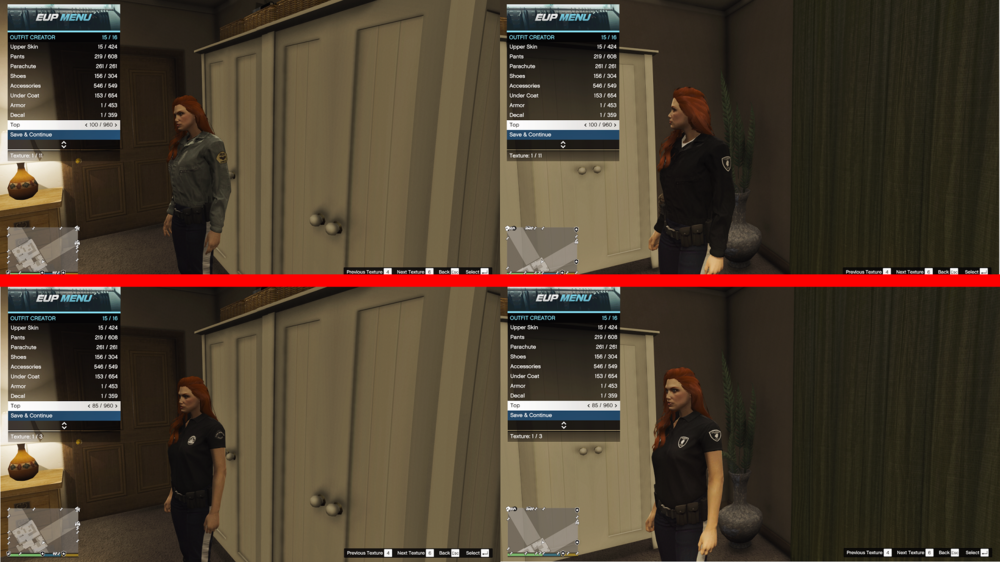
Well.. I have good and bad news: Good: I was able to use textures from packs that you linked above (here 2 examples, left side - without packs) When I did drag&drop all folders I had same result as you - nothing worked; Instead I had just enter to each folder (in .rar/.zip and in openIV) and drag&drop files included there - a bit more work than just replace whole folders Ik but somehow it works. Bad news: I have no idea why this works like that xD
-
They are working fine, you probably used RageNativeUI included in .zip of STP or UB - this one is outdated, download this version, drag it to main gta5 folder (can be both files) and should be fine
-
1. You are using a lot of plugins that seems outdated so I suggest start from removing them 1 by 1 and check when it stop crash your game. 2. Here is a list of plugins that you can use instead: Vechicle Search Plugin (you can use instead Stop The Ped plugin - it have similar feature build-in) Corpse Inspection (same as above - STP) BetterEMS (STP/Ultimate Backup) 3. Also: Ransom Ambience require STP For Holster Sound remember to set as it's mentioned by author of plugin - it must be set to false
-
Attach RagePluginHook log file (.txt or .log in your main gta5 folder)
-
Attach screenshot fo your gta5 folder. Also if you have mods folder you can try rename it to _mods and see if this help - but still pls look at 1.
-
Well.. I guess if you have eup folder then you installed previously EUP Law&Order - and it's should be fine cuz it's installed by 1 file that does everything for you (install this dlc pack, add line in dlclist.xml* to make it work etc). Tbh I installed some custom outfits but I used it as separated dlc folder so if you want I can show you how - just need to know is this smh that you are interested or you totally want it as replace for current eup dlcpack. * - maybe this is your problem and you don't have added line: in dlclist.xml (mods|update|update.rpf|common|data)
-
Hmm interesting it changed nothing - lets try temp remove also menyoo and scripts
-
-
No problem, glad I could help solve it. Have fun!
-
Ok and now pls send log when you have installed 1.9.2 ersion of RageNativeUI. Also update:



