




K4te
Members
-
Joined
-
Last visited
Everything posted by K4te
-
Try without Code 3 Callouts and AutomateSirenCutout... if remove one or even both won't help I would try with LSPDFRExpanded too. You can also update RageNativeUI if you didn't yet (https://github.com/alexguirre/RAGENativeUI/releases) And any mods installed?
-
It's more like even LSPDFR don't wanna launch. It was installed manually or with setup? Also: What plugins you wanna use? Do you have mods folder and installed mod vechicles or smh else?
-
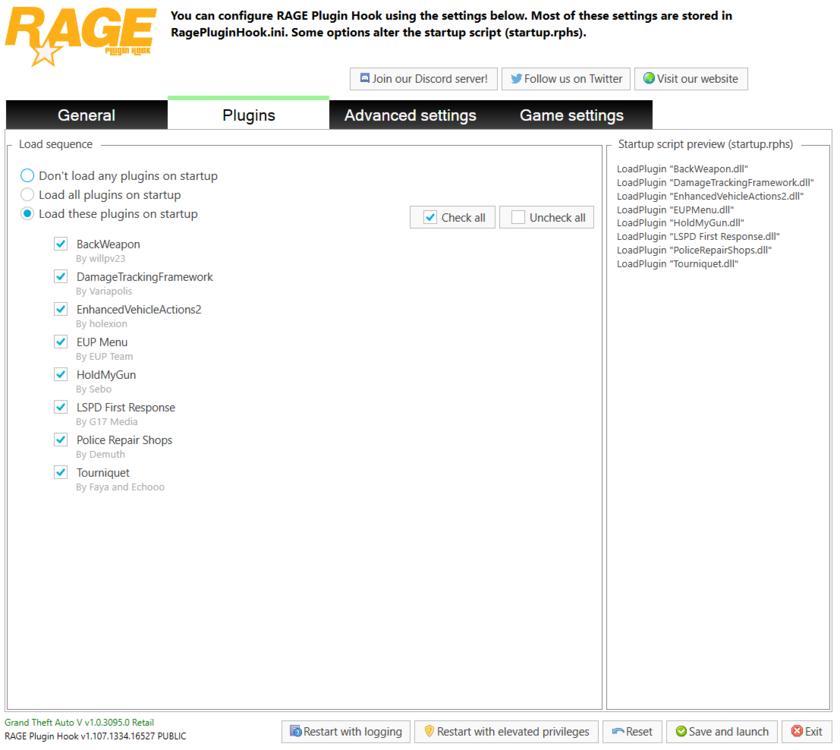
correct cmd: ReloadAllPlugins --------------------------------------- LoadPlugin need argument like: LoadPlugin (name of plugin file with .dll at the end) - examples: For now you gonna use only first one, second and third are just examples of another plugins Also u can turn on option in ragepluginhook to load plugins at startup, just need to be careful if you gonna install more plugins cuz some of them can cause crashes in middle of game or at game startup loading.
-
If plugins won't gonna crash then try temporally rename your mods folder to _mods (to disable them and see if they don't cause problem)
-
Yeah.. Week ago I thought my plugins and mods were also updated and everything works fine... What a bad feeling that was not true
-
Any mods installed?
-
Reinstall plugins but this time one by one with testing: add 1 plugin, test it and check if its making game crash - no crash - great! Leave tested one installed and now just add another plugin and test again if game crash.. and again and again. Also... if your Ultimate Backup won't let you call backup:

-
1 or more plugin is issue, uninstall all of them (by deleting all files that belongs to specyfic plugin - best way is just open zip/rar of plugin and looking on files there delete them from gta 5 folder) and then install them again just one by one with test: add 1 plugin - test if it crash or not.. this one not crash? Tested plugin stays in gta folder now you just add next one and again test... and again and again... I recommend pay special attention to: automatic siren cutout custom pullover lidargun prowler radar traffic policer Also now I'm testing kuchera callouts and for now I had 1 crash when callout from this plugin wanted to launch (solicitation)
-
Tbh a lot of plugins.. idk how about mods but: Drag this plugins (all of their files even from other folders) to another created for example on your desktop or just delete them and add it again one by one with testing - I mean u drag 1 plugin then you just test it in game if it crashes or not (if not - this one can stay and now u add another one, test it and again and again... If it still crash and u have mods folder rename in temporally to _mods to deactivate them and to see maybe this is problem Ik it's gonna take some time but there is big possibility that just one of this plugins (or maybe even more) is outdated and make game crash with lspdfr at first place
-
1. If u have mod vechicles try to disable them for a while (rename mods folder to _mods) 2. Check file veryfication cuz maybe smh didn't get downloaded and it cause problem
-
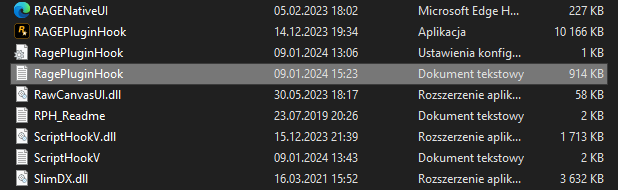
Send here RPH log file (its this selected one)
-
https://www.bejoijo.com Stop The Ped Ultimate Backup CompuLite Speed Radar Lite ALPR Lite I personaly use them and there is no problem to play without crashes --------------------------------------------------- Simple Callouts Attempted Crime Callouts This two I didn't tested yet but as I see it was updated 22.12.2023 so it shouldn't cause problems too
-
Try with rename mods folder to _mods (this gonna turn off your mods) and lets see if performence increase Also I would recommend to delete traffic policer plugin.. it's rly outdated and can cause problem later (crashes etc)
-
Did you downloaded RageNativeUI from here or used this one included in UltimateBackup.rar?
-
Temporaly rename mods folder to _mods and send here ss of your root gta 5 folder
-
1. Disk HDD or SSD (m.2 or SATA) 2. How much plugins and mods have u installed cuz some of them can be issue
-
What else u have installed? Some mods like vechicles etc or sripts?
-
I was able to launch game and use forceduty cmd with your plugins. With all plugins installed after forceduty cmd my game was totally freezing. Delete: Unsafe Callouts (UnsafeCallouts.dll, UnsafeCallouts.ini, UnsafeCallouts.pdb at plugins\lspdfr and Unsafe Callouts AUDIO folder at lspdfr\audio\scanner Section136Callouts (Section136Callouts folder, Section136Callouts.dll, Section136Callouts.pdb at plugins\lspdfr and Newtonsoft.Json.dll, XSerializer.dll from gta5 root folder) Without this 2 plugins other ones launched without problem for me
-
Seems u have installed some custom outfits cuz as I can see from log there is a lot of errors with it: lspdfr/data/custom Move it to folder on desktop or smh else to check it's gonna work without this files



