


Mustu
Members
-
Joined
-
Last visited
Everything posted by Mustu
-
Although lots of us browse this website via our PCs, on the way to school, on the way back, and on the road (basically anywhere my PC is not), I'm on my phone. Unfortunately, it seems like the website isn't optimized for mobile, which really frustrates me a lot. Some of the links are unclickable - especially on the home screen when I want to access a forum post - the pictures take a long time to load (even when I'm running on LTE), and it doses get frustrating. I didn't like the default IP Boards mobile site (limited features, stupid design) but it looks like I'll just have to go back to that - if there was an option somewhere. I love the site on my PC, but I think we should catch up with modern technology and polish the mobile site. Just my opinion, I want to know what you guys think.
-
Using an ENB? Using BxBugs' mapping? Using a timeline? Modified visualSettings? The possibilities are really endless, you have to tell us what else you have that's going on. I'd be willing to test this model if you like to see if it's happening with my game as well. I'll PM you if you want to go through with this.
-
-
This looks great? But like TNelson said, any updates?
-
LOLOLOLOL, I'm sorry to sound like a jerk, but really? Nobody, and I mean NOBODY, is going to give you a Caprice. Sorry bro :(
-
It gets annoying too.
-
-
-
Why does this car have plate readers, red and blue lights, and a police config light bar?
- 6 comments
- 1 review
-
Hmm, I'll try that! Thanks! Would this work for the whole car, or just the little text on top.
-
I'm currently working on a 2006 Tustin PD Dodge Charger, but I have no idea what font they use. Any ideas? Here's a pic: http://bit.ly/1lOpHRz
-
It's good, but Canada has no variety. All their police cars are just blue and red (sometimes even yellow). It's only really the OPP that are black and white.
- 4 comments
- 2 reviews
-
All California PD agencies aren't like this - I promise. The CHP like to think they are the best, and will do anything over the top to make them look like a classic cop. This is why I ruled out CHP for one of my future agencies, and it's probably the IPD now.
-
Wow, that really is no help at all. 1*, you didn't even try.
-
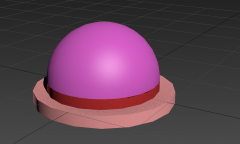
From the album: Mustu's WIP Vehicles
My WIP Whelen Vertex Hideaway Super LED for GTA IV. I don't know if I want to release this unlocked, or whether it should be private. I may release it unlocked, because I find that Corleone's is kind of hard to use, especially since (for me anyway) the ELS seems to be a bit weird. Let me know if you want them released in the comments section. I'm totally aware it's super inaccurate right now, but it's definitely coming together. I aimed for it to be low poly as well, so if I were to make it super accurate and perfectionist-like, it'd up the polys. Also, this is my first attempt at 3Ds Max scratch modeling, and I'm totally aware this is easy to do, but I thought of the Vertex because it was simple, effective, and super nice looking when used properly. I'm definitely getting the hang of 3Ds Max now. -
![Skin Pack [REL] its being approved now!](//s3-gallery.int-cdn.lcpdfrusercontent.com/gallery/album_2661/sml_gallery_138650_2661_186542.jpg) Pretty good! I like it!
Pretty good! I like it! -
It's a very good idea, but, I call bullshit. Here in Irvine (CA) you do get fined.
-
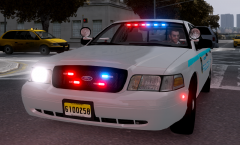 Cool! I'm working on scratch modeling these!
 -
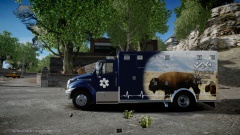 Yeah! Post it!
 -
xD OMG, that's the best spelling of 'hierarchy' I've ever seen!!
-
Well, I keep trying to do it again, but I don't understand what is going wrong.
-
Thanks :D
-
Oh cool :), hey, not to be begging, but you're an experienced modeler, do you mind checking out my newest thread?
-
This only applies to the vehicle's parts, not to the lighting equipment's parts. Does SNT actually allow you to do that?
-
I tried to start out making a console in 3Ds Max since I don't really like the ones available for public release. So, I did what you would normally do, you know - create a box, create some vertexes and put them upwards so it has a slant to it. I did exactly that, and I was about to put a cup holder when I came across a little problem. Can anyone tell me what I did wrong? :

![Skin Pack [REL] its being approved now!](http://s3-gallery.int-cdn.lcpdfrusercontent.com/gallery/album_2661/sml_gallery_138650_2661_186542.jpg)
