


Raggio
-
Joined
-
Last visited
Everything posted by Raggio
-
From the album: Raggio's GTA IV Mods and Gameplay Screenshots
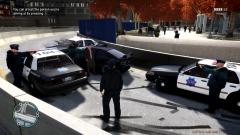
Seriously?!!? An old lady is speeding down the highway in a sports car?!!? You've got to be kidding me! :D© Copyright © 2012 Raggio - All Rights Reserved.
-
From the album: Raggio's GTA IV Mods and Gameplay Screenshots
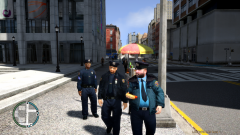
Commander K., Sgt. J., and Officer Dackerman patrolling the streets. Not surprisingly, the fat cop is the only one eating while on patrol... This is the first screenshot to show some detail of the Fat Cop's SFPD uniform mod that goes together with the set that I've made.© Copyright © 2012 Raggio - All Rights Reserved.
-
From the album: Raggio's GTA IV Mods and Gameplay Screenshots
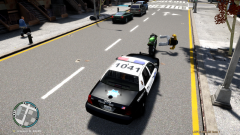
This is one of the weirdest things I've seen while on patrol. Two of the same peds are floating in midair and tilted sideways. They are also both dead...© Copyright © 2012 Raggio - All Rights Reserved.
-
From the album: Raggio's GTA IV Mods and Gameplay Screenshots
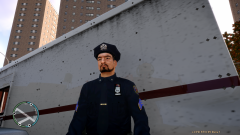
Sgt. K. looks dismal as he looks upon all the downed SFPD officers (not shown here) that were run over by the truck behind him during a pursuit. This is another screenshot to show the details of my SFPD sergeant uniform. Notice I even changed "LCPD" on his tie to "SFPD."© Copyright © 2012 Raggio - All Rights Reserved.
-
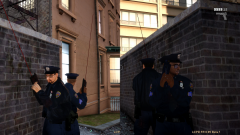
From the album: Raggio's GTA IV Mods and Gameplay Screenshots
Commander K. and Sgt. J are under attack by a gang shooting out at everyone on the streets! I love the deeper meaning found in this image. This image illustrates the definition of trust and respect: on the front lines, you and your partner are the saviors of each other--one life depends on the other. You've got his back, and he's got yours. It is crucial to have this kind of relationship, else, you'll both be dead. I know Sgt. J has my back, and he knows I've got his. ;)© Copyright © 2012 Raggio - All Rights Reserved.
-
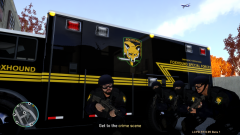
From the album: Raggio's GTA IV Mods and Gameplay Screenshots
FOXHOUND Special Forces prepares to head out to a high-steaks crime scene.© Copyright © 2012 Raggio - All Rights Reserved.
-
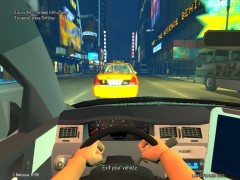 > The guy's hands look kind of like he had visible plastic surgery. LOL! Agreed! 'Tis what happens when you use the short-sleveed officer texture mod! I can't wait for the actual short-sleeved officers in GTA V!
 -
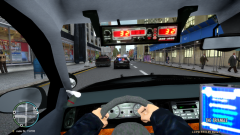 > Aww, I like the detail in you CVPI. Shit, thanks for the link anyways. You're welcome! Yeah, I like this one from BxBugs123 too. I'm not sure if he still has a similar one up though, since GPM is down at the moment.
 -
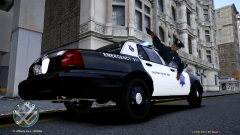 > "Roll the window down! I'm stuck!" > lol Sharp, that was funny, and not funny at the same time. LOL! 'Tis what happens when you play with ELS enabled cars! ;)
 -
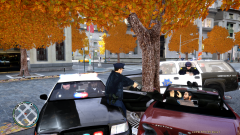 > Oh damn. I thought it was an animation to do that... I like the Noose guy, he looks like he's holding his upperbody out the window. So, I like this picture. Were you on foot patrol? Because I can't find your car... Thanks for the comments! Yes, it is the animations that are defying physics. If you look at the previous picture (the one with the CVPI that you wanted), you can see my partner sticking half his upper body out the window to shoot at the bad guys. I've only found this CVPI to do that. The other one (the one in the link I posted) doesn't do that; he simply sticks his hand out the window instead of his body.
 -
 > Currently,I personally have GTA:IV installed with purely non-els setup and EFLC installed with all-els setup.So,I thought...hehe! Yeah, I'm thinking about that too, to utilize EFLC and make it so that the two games have completely different content, allowing for seemingly different games. One interesting thing I've noticed after playing LCPD:FR 0.95 Beta 1 just now for the past hour or so. I've rarely had a game last longer than 30 minutes due to ELS related crashes, but today I've tried something new. For every person I've arrested, I simply pressed "F11" to leave the suspect there (and imagine that he's actually being dragged away later). Surprisingly, I haven't experienced any crashes by doing this, and I was able to play until I manually quit the game. Usually the ELS related crashes quits the game for me...not today! I'm going to try this again tomorrow to see if this is the case, or if I just got very lucky with the game today, LOL!
 -
> So,you mean two copies of your IV on your HDD? Not exactly. I mean to have a "set," so to speak, of mods that I can easily switch back and forth between. For example, I will have a set of vehicles.img, componentpeds.img, and resident.rpf of American PD in one folder and of European PD in another. Then, when I want to play as either, I simply cut/paste them into the game. When done, I put them back into their storage folder. Not very efficient I know, but at least it doesn't require two copies of the game installed or two computers to switch between the mods that I want to use. That way, I don't have to keep on editing the files with OpenIV and SparkIV all the time! ;)
-
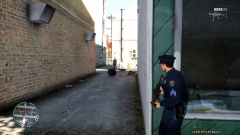 > +1 to Foruman for churning out uniforms with fireworks.Man,you gotta release them.Check your pm. Thanks, Dhruv! :)
 -
> I liked it too.Until I ran outta slots ;) LOL! I'm thinking about making separate mods for the different vehicles that I use. I'm going to save this "set" of police vehicles and skins as my SFPD American police, and start a new one with European police cars. That'll freshen things up a bit! ;)
-
> looks like he's sitting down on the car. The noose swat is just a WTF thing lol LOL! Agreed! :)
-
From the album: Raggio's GTA IV Mods and Gameplay Screenshots
SFPD box in an irratic driver. Good ol' physics...people can go through cars and doors...of course!© Copyright © 2012 Raggio - All Rights Reserved.
-
From the album: Raggio's GTA IV Mods and Gameplay Screenshots
Sgt. J. provides cover fire while Commander. K. drives the police car, chasing armed robbers shooting out into the street in their car.© Copyright © 2012 Raggio - All Rights Reserved.
-
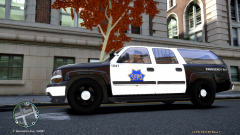
From the album: Raggio's GTA IV Mods and Gameplay Screenshots
Rolling onto the crime scene in the Chevrolet Suburban police "party van!" ;)© Copyright © 2012 Raggio - All Rights Reserved.
-
Hello All! I have recently uploaded screenshots from my heavily modified GTA IV game. if you're interested in seeing some NorCal police skins and uniforms! Or, if you've ever played MGS before, there's also the FOXHOUND Special Forces as well! All of the skin and uniform mods are custom made by me, and are not available to download yet. Here are some sample pics from my gallery (Click a picture to view the caption in my gallery. More to come as I update it!): I am also making several videos that show gameplay with LCPD:FR in both first person and third person views. Would anyone be interested in seeing those? I will upload some on YouTube if enough people are interested in them. If not, I'll continue to post just screenshots. Enjoy! Feel free to ask comment here about my gallers as you wish! I'd love to hear your feedback! :) Best Regards, Raggio
-
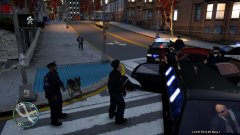 > How do you spawn the police dog? You have to first install the police dog mod as a ped. The default ped it replaces is Brucie, and I changed it to Vlad because I need Brucie in the game. ;) Then, using SNT, I simply spanwed Vlad as I would any other ped. I always spawn it as a bodyguard like I do for Sgt. J. so that he follows me and attacks the bad guys. ;)
 -
> Nice! What uniform is that? I'm using my custom made San Francisco Police Department uniforms. I have also made several rankings for them: officer, seargent, captain, and commander (changed lieutenant rank on jacket to a star). > how did you get the patches to come out so good? I used high resolution images and edited the uniforms using Adobe Fireworks, which makes excellent .png files for the game. I also made entirely new normal maps and specular maps so that light reflects off of the new patches properly! ;) I tried putting in just the modded police uniform texture before without making new normal and specular maps for it. The result...YUCK! Dosen't look that good, especially under the light! Things look off, and bumps were in the wrong places! But with the new maps generated for the texture, it makes it look all the more realistic! So those maps are crucial to good looking mods, next to using high quality pictures and programs, of course! > Damn! What ENB settings are you using? As stated in my gallery discription, I am using iCEnhancer 2.0. I can't wait for the 2.1 version, which reportedly will boost my FPS from 40 to 60! :D > Check my gallery for the uniform. Patches are placed a bit better. I'll be releasing soon. So you are also making SFPD uniforms? Because all I see are NYPD uniforms... Also, please don't advertise/brag about other mods in another user's gallery (especially when you are putting down my work). Thanks; I'd appreciate that. In addition, I used the official SFPD seargent patch, which is to scale with the armpatch. It may look a bit funky on the ped itself, but that's the model's fault. I don't want to make a mod to the model just to make the armpatches look better and centered...that'd take quite some time. > @DS: If its 0.95 Beta1 (look in lower right corner),then it must be an ENB for 1040. Yup, exactly what Dhruv said. Only 0.95 Beta 1 works on 1.0.4.0 of the game as of now. And I didn't originally install 1.0.4.0 for the ENB mods, but for the overall increased performance and stability of 1.0.4.0 over 1.0.7.0. As I said before, I can get up to 80 FPS with Vsync off on 1.0.4.0, but Rockstar Games did crappy things with 1.0.7.0 and made it very unstable, not to mention lowering the FPS to 40-50 (at least for me it did). > Nice Uniform Thanks! I will continue to make mods for other police departments.
-
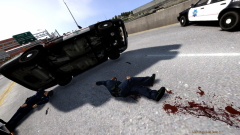 > lol. I always die from hitting a damn ambulance crossing an intersection all of a sudden when I'm in a pursuit. I fly out the window, smash into another car, and die. No kidding! Stupid ambulances are ironic in this game--they're supposed to save lives, but they just end up running over cops all the time. If I pull them over, they will most likely shoot at me with UZIs, LOL!
 -
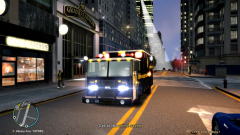
> That got my attention :) Cool! I like this hazmat truck mod because it dominates the streets! :D
-
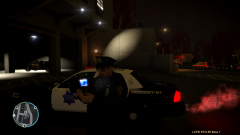 > Can you send me the link for the uniform please? This is my custom made mod, which I have not uploaded anywhere online yet. Sorry. If I do, I will let you know. ;)
 -
> how do you get that in car view > can you give me a link for this camera in car view?? I used the mod "First Person Mod." It lets you play the game entirely in first person view. > I love the car! Could you please tell me what car it is? Thanks. The one I'm driving is a CVPI K9 Unit by BxBugs123, with the mod name of "CVPI_K9_UNIT_V2.8D-ELSv4." Unfortunately, this mod is no longer available to download on GPM, as it is not in BxBugs123's downloads anymore. The one in front is, and it is originally his Alaska State Trooper CVPI mod.

