


Raggio
Members
-
Joined
-
Last visited
Everything posted by Raggio
-
UPDATED ON 06/10/2012 - See addendum below for additonal comments and clarifications. Hello All! This is NOT a thread asking for any kind of support. Rather, it is a thread on my findings after playing the various versions of LCPD:FR on GTA IV version 1.0.4.0. Hopefully, this will help the developers if they ever add support for 1.0.4.0, which I read they dropped because they couldn't get text boxes to work (according to their response on gta4-mods.com): Hopefully in the future, LCPD:FR will be fully compatible with 1.0.4.0, and Jay's response to my post on this issue at GPM gives me hope. It is just a matter of time. After some experimentation playing version 1.0.4.0 of the game with various versions of LCPD:FR, I can conclude that the ELS-related crashes that a lot of people seem to have depends on the version of LCPD:FR that I'm running as well. I have tried 0.91, 0.95 Beta, and 0.95 RC2. So far, 0.95 Beta appears to crash the most, and most often during car chases or when a random pursuit world event starts. I think that the crash happens when the 0.95 Beta tries to spawn backup units and/or NOOSE units. Just asking for NOOSE backup will cause the game to crash, and this was a problem with the coding that was resolved in 0.95 RC1. Also worthy of noting is that 0.91 says that ELS is installed in the console, whereas 0.95 Beta and 0.95 RC2 says it is not installed even if it is. The mod that runs the best is actually 0.95 RC2, believe it or not. I've had no ELS.asi or GTAIV.exe crashes playing this mod for over an hour, whereas 0.95 Beta will crash every 15-30 minutes or so. Even the suicide missions work properly, whereas in the 0.91 Stable and 0.95 Beta versions, it will keep spawning police cars until the game crashes (due to being out of memory, I believe) whenever I play that particular mission because of "[ERROR] Native function named "SET_PED_WEAPON" is not available." The only thing that doesn't work in 0.95 RC2 with 1.0.4.0 is arresting people. I've tried all other functions, including pulling cars over, giving parked cars tickets, frisking suspects, playing callout missions, etc. and they all work. The only flaw is just pressing "E" to arrest a ped, which will always automatically cause a C0000005 error (and also a CSharp.Engine.Core error). I believe that this error is attempting to read or write in protected memory and is related to MS .NET/C++ coding. I want to stress that I'm using 1.0.4.0 not for the graphics mods out there, but for the better performance and overall stability of that patch. I get 20+ increase FPS in 1.0.4.0, and can play at a near constant 60 FPS (except during car chases, of course), and about 90 with Vsync turned off. With 1.0.7.0, the game seems to like 40 FPS, regardless of Vsync. Plus, 1.0.7.0 seems more prone to crashing. I have two computers: one runs 1.0.4.0 with LCPD:FR and one runs 1.0.7.0 with LCPD:FR. The one that runs 1.0.4.0 actually crashes less than the one that runs 1.0.7.0. So, that's why I think that it would be great if there's a way to make the newest LCPD:FR versions work on the patch of GTA IV that works best overall (which is 1.0.4.0) someday. I don't know why anyone would play on 1.0.7.0 anyway, considering that Rockstar Games basically broke the game by dumping the good shadows/shading system for a crap one that lowers performance and FPS, limiting modding capabilities and performance, and bringing other BS into the game that causes it to crash more often. It's not our fault that 1.0.7.0 requires so much resources to play, because Rockstar Games made it that way after patch 1.0.4.0. Anyway, I hope this helps in the development of LCPD:FR in the future. I love playing this mod more than I do most of my other games, and hopefully I can continue to enjoy it in the future with added features and enhanced support! Keep up the great work, G17 Media! :) ADDENDUM on 06/10/2012: People have recently been PMing me in regards to this thread. I have tried to condense all the findings and additional topics into the following paragraphs. Please refer to them for a simplified and conclusive version of this thread, and feel free to PM me if you have any questions at all. To start off, a myriad of members here mix up patch 1.0.4.0 (4th patch) and 1.0.0.4 (5th patch). They are NOT the same version and hence cannot be treated as such. Also, to get most mods to work on 1.0.4.0 is an older version of ScriptHook.dll, which can be found here. It's really that simple. This version of ScriptHook.dll works with the latest version of ScriptHookDotNet.asi (1.7.1.7 Beta), which can also be found here (and is NOT included with the latest LCPD:FR...the version which it installs is only 1.7.1.4 Beta). The latest versions of dsound.dll, xlive.dll, and AdvancedHook.dll all work fine with this version of ScriptHook. To keep it simple, 0.95 Beta 1 works the best in terms of features, but 0.95 RC2 works the best in terms of stability. However, in the end I would still use 0.95 Beta 1 over 0.95 RC2 just because of the ability to arrest people (it is no fun to play LCPD:FR if I can't arrest anyone...). Mostly every function in 0.95 RC2 works in 1.0.4.0 except for the arresting peds (which if you try to arrest a ped, the game will automatically crash from a script error). Mostly everything works in 0.95 Beta 1 too, except for calling NOOSE backups (known problem to 0.95 Beta 1 itself, not because of patch 1.0.4.0) and authorizing lethal force (infinite loop of a script error until the suspect is killed or lethal force is unauthorized, but this does not crash the game). Also as an FYI, make sure to never play the suicide missions, as they always cause the game to work improperly. Remember, I said 0.95 Beta 1 works almost flawlessly on 1.0.4.0, while 0.95 RC2 works great, except you cannot arrest anyone (as it causes an instant script error). Therefore, if you really want to use 0.95 RC2 on 1.0.4.0, keep in mind not to arrest anyone. And lastly, ENBs will not interfere with the operation of LCPD:FR. They may interfere with ELS though, making the lights not as bright (or overly bright) due to the changed grapics settings. In such a case, a simple modification to the visualsettings.dat file will usually do the trick, although other flaws can't be fixed this way. To see proof of compatibility, you can to see screenshots which I took running LCPD:FR 0.95 Beta 1 on 1.0.4.0 with iCEnhancer 2.0. Hope all of this helps you all! Have fun, and enjoy modding! :happy:
-
Yeah, I can see your point. I would suggest either making a file included with the installer that just says "RUN AS ADMIN.file" or make the installer only work when it is run as admin, and popup a message that says "PLEASE RUN ME AS ADMIN!" when they don't. I don't know why so many people are having trouble figuring out this step, since, as you said, it is posted right there in the "READ THIS FIRST!" sticky. If they aren't going to read that sticky, then yeah, they obviously won't read any other sticky.
-
Honestly, this site gets this particular message so many times. Next time, please use the search feature before asking this. I know you're new to this, but that's no excuse to not search about the error first prior to posting. The solution is simple: run the installer as an admin, and make sure that your game directory folders aren't read-only. Can we get a sticky up with this one particular message? Seems like most of the people who are new to modding are especially having trouble with this problem.
-
Are you running the game as an admin? From the looks of your error report, your computer is not letting the mod read/write in protected memory, which usually means you are not playing the game with admin rights.
-
I agree with you; the same thing's been happening to me with 0.95 RC2. I tried going back to 0.95 Beta, and the callouts and random car pursuits were more frequent, not to mention equal in terms of type of callout and world event. But in 0.95 RC2, I almost always get domestic and suicide callouts only, and only see the guy running down the street world event. On a blue moon, I would see a drunkard or a pursuit in progress, but 95% of the time they just don't occur. Also, I have never had the gang shootout callout before. On YouTube, I see that it is quite fun, as you and several officers have to take down a whole warehouse full of baddies and what not. But I've never got that callout before...the most baddies with guns at a shootout callout for me was only four of them, whereas in the video, there were like six or eight. I hope the callouts will be more random, but still have an equal opportunity of occuring in the next release! I also hope that there are more car chase world events (and world events in general)! Otherwise, LCPD:FR is already quite an amazing mod with the current set of options and features! :)
-
Yeah, I know what you mean. For me, nearby AI usually join in the pursuit a few moments later. Seeing that yours never join you, I think there may still be other problems with your mods. I also see this problem from your report: "Error during Tick in script 'CSharp.Engine.Core': System.AccessViolationException: Attempted to read or write protected memory. This is often an indication that other memory is corrupt." Are you running the game as an administrator? You can set to run it as admin everytime by right-clicking the icon, select Properties, then Compatibility, then press Change settings for All Users, and finally check Run as Admin. As for the list of commands, are you saying the link I gave you is broken? It has nothing to fo with the installer. I can access that page and download the PDF just fine.
-
For 2, do the nearby cops never assist? Because it takes them a while to actually get into the pursuits, as I've come to find out. Otherwise, if you call for backup, you get immediate assistance. Cops that are standing/patrolling the streets usually don't join un on pursuits or foot chases, unless you press 3 while aiming your handgun at the suspect. For 4, I don't know what to say. But, you can easily find a list of commands for the game
-
Don't know if the Support category is the right place for you to ask, since you don't have a problem with the mod itself, but I will answer your question. I personally don't recommend gaming on laptops just because your hardware configuration is very limited and not likely upgradeable. But to get to your question, that laptop should have no problems running GTA IV. However, its performance will depend on how many mods you add to it. It will be able to play LCPD:FR, but I wouldn't suggest adding any other mods to the game. GTA IV is a very CPU-heavy game, not GPU-heavy, because it was not optimised for the PC. Looking at the specs, the max CPU speed you can get is with the "Intel Core i7 2637M 1.7GHz(2.8GHz w/Turbo Boost, 4MB Cache)," which is still not that fast for running high-CPU-usage games in my opinion. If you look online, the game still lags for people running it on a desktop Core i7. So I would not advise you to use any other mods with GTA IV besides LCPD:FR if you run it on that laptop.
-
If cars are not loading, this is indicative that you most likely have modded cars installed. If you do, make sure they were installed properly, and make sure that your computer is up to speed with running modded cars, as they take up a lot of resources. Do you have modded cars, ELS, etc. installed besides LCPD:FR? Post your specs too.
-
The LCPD:FR installer actually allows you to choose to install one of the two ASI loaders at a time. If you want to play online, install dsound.dll. Otherwise, install xlive.dll, as it is more stable (at least for me it is). The .dll files are the ASI loaders, so that's all you need, at least from what I can see in your diagnostics report. And yes, they should be placed in the game's root folder.
-
Please post some specs of your computer so we can see what's wrong?
-
Yeah, it appears that you have no ASI loader from your diagnostics report. You need an ASI loader for it to work properly. You can use dsound.dll, xlive.dll, or both, and they need to be placed in the root directory of your game (e.g. Drive Letter:/Program Files/Rockstar Games/Grand Theft Auto IV/). Contrary to what others have been saying, my game is actually more stable with BOTH dsound.dll and xlive.dll installed. It works flawlessly and perfectly for me, but you will hear people tell you to use only one of them. EDIT: Yes, I know they do practically the same thing, but it has always worked for me and never caused a problem. However, when I deleted one of the two, then LCPD:FR starts giving me more script erros and crashes more frequently...So just try out either or both and see if that works for you. If you have further questions about using both, feel free to PM me.
-
Thanks for the support all! I do hope that whenever the DVP team decides to take suggestions again, that they look at this post and try to implement the things said here.
-
Alright, thanks! I'll look into it some more and report back if I find anything, especially how to integrate the taser's custom weaponsinfo.xml file into an already modded weaponsinfo.xml file.
-
Hey, thanks for the heads up! I'm still pretty new here, but will adhere to the rules as best as I can. The question I have about the taser is actually a bit different than that. I actually have modded weapons, so I have modded weapons.img and weaponsinfo.xml files. I understand from the patch notes that the mod installer will update these files to add the weapon in. What I'm asking is that what can I do manually to add the taser in so that I don't have to overwrite the files with my modded weapons. Based on my knowledge about that file, there should be a separate entry for the statistics of the taser in the weaponsinfo.xml file. Do I simply need to add this into my modded file, and add the nailgun.wtd/wft files into my weapons.img file? Or you say they are added to the directory, so I only need to add the appropriate information to my custom weaponsinfo.xml file? Thanks agan for your time and efforts!
-
Also, does somebody who does modding know if this is possible? I mean I have experience with modding with SparkIV and stuff to get the custom weapons and cars into the game. But I don't know what the taser changes, and so I am just asking to see if anyone knows what I should change in my modded files to make them work with the new taser system. This is new to me because all the previous mods just used the handgun as a taser, so no other mods to the game files were needed. This is not really a support question, just a general modding question to the mod community. I'll eventually figure it out if no one knows and/or wants to respond to this. Thanks!
-
Sorry, did not know that suggestions aren't welcome at this time. I assumed that it was OK to post there because people still posted replies to threads, and I was wondering how they got those threads there in the first place if the whole board was locked. I'll pay more attention next time! When will suggestions be open again then?
-
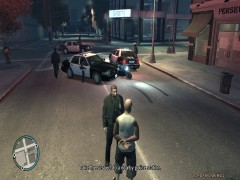 Just curious, which police car mod is used here?
 -
I would also like to give my gratitude and thanks towards the LCPDFR staff for their excellent mod and support! I can't start my own post on the Suggestions board for some reason, so I am posting it here (and also in a thread in the Suggestions board). Here are a couple of suggestions that I have to add to the discussion: 1) Callouts with locations closest to you rather than in set places are much more fun to deal with, not to mention more realistic. In the latest version, I have to drive halfway across the city sometimes! 2) Have the police be able to make traffic stops and arrest random NPC. I know that the game has regular people disturbing the peace and running from the police, but it'd be nice to see other cops make traffic stops besides me. Especially since all those sporty cars tend to run the red lights anyway! 3) Your partner should be more responsive. In the 0.95 beta, your partner would protect you from most bad guys. Now, he'll only shoot once in a while, and most likely die because he doesn't protect himself. When you open your trunk, it should heal and clean the clothes of your partner too! (That for yourself only was already an excellent addition, BTW.) 4) In the latest mod, while pressing "E" to arrest someone, nearby cops will teleport out of their police cars. When they are in motion, they look like they are flying out of their windshield and into the street! This did not happen with the other mods, where your partner will reappear somewhere everytime you arrest someone. Just an annoying bug that appears hard to get rid of! 5) When performing CPR, your character drops down on his knees twice, and upon the second time he will say something. Can it be adjusted to only drop down once and still say his line? 6) The newest update brings with it a new taser. I have a question about the taser addon itself. What happens if I am using custom weapons.img and weaponsinfo.xml files due to modded weapons and modded weapon statistics? Which file(s) and/or value(s) would I need to add/change to use the taser? That's all for now! Keep up with the good work!
-
Sounds cool, I'll give it a shot! If someone can also add the brake lights in for when your car is stopped, that'd be neat! :)
-
I see, thank you for your reply! I have also looked at those forums with negative results. Do you think that can be done in some way for regular driving as well? It gets so annoying when the AI rear ends my exotic cars...not so much my police cars since with ELS enabled, they repair themselves with every flash, lol!
-
Hello All! After successfully playing around with LCPDFR, I find that it is a very fun and enjoyable mod! Thanks to the G17 team for continuing development on this cool mod! I have one thing I thought I might ask to see if anyone knows. When I press the tilde ("~") button to bring up the console, my car's brake lights automatically go on and the cars behind me don't try to overtake me. This is a really cool feature to have in the game, is there a mod that does this? If I'm a cop and am obeying the traffic lights, I want to be able to wait at a red light with the brake lights on and the cars behind me waiting patiently. I don't always want cars behind me to overtake me or smash into my bumper all the time. Does anyone know if this mod exists, or if the script within the console can be modded to work with your car when either you stop or turn the feature on through a combo of keys, just like the hazard lights for the ELS mod? Thanks all!
-
You've gotta post much more info for us to begin helping you, pal! Start off with which version of the game you have installed, your system specs, and any other mods you are currently running. Are you running the program as an administrator? Have you set compatibility mode to Windows XP SP3/Windows Vista SP2?
-
Just making sure: Are you telling me this to stop helping Sideways or are you talking to Sideways instead and tellinh him to stop asking for official support? I will cease assistance if it is against the rules here for normal users to help others with cracked versions of the game. I don't want any trouble from misunderstandings. Thanks.
-
Yes, these are the EXACT steps I took to install my game and the mod and it runs fine! Someone should add this to an FAQ/Sticky if there isn't already one. It should stop A LOT of the repeat threads, if people bother to search and/or read the stickies.

