


NicolaiB
Members
-
Joined
Everything posted by NicolaiB
-
-
There's no point in buying Alienware, you'll be able to get a equally powerful laptop for less. I'd suggest investing in a decent desktop, and a cheaper laptop if you actually need the mobility of a laptop A common trend with "gaming laptops", is that they tend to die much quicker than less powerful laptops and desktops.
-
This has to be the weirdest/most pointless thread this side of banned members.
-
The WB devs decided that they should release a newer version of the configuration, only problem is that it's not completely done, they didn't add the language options, someone might have an older version that could do the trick.
-
Your scripts folder.
-
It shows what it's really like when you're working for the police, some of the sheer shit we have to put up with is shocking, not even mentioning all the gutterpress claptrap that the media loves.
-
-
A mate of mine recently showed me a blog, which is written by a police officer from England, I haven't been able to pinpoint what force the officer is with. There's a few harrowing tales, his most recent post, showing a bit of a foggy judgement call, and a post back from last year, where he/she was first on scene at what involved into a fatal RTC, you can read it here. It really is a good read, even for those of us that will never see action on the beat in Britain. You'll find the main page here.
-
Nothing to see here! This topic has been closed by G17 Media staff. If you feel that this topic has been closed in error, please report this post.
-
We only provide support for fresh installations, post in the support section and follow the troubleshooter.
-
That's waay too high, someone's raping your wallet if they're demanding that much for it, Amazon has it for a tenner it's right here.
-
Nothing to see here! This topic has been closed by G17 Media staff. If you feel that this topic has been closed in error, please report this post.
-
Last warning, do not create new topics every time you upload a video.
-
Nothing to see here! This topic has been closed by G17 Media staff. If you feel that this topic has been closed in error, please report this post.
-
Post in the support section, remember to follow the troubleshooter.
-
A proper batoncompliments LCPDFR fairly well. I also use the indicator mod, as it allows us to use the parking lights, and turn the headlights on and off during nights, not to mention having working turn signals.
-
You already made a post just like this, closed.
-
Nothing to see here! This topic has been closed by G17 Media staff. If you feel that this topic has been closed in error, please report this post.
-
Anything that involves objects moving has a high potential for going horribly wrong when it comes to Emergency 4, cars getting stuck, peds that cannot leave buildings they've entered, the list goes on and on.
-
The "German mods" usually has some form of dispatch formations implemented, generally I try and access the situation, and dispatch accordingly.
-
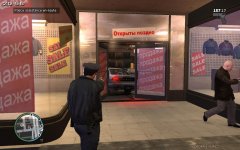 Finally an opportunity to use the parking ticketing system, that guy obviously parked outside the clearly marked booths.
 -
I've moved this to content modifications, as it belongs there.
-
BURN YOUR COMPUTER, DO IT NOW! If you hover your mouse near the top right corner, there should appear a dark icon, with some arrows in it, click on that and it should magically reappear.
-
This is not related to LCPDFR, moving to Content modifications, please check if you're posting in the correct section the next time.
-
Nothing to see here! This topic has been closed by G17 Media staff. If you feel that this topic has been closed in error, please report this post.


