


NicolaiB
Members
-
Joined
Everything posted by NicolaiB
-
We cannot provide support for installations where other mods are installed, uninstall any mods you may have installed and try again, we can't help you if it's working on a fresh install. Nothing to see here! This topic has been closed by G17 Media staff. If you feel that this topic has been closed in error, please report this post.
-
We cannot provide support for installations with other mods than LCPDFR installed, uninstall any mods and try again, we can't help you if it works then. Nothing to see here! This topic has been closed by G17 Media staff. If you feel that this topic has been closed in error, please report this post.
-
Don't get your hopes up, it's made by the same people who makes, among other games, Forklift Simulator, Street Sweeper simulator and the ever-thrilling camping manager games.
-
You've posted in the wrong section, this belongs in the LCPDFR > Support section, remember to read and follow the pinned posts, as well as follow the steps given by the troubleshooter, you will be allowed to create a new thread if neither the pinned posts, nor the toubleshooter can solve the issue. Nothing to see here! This topic has been closed by G17 Media staff. If you feel that this topic has been closed in error, please report this post.
-
You've posted in the wrong section, this belongs in the LCPDFR > Support section, remember to read and follow the pinned posts, as well as follow the steps given by the troubleshooter, you will be allowed to create a new thread if neither the pinned posts, nor the toubleshooter can solve the issue. Nothing to see here! This topic has been closed by G17 Media staff. If you feel that this topic has been closed in error, please report this post.
-
Yes, saving while on duty will make susequent loads crash, you'll have to either use another save game, or start with the story again.
-
Nothing to see here! This topic has been closed by G17 Media staff. If you feel that this topic has been closed in error, please report this post.
-
The suggestion section is closed as the dev team isn't taking any suggestions.
-
Sticking to default vehicles and no ELS, as well as disabling world events makes it loads more stable, it's actually playable in MP.
-
Nothing to see here! This topic has been closed by G17 Media staff. If you feel that this topic has been closed in error, please report this post.
-
Please do not necro-post/bump old threads, it's against the community guidelines.
-
Have you tied Googling your question, there's several first person mods on the different GTA IV modding sites.
-
CHP is either trialling, or are buying the 2013 Utility PI:
-
Did you download a pirated version of the game, or did you buy it from a online vendor?
-
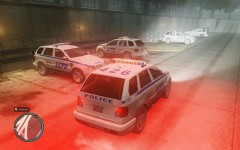 Nice work, there's a NYPD pushrod on GPM, otherwise you should be able to export one from the default cop cars.
 -
Nothing to see here! This topic has been closed by G17 Media staff. If you feel that this topic has been closed in error, please report this post.
-
Please do not necro-post/bump threads, it's against the community guidelines.
-
Your two threads have been merged, please keep the conversation to this thread only.
-
The things you're looking for aren't related to the LCPDFR mod, so I've moved this thread to the GTA IV > discussion section. There's a few sites you can look at: http://www.gtagaming.com/ http://www.gtainside.com/en/news.php There's more, however those are two of my preferred sites. You can find the ELS (emergency light system) here: http://gtapolicemods.com/downloads.php?do=file&id=196 Using ELS has a few set-backs, your car will be invincible when the lights are on, the game also becomes unstable with the high-poly car mods. You can find some of the best police car mods in our downloads section. Look about on those two sites, as I said, there's more sites out there with mods out there, those are a good start though, you can always find more if you search around for it. There's no need to be dickish about it.
-
Every laptop is full with crapware, I formatted my Lenovo the day it got it, it's was much easier, it also came with a recovery partition, I prefer to do the installation so I can get rid of all the bloatware that comes with pre-built computers. I also had problems with the charger, the isolation cracked near the "brick", exposing the live wire inside, despite contacting HP several times, no replacement charger were ever received. I've been using my Lenovo since August last year, and had no issues, the battery isn't completely dead yet, which weren't the case with the HP.
-
Not related to LCPDFR, moved to GTA IV > discussion.
-
I've had two HP computers, one desktop, obviously not as good as it could be for the money spent on it, it also made an appalling racket. The other was a HP laptop, which had the most enthusiastic fan I've ever experience, it was on full-throttle all the bloody time, it also got nearly too hot to touch at times. I've had several relatives and friends with similar experiences of HP laptops being noisy, and getting very hot, right from the cheap consumer lines to their high-end business-oriented product lines.
-
Either Grand Theft Auto IV or Episodes From Liberty City, both will work.
-
I loved World In Conflict, it's a no-frills RTS, you don't have to muck about with setting up a base, building barracks, all the boring stuff, it's solely focused on action.
-
Nothing to see here! This topic has been closed by G17 Media staff. If you feel that this topic has been closed in error, please report this post.

