




LukeD
Friends of LSPDFR
-
Joined
-
Last visited
Everything posted by LukeD
-
Mine is pretty simple, first name, initial for last name LukeD. Or if you happen to be Sam my username means "Luke Dense".
-
I have this one projected onto both monitors Although I was using a dual monitor wallpaper before which was this:
-
Hi, Can you please run the diagnostics tool inside the LCPDFR folder (if you get a critical error 0x1 click the advanced mode box and browse to your directory) and get it to check your installation. Generally speaking it is much better to link the user to the official microsoft page where they can download the redistributables themselves rather than package up a .zip file for them. If the resource is officially available.
-
Hi, Are you doing anything to interrupt the audio? For example if you get a callout and then go off duty that will produce the exact same never ending loop of static. Could you also please post your full LCPDFR.log file (as an attachment or in a spoiler if you copy the text) and a screenshot of your GTA IV directory please?
-
1.0b* Also, there is no "support staff" just for your information. What Andrew said is correct, only 1.0c and the legacy versions 0.91 and 0.95 RC2 are available to download. I'm not entirely sure why you would want 1.0b as 1.0c fixes the issues in 1.0b, but your best bet if you really need 1.0b in particular is to see if any forum users happen to still have to 1.0b installer for you to acquire from them.
-
There are 2 things you could do to get ELS mapped to your controller. The first is you can turn on Express Mode in ELS and then map that keybind to the controller if ELS supports it well enough. Express Mode basically disables all of the toggles (so j,k l t etc) and switches it to pretty much replace the default siren lights. So when you press G or whatever controller button you bind, it will act just as if it was an ordinary siren. (note this disables the ability to toggle individual lights, if you do toggle a light or the siren in particular it auto-disables express mode) The alternative is to use a macro program to bind your controller button. This will mean when you press the controller button you bind, it will tell the pc to react as if J,K and L were all pressed. I don't think there is any other way (that avoids mapping each possible keybind). Hope this helps
-
A toaster with 2 toast ports! 2!!! Lol No seriously though: Intel i5 - 3450 quad core @ 3.20GHz EVGA GTX 760 SuperClocked 2GB 8GB DDR3 Generic RAM (soon to be Corsair Vengence) Gigabyte GA-H61M-S2PV motherboard Windows 7 home premium 64x
-
Nono. That one icon is nothing but pure comedy. :) Including the angry letter of complaint they got for that episode saying "I bet if the stig drove it, he wouldn't roll it" and then the stig goes and rolls it several times. :)
-
Can you post your logs and a screenshot of your GTA IV directory please. Also can you answer the following: What other mods are you using? Automatic or Manual install for LCPDFR? GTA IV version? Have you tried it on a fresh install of GTA IV?
-
Does LCPDFR run for you at all? I'm seeing an unable to load error in the scripthookdotnet log which suggests you might have a dependency missing. But then your LCPDFR log seems fine (the random ambient scenario manager crashing is a bug)
-
I think it's safe for us to conclude then that your pc in particular hates ELS :) I'll keep thinking and if I think of anything else you can try I'll quote you and let you know. Sorry I can't be of much further help at the moment.
-
Well now we've established your setup is fine and you have all the prerequisites. Yes he mentioned that in the OP, unless the framework is corrupt you wouldn't be getting this error. Usually framework issues cause an "Error loading module AdvancedHook" rather than an import issue. So all the scripts are loading fine but in this case ELS v8 is the one causing issues. I know I had an issue with ELS v8 when I first tried it out but I'm pretty sure mine was fixed by uninstalling everything and starting again.
-
Are you using any other mods or plugins for LCPDFR? Cars usually don't despawn because a script is telling the game to keep it loaded in memory, it's the result of some mods which don't free up the vehicles when they're done with them. Your best bet is to just cause the vehicle not to exist any more (such as by towing it).
-
Click the advanced mode box in the bottom left corner and navigate to your directory
-
Keeping it on the cop theme of jokes here is an old one. A farmer gets a phone call from his son "Dad, I've run over a pig, what do I do?" the farmer replies "bury it son". So the son hangs up, 20 minutes later the farmer get's another phone call from his son "alright I've buried the pig, but what do I do with his speed camera?"
-
Not to worry. Right ok, can you run the LCPDFR diagnostics tool and get it to check your installation please. Let me know what it says. It will probably come up clean but check it anyway so we can eliminate possibilities. Also, try removing all your other mods, so only LCPDFR remains and then try running LCPDFR on it's own. If it works fine, try installing one car model and ELS v8 and try again. If it doesn't work we know you've got an issue with LCPDFR somewhere.
-
Wrong file. I need the ScriptHookDotNet log not the ScriptHook log. The one highlighted blue in my screenshot...
-
This has been suggested before about translating into different languages. LMS responded with the following:
-
When you say you've tried reinstalls can you clarify, does this mean an entire reinstall of GTA IV as well or just of the different mods? Have you run the advancedhook files that come with ELS v8 and NOT the ones which come with LCPDFR (you do have to overwrite the LCPDFR ones afaik)? Can you upload your ScriptHookDotNet log file please?
-
Alright so you got all the latest scripthook, advancedhook etc etc. Running LCPDFR 1.0c on the 1.0.7.0 patch for GTA, a legal copy of GTA. You got ELS v8 with ELS v8 enabled cars, and converted any ELS v7 config files over to the ELS v8 format if you had to. You've tried with multiple different ELS cars to ensure it isn't just a dodgy car model you're using?
-
You're using the wrong AdvancedHook, the latest version is 0.34 and you're using 0.33. That is why ELS v8 is faulting.
-
Hi, Can you please post a screenshot of your GTA IV directory and answer the following questions for me... What version of LCPDFR are you using? What other mods are you using? Can you also post your scripthookdotnet log and your LCPDFR log please.
-
Does everything else function correctly? If so I'm not too sure what the issue could be, I assume it must be some sort of glitch on your system causing it but again, I actually don't know for a fact.
-
Audi A4 Avant Quattro SE (3.0L TDI) EuroCopter 135. This image is actually my local police force's Heli :) Well you never specified it couldn't be a helicopter :P
-
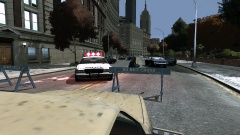
From the album: My Experiences in the LCPD
This afternoon a road was closed in North West Algonquin after a serious Road Traffic Collision occurred between 2 vehicles. The first officer on scene promptly set up barriers to cordon off the road and tended to one of the victims on the floor while waiting for the paramedics to arrive. It is still unknown at this time how the collision occurred, but is known that it was a fatality for both parties involved.


