




LukeD
Friends of LSPDFR
-
Joined
-
Last visited
Everything posted by LukeD
-
taxi,man4 Meh ,that'll do.
-
I'm glad the issue is solved, enjoy :)
-
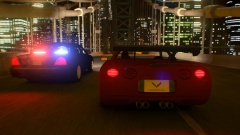 If the corvette driver leathers it now that rolling road block would fail lol. Nice image though :)
 -
Right, there is no crash being recorded in either the LCPDFR.log or the ScriptHookDotNet log which means it isn't likely to be an issue with LCPDFR itself. I would recommend start fresh with a clean install of GTA IV and then only install LCPDFR 1.0c and see if that fixes the issue.
-
Hello there -- welcome to LCPDFR.com and thanks for trying out LCPDFR. You failed to read the instructions before posting in this forum. So we'll remind you of them. Please do the following: Make sure you aren't using a crack - We don't support cracks Update GTA IV to 1.0.7.0 (the latest version of the game, or 1.1.2.0 for EFLC) - This sometimes fixes a wide variety of issues Make sure that you run the game as an administrator. Make sure that your GTA IV root folder (and every subdirectory) is not set to "read-only" Ensure that ScriptHook.dll, ScriptHookDotNet.asi and Dsound.dll OR Xlive.dll are in the GTA IV ROOT folder Ensure that there is a folder titled 'LCPDFR' in the ROOT GTA IV folder. Check that all the above files exist, if they do not, reinstall LCPDFR with the MANUAL installation. Ensure that you are using up to date versions of every LCPDFR dependency and LCPDFR itself. Install these: .Net Framework 4.5, Microsoft Visual C++ Redist 2012 If your problem has been solved after following these basic instructions, hit 'Mark Solved' next to this post. If not, please now reply to this thread, and make sure that you do the following: Give a clear, detailed description of the problem. Explain any circumstances surrounding the problem. State what solutions you have tried. Post ALL relevant logs (LCPDFR.log, Scripthook.log, ScriptHookDotNet.log, AdvancedHook.log). Include as much information as possible. Post your system specifications. Post what other mods you are using. This includes car and script mods. Please note that failure to follow these instructions may cause this thread to be closed.
-
Correct. It's 12210 for GTA IV and 12220 for EFLC. Alternatively to make it easier you can right click the steam icon on your toolbar, click screenshots use the drop down menu at the top to pick the game, and then a button at the bottom says "show on disk" clicking it will take you to the folder.
-
No the problem is your particular set up. ELS V8 works fine for many people, you may have not set up the configuration correctly. If you wish to use ELS V8 I would highly recommend getting a clean installation of GTA IV with LCPDFR 1.0c. And then following the installation instructions very very carefully (be sure to make backups).
-
That error is due to modified cars. If you removed the modified police vehicle you wont get that error.
-
If you have ELS installed the config file that came with the car needs to go inside the ELS folder in your GTA IV directory. You then need to open the ELS.ini file and make sure the vehicle you downloaded uses that config file rather than the ELS default file.
-
Hi, I'm seeing several different errors in your LCPDFR.log file. You stated you use no other mods, yet I can see ELS in your directory and TrafficFlow being loaded into the game as well as you mentioning using an FBI vehicle replacement. My advice to you would be to double check you have no mods installed and see how that affects your game. I would also suggest using dsound.dll instead of xlive.dll just to see if this might be causing some issues for you.
-
MODERATOR NOTICE Moving topic from LCPDFR support to GTA IV support For future reference, the LCPDFR support forum section is for LCPDFR related issues only, neither of these two mods you mentioned relate to LCPDFR's functionality itself.
-
wp;;[v23 Well then.... Seems I got ninja'd by: ineseri Woop :D
-
I felt bad for the guy up until you posting this. Now I can't stop laughing. Thanks lol
-
This is why we can't have nice things.
-
Ohhhhhhhh it bends like cardboard :O He'll be out for a while, something similar happened to a player in my local football team, I never heard his name mentioned again. But then I rarely pay attention to any sport other than rugby so :)
-
Ok so I'm seeing a few crash issues in your LCPDFR.log file. A couple related to Callouts+ which I can tell you in advance those have been fixed for the next version. But I'm seeing one which crashes and isn't due to my script. So my advice would be to uninstall your other script mods, and see if the crash issue persists. If it doesn't we'll know it was one of the script mods so you can start installing each one and trying it. If it does still crash let me know.
-
MODERATOR NOTICE Moving from General Discussion to Creativity and Media
-
These are my 3 favourite songs at the moment: https://www.youtube.com/watch?v=hN7gZnKpfsk I blame ineseri for playing this one on FCR every night (all aboard the GTA V PC hype train)
-
Not to sure why you're unable to upload the LCPDFR.log, but we need that and the ScriptHookDotNet log as well. Can you post them the here as a reply using spoilers please. We can't do much without them.
-
Just to be absolutely certain try it without your police cars installed. I know you said they always worked but, just try it anyway. That way we can eliminate them from the issue entirely. Also, have you made any alteration to the LCPDFR.ini file? And what vehicles are you using? Specifically these two lines: AdditionalCopCarModels= SuspectTransporterModels=POLICE;POLICE2;PSTOCKADE;
-
11 wait.... Back you go :)
-
Right ok. It could be an issue with one of those mods then, so try it without a couple of them. Also, you could help to reduce the chance it occurs by lowering the number of police vehicles that start out in pursuits and the number of cops allowed (this can be found in the .ini file) This wont reduce the number of random AI units that join but it may help clear the LCPDFR spawned ones.
-
My apologies then, the way in which you phrased it made it seem like a reference to the mod itself rather than specifically this crash. I appreciate crashes can anger people, but perhaps a good idea would be to give it a minute or 2 and then post to avoid "rage posting" as I like to call it. But now we've cleared that up, no issues. Ok, so my advice at this point would be to try it on a clean install of GTA IV. You mention it is heavily modded, well I'm sure you're aware in your experience that version 1.0 of LCPDFR is much more demanding than the legacy versions, and 1.0c did introduce new handling for crashes and more catches. I'm sure you're also aware that LCPDFR only supports an unmodded copy of the game so using other mods (like we all do) will destabilise it further. Try it without any other mods, and if the problem happens again, come back and post exactly what you were doing.
-
Currently in a stage where I'm just removing bugs and tidying up any lose ends. However I am now in training so progress is a little slower (although not too much slower). I can't give an expected date of release or a timescale. Because new bugs may arise as and when I remove others. But once I am closer to a stable build I'll update you all.
-

